mirror of
https://github.com/error311/FileRise.git
synced 2026-05-24 14:39:43 -05:00
 Ryan
Ryan
373 lines
18 KiB
Markdown
373 lines
18 KiB
Markdown
# FileRise
|
||
|
||
[](https://github.com/error311/FileRise)
|
||
[](https://hub.docker.com/r/error311/filerise-docker)
|
||
[](https://github.com/error311/filerise-docker/actions/workflows/main.yml)
|
||
[](https://github.com/error311/FileRise/actions/workflows/ci.yml)
|
||
[](https://demo.filerise.net)
|
||
[](https://github.com/error311/FileRise/releases)
|
||
[](LICENSE)
|
||
[](https://discord.gg/7WN6f56X2e)
|
||
[](https://github.com/sponsors/error311)
|
||
[](https://ko-fi.com/error311)
|
||
|
||
**FileRise** is a self-hosted web file manager with WebDAV, sharing, and per-folder ACLs.
|
||
Drag & drop uploads, OnlyOffice integration, and **optional folder-level encryption at rest** — all in one PHP app you control.
|
||
|
||
- 💾 **Self-hosted “cloud drive”** – Runs anywhere with PHP (or via Docker). No external database required.
|
||
- 🔐 **Granular per-folder ACLs** – Manage View (all/own), Upload, Create, Edit, Rename, Move, Copy, Delete, Extract, Share, and more — all enforced consistently across the UI, API, and WebDAV.
|
||
- 🔐 **Folder-level encryption at rest (optional)** – Encrypt entire folders (and all descendants) on disk using modern authenticated encryption.
|
||
- Opt-in per folder with inherited protection for subfolders
|
||
- Files are stored encrypted on disk and transparently decrypted on download
|
||
- Master key can be generated by FileRise or supplied via environment variable
|
||
- When enabled, incompatible features (WebDAV, sharing, ZIP operations, OnlyOffice) are automatically disabled for safety
|
||
- 🔄 **Fast drag-and-drop uploads** – Chunked, resumable uploads with pause/resume and progress tracking. If your connection drops, FileRise resumes automatically.
|
||
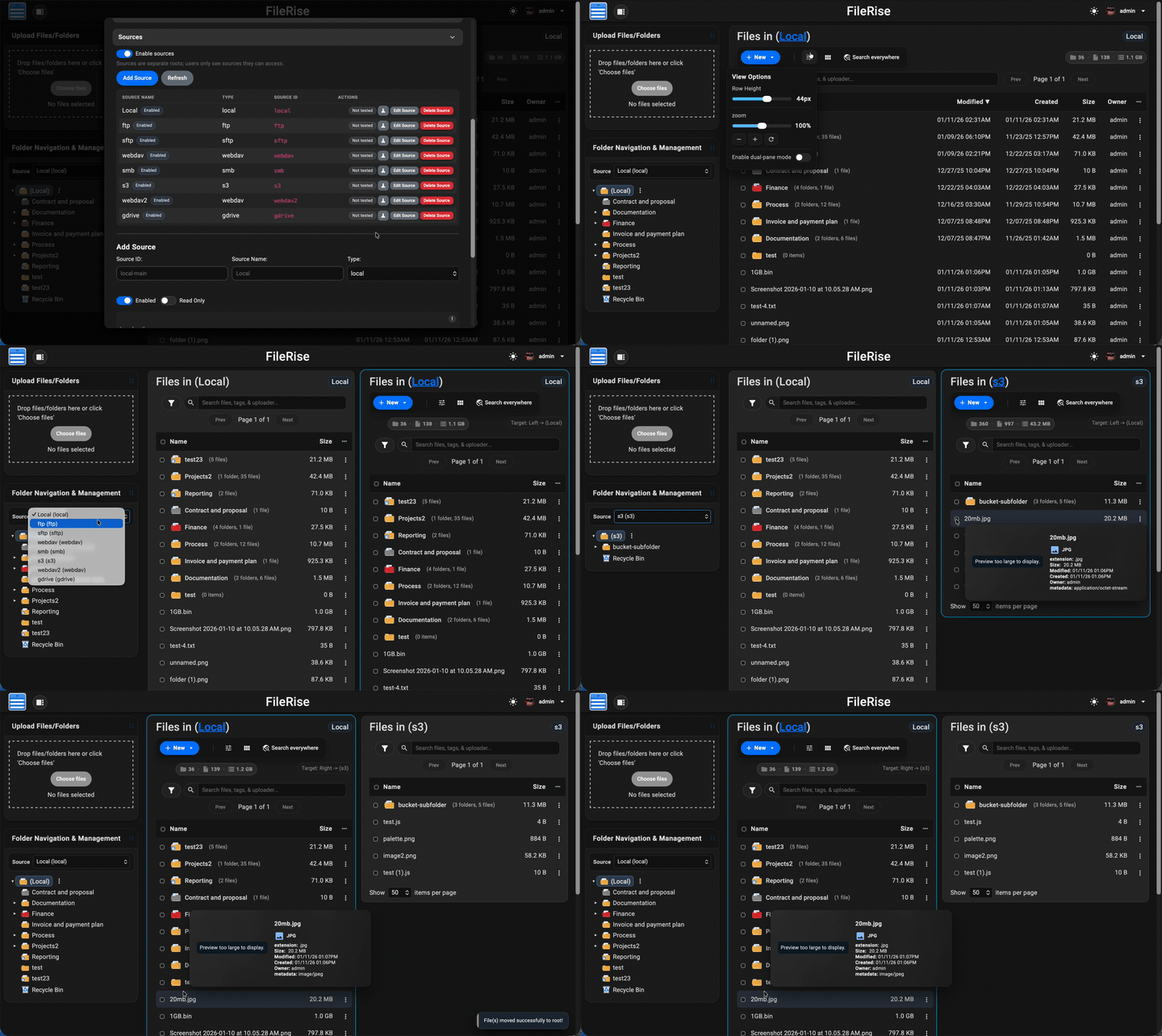
- 🪟 **Dual-pane mode + keyboard shortcuts** – Optional two-pane file browser for fast workflows (copy/move between panes, compare folders, and operate without the mouse). Shortcut overlay + hotkeys (F3 preview, F4 edit, F5 copy, F6 move, F7 new folder, Del delete, `/` search).
|
||
- 🌳 **Scales to huge trees** – Tested with **100k+ folders** in the sidebar tree without choking the UI.
|
||
- 🌈 **Visual organization** – Color-code folders in the tree, inline list, and folder strip, plus tag files with color-coded labels for fast visual scanning.
|
||
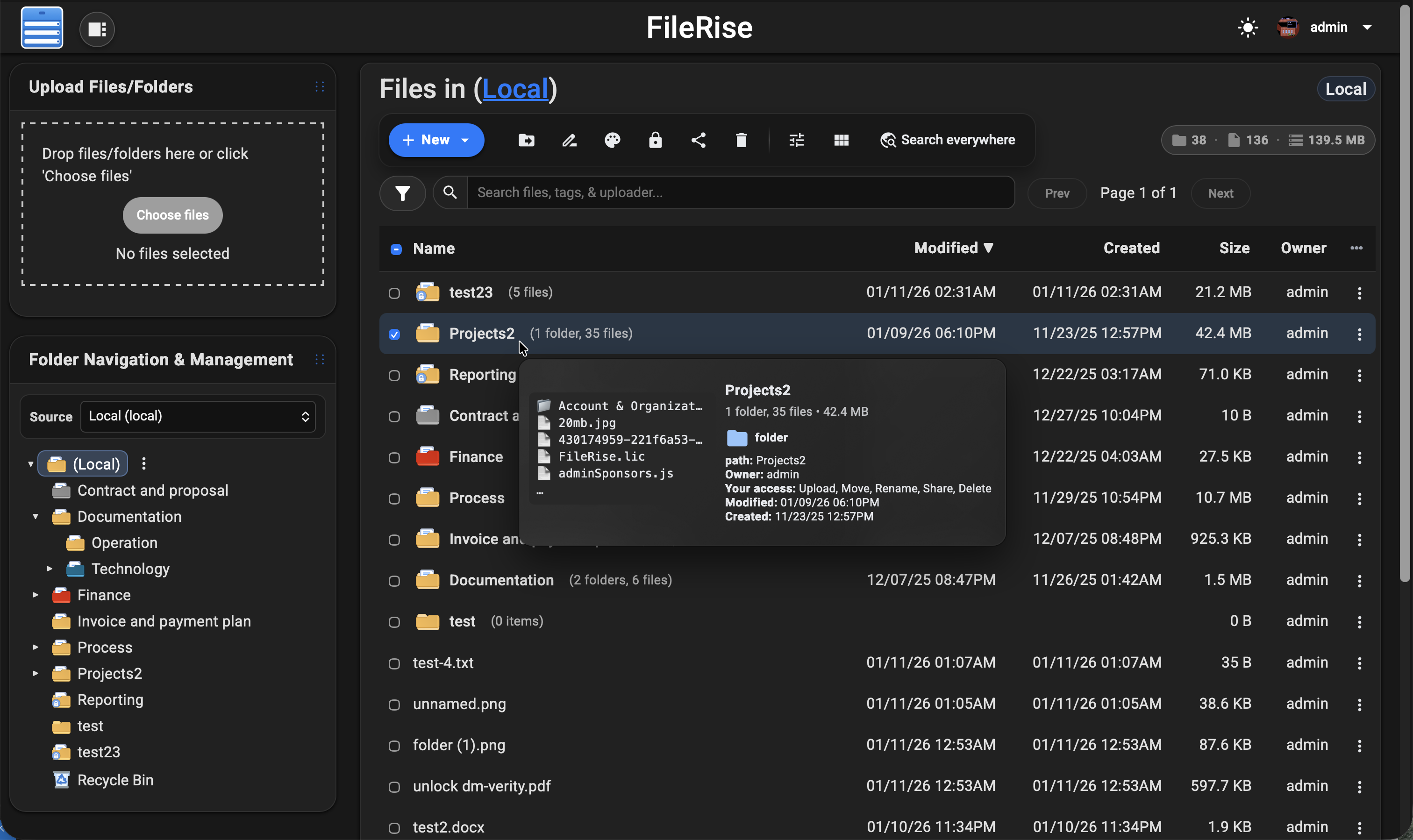
- 👀 **Hover preview “peek” cards** – On desktop, hover files or folders to see thumbnails (images/video), quick metadata (size, timestamps, tags), and effective permissions. Per-user toggle stored in `localStorage`.
|
||
- 🎬 **Smart media handling** – Track per-file video watch progress with a “watched” indicator, remember last volume/mute state, and reset progress when needed.
|
||
- 🧩 **OnlyOffice support (optional)** – Edit DOCX/XLSX/PPTX using your own Document Server; ODT/ODS/ODP supported as well. PDFs can be viewed inline.
|
||
- 🌍 **WebDAV (ACL-aware)** – Mount FileRise as a drive from macOS, Windows, Linux, or Cyberduck/WinSCP. Listings, uploads, overwrites, deletes, and folder creation all honor the same ACLs as the web UI.
|
||
- 🏷️ **Tags, search & trash** – Tag files, search by name/tag/uploader/content via fuzzy search, and recover mistakes using a Trash with time-based retention.
|
||
- 📚 **API + live docs** – OpenAPI spec (`openapi.json`) plus an embedded Redoc viewer (`api.html`) for exploring endpoints.
|
||
- 📊 **Storage / disk usage summary** – CLI scanner with snapshots, total usage, and per-volume breakdowns surfaced in the admin panel.
|
||
- 🎨 **Polished, responsive UI** – Dark/light mode, mobile-friendly layout, in-browser previews, and a built-in code editor powered by CodeMirror.
|
||
- 🌐 **Internationalization** – English, Spanish, French, German, and Simplified Chinese included; community translations welcome.
|
||
- 🔑 **Login + SSO** – Local users, TOTP 2FA, and OIDC (Auth0 / Authentik / Keycloak / etc.) with optional auto-provisioning, IdP-driven admin role assignment, and Pro user-group mapping.
|
||
- 🛡️ **ClamAV virus scanning (Core) + Pro virus log** – Optional ClamAV upload scanning, with a Pro virus detection log in the admin panel and CSV export.
|
||
- 🌐 **Reverse proxy & subpath aware** – Designed to run cleanly behind Nginx, Traefik, Caddy, or Apache:
|
||
- Supports installs under a subpath (e.g. `https://example.com/files`)
|
||
- Correct URL generation for assets, APIs, portals, PWA, and share links
|
||
- Explicit “Published URL” setting for proxy / firewall environments
|
||
- Works with `X-Forwarded-*` headers and Kubernetes ingress setups
|
||
- 👥 **Pro: user groups, client portals, global search, storage explorer & audit logs** –
|
||
Group-based ACLs, brandable client upload portals, **ACL-aware global search across files, folders, users, and permissions**, an ncdu-style storage explorer for identifying large folders/files and reclaiming disk space directly from the UI, and **Pro Audit Logs** (configurable activity logging with filters + CSV export for tracking key actions across web, WebDAV, shares, and portals).
|
||
- 🌐 **Pro: Sources (multi-storage adapters)** –
|
||
Turn FileRise into a storage hub by connecting multiple backends and switching between them in the UI:
|
||
- Multiple local roots (additional local paths)
|
||
- **S3-compatible** (AWS S3 / MinIO / Wasabi / Backblaze B2 S3 / etc.)
|
||
- **SMB/CIFS**, **SFTP**, **FTP**
|
||
- **WebDAV** (Nextcloud / ownCloud / FileRise)
|
||
- **Google Drive**
|
||
- Works with **dual-pane** so you can copy/move via drag & drop or toolbar actions **between sources**, with **per-source Trash**
|
||
|
||
Full list of features: [Full Feature Wiki](https://github.com/error311/FileRise/wiki/Features)
|
||
|
||
|
||
|
||
|
||
|
||
> 💡 Looking for **FileRise Pro** (brandable header, **user groups**, **client upload portals**, license handling)?
|
||
> Check out [filerise.net](https://filerise.net) – FileRise Core stays fully open-source (MIT).
|
||
|
||
---
|
||
|
||
## Quick links
|
||
|
||
- 🚀 **Live demo:** [Demo](https://demo.filerise.net) (username: `demo` / password: `demo`)
|
||
- 📚 **Docs & Wiki:** [Wiki](https://github.com/error311/FileRise/wiki)
|
||
- [Features overview](https://github.com/error311/FileRise/wiki/Features)
|
||
- [WebDAV](https://github.com/error311/FileRise/wiki/WebDAV)
|
||
- [ONLYOFFICE](https://github.com/error311/FileRise/wiki/ONLYOFFICE)
|
||
- 🐳 **Docker image:**
|
||
- Docker Hub: [Docker](https://hub.docker.com/r/error311/filerise-docker)
|
||
- Build pipeline / tags: [Workflow](https://github.com/error311/filerise-docker)
|
||
- 💬 **Discord:** [Discord](https://discord.gg/7WN6f56X2e)
|
||
- 📝 **Changelog:** [Changelog](https://github.com/error311/FileRise/blob/master/CHANGELOG.md)
|
||
|
||
### Support checklist (please include)
|
||
|
||
If you open an issue/discussion, please include:
|
||
|
||
- FileRise version + install method (Docker tag / release ZIP / git)
|
||
- Reverse proxy (Nginx / Traefik / Caddy) + subpath (yes/no)
|
||
- Browser console errors (if any)
|
||
- Server/container logs around the error
|
||
|
||
---
|
||
|
||
## Install (Docker – recommended)
|
||
|
||
The easiest way to run FileRise is the official Docker image.
|
||
|
||
> ✅ **Tip:** For stability, pin a version tag (example: `error311/filerise-docker:v2.10.5`) instead of `:latest`.
|
||
|
||
### Option A – Quick start (docker run)
|
||
|
||
```bash
|
||
docker run -d \
|
||
--name filerise \
|
||
-p 8080:80 \
|
||
-e TIMEZONE="America/New_York" \
|
||
-e TOTAL_UPLOAD_SIZE="10G" \
|
||
-e SECURE="false" \
|
||
-e PERSISTENT_TOKENS_KEY="default_please_change_this_key" \
|
||
-e SCAN_ON_START="true" \
|
||
-e CHOWN_ON_START="true" \
|
||
-v ~/filerise/uploads:/var/www/uploads \
|
||
-v ~/filerise/users:/var/www/users \
|
||
-v ~/filerise/metadata:/var/www/metadata \
|
||
error311/filerise-docker:latest
|
||
```
|
||
|
||
Then visit:
|
||
|
||
```text
|
||
http://your-server-ip:8080
|
||
```
|
||
|
||
On first launch you’ll be guided through creating the **initial admin user**.
|
||
|
||
> 💡 After the first run, you can set `CHOWN_ON_START="false"` if permissions are already correct and you don’t want a recursive `chown` on every start.
|
||
>
|
||
> ⚠️ **Uploads folder recommendation**
|
||
>
|
||
> It’s strongly recommended to bind `/var/www/uploads` to a **dedicated folder**
|
||
> (for example `~/filerise/uploads` or `/mnt/user/appdata/FileRise/uploads`),
|
||
> not the root of a huge media share.
|
||
>
|
||
> If you really want FileRise to sit “on top of” an existing share, use a
|
||
> subfolder (e.g. `/mnt/user/media/filerise_root`) instead of the share root,
|
||
> so scans and permission changes stay scoped to that folder.
|
||
|
||
### Option B – docker-compose.yml
|
||
|
||
```yaml
|
||
services:
|
||
filerise:
|
||
image: error311/filerise-docker:latest
|
||
container_name: filerise
|
||
ports:
|
||
- "8080:80"
|
||
environment:
|
||
TIMEZONE: "America/New_York"
|
||
TOTAL_UPLOAD_SIZE: "10G"
|
||
SECURE: "false"
|
||
PERSISTENT_TOKENS_KEY: "default_please_change_this_key"
|
||
SCAN_ON_START: "true" # auto-index existing files on startup
|
||
CHOWN_ON_START: "true" # fix permissions on uploads/users/metadata on startup
|
||
volumes:
|
||
- ./uploads:/var/www/uploads
|
||
- ./users:/var/www/users
|
||
- ./metadata:/var/www/metadata
|
||
```
|
||
|
||
Bring it up with:
|
||
|
||
```bash
|
||
docker compose up -d
|
||
```
|
||
|
||
### Common environment variables
|
||
|
||
| Variable | Required | Example | What it does |
|
||
|-------------------------|----------|----------------------------------|--------------|
|
||
| `TIMEZONE` | ✅ | `America/New_York` | PHP / container timezone. |
|
||
| `TOTAL_UPLOAD_SIZE` | ✅ | `10G` | Max total upload size per request; also used to set PHP/Apache upload limits. |
|
||
| `SECURE` | ✅ | `false` | `true` when running behind HTTPS / a reverse proxy, else `false`. |
|
||
| `PERSISTENT_TOKENS_KEY` | ✅ | `change_me_super_secret` | Secret used to sign “remember me” tokens. **Do not leave this at the default.** |
|
||
| `SCAN_ON_START` | Optional | `true` | If `true`, runs a scan once on container start to index existing files. |
|
||
| `CHOWN_ON_START` | Optional | `true` | If `true`, recursively `chown`s `uploads/`, `users/`, `metadata/` to `www-data`. |
|
||
| `PUID` | Optional | `99` | If running as root, remap `www-data` user to this UID (e.g. Unraid’s 99). |
|
||
| `PGID` | Optional | `100` | If running as root, remap `www-data` group to this GID (e.g. Unraid’s 100). |
|
||
| `FR_PUBLISHED_URL` | Optional | `https://example.com/files` | Public URL when behind proxies/subpaths (share links, portals, redirects). |
|
||
| `FR_TRUSTED_PROXIES` | Optional | `127.0.0.1,10.0.0.0/8` | Comma-separated IPs/CIDRs for trusted proxies; only these can supply the client IP header. |
|
||
| `FR_IP_HEADER` | Optional | `X-Forwarded-For` | Header to trust for the real client IP when the proxy is trusted. |
|
||
|
||
> Full list of common env variables: [Common Environment variables](https://github.com/error311/FileRise/wiki/Common-Env-Variables)
|
||
>
|
||
> 🧩 **Traefik + subpath note (Kubernetes):** use `StripPrefix` and rely on `X-Forwarded-Prefix` + `FR_PUBLISHED_URL`.
|
||
> See: [Deployments Wiki](https://github.com/error311/FileRise/wiki/Kubernetes---k8s-deployment)
|
||
> More deployment docs: [Install Setup](https://github.com/error311/FileRise/wiki/Installation-Setup)
|
||
|
||
---
|
||
|
||
## Manual install (PHP web server)
|
||
|
||
> ⚠️ **Manual installs: understand the default paths (saves you 30 minutes of pain)**
|
||
>
|
||
> By default, FileRise writes data to **these absolute paths**:
|
||
>
|
||
> - `/var/www/uploads`
|
||
> - `/var/www/users`
|
||
> - `/var/www/metadata`
|
||
>
|
||
> Your web server must point to FileRise’s **public/** folder:
|
||
>
|
||
> - DocumentRoot → `/var/www/filerise/public` (example)
|
||
>
|
||
> ✅ **Recommended layout (no config changes):**
|
||
>
|
||
> - Install FileRise code in: `/var/www/filerise`
|
||
> - Create data dirs in: `/var/www/uploads`, `/var/www/users`, `/var/www/metadata`
|
||
>
|
||
> If you install FileRise under `/var/www/html` (or anywhere else), you must either:
|
||
>
|
||
> - still create the data folders at `/var/www/{uploads,users,metadata}` **(simplest)**, or
|
||
> - change the paths in `config/config.php` to match your layout.
|
||
>
|
||
>If you created `users/metadata/uploads` under `/var/www/html`, FileRise will still try to write to `/var/www/users` unless you change config.
|
||
|
||
### Requirements
|
||
|
||
- PHP **8.3+**
|
||
- Web server (Apache / Nginx / Caddy + PHP-FPM)
|
||
- PHP extensions: `json`, `curl`, `zip` (and usual defaults)
|
||
- No database required
|
||
|
||
### Step 0: Create data directories (default locations)
|
||
|
||
```bash
|
||
sudo mkdir -p /var/www/uploads /var/www/users /var/www/metadata
|
||
sudo chown -R www-data:www-data /var/www/uploads /var/www/users /var/www/metadata # adjust web user if needed
|
||
sudo chmod -R 775 /var/www/uploads /var/www/users /var/www/metadata
|
||
```
|
||
|
||
Quick write test:
|
||
|
||
```bash
|
||
sudo -u www-data touch /var/www/users/.write_test && echo OK
|
||
```
|
||
|
||
### Login security notes
|
||
|
||
- Failed login attempts are throttled per **IP + username** and stored in `/var/www/users/failed_logins.json` by default.
|
||
- Failed logins are also written to `/var/www/users/fail2ban.log` (rotate at 50MB, keep 5 files).
|
||
- If you’re behind a reverse proxy, set `FR_TRUSTED_PROXIES` and `FR_IP_HEADER` so rate limiting and logs use the real client IP.
|
||
|
||
### Install from release ZIP (recommended)
|
||
|
||
```bash
|
||
cd /var/www
|
||
sudo mkdir -p filerise
|
||
sudo chown -R $USER:$USER /var/www/filerise
|
||
cd /var/www/filerise
|
||
|
||
VERSION="v2.10.5" # replace with the tag you want
|
||
ASSET="FileRise-${VERSION}.zip"
|
||
|
||
curl -fsSL "https://github.com/error311/FileRise/releases/download/${VERSION}/${ASSET}" -o "${ASSET}"
|
||
unzip "${ASSET}"
|
||
```
|
||
|
||
Point your web server at `public/`:
|
||
|
||
- Apache: `DocumentRoot /var/www/filerise/public`
|
||
- Nginx: `root /var/www/filerise/public;`
|
||
|
||
> ✅ After setting DocumentRoot to `.../public`, access FileRise at:
|
||
> `http://serverip/` (not `http://serverip/public/`)
|
||
|
||
### Install from git (developer mode)
|
||
|
||
```bash
|
||
cd /var/www
|
||
sudo git clone https://github.com/error311/FileRise.git filerise
|
||
sudo chown -R $USER:$USER /var/www/filerise
|
||
|
||
cd /var/www/filerise
|
||
composer install
|
||
```
|
||
|
||
### Manual install troubleshooting (common mistakes)
|
||
|
||
- **Browsing `/public` in the URL**
|
||
- Wrong: `http://serverip/public/`
|
||
- Correct: `http://serverip/`
|
||
- **“Failed to write users file”**
|
||
- Check your server error log — it will show the exact write path.
|
||
- If it mentions `/var/www/users/users.txt`, fix permissions on `/var/www/users` (not `/var/www/html/users`).
|
||
- **open_basedir restrictions**
|
||
- Ensure it includes `/var/www` and `/tmp` (example: `/var/www:/tmp`).
|
||
|
||
---
|
||
|
||
## WebDAV & ONLYOFFICE (optional)
|
||
|
||
### WebDAV
|
||
|
||
Once enabled in the Admin panel, FileRise exposes a WebDAV endpoint (e.g. `/webdav.php`). Use it with:
|
||
|
||
- **macOS Finder** – Go → Connect to Server → `https://your-host/webdav.php/`
|
||
- **Windows File Explorer** – Map Network Drive → `https://your-host/webdav.php/`
|
||
- **Linux (GVFS/Nautilus)** – `dav://your-host/webdav.php/`
|
||
- Clients like **Cyberduck**, **WinSCP**, etc.
|
||
|
||
WebDAV operations honor the same ACLs as the web UI.
|
||
|
||
Docs: [WebDAV Wiki](https://github.com/error311/FileRise/wiki/WebDAV)
|
||
|
||
### ONLYOFFICE integration
|
||
|
||
If you run an ONLYOFFICE Document Server you can open/edit Office documents directly from FileRise (DOCX, XLSX, PPTX, ODT, ODS, ODP; PDFs view-only).
|
||
|
||
Configure it in **Admin → ONLYOFFICE**:
|
||
|
||
- Enable ONLYOFFICE
|
||
- Set your Document Server origin (e.g. `https://docs.example.com`)
|
||
- Configure a shared JWT secret
|
||
- Copy the suggested Content-Security-Policy header into your reverse proxy
|
||
|
||
Docs: [ONLYOFFICE Wiki](https://github.com/error311/FileRise/wiki/ONLYOFFICE)
|
||
|
||
---
|
||
|
||
## Security & updates
|
||
|
||
- FileRise is actively maintained and has published security advisories.
|
||
- See **SECURITY.md** and GitHub Security Advisories for details.
|
||
|
||
### Upgrading
|
||
|
||
- **Docker:** pull the new tag and recreate the container with the same volumes.
|
||
|
||
Example:
|
||
|
||
```bash
|
||
docker pull error311/filerise-docker:latest
|
||
# or pin a specific version from Releases
|
||
```
|
||
|
||
- **Manual:** replace app files with the latest release ZIP (keep `/var/www/uploads`, `/var/www/users`, `/var/www/metadata`, and your config).
|
||
|
||
Please report vulnerabilities responsibly via the channels listed in **SECURITY.md**.
|
||
|
||
---
|
||
|
||
## Community, support & contributing
|
||
|
||
Contributions are welcome — from bug fixes and docs to translations and UI polish.
|
||
See `CONTRIBUTING.md` for guidelines.
|
||
|
||
If FileRise saves you time or becomes your daily driver, a ⭐ on GitHub or sponsorship is hugely appreciated:
|
||
|
||
- ❤️ [GitHub Sponsors](https://github.com/sponsors/error311)
|
||
- ☕ [Ko-Fi](https://ko-fi.com/error311)
|
||
|
||
---
|
||
|
||
## AI Disclosure
|
||
|
||
FileRise is my project. I use AI like a tool for some tasks (e.g., translations/snippets), but the architecture, core code, and ongoing maintenance are mine.
|
||
|
||
---
|
||
|
||
## License & third-party code
|
||
|
||
FileRise Core is released under the **MIT License** – see `LICENSE`.
|
||
|
||
It bundles a small set of well-known client and server libraries (Bootstrap, CodeMirror, DOMPurify, Fuse.js, Resumable.js, sabre/dav, etc.).
|
||
All third-party code remains under its original licenses.
|
||
|
||
The official Docker image includes the **ClamAV** antivirus scanner (GPL-2.0-only) for optional upload scanning.
|
||
|
||
See `THIRD_PARTY.md` and the `licenses/` folder for full details.
|
||
|
||
---
|
||
|
||
## Press
|
||
|
||
- [Heise / iX Magazin – “FileRise 2.0: Web-Dateimanager mit Client Portals” (DE)](https://www.heise.de/news/FileRise-2-0-Web-Dateimanager-mit-Client-Portals-11092171.html)
|
||
- [Heise / iX Magazin – “FileRise 2.0: Web File Manager with Client Portals” (EN)](https://www.heise.de/en/news/FileRise-2-0-Web-File-Manager-with-Client-Portals-11092376.html)
|