# TimeTracker
### Professional Time Tracking & Project Management for Teams **Track time. Manage projects. Generate invoices. All in one place.** [๐Ÿš€ Quick Start](#-quick-start) โ€ข [โœจ Features](#-features) โ€ข [๐Ÿ“ธ Screenshots](#-screenshots) โ€ข [๐Ÿ“– Getting Started](docs/GETTING_STARTED.md) โ€ข [๐Ÿ“š Documentation](docs/) โ€ข [๐Ÿณ Deploy](#-deployment) ---
## ๐ŸŽฏ What is TimeTracker? TimeTracker is a **self-hosted, web-based time tracking application** designed for freelancers, teams, and businesses who need professional time management with complete control over their data. **Perfect for:** - ๐Ÿ’ผ **Freelancers** tracking billable hours across multiple clients - ๐Ÿ‘ฅ **Small Teams** managing projects and tracking productivity - ๐Ÿข **Agencies** needing detailed reporting and client billing - ๐Ÿ”’ **Privacy-focused organizations** wanting self-hosted solutions --- ## โœจ Features ### โฑ๏ธ **Smart Time Tracking** - **One-Click Timers** โ€” Start tracking with a single click - **Persistent Timers** โ€” Timers keep running even after browser closes - **Idle Detection** โ€” Automatic pause after configurable idle time - **Manual Entry** โ€” Add historical time entries with notes and tags - **Real-time Updates** โ€” See live timer updates across all devices ### ๐Ÿ“Š **Project & Task Management** - **Unlimited Projects & Tasks** โ€” Organize work your way - **Client Management** โ€” Store client details and billing rates - **Task Board** โ€” Visual task management with priorities and assignments - **Status Tracking** โ€” Monitor progress from to-do to completion - **Estimates vs Actuals** โ€” Track project budgets and burn rates ### ๐Ÿงพ **Professional Invoicing** - **Generate from Time** โ€” Convert tracked hours to invoices automatically - **Custom Line Items** โ€” Add manual items for expenses or services - **Tax Calculation** โ€” Automatic tax calculations with configurable rates - **PDF Export** โ€” Professional invoice templates (coming soon) - **Status Tracking** โ€” Track draft, sent, paid, and overdue invoices ### ๐Ÿ“ˆ **Analytics & Reporting** - **Visual Dashboards** โ€” Charts and graphs for quick insights - **Detailed Reports** โ€” Time breakdown by project, user, or date range - **CSV Export** โ€” Export data for external analysis - **Billable vs Non-billable** โ€” Separate tracking for accurate billing - **Custom Date Ranges** โ€” Flexible reporting periods ### ๐Ÿ” **Multi-User & Security** - **Role-Based Access** โ€” Admin and user roles with appropriate permissions - **User Management** โ€” Add team members and manage access - **Self-Hosted** โ€” Complete control over your data - **Username-Only Login** โ€” Simple authentication for internal use - **Session Management** โ€” Secure cookies and session handling - **Profile Pictures** โ€” Users can upload a profile picture in their profile settings ### ๐Ÿ› ๏ธ **Technical Excellence** - **Docker Ready** โ€” Deploy in minutes with Docker Compose - **Database Flexibility** โ€” PostgreSQL for production, SQLite for testing - **Responsive Design** โ€” Works perfectly on desktop, tablet, and mobile - **Real-time Sync** โ€” WebSocket support for live updates - **Automatic Backups** โ€” Scheduled database backups (configurable) --- ## ๐Ÿ“ธ Screenshots
### Dashboard โ€” Your Command Center Dashboard *Start timers, view recent entries, and see your productivity at a glance* --- ### Projects & Tasks โ€” Stay Organized
Projects Tasks
*Manage multiple projects and break them down into actionable tasks* --- ### Time Tracking โ€” Flexible & Powerful
Log Time Calendar View
*Manual time entry and visual calendar view for better planning* --- ### Invoicing & Clients โ€” Professional Billing
Invoices Client Management
*Generate invoices from tracked time and manage client relationships* --- ### Reports & Analytics โ€” Data-Driven Insights
Reports User Reports
*Comprehensive reporting and user analytics for informed decisions* --- ### Easy Creation โ€” Streamlined Workflows
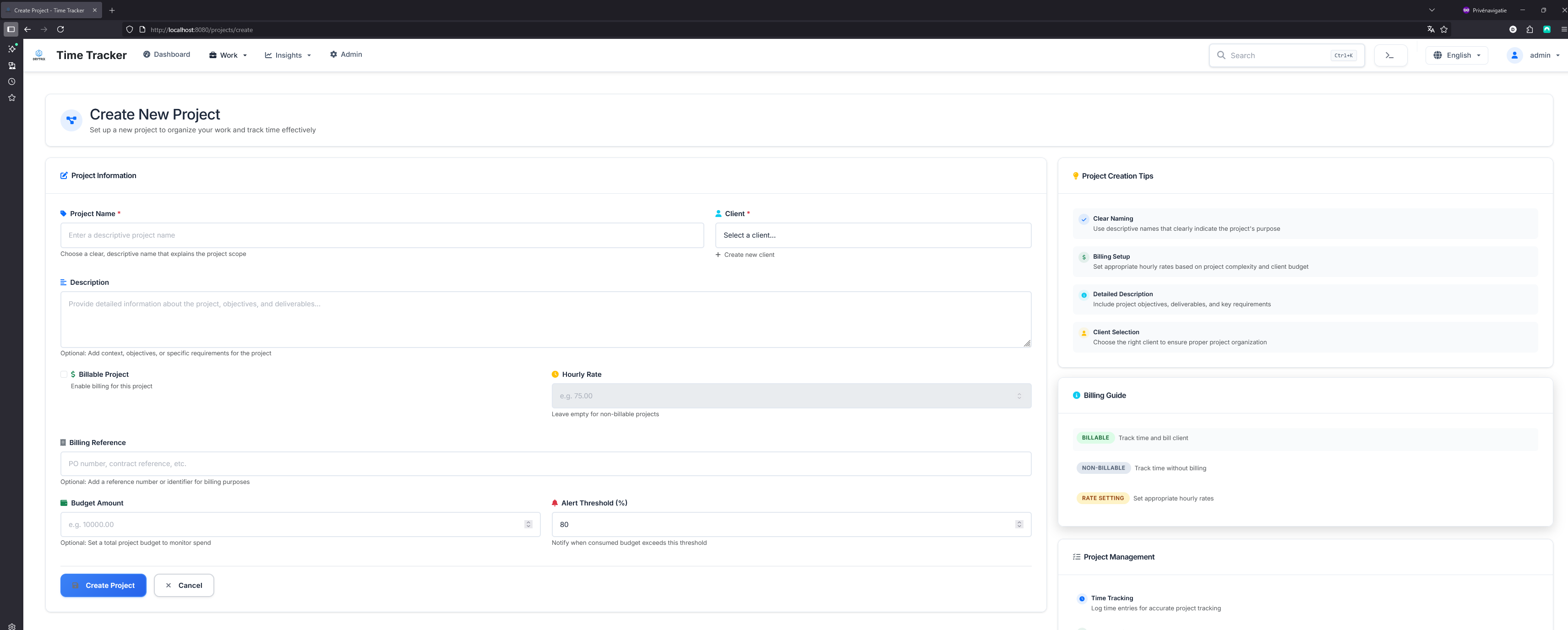
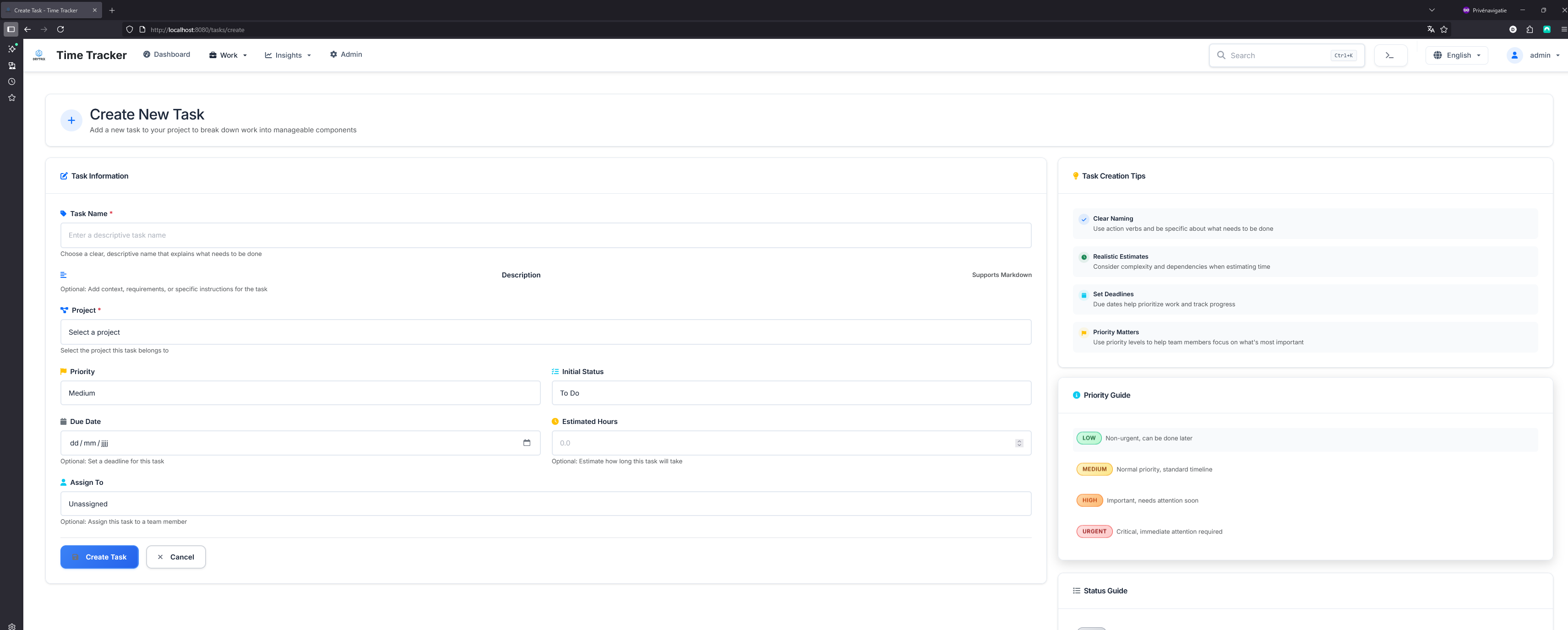
Create Project Create Task Create Client
*Simple, intuitive forms for creating projects, tasks, and clients*
--- ## ๐Ÿš€ Quick Start ### Docker (Recommended) Get TimeTracker running in under 2 minutes: ```bash # Clone the repository git clone https://github.com/drytrix/TimeTracker.git cd TimeTracker # Create your .env from the template and set SECRET_KEY and TZ cp env.example .env # Edit .env and set a strong SECRET_KEY (python -c "import secrets; print(secrets.token_hex(32))") # Start with Docker Compose (HTTPS via nginx) docker-compose up -d # Access at https://localhost (self-signed cert) # Prefer plain HTTP on port 8080? # Use the example compose that publishes the app directly: # docker-compose -f docker-compose.example.yml up -d # Access at http://localhost:8080 ``` See the full Docker Compose setup guide: [`docs/DOCKER_COMPOSE_SETUP.md`](docs/DOCKER_COMPOSE_SETUP.md) **First login creates the admin account** โ€” just enter your username! ### Quick Test with SQLite Want to try it out without setting up a database? ```bash docker-compose -f docker-compose.local-test.yml up --build ``` No configuration needed โ€” perfect for testing! --- ## ๐Ÿ’ก Use Cases ### For Freelancers Track time across multiple client projects, generate professional invoices, and understand where your time goes. TimeTracker helps you bill accurately and identify your most profitable clients. ### For Teams Assign tasks, track team productivity, and generate reports for stakeholders. See who's working on what, identify bottlenecks, and optimize team performance. ### For Agencies Manage multiple clients and projects simultaneously. Track billable hours, generate client invoices, and analyze project profitability โ€” all in one place. ### For Personal Projects Even if you're not billing anyone, understanding where your time goes is valuable. Track personal projects, hobbies, and learning activities to optimize your time. --- ## ๐ŸŒŸ Why TimeTracker? | Feature | TimeTracker | Traditional Time Trackers | |---------|-------------|---------------------------| | **Self-Hosted** | โœ… Complete data control | โŒ Cloud-only, subscription fees | | **Open Source** | โœ… Free to use & modify | โŒ Proprietary, locked features | | **Persistent Timers** | โœ… Runs server-side | โŒ Browser-dependent | | **Docker Ready** | โœ… Deploy anywhere | โš ๏ธ Complex setup | | **Invoicing Built-in** | โœ… Track to bill workflow | โŒ Requires integration | | **No User Limits** | โœ… Unlimited users | โŒ Per-user pricing | --- ## ๐Ÿ“š Documentation Comprehensive documentation is available in the [`docs/`](docs/) directory: ### Getting Started - **[๐Ÿ“– Getting Started Guide](docs/GETTING_STARTED.md)** โ€” Complete beginner's guide (โญ Start here!) - **[Installation Guide](docs/DOCKER_PUBLIC_SETUP.md)** โ€” Detailed setup instructions - **[Requirements](docs/REQUIREMENTS.md)** โ€” System requirements and dependencies - **[Troubleshooting](docs/DOCKER_STARTUP_TROUBLESHOOTING.md)** โ€” Common issues and solutions - **[CSRF Token Issues](CSRF_TROUBLESHOOTING.md)** โ€” Fix "CSRF token missing or invalid" errors - **[CSRF IP Access Fix](CSRF_IP_ACCESS_FIX.md)** โ€” ๐Ÿ”ฅ Fix cookies not working when accessing via IP address - **[HTTPS Auto-Setup](README_HTTPS_AUTO.md)** โ€” ๐Ÿš€ Automatic HTTPS at startup (one command!) - **[HTTPS Manual Setup (mkcert)](README_HTTPS.md)** โ€” ๐Ÿ”’ Manual HTTPS with no certificate warnings ### Features - **[Task Management](docs/TASK_MANAGEMENT_README.md)** โ€” Break projects into manageable tasks - **[Invoice System](docs/INVOICE_FEATURE_README.md)** โ€” Generate professional invoices - **[Client Management](docs/CLIENT_MANAGEMENT_README.md)** โ€” Manage client relationships - **[Calendar Features](docs/CALENDAR_FEATURES_README.md)** โ€” Calendar and bulk entry features - **[Command Palette](docs/COMMAND_PALETTE_USAGE.md)** โ€” Keyboard shortcuts for power users ### Technical Documentation - **[Project Structure](docs/PROJECT_STRUCTURE.md)** โ€” Codebase architecture - **[Database Migrations](migrations/README.md)** โ€” Database schema management - **[Version Management](docs/VERSION_MANAGEMENT.md)** โ€” Release and versioning - **[CSRF Configuration](docs/CSRF_CONFIGURATION.md)** โ€” Security and CSRF token setup for Docker - **[CI/CD Documentation](docs/cicd/)** โ€” Continuous integration setup ### Contributing - **[Contributing Guidelines](docs/CONTRIBUTING.md)** โ€” How to contribute - **[Code of Conduct](docs/CODE_OF_CONDUCT.md)** โ€” Community standards --- ## ๐Ÿณ Deployment ### Local Development ```bash docker-compose up -d ``` ### Production with PostgreSQL ```bash # Configure your .env file cp env.example .env # Edit .env with production settings (set SECRET_KEY, TZ, DB credentials) # Start with production compose (published image) docker-compose -f docker-compose.remote.yml up -d ``` > **โš ๏ธ Security Note:** Always set a unique `SECRET_KEY` in production! See [CSRF Configuration](docs/CSRF_CONFIGURATION.md) for details. ### Raspberry Pi TimeTracker runs perfectly on Raspberry Pi 4 (2GB+): ```bash # Same commands work on ARM architecture docker-compose up -d ``` **๐Ÿ“– See [Deployment Guide](docs/DOCKER_PUBLIC_SETUP.md) for detailed instructions** --- ## ๐Ÿ”ง Configuration TimeTracker is highly configurable through environment variables. For a comprehensive list and recommended values, see: - [`docs/DOCKER_COMPOSE_SETUP.md`](docs/DOCKER_COMPOSE_SETUP.md) - [`env.example`](env.example) Common settings: ```bash # Timezone and locale TZ=America/New_York CURRENCY=USD # Timer behavior SINGLE_ACTIVE_TIMER=true IDLE_TIMEOUT_MINUTES=30 ROUNDING_MINUTES=1 # User management ADMIN_USERNAMES=admin,manager ALLOW_SELF_REGISTER=false # Security (production) SECRET_KEY=your-secure-random-key SESSION_COOKIE_SECURE=true ``` --- ## ๐Ÿ“Š Analytics & Telemetry TimeTracker includes **optional** analytics and monitoring features to help improve the application and understand how it's being used. All analytics features are: - โœ… **Disabled by default** โ€” You must explicitly opt-in - โœ… **Privacy-first** โ€” No personally identifiable information (PII) is collected - โœ… **Self-hostable** โ€” Run your own analytics infrastructure - โœ… **Transparent** โ€” All data collection is documented ### What We Collect (When Enabled) #### 1. **Structured Logs** (Always On, Local Only) - Request logs and error messages stored **locally** in `logs/app.jsonl` - Used for troubleshooting and debugging - **Never leaves your server** #### 2. **Prometheus Metrics** (Always On, Self-Hosted) - Request counts, latency, and performance metrics - Exposed at `/metrics` endpoint for your Prometheus server - **Stays on your infrastructure** #### 3. **Error Monitoring** (Optional - Sentry) - Captures uncaught exceptions and performance issues - Helps identify and fix bugs quickly - **Opt-in:** Set `SENTRY_DSN` environment variable #### 4. **Product Analytics** (Optional - PostHog) - Tracks feature usage and user behavior patterns with advanced features: - **Person Properties**: Role, auth method, login history - **Feature Flags**: Gradual rollouts, A/B testing, kill switches - **Group Analytics**: Segment by version, platform, deployment - **Rich Context**: Browser, device, environment on every event - **Opt-in:** Set `POSTHOG_API_KEY` environment variable - See [POSTHOG_ADVANCED_FEATURES.md](POSTHOG_ADVANCED_FEATURES.md) for complete guide #### 5. **Installation Telemetry** (Optional, Anonymous) - Sends anonymous installation data via PostHog with: - Anonymized fingerprint (SHA-256 hash, cannot be reversed) - Application version - Platform information - **No PII:** No IP addresses, usernames, or business data - **Opt-in:** Set `ENABLE_TELEMETRY=true` and `POSTHOG_API_KEY` environment variables ### How to Enable Analytics ```bash # Enable Sentry error monitoring (optional) SENTRY_DSN=https://your-sentry-dsn@sentry.io/project-id SENTRY_TRACES_RATE=0.1 # 10% sampling for performance traces # Enable PostHog product analytics (optional) POSTHOG_API_KEY=your-posthog-api-key POSTHOG_HOST=https://app.posthog.com # Enable anonymous telemetry (optional, uses PostHog) ENABLE_TELEMETRY=true TELE_SALT=your-unique-salt APP_VERSION=1.0.0 ``` ### Self-Hosting Analytics You can self-host all analytics services for complete control: ```bash # Use docker-compose with monitoring profile docker-compose --profile monitoring up -d ``` This starts: - **Prometheus** โ€” Metrics collection and storage - **Grafana** โ€” Visualization dashboards - **Loki** (optional) โ€” Log aggregation - **Promtail** (optional) โ€” Log shipping ### Privacy & Data Protection > **Telemetry**: TimeTracker can optionally send anonymized usage data to help improve the product (errors, feature usage, install counts). All telemetry is **opt-in**. No personal data is collected. To disable telemetry, set `ENABLE_TELEMETRY=false` or simply don't set the environment variable (disabled by default). **What we DON'T collect:** - โŒ Email addresses or usernames - โŒ IP addresses - โŒ Project names or descriptions - โŒ Time entry notes or client data - โŒ Any personally identifiable information (PII) **Your rights:** - ๐Ÿ“ฅ **Access**: View all collected data - โœ๏ธ **Rectify**: Correct inaccurate data - ๐Ÿ—‘๏ธ **Erase**: Delete your data at any time - ๐Ÿ“ค **Export**: Export your data in standard formats **๐Ÿ“– See [Privacy Policy](docs/privacy.md) for complete details** **๐Ÿ“– See [Analytics Documentation](docs/analytics.md) for configuration** **๐Ÿ“– See [Events Schema](docs/events.md) for tracked events** --- ## ๐Ÿ›ฃ๏ธ Roadmap ### Planned Features - ๐Ÿ“„ **PDF Invoice Templates** โ€” Professional PDF generation - ๐Ÿ“ง **Email Integration** โ€” Send invoices to clients - ๐Ÿ“ฑ **Progressive Web App** โ€” Install as mobile app - ๐Ÿ”„ **Recurring Invoices** โ€” Automate recurring billing - ๐ŸŽจ **Custom Themes** โ€” Personalize your interface - ๐Ÿ”Œ **API Extensions** โ€” RESTful API for integrations - ๐Ÿ“Š **Advanced Analytics** โ€” More charts and insights ### Recently Added - โœ… **Invoice Generation** โ€” Complete invoicing system - โœ… **Task Management** โ€” Full task tracking and management - โœ… **Command Palette** โ€” Keyboard-driven navigation - โœ… **Calendar View** โ€” Visual time entry calendar - โœ… **Bulk Operations** โ€” Bulk time entry creation --- ## ๐Ÿค Contributing We welcome contributions! Whether it's: - ๐Ÿ› **Bug Reports** โ€” Help us identify issues - ๐Ÿ’ก **Feature Requests** โ€” Share your ideas - ๐Ÿ“ **Documentation** โ€” Improve our docs - ๐Ÿ’ป **Code Contributions** โ€” Submit pull requests **๐Ÿ“– See [Contributing Guidelines](docs/CONTRIBUTING.md) to get started** --- ## ๐Ÿ“„ License TimeTracker is licensed under the **GNU General Public License v3.0**. This means you can: - โœ… Use it commercially - โœ… Modify and adapt it - โœ… Distribute it - โœ… Use it privately **See [LICENSE](LICENSE) for full details** --- ## ๐Ÿ†˜ Support - ๐Ÿ“– **Documentation**: Check the [`docs/`](docs/) directory - ๐Ÿ› **Bug Reports**: [Open an issue](https://github.com/drytrix/TimeTracker/issues) - ๐Ÿ’ฌ **Discussions**: [GitHub Discussions](https://github.com/drytrix/TimeTracker/discussions) - ๐Ÿ“ง **Contact**: [Create an issue](https://github.com/drytrix/TimeTracker/issues) for support --- ## โญ Star Us! If TimeTracker helps you track your time better, consider giving us a star on GitHub! It helps others discover the project.
**[โญ Star on GitHub](https://github.com/drytrix/TimeTracker)** --- **Built with โค๏ธ for the time-tracking community**