# Cua
Create and run high-performance macOS and Linux VMs on Apple Silicon, with built-in support for AI agents.
## Libraries
| Library | Description | Installation | Version |
|---------|-------------|--------------|---------|
| [**Lume**](./libs/lume/README.md) | CLI for running macOS/Linux VMs with near-native performance using Apple's `Virtualization.Framework`. | [](https://github.com/trycua/cua/releases/latest/download/lume.pkg.tar.gz) | [](https://github.com/trycua/cua/releases) |
| [**Computer**](./libs/computer/README.md) | Computer-Use Interface (CUI) framework for interacting with macOS/Linux sandboxes | `pip install cua-computer` | [](https://pypi.org/project/cua-computer/) |
| [**Agent (Experimental)**](./libs/agent/README.md) | Computer-Use Agent (CUA) framework for running agentic workflows in macOS/Linux dedicated sandboxes | `pip install cua-agent` | [](https://pypi.org/project/cua-agent/) |
## Lume
**Originally looking for Lume?** If you're here for the original Lume project, it's now part of this monorepo. Simply install with our one-line installer script and refer to its [documentation](./libs/lume/README.md):
```bash
/bin/bash -c "$(curl -fsSL https://raw.githubusercontent.com/trycua/cua/main/libs/lume/scripts/install.sh)"
```
## Docs
For optimal onboarding, we recommend starting with the [Computer](./libs/computer/README.md) documentation to cover the core functionality of the Computer sandbox, then exploring the [Agent](./libs/agent/README.md) documentation to understand Cua's AI agent capabilities, and finally working through the Notebook examples to try out the Computer-Use interface and agent.
- [Computer](./libs/computer/README.md)
- [Agent](./libs/agent/README.md)
- [Notebooks](./notebooks/)
## Demos
Demos of the Computer-Use Agent in action. Share your most impressive demos in Cua's [Discord community](https://discord.com/invite/mVnXXpdE85)!
AI-Gradio: multi-app workflow requiring browser, VS Code and terminal access
Notebook: Fix GitHub issue in Cursor
## Accessory Libraries
| Library | Description | Installation | Version |
|---------|-------------|--------------|---------|
| [**Core**](./libs/core/README.md) | Core functionality and utilities used by other Cua packages | `pip install cua-core` | [](https://pypi.org/project/cua-core/) |
| [**PyLume**](./libs/pylume/README.md) | Python bindings for Lume | `pip install pylume` | [](https://pypi.org/project/pylume/) |
| [**Computer Server**](./libs/computer-server/README.md) | Server component for the Computer-Use Interface (CUI) framework | `pip install cua-computer-server` | [](https://pypi.org/project/cua-computer-server/) |
| [**SOM**](./libs/som/README.md) | Self-of-Mark library for Agent | `pip install cua-som` | [](https://pypi.org/project/cua-som/) |
## Contributing
We welcome and greatly appreciate contributions to Cua! Whether you're improving documentation, adding new features, fixing bugs, or adding new VM images, your efforts help make lume better for everyone. For detailed instructions on how to contribute, please refer to our [Contributing Guidelines](CONTRIBUTING.md).
Join our [Discord community](https://discord.com/invite/mVnXXpdE85) to discuss ideas or get assistance.
## License
Cua is open-sourced under the MIT License - see the [LICENSE](LICENSE) file for details.
## Trademarks
Apple, macOS, and Apple Silicon are trademarks of Apple Inc. Ubuntu and Canonical are registered trademarks of Canonical Ltd. This project is not affiliated with, endorsed by, or sponsored by Apple Inc. or Canonical Ltd.
## Stargazers over time
[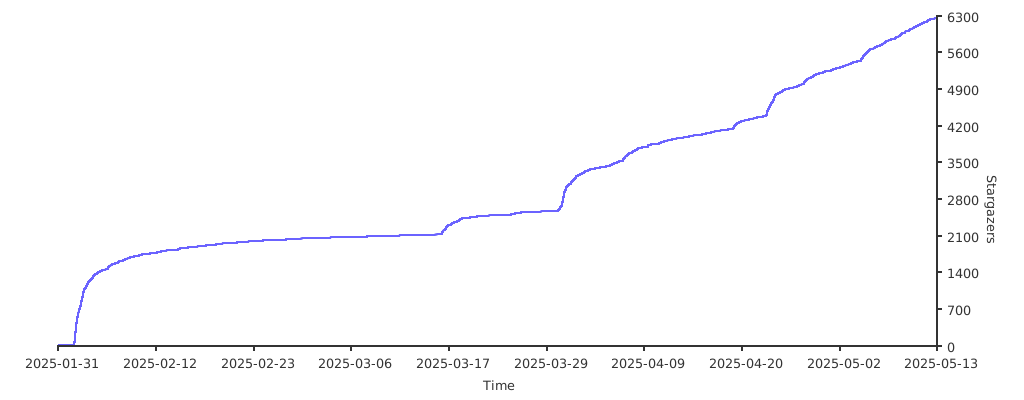](https://starchart.cc/trycua/cua)
## Contributors


