> We’re hosting the **Computer-Use Agents SOTA Challenge** at [Hack the North](https://hackthenorth.com) and online!
>> **Track A (On-site @ UWaterloo)**: Reserved for participants accepted to Hack the North. 🏆 Prize: **YC interview guaranteed**.
>> **Track B (Remote)**: Open to everyone worldwide. 🏆 Prize: **Cash award**.
>>> 👉 Sign up here: [trycua.com/hackathon](https://www.trycua.com/hackathon)
**cua** ("koo-ah") is Docker for [Computer-Use Agents](https://www.oneusefulthing.org/p/when-you-give-a-claude-a-mouse) - it enables AI agents to control full operating systems in virtual containers and deploy them locally or to the cloud.
With the Computer SDK, you can:
- automate Windows, Linux, and macOS VMs with a consistent, [pyautogui-like API](https://docs.trycua.com/docs/libraries/computer#interface-actions)
- create & manage VMs [locally](https://docs.trycua.com/docs/computer-sdk/computers#cua-local-containers) or using [cua cloud](https://www.trycua.com/)
With the Agent SDK, you can:
- run computer-use models with a [consistent output](https://docs.trycua.com/docs/agent-sdk/chat-history#message-array-structure)
- run composed agents using UI grounding models and any LLM
- use any liteLLM provider (`openai/`, `openrouter/`, etc.) or our included local providers (`huggingface-local/`, `mlx/`)
- quickly evaluate new UI agent models and UI grounding models
- `anthropic/claude-opus-4-1-20250805` (using [Computer-Use Models](https://docs.trycua.com/docs/agent-sdk/supported-agents/computer-use-agents))
- `openai/computer-use-preview`
- `openrouter/z-ai/glm-4.5v`
- `huggingface-local/ByteDance-Seed/UI-TARS-1.5-7B`
- `omniparser+{any LLM}` (using [Composed Agents](https://docs.trycua.com/docs/agent-sdk/supported-agents/composed-agents))
- `huggingface-local/HelloKKMe/GTA1-7B+{any LLM}`
- `huggingface/HelloKKMe/GTA1-32B+{any LLM}`
- `vllm_hosted/HelloKKMe/GTA1-72B+{any LLM}`
- `human/human` (using [Human-in-the-Loop](https://docs.trycua.com/docs/agent-sdk/supported-agents/human-in-the-loop))
- benchmark on OSWorld-Verified, SheetBench-V2, and more [with a single line of code using HUD](https://docs.trycua.com/docs/agent-sdk/integrations/hud) ([Notebook](https://github.com/trycua/cua/blob/main/notebooks/eval_osworld.ipynb))
Missing a model? [Raise a feature request](https://github.com/trycua/cua/issues/new?assignees=&labels=enhancement&projects=&title=%5BAgent%5D%3A+Add+model+support+for+) or [contribute](https://github.com/trycua/cua/blob/main/CONTRIBUTING.md)!
# Quick Start
- [Get started with a Computer-Use Agent UI](https://docs.trycua.com/docs/quickstart-ui)
- [Get started with the Computer-Use Agent CLI](https://docs.trycua.com/docs/quickstart-cli)
- [Get started with the Python SDKs](https://docs.trycua.com/docs/quickstart-devs)
# Usage ([Docs](https://docs.trycua.com/docs))
```bash
pip install cua-agent[all]
```
```python
from agent import ComputerAgent
agent = ComputerAgent(
model="anthropic/claude-3-5-sonnet-20241022",
tools=[computer],
max_trajectory_budget=5.0
)
messages = [{"role": "user", "content": "Take a screenshot and tell me what you see"}]
async for result in agent.run(messages):
for item in result["output"]:
if item["type"] == "message":
print(item["content"][0]["text"])
```
### Output format (OpenAI Agent Responses Format):
```json
{
"output": [
# user input
{
"role": "user",
"content": "go to trycua on gh"
},
# first agent turn adds the model output to the history
{
"summary": [
{
"text": "Searching Firefox for Trycua GitHub",
"type": "summary_text"
}
],
"type": "reasoning"
},
{
"action": {
"text": "Trycua GitHub",
"type": "type"
},
"call_id": "call_QI6OsYkXxl6Ww1KvyJc4LKKq",
"status": "completed",
"type": "computer_call"
},
# second agent turn adds the computer output to the history
{
"type": "computer_call_output",
"call_id": "call_QI6OsYkXxl6Ww1KvyJc4LKKq",
"output": {
"type": "input_image",
"image_url": "data:image/png;base64,..."
}
},
# final agent turn adds the agent output text to the history
{
"type": "message",
"role": "assistant",
"content": [
{
"text": "Success! The Trycua GitHub page has been opened.",
"type": "output_text"
}
]
}
],
"usage": {
"prompt_tokens": 150,
"completion_tokens": 75,
"total_tokens": 225,
"response_cost": 0.01,
}
}
```
# Computer ([Docs](https://docs.trycua.com/docs/computer-sdk/computers))
```bash
pip install cua-computer[all]
```
```python
from computer import Computer
async with Computer(
os_type="linux",
provider_type="cloud",
name="your-container-name",
api_key="your-api-key"
) as computer:
# Take screenshot
screenshot = await computer.interface.screenshot()
# Click and type
await computer.interface.left_click(100, 100)
await computer.interface.type("Hello!")
```
# Resources
- [How to use the MCP Server with Claude Desktop or other MCP clients](./libs/python/mcp-server/README.md) - One of the easiest ways to get started with Cua
- [How to use OpenAI Computer-Use, Anthropic, OmniParser, or UI-TARS for your Computer-Use Agent](./libs/python/agent/README.md)
- [How to use Lume CLI for managing desktops](./libs/lume/README.md)
- [Training Computer-Use Models: Collecting Human Trajectories with Cua (Part 1)](https://www.trycua.com/blog/training-computer-use-models-trajectories-1)
## Modules
| Module | Description | Installation |
|--------|-------------|---------------|
| [**Lume**](./libs/lume/README.md) | VM management for macOS/Linux using Apple's Virtualization.Framework | `curl -fsSL https://raw.githubusercontent.com/trycua/cua/main/libs/lume/scripts/install.sh \| bash` |
| [**Lumier**](./libs/lumier/README.md) | Docker interface for macOS and Linux VMs | `docker pull trycua/lumier:latest` |
| [**Computer (Python)**](./libs/python/computer/README.md) | Python Interface for controlling virtual machines | `pip install "cua-computer[all]"` |
| [**Computer (Typescript)**](./libs/typescript/computer/README.md) | Typescript Interface for controlling virtual machines | `npm install @trycua/computer` |
| [**Agent**](./libs/python/agent/README.md) | AI agent framework for automating tasks | `pip install "cua-agent[all]"` |
| [**MCP Server**](./libs/python/mcp-server/README.md) | MCP server for using CUA with Claude Desktop | `pip install cua-mcp-server` |
| [**SOM**](./libs/python/som/README.md) | Self-of-Mark library for Agent | `pip install cua-som` |
| [**Computer Server**](./libs/python/computer-server/README.md) | Server component for Computer | `pip install cua-computer-server` |
| [**Core (Python)**](./libs/python/core/README.md) | Python Core utilities | `pip install cua-core` |
| [**Core (Typescript)**](./libs/typescript/core/README.md) | Typescript Core utilities | `npm install @trycua/core` |
## Community
Join our [Discord community](https://discord.com/invite/mVnXXpdE85) to discuss ideas, get assistance, or share your demos!
## License
Cua is open-sourced under the MIT License - see the [LICENSE](LICENSE) file for details.
The base image `kasmweb/core-ubuntu-jammy` is maintained by [Kasm Technologies](https://github.com/kasmtech/workspaces-core-images) and distributed under the Apache License 2.0. Usage of that image is subject to its own license terms.
Microsoft's OmniParser, which is used in this project, is licensed under the Creative Commons Attribution 4.0 International License (CC-BY-4.0) - see the [OmniParser LICENSE](https://github.com/microsoft/OmniParser/blob/master/LICENSE) file for details.
### Third-Party Licenses and Optional Components
Some optional extras for this project depend on third-party packages that are licensed under terms different from the MIT License.
- The optional "omni" extra (installed via `pip install "cua-agent[omni]"`) installs the `cua-som` module, which includes `ultralytics` and is licensed under the AGPL-3.0.
When you choose to install and use such optional extras, your use, modification, and distribution of those third-party components are governed by their respective licenses (e.g., AGPL-3.0 for `ultralytics`).
## Contributing
We welcome contributions to Cua! Please refer to our [Contributing Guidelines](CONTRIBUTING.md) for details.
## Trademarks
Apple, macOS, and Apple Silicon are trademarks of Apple Inc.
Ubuntu and Canonical are registered trademarks of Canonical Ltd.
Microsoft is a registered trademark of Microsoft Corporation.
This project is not affiliated with, endorsed by, or sponsored by Apple Inc., Canonical Ltd., Microsoft Corporation, or Kasm Technologies.
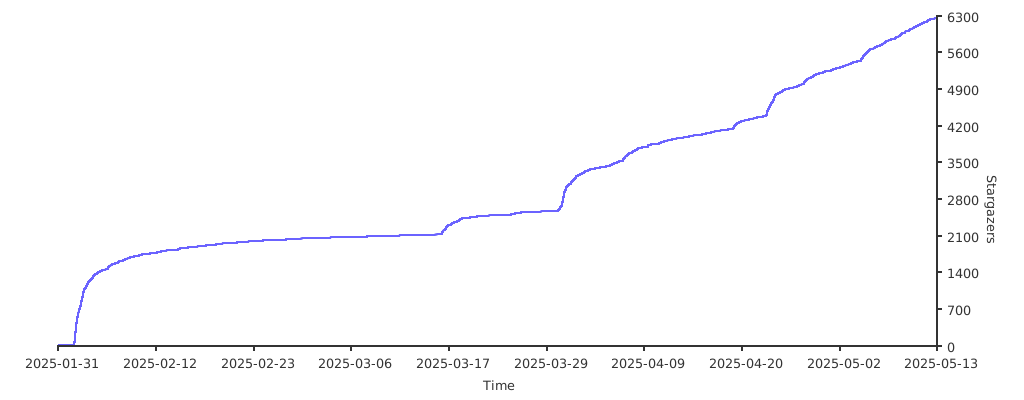
## Stargazers
Thank you to all our supporters!
[](https://starchart.cc/trycua/cua)
## Contributors


