**cua** ("koo-ah") is Docker for [Computer-Use Agents](https://www.oneusefulthing.org/p/when-you-give-a-claude-a-mouse) - it enables AI agents to control full operating systems in virtual containers and deploy them locally or to the cloud.
Check out more demos of the Computer-Use Agent in action
MCP Server: Work with Claude Desktop and Tableau
AI-Gradio: Multi-app workflow with browser, VS Code and terminal
Notebook: Fix GitHub issue in Cursor
# 🚀 Quick Start
Read our guide on getting started with a Computer-Use Agent:
[Computer-Use Agent Quickstart](https://docs.trycua.com/home/guides/usage-guide)
Get started using Cua services on your machine:
[Cua Usage Guide](https://docs.trycua.com/home/guides/cua-usage-guide)
Set up a development environment with the Dev Container:
[Dev Container Setup](https://docs.trycua.com/home/guides/dev-container-setup)
## Lume
For managing and creating virtual machines on macOS, check out [Lume](./libs/lume/README.md).
```bash
# Install Lume CLI and background service
curl -fsSL https://raw.githubusercontent.com/trycua/cua/main/libs/lume/scripts/install.sh | bash
# Pull a VM image
lume pull macos-sequoia-cua:latest
# Create a new VM
lume create my-vm --os macos --cpu 4 --memory 8GB --disk-size 50GB
# Run a VM (creates and starts if it doesn't exist)
lume run macos-sequoia-cua:latest
# Stop a VM
lume stop macos-sequoia-cua_latest
```
## Lumier
For advanced container-like virtualization, check out [Lumier](./libs/lumier/README.md) - a Docker interface for macOS and Linux VMs.
```bash
# Install Lume CLI and background service
curl -fsSL https://raw.githubusercontent.com/trycua/cua/main/libs/lume/scripts/install.sh | bash
# Run macOS in a Docker container
docker run -it --rm \
--name lumier-vm \
-p 8006:8006 \
-v $(pwd)/storage:/storage \
-v $(pwd)/shared:/shared \
-e VM_NAME=lumier-vm \
-e VERSION=ghcr.io/trycua/macos-sequoia-cua:latest \
-e CPU_CORES=4 \
-e RAM_SIZE=8192 \
-e HOST_STORAGE_PATH=$(pwd)/storage \
-e HOST_SHARED_PATH=$(pwd)/shared \
trycua/lumier:latest
```
# Resources
- [How to use the MCP Server with Claude Desktop or other MCP clients](./libs/python/mcp-server/README.md) - One of the easiest ways to get started with Cua
- [How to use OpenAI Computer-Use, Anthropic, OmniParser, or UI-TARS for your Computer-Use Agent](./libs/python/agent/README.md)
- [How to use Lume CLI for managing desktops](./libs/lume/README.md)
- [Training Computer-Use Models: Collecting Human Trajectories with Cua (Part 1)](https://www.trycua.com/blog/training-computer-use-models-trajectories-1)
- [Build Your Own Operator on macOS (Part 1)](https://www.trycua.com/blog/build-your-own-operator-on-macos-1)
# Modules
| Module | Description | Installation |
|--------|-------------|---------------|
| [**Lume**](./libs/lume/README.md) | VM management for macOS/Linux using Apple's Virtualization.Framework | `curl -fsSL https://raw.githubusercontent.com/trycua/cua/main/libs/lume/scripts/install.sh \| bash` |
| [**Lumier**](./libs/lumier/README.md) | Docker interface for macOS and Linux VMs | `docker pull trycua/lumier:latest` |
| [**Computer (Python)**](./libs/python/computer/README.md) | Python Interface for controlling virtual machines | `pip install "cua-computer[all]"` |
| [**Computer (Typescript)**](./libs/typescript/computer/README.md) | Typescript Interface for controlling virtual machines | `npm install @trycua/computer` |
| [**Agent**](./libs/python/agent/README.md) | AI agent framework for automating tasks | `pip install "cua-agent[all]"` |
| [**MCP Server**](./libs/python/mcp-server/README.md) | MCP server for using CUA with Claude Desktop | `pip install cua-mcp-server` |
| [**SOM**](./libs/python/som/README.md) | Self-of-Mark library for Agent | `pip install cua-som` |
| [**Computer Server**](./libs/python/computer-server/README.md) | Server component for Computer | `pip install cua-computer-server` |
| [**Core (Python)**](./libs/python/core/README.md) | Python Core utilities | `pip install cua-core` |
| [**Core (Typescript)**](./libs/typescript/core/README.md) | Typescript Core utilities | `npm install @trycua/core` |
## Community
Join our [Discord community](https://discord.com/invite/mVnXXpdE85) to discuss ideas, get assistance, or share your demos!
## License
Cua is open-sourced under the MIT License - see the [LICENSE](LICENSE) file for details.
Microsoft's OmniParser, which is used in this project, is licensed under the Creative Commons Attribution 4.0 International License (CC-BY-4.0) - see the [OmniParser LICENSE](https://github.com/microsoft/OmniParser/blob/master/LICENSE) file for details.
## Contributing
We welcome contributions to CUA! Please refer to our [Contributing Guidelines](CONTRIBUTING.md) for details.
## Trademarks
Apple, macOS, and Apple Silicon are trademarks of Apple Inc. Ubuntu and Canonical are registered trademarks of Canonical Ltd. Microsoft is a registered trademark of Microsoft Corporation. This project is not affiliated with, endorsed by, or sponsored by Apple Inc., Canonical Ltd., or Microsoft Corporation.
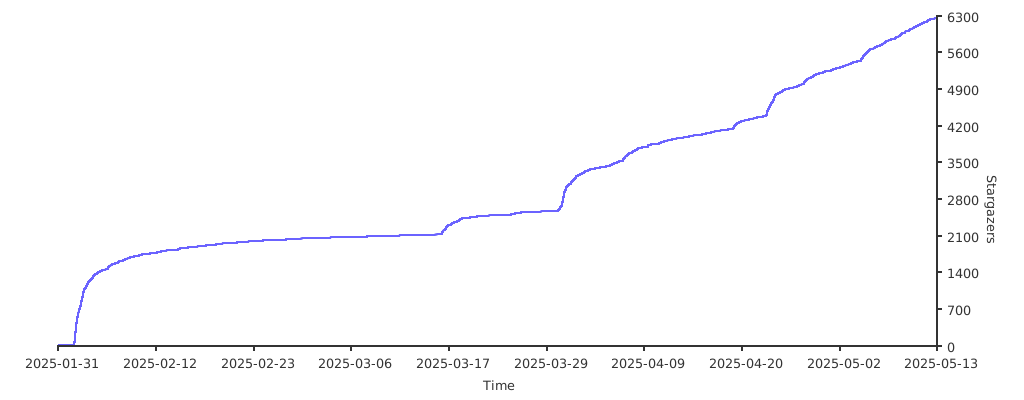
## Stargazers
Thank you to all our supporters!
[](https://starchart.cc/trycua/cua)
## Contributors


