> We’re hosting the **Computer-Use Agents SOTA Challenge** at [Hack the North](https://hackthenorth.com) and online!
>> **Track A (On-site @ UWaterloo)**: Reserved for participants accepted to Hack the North. 🏆 Prize: **YC interview guaranteed**.
>> **Track B (Remote)**: Open to everyone worldwide. 🏆 Prize: **Cash award**.
>>> 👉 Sign up here: [trycua.com/hackathon](https://www.trycua.com/hackathon)
**cua** ("koo-ah") is Docker for [Computer-Use Agents](https://www.oneusefulthing.org/p/when-you-give-a-claude-a-mouse) - it enables AI agents to control full operating systems in virtual containers and deploy them locally or to the cloud.
With the Computer SDK, you can:
- automate Windows, Linux, and macOS VMs with a consistent, [pyautogui-like API](https://docs.trycua.com/docs/libraries/computer#interface-actions)
- create & manage VMs [locally](https://docs.trycua.com/docs/computer-sdk/computers#cua-local-containers) or using [cua cloud](https://www.trycua.com/)
With the Agent SDK, you can:
- run computer-use models with a [consistent schema](https://docs.trycua.com/docs/agent-sdk/message-format)
- benchmark on OSWorld-Verified, SheetBench-V2, and more [with a single line of code using HUD](https://docs.trycua.com/docs/agent-sdk/integrations/hud) ([Notebook](https://github.com/trycua/cua/blob/main/notebooks/eval_osworld.ipynb))
- combine UI grounding models with any LLM using [composed agents](https://docs.trycua.com/docs/agent-sdk/supported-agents/composed-agents)
- use new UI agent models and UI grounding models from the Model Zoo below with just a model string (e.g., `ComputerAgent(model="openai/computer-use-preview")`)
- use API or local inference by changing a prefix (e.g., `openai/`, `openrouter/`, `ollama/`, `huggingface-local/`, `mlx/`, [etc.](https://docs.litellm.ai/docs/providers))
### CUA Model Zoo 🐨
| [All-in-one CUAs](https://docs.trycua.com/docs/agent-sdk/supported-agents/computer-use-agents) | [UI Grounding Models](https://docs.trycua.com/docs/agent-sdk/supported-agents/composed-agents) | [UI Planning Models](https://docs.trycua.com/docs/agent-sdk/supported-agents/composed-agents) |
|---|---|---|
| `anthropic/claude-sonnet-4-5-20250929` | `huggingface-local/xlangai/OpenCUA-{7B,32B}` | any all-in-one CUA |
| `openai/computer-use-preview` | `huggingface-local/HelloKKMe/GTA1-{7B,32B,72B}` | any VLM (using liteLLM, requires `tools` parameter) |
| `openrouter/z-ai/glm-4.5v` | `huggingface-local/Hcompany/Holo1.5-{3B,7B,72B}` | any LLM (using liteLLM, requires `moondream3+` prefix ) |
| `huggingface-local/OpenGVLab/InternVL3_5-{1B,2B,4B,8B,...}` | any all-in-one CUA | |
| `huggingface-local/ByteDance-Seed/UI-TARS-1.5-7B` | |
| `moondream3+{ui planning}` (supports text-only models) | |
| `omniparser+{ui planning}` | | |
| `{ui grounding}+{ui planning}` | | |
- `human/human` → [Human-in-the-Loop](https://docs.trycua.com/docs/agent-sdk/supported-agents/human-in-the-loop)
Missing a model? [Raise a feature request](https://github.com/trycua/cua/issues/new?assignees=&labels=enhancement&projects=&title=%5BAgent%5D%3A+Add+model+support+for+) or [contribute](https://github.com/trycua/cua/blob/main/CONTRIBUTING.md)!
# Quick Start
- [Get started with a Computer-Use Agent UI](https://docs.trycua.com/docs/quickstart-ui)
- [Get started with the Computer-Use Agent CLI](https://docs.trycua.com/docs/quickstart-cli)
- [Get started with the Python SDKs](https://docs.trycua.com/docs/quickstart-devs)
# Usage ([Docs](https://docs.trycua.com/docs))
```bash
pip install cua-agent[all]
```
```python
from agent import ComputerAgent
agent = ComputerAgent(
model="anthropic/claude-3-5-sonnet-20241022",
tools=[computer],
max_trajectory_budget=5.0
)
messages = [{"role": "user", "content": "Take a screenshot and tell me what you see"}]
async for result in agent.run(messages):
for item in result["output"]:
if item["type"] == "message":
print(item["content"][0]["text"])
```
### Output format (OpenAI Agent Responses Format):
```json
{
"output": [
# user input
{
"role": "user",
"content": "go to trycua on gh"
},
# first agent turn adds the model output to the history
{
"summary": [
{
"text": "Searching Firefox for Trycua GitHub",
"type": "summary_text"
}
],
"type": "reasoning"
},
{
"action": {
"text": "Trycua GitHub",
"type": "type"
},
"call_id": "call_QI6OsYkXxl6Ww1KvyJc4LKKq",
"status": "completed",
"type": "computer_call"
},
# second agent turn adds the computer output to the history
{
"type": "computer_call_output",
"call_id": "call_QI6OsYkXxl6Ww1KvyJc4LKKq",
"output": {
"type": "input_image",
"image_url": "data:image/png;base64,..."
}
},
# final agent turn adds the agent output text to the history
{
"type": "message",
"role": "assistant",
"content": [
{
"text": "Success! The Trycua GitHub page has been opened.",
"type": "output_text"
}
]
}
],
"usage": {
"prompt_tokens": 150,
"completion_tokens": 75,
"total_tokens": 225,
"response_cost": 0.01,
}
}
```
# Computer ([Docs](https://docs.trycua.com/docs/computer-sdk/computers))
```bash
pip install cua-computer[all]
```
```python
from computer import Computer
async with Computer(
os_type="linux",
provider_type="cloud",
name="your-container-name",
api_key="your-api-key"
) as computer:
# Take screenshot
screenshot = await computer.interface.screenshot()
# Click and type
await computer.interface.left_click(100, 100)
await computer.interface.type("Hello!")
```
# Resources
- [How to use the MCP Server with Claude Desktop or other MCP clients](./libs/python/mcp-server/README.md) - One of the easiest ways to get started with Cua
- [How to use OpenAI Computer-Use, Anthropic, OmniParser, or UI-TARS for your Computer-Use Agent](./libs/python/agent/README.md)
- [How to use Lume CLI for managing desktops](./libs/lume/README.md)
- [Training Computer-Use Models: Collecting Human Trajectories with Cua (Part 1)](https://www.trycua.com/blog/training-computer-use-models-trajectories-1)
## Modules
| Module | Description | Installation |
|--------|-------------|---------------|
| [**Lume**](./libs/lume/README.md) | VM management for macOS/Linux using Apple's Virtualization.Framework | `curl -fsSL https://raw.githubusercontent.com/trycua/cua/main/libs/lume/scripts/install.sh \| bash` |
| [**Lumier**](./libs/lumier/README.md) | Docker interface for macOS and Linux VMs | `docker pull trycua/lumier:latest` |
| [**Computer (Python)**](./libs/python/computer/README.md) | Python Interface for controlling virtual machines | `pip install "cua-computer[all]"` |
| [**Computer (Typescript)**](./libs/typescript/computer/README.md) | Typescript Interface for controlling virtual machines | `npm install @trycua/computer` |
| [**Agent**](./libs/python/agent/README.md) | AI agent framework for automating tasks | `pip install "cua-agent[all]"` |
| [**MCP Server**](./libs/python/mcp-server/README.md) | MCP server for using CUA with Claude Desktop | `pip install cua-mcp-server` |
| [**SOM**](./libs/python/som/README.md) | Self-of-Mark library for Agent | `pip install cua-som` |
| [**Computer Server**](./libs/python/computer-server/README.md) | Server component for Computer | `pip install cua-computer-server` |
| [**Core (Python)**](./libs/python/core/README.md) | Python Core utilities | `pip install cua-core` |
| [**Core (Typescript)**](./libs/typescript/core/README.md) | Typescript Core utilities | `npm install @trycua/core` |
## Community
Join our [Discord community](https://discord.com/invite/mVnXXpdE85) to discuss ideas, get assistance, or share your demos!
## License
Cua is open-sourced under the MIT License - see the [LICENSE](LICENSE) file for details.
Portions of this project, specifically components adapted from Kasm Technologies Inc., are also licensed under the MIT License. See [libs/kasm/LICENSE](libs/kasm/LICENSE) for details.
Microsoft's OmniParser, which is used in this project, is licensed under the Creative Commons Attribution 4.0 International License (CC-BY-4.0). See the [OmniParser LICENSE](https://github.com/microsoft/OmniParser/blob/master/LICENSE) for details.
### Third-Party Licenses and Optional Components
Some optional extras for this project depend on third-party packages that are licensed under terms different from the MIT License.
- The optional "omni" extra (installed via `pip install "cua-agent[omni]"`) installs the `cua-som` module, which includes `ultralytics` and is licensed under the AGPL-3.0.
When you choose to install and use such optional extras, your use, modification, and distribution of those third-party components are governed by their respective licenses (e.g., AGPL-3.0 for `ultralytics`).
## Contributing
We welcome contributions to Cua! Please refer to our [Contributing Guidelines](CONTRIBUTING.md) for details.
## Trademarks
Apple, macOS, and Apple Silicon are trademarks of Apple Inc.
Ubuntu and Canonical are registered trademarks of Canonical Ltd.
Microsoft is a registered trademark of Microsoft Corporation.
This project is not affiliated with, endorsed by, or sponsored by Apple Inc., Canonical Ltd., Microsoft Corporation, or Kasm Technologies.
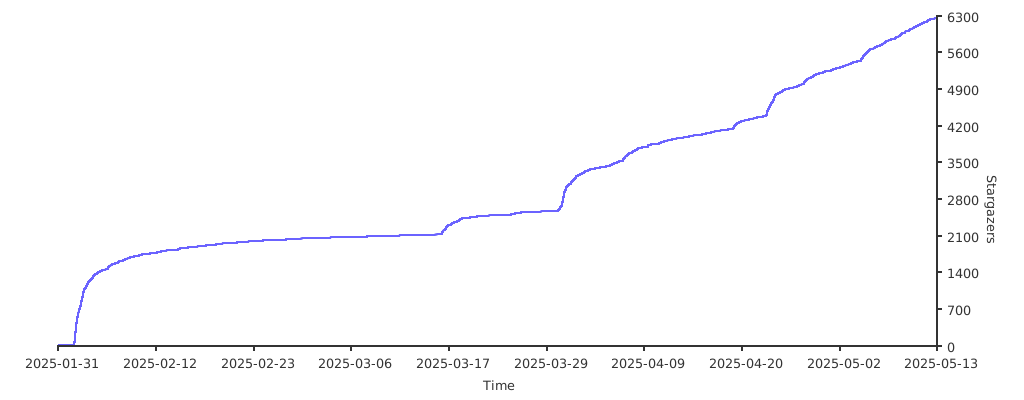
## Stargazers
Thank you to all our supporters!
[](https://starchart.cc/trycua/cua)
