mirror of
https://github.com/formbricks/formbricks.git
synced 2025-12-27 17:00:25 -06:00

129 lines
4.3 KiB
Plaintext
129 lines
4.3 KiB
Plaintext
---
|
||
title: "REST API"
|
||
icon: "code"
|
||
description: "
|
||
Formbricks provides two APIs: the Public Client API for frontend survey interactions and the Management API for backend management tasks."
|
||
---
|
||
|
||
<Info>
|
||
View our [API Documentation](/api-reference) in more than 30 frameworks and languages.
|
||
</Info>
|
||
|
||
## Public Client API
|
||
|
||
The **Public Client API** is used by our SDKs and doesn’t require authentication, making it ideal for client-side interactions without exposing sensitive data.
|
||
|
||
We currently have the following Client API methods exposed and below is their documentation attached in Postman:
|
||
|
||
- [Displays API](/api-reference/client-api->-display/create-display) - Mark a survey as displayed or link a display to a response for a person.
|
||
|
||
- [People API](/api-reference/client-api->-people/create-person) - Create & Update a Person (e.g., attributes, email, userId, etc.)
|
||
|
||
- [Responses API](/api-reference/client-api->-response/create-response) - Create & Update a Response for a Survey.
|
||
|
||
## Management API
|
||
|
||
The **Management API** gives full access to all data and settings available in your Formbricks account. It requires a personal API Key for authentication, which you can generate and manage in the Settings section of the Formbricks app.
|
||
|
||
We currently have the following Management API methods exposed and below is their documentation attached in Postman:
|
||
|
||
- [Action Class API](/api-reference/management-api->-action-class/get-all-action-classes) - Create, List, and Delete Action Classes
|
||
|
||
- [Attribute Class API ](/api-reference/management-api->-attribute-class/get-all-attribute-classes)- Create, List, and Delete Attribute Classes
|
||
|
||
- [Me API](/api-reference/management-api->-me/me) - Retrieve Account Information
|
||
|
||
- [People API](/api-reference/management-api->-people/get-all-persons) - List and Delete People
|
||
|
||
- [Response API](/api-reference/management-api->-response/get-survey-responses) - List, List by Survey, Update, and Delete Responses
|
||
|
||
- [Survey API](/api-reference/management-api->-survey/get-all-surveys) - List, Create, Update, generate multiple suId, and Delete Surveys
|
||
|
||
- [Webhook API](/api-reference/management-api->-webhook/get-all-webhooks) - List, Create, and Delete Webhooks
|
||
|
||
## How to Generate an API key
|
||
|
||
API requests require a personal API key for authorization. This API key gives you the same rights as if you were logged in at Formbricks UI - **keep it private!**
|
||
|
||
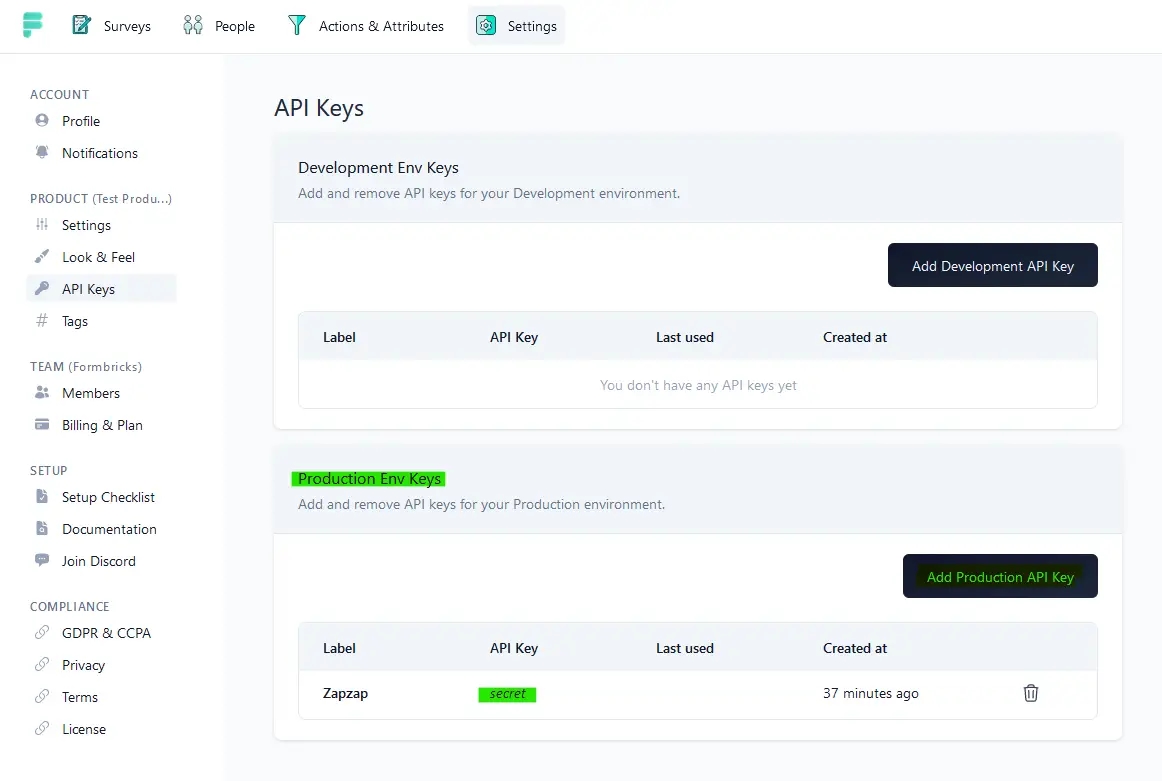
- Go to your settings on [Formbricks UI](https://app.formbricks.com).
|
||
|
||
- Go to page “API keys”
|
||
|
||
|
||
|
||
- Create a key for the development or production environment.
|
||
|
||
- Copy the key immediately. You won’t be able to see it again.
|
||
|
||

|
||
|
||
<Note>
|
||
**Store API key safely! Anyone who has your API key has full control over your
|
||
account. For security reasons, you cannot view the API key again.**
|
||
</Note>
|
||
|
||
## Test your API Key
|
||
|
||
Hit the below request to verify that you are authenticated with your API Key and the server is responding.
|
||
|
||
### Get My Profile
|
||
|
||
Get the project details and environment type of your account.
|
||
|
||
### Mandatory Headers
|
||
|
||
| Name | x-Api-Key |
|
||
| --------------- | ------------------------ |
|
||
| **Type** | string |
|
||
| **Description** | Your Formbricks API key. |
|
||
|
||
### Request
|
||
|
||
```bash cURL
|
||
GET - /api/v1/me
|
||
|
||
curl --location \
|
||
'https://app.formbricks.com/api/v1/me' \
|
||
--header \
|
||
'x-api-key: <your-api-key>'
|
||
```
|
||
|
||
### Response
|
||
|
||
<CodeGroup>
|
||
|
||
|
||
```bash 200 (Success)
|
||
{
|
||
"id": "cll2m30r70004mx0huqkitgqv",
|
||
"createdAt": "2023-08-08T18:04:59.922Z",
|
||
"updatedAt": "2023-08-08T18:04:59.922Z",
|
||
"type": "production",
|
||
"project": {
|
||
"id": "cll2m30r60003mx0hnemjfckr",
|
||
"name": "My Project"
|
||
},
|
||
"appSetupCompleted": false,
|
||
"websiteSetupCompleted": false,
|
||
}
|
||
```
|
||
|
||
```bash 401 (Not Authenticated)
|
||
Not authenticated
|
||
```
|
||
</CodeGroup>
|
||
|
||
|
||
### Delete a personal API key
|
||
|
||
- Go to settings on [app.formbricks.com](https://app.formbricks.com/).
|
||
|
||
- Go to the page “API keys”.
|
||
|
||
- Find the key you wish to revoke and select “Delete”.
|
||
|
||
- Your API key will stop working immediately.
|
||
|
||
---
|
||
|
||
**Can’t figure it out?** Get help in [GitHub Discussions](https://github.com/formbricks/formbricks/discussions). |