
Graph
The graph service provides the Graph API which is a RESTful web API used to access Infinite Scale resources. It is inspired by the Microsoft Graph API and can be used by clients or other services or extensions.
Manual Filters
Using the API, you can manually filter like for users. See the Libre Graph API for examples in the developer documentation. Note that you can use and and or to refine results.
Sequence Diagram
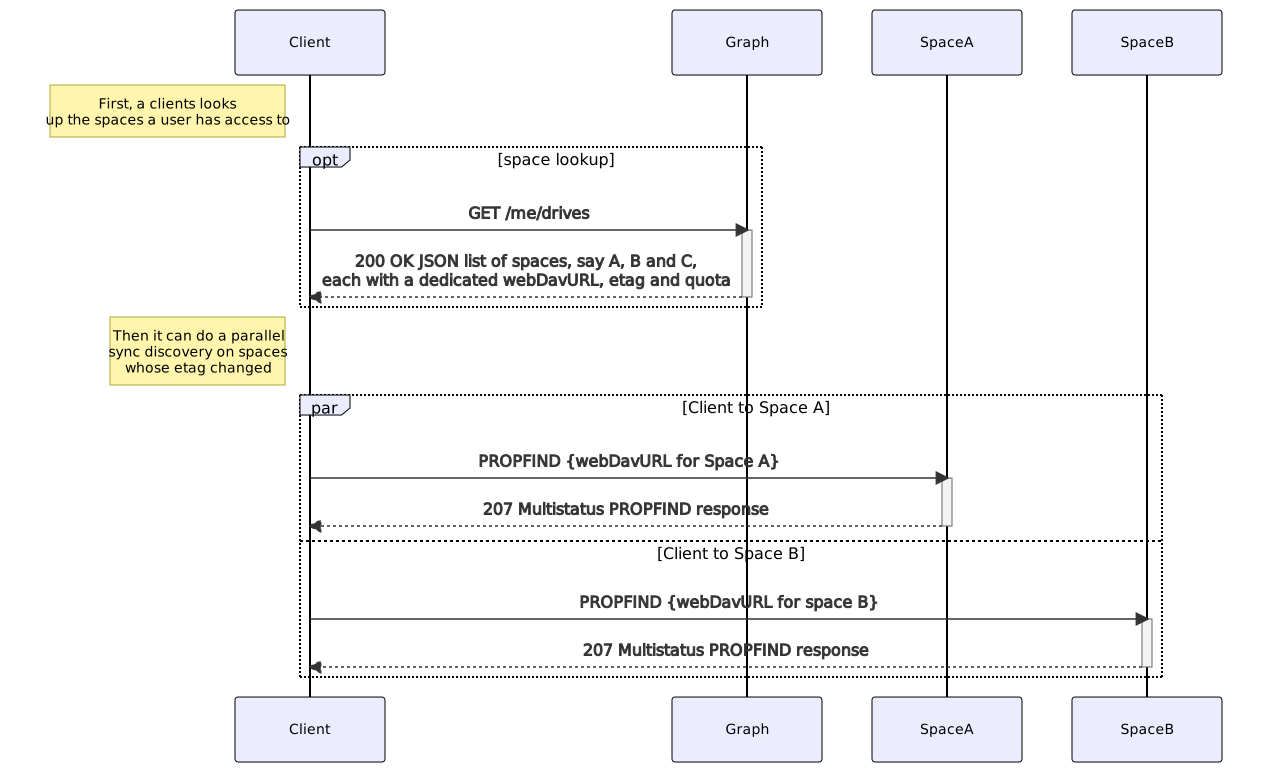
The following image gives an overview of the scenario when a client requests to list available spaces the user has access to. To do so, the client is directed with his request automatically via the proxy service to the graph service.
Caching
The graph service can use a configured store via GRAPH_STORE_TYPE. Possible stores are:
memory: Basic in-memory store and the default.ocmem: Advanced in-memory store allowing max size.redis: Stores data in a configured redis cluster.redis-sentinel: Stores data in a configured redis sentinel cluster.etcd: Stores data in a configured etcd cluster.nats-js: Stores data using key-value-store feature of nats jetstreamnoop: Stores nothing. Useful for testing. Not recommended in productive enviroments.
- Note that in-memory stores are by nature not reboot persistent.
- Though usually not necessary, a database name and a database table can be configured for event stores if the event store supports this. Generally not applicapable for stores of type
in-memory. These settings are blank by default which means that the standard settings of the configured store applies. - The graph service can be scaled if not using
in-memorystores and the stores are configured identically over all instances. - When using
redis-sentinel, the Redis master to use is configured viaGRAPH_CACHE_STORE_NODESin the form of<sentinel-host>:<sentinel-port>/<redis-master>like10.10.0.200:26379/mymaster.
Keycloak Configuration For The Personal Data Export
If Keycloak is used for authentication, GDPR regulations require to add all personal identifiable information that Keycloak has about the user to the personal data export. To do this, the following environment variables must be set:
OCIS_KEYCLOAK_BASE_PATH- The URL to the keycloak instance.OCIS_KEYCLOAK_CLIENT_ID- The client ID of the client that is used to authenticate with keycloak, this client has to be able to list users and get the credential data.OCIS_KEYCLOAK_CLIENT_SECRET- The client secret of the client that is used to authenticate with keycloak.OCIS_KEYCLOAK_CLIENT_REALM- The realm the client is defined in.OCIS_KEYCLOAK_USER_REALM- The realm the oCIS users are defined in.OCIS_KEYCLOAK_INSECURE_SKIP_VERIFY- If set to true, the TLS certificate of the keycloak instance is not verified.
Keycloak Client Configuration
The client that is used to authenticate with keycloak has to be able to list users and get the credential data. To do this, the following roles have to be assigned to the client and they have to be about the realm that contains the oCIS users:
view-usersview-identity-providersview-realmview-clientsview-eventsview-authorization
Note that these roles are only available to assign if the client is in the master realm.