mirror of
https://github.com/trycua/computer.git
synced 2026-01-04 04:19:57 -06:00

413 lines
21 KiB
Markdown
413 lines
21 KiB
Markdown
<div align="center">
|
|
<picture>
|
|
<source media="(prefers-color-scheme: dark)" alt="Cua logo" height="150" srcset="img/logo_white.png">
|
|
<source media="(prefers-color-scheme: light)" alt="Cua logo" height="150" srcset="img/logo_black.png">
|
|
<img alt="Cua logo" height="150" src="img/logo_black.png">
|
|
</picture>
|
|
|
|
[](#)
|
|
[](#)
|
|
[](#)
|
|
[](https://discord.com/invite/mVnXXpdE85)
|
|
<br>
|
|
<a href="https://trendshift.io/repositories/13685" target="_blank"><img src="https://trendshift.io/api/badge/repositories/13685" alt="trycua%2Fcua | Trendshift" style="width: 250px; height: 55px;" width="250" height="55"/></a>
|
|
</div>
|
|
|
|
**cua** ("koo-ah") is Docker for [Computer-Use Agents](https://www.oneusefulthing.org/p/when-you-give-a-claude-a-mouse) - it enables AI agents to control full operating systems in virtual containers and deploy them locally or to the cloud.
|
|
|
|
<div align="center">
|
|
<video src="https://github.com/user-attachments/assets/c619b4ea-bb8e-4382-860e-f3757e36af20" width="800" controls></video>
|
|
</div>
|
|
<details>
|
|
<summary><b>Check out more demos of the Computer-Use Agent in action
|
|
</b></summary>
|
|
|
|
<details open>
|
|
<summary><b>MCP Server: Work with Claude Desktop and Tableau</b></summary>
|
|
<br>
|
|
<div align="center">
|
|
<video src="https://github.com/user-attachments/assets/9f573547-5149-493e-9a72-396f3cff29df" width="800" controls></video>
|
|
</div>
|
|
</details>
|
|
|
|
<details>
|
|
<summary><b>AI-Gradio: Multi-app workflow with browser, VS Code and terminal</b></summary>
|
|
<br>
|
|
<div align="center">
|
|
<video src="https://github.com/user-attachments/assets/723a115d-1a07-4c8e-b517-88fbdf53ed0f" width="800" controls></video>
|
|
</div>
|
|
</details>
|
|
|
|
<details>
|
|
<summary><b>Notebook: Fix GitHub issue in Cursor</b></summary>
|
|
<br>
|
|
<div align="center">
|
|
<video src="https://github.com/user-attachments/assets/f67f0107-a1e1-46dc-aa9f-0146eb077077" width="800" controls></video>
|
|
</div>
|
|
</details>
|
|
</details><br/>
|
|
|
|
# 🚀 Quick Start with a Computer-Use Agent UI
|
|
|
|
**Need to automate desktop tasks? Launch the Computer-Use Agent UI with a single command.**
|
|
|
|
### Option 1: Fully-managed install with Docker (recommended)
|
|
|
|
*Docker-based guided install for quick use*
|
|
|
|
**macOS/Linux/Windows (via WSL):**
|
|
|
|
```bash
|
|
# Requires Docker
|
|
/bin/bash -c "$(curl -fsSL https://raw.githubusercontent.com/trycua/cua/main/scripts/playground-docker.sh)"
|
|
```
|
|
|
|
This script will guide you through setup using Docker containers and launch the Computer-Use Agent UI.
|
|
|
|
---
|
|
|
|
### Option 2: [Dev Container](./.devcontainer/README.md)
|
|
|
|
*Best for contributors and development*
|
|
|
|
This repository includes a [Dev Container](./.devcontainer/README.md) configuration that simplifies setup to a few steps:
|
|
|
|
1. **Install the Dev Containers extension ([VS Code](https://marketplace.visualstudio.com/items?itemName=ms-vscode-remote.remote-containers) or [WindSurf](https://docs.windsurf.com/windsurf/advanced#dev-containers-beta))**
|
|
2. **Open the repository in the Dev Container:**
|
|
- Press `Ctrl+Shift+P` (or `⌘+Shift+P` on macOS)
|
|
- Select `Dev Containers: Clone Repository in Container Volume...` and paste the repository URL: `https://github.com/trycua/cua.git` (if not cloned) or `Dev Containers: Open Folder in Container...` (if git cloned).
|
|
> **Note**: On WindSurf, the post install hook might not run automatically. If so, run `/bin/bash .devcontainer/post-install.sh` manually.
|
|
3. **Open the VS Code workspace:** Once the post-install.sh is done running, open the `.vscode/py.code-workspace` workspace and press 
|
|
.
|
|
4. **Run the Agent UI example:** Click 
|
|
to start the Gradio UI. If prompted to install **debugpy (Python Debugger)** to enable remote debugging, select 'Yes' to proceed.
|
|
5. **Access the Gradio UI:** The Gradio UI will be available at `http://localhost:7860` and will automatically forward to your host machine.
|
|
|
|
---
|
|
|
|
### Option 3: PyPI
|
|
|
|
*Direct Python package installation*
|
|
|
|
```bash
|
|
# conda create -yn cua python==3.12
|
|
|
|
pip install -U "cua-computer[all]" "cua-agent[all]"
|
|
python -m agent.ui # Start the agent UI
|
|
```
|
|
|
|
Or check out the [Usage Guide](#-usage-guide) to learn how to use our Python SDK in your own code.
|
|
|
|
---
|
|
|
|
## Supported [Agent Loops](https://github.com/trycua/cua/blob/main/libs/python/agent/README.md#agent-loops)
|
|
|
|
- [UITARS-1.5](https://github.com/trycua/cua/blob/main/libs/python/agent/README.md#agent-loops) - Run locally on Apple Silicon with MLX, or use cloud providers
|
|
- [OpenAI CUA](https://github.com/trycua/cua/blob/main/libs/python/agent/README.md#agent-loops) - Use OpenAI's Computer-Use Preview model
|
|
- [Anthropic CUA](https://github.com/trycua/cua/blob/main/libs/python/agent/README.md#agent-loops) - Use Anthropic's Computer-Use capabilities
|
|
- [OmniParser-v2.0](https://github.com/trycua/cua/blob/main/libs/python/agent/README.md#agent-loops) - Control UI with [Set-of-Marks prompting](https://som-gpt4v.github.io/) using any vision model
|
|
|
|
## 🖥️ Compatibility
|
|
|
|
For detailed compatibility information including host OS support, VM emulation capabilities, and model provider compatibility, see the [Compatibility Matrix](./COMPATIBILITY.md).
|
|
|
|
<br/>
|
|
<br/>
|
|
|
|
# 🐍 Usage Guide
|
|
|
|
Follow these steps to use Cua in your own Python code. See [Developer Guide](./docs/Developer-Guide.md) for building from source.
|
|
|
|
### Step 1: Install Lume CLI
|
|
|
|
```bash
|
|
/bin/bash -c "$(curl -fsSL https://raw.githubusercontent.com/trycua/cua/main/libs/lume/scripts/install.sh)"
|
|
```
|
|
|
|
Lume CLI manages high-performance macOS/Linux VMs with near-native speed on Apple Silicon.
|
|
|
|
### Step 2: Pull the macOS CUA Image
|
|
|
|
```bash
|
|
lume pull macos-sequoia-cua:latest
|
|
```
|
|
|
|
The macOS CUA image contains the default Mac apps and the Computer Server for easy automation.
|
|
|
|
### Step 3: Install Python SDK
|
|
|
|
```bash
|
|
pip install "cua-computer[all]" "cua-agent[all]"
|
|
```
|
|
|
|
### Step 4: Use in Your Code
|
|
|
|
```python
|
|
import asyncio
|
|
from computer import Computer
|
|
from agent import ComputerAgent
|
|
|
|
async def main():
|
|
# Start a local macOS VM
|
|
computer = Computer(os_type="macos")
|
|
await computer.run()
|
|
|
|
# Or with Cua Cloud Container
|
|
computer = Computer(
|
|
os_type="linux",
|
|
api_key="your_cua_api_key_here",
|
|
name="your_container_name_here"
|
|
)
|
|
|
|
# Example: Direct control of a macOS VM with Computer
|
|
computer.interface.delay = 0.1 # Wait 0.1 seconds between kb/m actions
|
|
await computer.interface.left_click(100, 200)
|
|
await computer.interface.type_text("Hello, world!")
|
|
screenshot_bytes = await computer.interface.screenshot()
|
|
|
|
# Example: Create and run an agent locally using mlx-community/UI-TARS-1.5-7B-6bit
|
|
agent = ComputerAgent(
|
|
model="mlx/mlx-community/UI-TARS-1.5-7B-6bit",
|
|
tools=[computer],
|
|
)
|
|
async for result in agent.run("Find the trycua/cua repository on GitHub and follow the quick start guide"):
|
|
print(result)
|
|
|
|
if __name__ == "__main__":
|
|
asyncio.run(main())
|
|
```
|
|
|
|
For ready-to-use examples, check out our [Notebooks](./notebooks/) collection.
|
|
|
|
### Lume CLI Reference
|
|
|
|
```bash
|
|
# Install Lume CLI and background service
|
|
curl -fsSL https://raw.githubusercontent.com/trycua/cua/main/libs/lume/scripts/install.sh | bash
|
|
|
|
# List all VMs
|
|
lume ls
|
|
|
|
# Pull a VM image
|
|
lume pull macos-sequoia-cua:latest
|
|
|
|
# Create a new VM
|
|
lume create my-vm --os macos --cpu 4 --memory 8GB --disk-size 50GB
|
|
|
|
# Run a VM (creates and starts if it doesn't exist)
|
|
lume run macos-sequoia-cua:latest
|
|
|
|
# Stop a VM
|
|
lume stop macos-sequoia-cua_latest
|
|
|
|
# Delete a VM
|
|
lume delete macos-sequoia-cua_latest
|
|
```
|
|
|
|
### Lumier CLI Reference
|
|
|
|
For advanced container-like virtualization, check out [Lumier](./libs/lumier/README.md) - a Docker interface for macOS and Linux VMs.
|
|
|
|
```bash
|
|
# Install Lume CLI and background service
|
|
curl -fsSL https://raw.githubusercontent.com/trycua/cua/main/libs/lume/scripts/install.sh | bash
|
|
|
|
# Run macOS in a Docker container
|
|
docker run -it --rm \
|
|
--name lumier-vm \
|
|
-p 8006:8006 \
|
|
-v $(pwd)/storage:/storage \
|
|
-v $(pwd)/shared:/shared \
|
|
-e VM_NAME=lumier-vm \
|
|
-e VERSION=ghcr.io/trycua/macos-sequoia-cua:latest \
|
|
-e CPU_CORES=4 \
|
|
-e RAM_SIZE=8192 \
|
|
-e HOST_STORAGE_PATH=$(pwd)/storage \
|
|
-e HOST_SHARED_PATH=$(pwd)/shared \
|
|
trycua/lumier:latest
|
|
```
|
|
|
|
## Resources
|
|
|
|
- [How to use the MCP Server with Claude Desktop or other MCP clients](./libs/python/mcp-server/README.md) - One of the easiest ways to get started with Cua
|
|
- [How to use OpenAI Computer-Use, Anthropic, OmniParser, or UI-TARS for your Computer-Use Agent](./libs/python/agent/README.md)
|
|
- [How to use Lume CLI for managing desktops](./libs/lume/README.md)
|
|
- [Training Computer-Use Models: Collecting Human Trajectories with Cua (Part 1)](https://www.trycua.com/blog/training-computer-use-models-trajectories-1)
|
|
- [Build Your Own Operator on macOS (Part 1)](https://www.trycua.com/blog/build-your-own-operator-on-macos-1)
|
|
|
|
## Modules
|
|
|
|
| Module | Description | Installation |
|
|
|--------|-------------|---------------|
|
|
| [**Lume**](./libs/lume/README.md) | VM management for macOS/Linux using Apple's Virtualization.Framework | `curl -fsSL https://raw.githubusercontent.com/trycua/cua/main/libs/lume/scripts/install.sh \| bash` |
|
|
| [**Lumier**](./libs/lumier/README.md) | Docker interface for macOS and Linux VMs | `docker pull trycua/lumier:latest` |
|
|
| [**Computer (Python)**](./libs/python/computer/README.md) | Python Interface for controlling virtual machines | `pip install "cua-computer[all]"` |
|
|
| [**Computer (Typescript)**](./libs/typescript/computer/README.md) | Typescript Interface for controlling virtual machines | `npm install @trycua/computer` |
|
|
| [**Agent**](./libs/python/agent/README.md) | AI agent framework for automating tasks | `pip install "cua-agent[all]"` |
|
|
| [**MCP Server**](./libs/python/mcp-server/README.md) | MCP server for using CUA with Claude Desktop | `pip install cua-mcp-server` |
|
|
| [**SOM**](./libs/python/som/README.md) | Self-of-Mark library for Agent | `pip install cua-som` |
|
|
| [**Computer Server**](./libs/python/computer-server/README.md) | Server component for Computer | `pip install cua-computer-server` |
|
|
| [**Core (Python)**](./libs/python/core/README.md) | Python Core utilities | `pip install cua-core` |
|
|
| [**Core (Typescript)**](./libs/typescript/core/README.md) | Typescript Core utilities | `npm install @trycua/core` |
|
|
|
|
## Computer Interface Reference
|
|
|
|
For complete examples, see [computer_examples.py](./examples/computer_examples.py) or [computer_nb.ipynb](./notebooks/computer_nb.ipynb)
|
|
|
|
```python
|
|
# Shell Actions
|
|
result = await computer.interface.run_command(cmd) # Run shell command
|
|
# result.stdout, result.stderr, result.returncode
|
|
|
|
# Mouse Actions
|
|
await computer.interface.left_click(x, y) # Left click at coordinates
|
|
await computer.interface.right_click(x, y) # Right click at coordinates
|
|
await computer.interface.double_click(x, y) # Double click at coordinates
|
|
await computer.interface.move_cursor(x, y) # Move cursor to coordinates
|
|
await computer.interface.drag_to(x, y, duration) # Drag to coordinates
|
|
await computer.interface.get_cursor_position() # Get current cursor position
|
|
await computer.interface.mouse_down(x, y, button="left") # Press and hold a mouse button
|
|
await computer.interface.mouse_up(x, y, button="left") # Release a mouse button
|
|
|
|
# Keyboard Actions
|
|
await computer.interface.type_text("Hello") # Type text
|
|
await computer.interface.press_key("enter") # Press a single key
|
|
await computer.interface.hotkey("command", "c") # Press key combination
|
|
await computer.interface.key_down("command") # Press and hold a key
|
|
await computer.interface.key_up("command") # Release a key
|
|
|
|
# Scrolling Actions
|
|
await computer.interface.scroll(x, y) # Scroll the mouse wheel
|
|
await computer.interface.scroll_down(clicks) # Scroll down
|
|
await computer.interface.scroll_up(clicks) # Scroll up
|
|
|
|
# Screen Actions
|
|
await computer.interface.screenshot() # Take a screenshot
|
|
await computer.interface.get_screen_size() # Get screen dimensions
|
|
|
|
# Clipboard Actions
|
|
await computer.interface.set_clipboard(text) # Set clipboard content
|
|
await computer.interface.copy_to_clipboard() # Get clipboard content
|
|
|
|
# File System Operations
|
|
await computer.interface.file_exists(path) # Check if file exists
|
|
await computer.interface.directory_exists(path) # Check if directory exists
|
|
await computer.interface.read_text(path, encoding="utf-8") # Read file content
|
|
await computer.interface.write_text(path, content, encoding="utf-8") # Write file content
|
|
await computer.interface.read_bytes(path) # Read file content as bytes
|
|
await computer.interface.write_bytes(path, content) # Write file content as bytes
|
|
await computer.interface.delete_file(path) # Delete file
|
|
await computer.interface.create_dir(path) # Create directory
|
|
await computer.interface.delete_dir(path) # Delete directory
|
|
await computer.interface.list_dir(path) # List directory contents
|
|
|
|
# Accessibility
|
|
await computer.interface.get_accessibility_tree() # Get accessibility tree
|
|
|
|
# Delay Configuration
|
|
# Set default delay between all actions (in seconds)
|
|
computer.interface.delay = 0.5 # 500ms delay between actions
|
|
|
|
# Or specify delay for individual actions
|
|
await computer.interface.left_click(x, y, delay=1.0) # 1 second delay after click
|
|
await computer.interface.type_text("Hello", delay=0.2) # 200ms delay after typing
|
|
await computer.interface.press_key("enter", delay=0.5) # 500ms delay after key press
|
|
|
|
# Python Virtual Environment Operations
|
|
await computer.venv_install("demo_venv", ["requests", "macos-pyxa"]) # Install packages in a virtual environment
|
|
await computer.venv_cmd("demo_venv", "python -c 'import requests; print(requests.get(`https://httpbin.org/ip`).json())'") # Run a shell command in a virtual environment
|
|
await computer.venv_exec("demo_venv", python_function_or_code, *args, **kwargs) # Run a Python function in a virtual environment and return the result / raise an exception
|
|
|
|
# Example: Use sandboxed functions to execute code in a Cua Container
|
|
from computer.helpers import sandboxed
|
|
|
|
@sandboxed("demo_venv")
|
|
def greet_and_print(name):
|
|
"""Get the HTML of the current Safari tab"""
|
|
import PyXA
|
|
safari = PyXA.Application("Safari")
|
|
html = safari.current_document.source()
|
|
print(f"Hello from inside the container, {name}!")
|
|
return {"greeted": name, "safari_html": html}
|
|
|
|
# When a @sandboxed function is called, it will execute in the container
|
|
result = await greet_and_print("Cua")
|
|
# Result: {"greeted": "Cua", "safari_html": "<html>...</html>"}
|
|
# stdout and stderr are also captured and printed / raised
|
|
print("Result from sandboxed function:", result)
|
|
```
|
|
|
|
## ComputerAgent Reference
|
|
|
|
For complete examples, see [agent_examples.py](./examples/agent_examples.py) or [agent_nb.ipynb](./notebooks/agent_nb.ipynb)
|
|
|
|
```python
|
|
# Import necessary components
|
|
from agent import ComputerAgent
|
|
|
|
# UI-TARS-1.5 agent for local execution with MLX
|
|
ComputerAgent(model="mlx/mlx-community/UI-TARS-1.5-7B-6bit")
|
|
# OpenAI Computer-Use agent using OPENAI_API_KEY
|
|
ComputerAgent(model="computer-use-preview")
|
|
# Anthropic Claude agent using ANTHROPIC_API_KEY
|
|
ComputerAgent(model="anthropic/claude-3-5-sonnet-20240620")
|
|
|
|
# OmniParser loop for UI control using Set-of-Marks (SOM) prompting and any vision LLM
|
|
ComputerAgent(model="omniparser+ollama_chat/gemma3:12b-it-q4_K_M")
|
|
```
|
|
|
|
## Community
|
|
|
|
Join our [Discord community](https://discord.com/invite/mVnXXpdE85) to discuss ideas, get assistance, or share your demos!
|
|
|
|
## License
|
|
|
|
Cua is open-sourced under the MIT License - see the [LICENSE](LICENSE) file for details.
|
|
|
|
Microsoft's OmniParser, which is used in this project, is licensed under the Creative Commons Attribution 4.0 International License (CC-BY-4.0) - see the [OmniParser LICENSE](https://github.com/microsoft/OmniParser/blob/master/LICENSE) file for details.
|
|
|
|
## Contributing
|
|
|
|
We welcome contributions to CUA! Please refer to our [Contributing Guidelines](CONTRIBUTING.md) for details.
|
|
|
|
## Trademarks
|
|
|
|
Apple, macOS, and Apple Silicon are trademarks of Apple Inc. Ubuntu and Canonical are registered trademarks of Canonical Ltd. Microsoft is a registered trademark of Microsoft Corporation. This project is not affiliated with, endorsed by, or sponsored by Apple Inc., Canonical Ltd., or Microsoft Corporation.
|
|
|
|
## Stargazers
|
|
|
|
Thank you to all our supporters!
|
|
|
|
[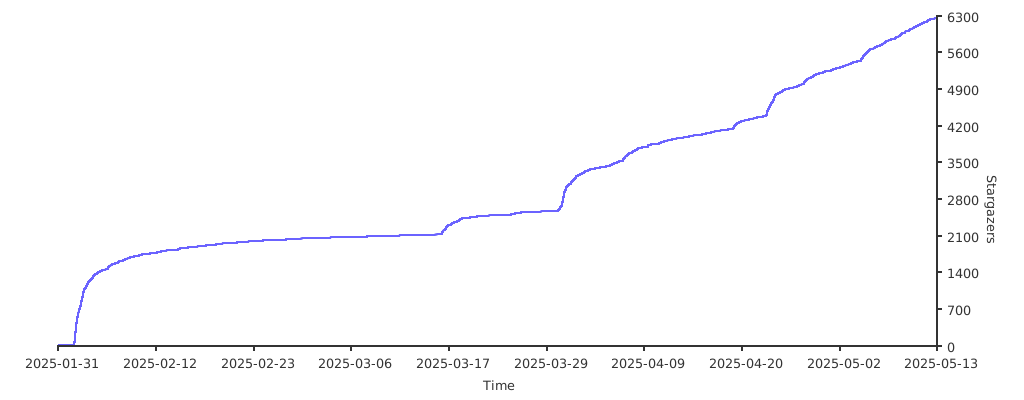](https://starchart.cc/trycua/cua)
|
|
|
|
## Contributors
|
|
|
|
<!-- ALL-CONTRIBUTORS-LIST:START - Do not remove or modify this section -->
|
|
<!-- prettier-ignore-start -->
|
|
<!-- markdownlint-disable -->
|
|
<table>
|
|
<tbody>
|
|
<tr>
|
|
<td align="center" valign="top" width="14.28%"><a href="https://github.com/f-trycua"><img src="https://avatars.githubusercontent.com/u/195596869?v=4?s=100" width="100px;" alt="f-trycua"/><br /><sub><b>f-trycua</b></sub></a><br /><a href="#code-f-trycua" title="Code">💻</a></td>
|
|
<td align="center" valign="top" width="14.28%"><a href="http://pepicrft.me"><img src="https://avatars.githubusercontent.com/u/663605?v=4?s=100" width="100px;" alt="Pedro Piñera Buendía"/><br /><sub><b>Pedro Piñera Buendía</b></sub></a><br /><a href="#code-pepicrft" title="Code">💻</a></td>
|
|
<td align="center" valign="top" width="14.28%"><a href="https://iamit.in"><img src="https://avatars.githubusercontent.com/u/5647941?v=4?s=100" width="100px;" alt="Amit Kumar"/><br /><sub><b>Amit Kumar</b></sub></a><br /><a href="#code-aktech" title="Code">💻</a></td>
|
|
<td align="center" valign="top" width="14.28%"><a href="https://productsway.com/"><img src="https://avatars.githubusercontent.com/u/870029?v=4?s=100" width="100px;" alt="Dung Duc Huynh (Kaka)"/><br /><sub><b>Dung Duc Huynh (Kaka)</b></sub></a><br /><a href="#code-jellydn" title="Code">💻</a></td>
|
|
<td align="center" valign="top" width="14.28%"><a href="http://zaydkrunz.com"><img src="https://avatars.githubusercontent.com/u/70227235?v=4?s=100" width="100px;" alt="Zayd Krunz"/><br /><sub><b>Zayd Krunz</b></sub></a><br /><a href="#code-ShrootBuck" title="Code">💻</a></td>
|
|
<td align="center" valign="top" width="14.28%"><a href="https://github.com/PrashantRaj18198"><img src="https://avatars.githubusercontent.com/u/23168997?v=4?s=100" width="100px;" alt="Prashant Raj"/><br /><sub><b>Prashant Raj</b></sub></a><br /><a href="#code-PrashantRaj18198" title="Code">💻</a></td>
|
|
<td align="center" valign="top" width="14.28%"><a href="https://www.mobile.dev"><img src="https://avatars.githubusercontent.com/u/847683?v=4?s=100" width="100px;" alt="Leland Takamine"/><br /><sub><b>Leland Takamine</b></sub></a><br /><a href="#code-Leland-Takamine" title="Code">💻</a></td>
|
|
</tr>
|
|
<tr>
|
|
<td align="center" valign="top" width="14.28%"><a href="https://github.com/ddupont808"><img src="https://avatars.githubusercontent.com/u/3820588?v=4?s=100" width="100px;" alt="ddupont"/><br /><sub><b>ddupont</b></sub></a><br /><a href="#code-ddupont808" title="Code">💻</a></td>
|
|
<td align="center" valign="top" width="14.28%"><a href="https://github.com/Lizzard1123"><img src="https://avatars.githubusercontent.com/u/46036335?v=4?s=100" width="100px;" alt="Ethan Gutierrez"/><br /><sub><b>Ethan Gutierrez</b></sub></a><br /><a href="#code-Lizzard1123" title="Code">💻</a></td>
|
|
<td align="center" valign="top" width="14.28%"><a href="https://ricterz.me"><img src="https://avatars.githubusercontent.com/u/5282759?v=4?s=100" width="100px;" alt="Ricter Zheng"/><br /><sub><b>Ricter Zheng</b></sub></a><br /><a href="#code-RicterZ" title="Code">💻</a></td>
|
|
<td align="center" valign="top" width="14.28%"><a href="https://www.trytruffle.ai/"><img src="https://avatars.githubusercontent.com/u/50844303?v=4?s=100" width="100px;" alt="Rahul Karajgikar"/><br /><sub><b>Rahul Karajgikar</b></sub></a><br /><a href="#code-rahulkarajgikar" title="Code">💻</a></td>
|
|
<td align="center" valign="top" width="14.28%"><a href="https://github.com/trospix"><img src="https://avatars.githubusercontent.com/u/81363696?v=4?s=100" width="100px;" alt="trospix"/><br /><sub><b>trospix</b></sub></a><br /><a href="#code-trospix" title="Code">💻</a></td>
|
|
<td align="center" valign="top" width="14.28%"><a href="https://github.com/evnsnclr"><img src="https://avatars.githubusercontent.com/u/139897548?v=4?s=100" width="100px;" alt="Evan smith"/><br /><sub><b>Evan smith</b></sub></a><br /><a href="#code-evnsnclr" title="Code">💻</a></td>
|
|
</tr>
|
|
</tbody>
|
|
</table>
|
|
|
|
<!-- markdownlint-restore -->
|
|
<!-- prettier-ignore-end -->
|
|
|
|
<!-- ALL-CONTRIBUTORS-LIST:END --> |