Compare commits
17 Commits
feat/heic
...
473-weekly
| Author | SHA1 | Date | |
|---|---|---|---|

|
eae5d67a2b | ||
|
|
5c2c1bbfcd | ||
|
|
54e84858b5 | ||
|
|
833d0789d7 | ||
|
|
1a974f3dd8 | ||
|
|
146173883f | ||
|
|
ebb02a5723 | ||
|
|
c96f7fed18 | ||
|
|
861eff3cd2 | ||
|
|
b66c0d17d0 | ||
|
|
0e748050f3 | ||
|
|
ae3524b79f | ||
|
|
0ce58b592a | ||
|
|
578346840e | ||
|
|
56bcb46d6c | ||
|
|
91405c48e0 | ||
|
|
b40dff621a |
29
.github/workflows/tolgee.yml
vendored
@@ -30,13 +30,36 @@ jobs:
|
||||
npx tolgee tag \
|
||||
--api-key ${{ secrets.TOLGEE_API_KEY }} \
|
||||
--filter-extracted \
|
||||
--filter-tag "draft: ${BRANCH_NAME}" \
|
||||
--filter-tag "draft:${BRANCH_NAME}" \
|
||||
--tag production \
|
||||
--untag "draft: ${BRANCH_NAME}"
|
||||
--untag "draft:${BRANCH_NAME}"
|
||||
|
||||
- name: Tag Deprecated Keys
|
||||
- name: Tag unused production keys as Deprecated
|
||||
run: |
|
||||
npx tolgee tag \
|
||||
--api-key ${{ secrets.TOLGEE_API_KEY }} \
|
||||
--filter-not-extracted --filter-tag production \
|
||||
--tag deprecated --untag production
|
||||
|
||||
- name: Tag unused draft:current-branch keys as Deprecated
|
||||
run: |
|
||||
BRANCH_NAME=${GITHUB_REF##*/}
|
||||
npx tolgee tag \
|
||||
--api-key ${{ secrets.TOLGEE_API_KEY }} \
|
||||
--filter-not-extracted --filter-tag "draft:${BRANCH_NAME}" \
|
||||
--tag deprecated --untag "draft:${BRANCH_NAME}"
|
||||
|
||||
- name: Sync with backup
|
||||
run: |
|
||||
npx tolgee sync \
|
||||
--api-key ${{ secrets.TOLGEE_API_KEY }} \
|
||||
--backup ./tolgee-backup \
|
||||
--continue-on-warning \
|
||||
--yes
|
||||
|
||||
- name: Upload backup as artifact
|
||||
uses: actions/upload-artifact@v4
|
||||
with:
|
||||
name: tolgee-backup-${{ github.sha }}
|
||||
path: ./tolgee-backup
|
||||
retention-days: 90
|
||||
|
||||
5
.gitignore
vendored
@@ -59,4 +59,7 @@ packages/lib/uploads
|
||||
apps/web/public/js
|
||||
|
||||
|
||||
packages/database/migrations
|
||||
packages/database/migrations
|
||||
|
||||
# tolgee
|
||||
branch.json
|
||||
@@ -1 +1 @@
|
||||
echo "{\"branchName\": \"$(git rev-parse --abbrev-ref HEAD)\"}" > ../branch.json
|
||||
echo "{\"branchName\": \"$(git rev-parse --abbrev-ref HEAD)\"}" > ./branch.json
|
||||
@@ -1 +1 @@
|
||||
echo "{\"branchName\": \"$(git rev-parse --abbrev-ref HEAD)\"}" > ../branch.json
|
||||
echo "{\"branchName\": \"$(git rev-parse --abbrev-ref HEAD)\"}" > ./branch.json
|
||||
@@ -1,5 +1,17 @@
|
||||
pnpm lint-staged
|
||||
pnpm tolgee-pull || true
|
||||
echo "{\"branchName\": \"main\"}" > ../branch.json
|
||||
git add branch.json packages/lib/messages/*.json
|
||||
#!/bin/sh
|
||||
. "$(dirname "$0")/_/husky.sh"
|
||||
|
||||
# Load environment variables from .env files
|
||||
if [ -f .env ]; then
|
||||
export $(cat .env | grep -v '#' | xargs)
|
||||
fi
|
||||
|
||||
pnpm lint-staged
|
||||
|
||||
if [ -z "$NEXT_PUBLIC_TOLGEE_API_KEY" ]; then
|
||||
echo "Skipping tolgee-pull: NEXT_PUBLIC_TOLGEE_API_KEY is not set"
|
||||
else
|
||||
pnpm run tolgee-pull
|
||||
git add packages/lib/messages
|
||||
fi
|
||||
|
||||
|
||||
1
.prettierignore
Normal file
@@ -0,0 +1 @@
|
||||
vercel.json
|
||||
@@ -72,6 +72,7 @@ export const getSurveysForEnvironmentState = reactCache(
|
||||
},
|
||||
displayPercentage: true,
|
||||
delay: true,
|
||||
projectOverwrites: true,
|
||||
},
|
||||
});
|
||||
|
||||
|
||||
@@ -138,7 +138,7 @@ export const EditLogo = ({ project, environmentId, isReadOnly }: EditLogoProps)
|
||||
) : (
|
||||
<FileInput
|
||||
id="logo-input"
|
||||
allowedFileExtensions={["png", "jpeg", "jpg", "webp"]}
|
||||
allowedFileExtensions={["png", "jpeg", "jpg", "webp", "heic"]}
|
||||
environmentId={environmentId}
|
||||
onFileUpload={(files: string[]) => {
|
||||
setLogoUrl(files[0]);
|
||||
@@ -151,7 +151,7 @@ export const EditLogo = ({ project, environmentId, isReadOnly }: EditLogoProps)
|
||||
<Input
|
||||
ref={fileInputRef}
|
||||
type="file"
|
||||
accept="image/jpeg, image/png, image/webp"
|
||||
accept="image/jpeg, image/png, image/webp, image/heic"
|
||||
className="hidden"
|
||||
disabled={isReadOnly}
|
||||
onChange={handleFileChange}
|
||||
|
||||
@@ -308,7 +308,7 @@ export const QuestionFormInput = ({
|
||||
{showImageUploader && id === "headline" && (
|
||||
<FileInput
|
||||
id="question-image"
|
||||
allowedFileExtensions={["png", "jpeg", "jpg", "webp"]}
|
||||
allowedFileExtensions={["png", "jpeg", "jpg", "webp", "heic"]}
|
||||
environmentId={localSurvey.environmentId}
|
||||
onFileUpload={(url: string[] | undefined, fileType: "image" | "video") => {
|
||||
if (url) {
|
||||
|
||||
@@ -114,7 +114,7 @@ export const EditWelcomeCard = ({
|
||||
<div className="mt-3 flex w-full items-center justify-center">
|
||||
<FileInput
|
||||
id="welcome-card-image"
|
||||
allowedFileExtensions={["png", "jpeg", "jpg", "webp"]}
|
||||
allowedFileExtensions={["png", "jpeg", "jpg", "webp", "heic"]}
|
||||
environmentId={environmentId}
|
||||
onFileUpload={(url: string[]) => {
|
||||
updateSurvey({ fileUrl: url[0] });
|
||||
|
||||
@@ -16,7 +16,7 @@ export const UploadImageSurveyBg = ({
|
||||
<div className="flex w-full items-center justify-center">
|
||||
<FileInput
|
||||
id="survey-bg-file-input"
|
||||
allowedFileExtensions={["png", "jpeg", "jpg", "webp"]}
|
||||
allowedFileExtensions={["png", "jpeg", "jpg", "webp", "heic"]}
|
||||
environmentId={environmentId}
|
||||
onFileUpload={(url: string[]) => {
|
||||
if (url.length > 0) {
|
||||
|
||||
@@ -133,7 +133,7 @@ export const PictureSelectionForm = ({
|
||||
<div className="mt-3 flex w-full items-center justify-center">
|
||||
<FileInput
|
||||
id="choices-file-input"
|
||||
allowedFileExtensions={["png", "jpeg", "jpg", "webp"]}
|
||||
allowedFileExtensions={["png", "jpeg", "jpg", "webp", "heic"]}
|
||||
environmentId={environmentId}
|
||||
onFileUpload={handleFileInputChanges}
|
||||
fileUrl={question?.choices?.map((choice) => choice.imageUrl)}
|
||||
|
||||
@@ -29,18 +29,21 @@ export const SurveyPlacementCard = ({
|
||||
const { projectOverwrites } = localSurvey ?? {};
|
||||
const { placement, clickOutsideClose, darkOverlay } = projectOverwrites ?? {};
|
||||
|
||||
const setProjectOverwrites = (projectOverwrites: TSurveyProjectOverwrites) => {
|
||||
const setProjectOverwrites = (projectOverwrites: TSurveyProjectOverwrites | null) => {
|
||||
setLocalSurvey({ ...localSurvey, projectOverwrites: projectOverwrites });
|
||||
};
|
||||
|
||||
const togglePlacement = () => {
|
||||
if (setProjectOverwrites) {
|
||||
setProjectOverwrites({
|
||||
...projectOverwrites,
|
||||
placement: !!placement ? null : "bottomRight",
|
||||
clickOutsideClose: false,
|
||||
darkOverlay: false,
|
||||
});
|
||||
if (!!placement) {
|
||||
setProjectOverwrites(null);
|
||||
} else {
|
||||
setProjectOverwrites({
|
||||
placement: "bottomRight",
|
||||
clickOutsideClose: false,
|
||||
darkOverlay: false,
|
||||
});
|
||||
}
|
||||
}
|
||||
};
|
||||
|
||||
|
||||
@@ -479,6 +479,14 @@ export const getLogicRules = (t: TFnType) => {
|
||||
label: t("environments.surveys.edit.does_not_end_with"),
|
||||
value: ZSurveyLogicConditionsOperator.Enum.doesNotEndWith,
|
||||
},
|
||||
{
|
||||
label: t("environments.surveys.edit.is_set"),
|
||||
value: ZSurveyLogicConditionsOperator.Enum.isSet,
|
||||
},
|
||||
{
|
||||
label: t("environments.surveys.edit.is_not_set"),
|
||||
value: ZSurveyLogicConditionsOperator.Enum.isNotSet,
|
||||
},
|
||||
],
|
||||
},
|
||||
};
|
||||
|
||||
@@ -216,6 +216,8 @@ export const getMatchValueProps = (
|
||||
"isPartiallySubmitted",
|
||||
"isSkipped",
|
||||
"isSubmitted",
|
||||
"isSet",
|
||||
"isNotSet",
|
||||
].includes(condition.operator)
|
||||
) {
|
||||
return { show: false, options: [] };
|
||||
|
||||
@@ -68,7 +68,7 @@ export const FileInput = ({
|
||||
toast.error(t("common.only_one_file_allowed"));
|
||||
}
|
||||
|
||||
const allowedFiles = getAllowedFiles(files, allowedFileExtensions, maxSizeInMB);
|
||||
const allowedFiles = await getAllowedFiles(files, allowedFileExtensions, maxSizeInMB);
|
||||
|
||||
if (allowedFiles.length === 0) {
|
||||
return;
|
||||
@@ -137,7 +137,7 @@ export const FileInput = ({
|
||||
};
|
||||
|
||||
const handleUploadMore = async (files: File[]) => {
|
||||
const allowedFiles = getAllowedFiles(files, allowedFileExtensions, maxSizeInMB);
|
||||
const allowedFiles = await getAllowedFiles(files, allowedFileExtensions, maxSizeInMB);
|
||||
if (allowedFiles.length === 0) {
|
||||
return;
|
||||
}
|
||||
|
||||
29
apps/web/modules/ui/components/file-input/lib/actions.ts
Normal file
@@ -0,0 +1,29 @@
|
||||
"use server";
|
||||
|
||||
import { authenticatedActionClient } from "@/lib/utils/action-client";
|
||||
import { z } from "zod";
|
||||
|
||||
const ZConvertHeicToJpegInput = z.object({
|
||||
file: z.instanceof(File),
|
||||
});
|
||||
|
||||
export const convertHeicToJpegAction = authenticatedActionClient
|
||||
.schema(ZConvertHeicToJpegInput)
|
||||
.action(async ({ parsedInput }) => {
|
||||
if (!parsedInput.file || !parsedInput.file.name.endsWith(".heic")) return parsedInput.file;
|
||||
|
||||
const convert = (await import("heic-convert")).default;
|
||||
|
||||
const arrayBuffer = await parsedInput.file.arrayBuffer();
|
||||
const nodeBuffer = Buffer.from(arrayBuffer) as unknown as ArrayBufferLike;
|
||||
|
||||
const convertedBuffer = await convert({
|
||||
buffer: nodeBuffer,
|
||||
format: "JPEG",
|
||||
quality: 0.9,
|
||||
});
|
||||
|
||||
return new File([convertedBuffer], parsedInput.file.name.replace(/\.heic$/, ".jpg"), {
|
||||
type: "image/jpeg",
|
||||
});
|
||||
});
|
||||
@@ -2,6 +2,7 @@
|
||||
|
||||
import { toast } from "react-hot-toast";
|
||||
import { TAllowedFileExtension } from "@formbricks/types/common";
|
||||
import { convertHeicToJpegAction } from "./actions";
|
||||
|
||||
export const uploadFile = async (
|
||||
file: File | Blob,
|
||||
@@ -15,8 +16,6 @@ export const uploadFile = async (
|
||||
|
||||
const fileBuffer = await file.arrayBuffer();
|
||||
|
||||
// check the file size
|
||||
|
||||
const bufferBytes = fileBuffer.byteLength;
|
||||
const bufferKB = bufferBytes / 1024;
|
||||
|
||||
@@ -74,7 +73,6 @@ export const uploadFile = async (
|
||||
});
|
||||
}
|
||||
|
||||
// Add the actual file to be uploaded
|
||||
formData.append("file", file);
|
||||
|
||||
const uploadResponse = await fetch(signedUrl, {
|
||||
@@ -96,34 +94,63 @@ export const uploadFile = async (
|
||||
}
|
||||
};
|
||||
|
||||
export const getAllowedFiles = (
|
||||
const isFileSizeExceed = (fileSizeInMB: number, maxSizeInMB?: number) => {
|
||||
if (maxSizeInMB && fileSizeInMB > maxSizeInMB) {
|
||||
return true;
|
||||
}
|
||||
return false;
|
||||
};
|
||||
|
||||
export const getAllowedFiles = async (
|
||||
files: File[],
|
||||
allowedFileExtensions: string[],
|
||||
maxSizeInMB?: number
|
||||
): File[] => {
|
||||
): Promise<File[]> => {
|
||||
const sizeExceedFiles: string[] = [];
|
||||
const unsupportedExtensionFiles: string[] = [];
|
||||
const convertedFiles: File[] = [];
|
||||
|
||||
const allowedFiles = files.filter((file) => {
|
||||
for (const file of files) {
|
||||
if (!file || !file.type) {
|
||||
return false;
|
||||
continue;
|
||||
}
|
||||
|
||||
const extension = file.name.split(".").pop();
|
||||
const fileSizeInMB = file.size / 1000000; // Kb -> Mb
|
||||
const extension = file.name.split(".").pop()?.toLowerCase();
|
||||
const fileSizeInMB = file.size / 1000000;
|
||||
|
||||
if (!allowedFileExtensions.includes(extension as TAllowedFileExtension)) {
|
||||
unsupportedExtensionFiles.push(file.name);
|
||||
return false; // Exclude file if extension not allowed
|
||||
} else if (maxSizeInMB && fileSizeInMB > maxSizeInMB) {
|
||||
sizeExceedFiles.push(file.name);
|
||||
return false; // Exclude files larger than the maximum size
|
||||
continue;
|
||||
}
|
||||
|
||||
return true;
|
||||
});
|
||||
if (isFileSizeExceed(fileSizeInMB, maxSizeInMB)) {
|
||||
sizeExceedFiles.push(file.name);
|
||||
continue;
|
||||
}
|
||||
|
||||
if (extension === "heic") {
|
||||
const convertedFileResponse = await convertHeicToJpegAction({ file });
|
||||
if (!convertedFileResponse?.data) {
|
||||
unsupportedExtensionFiles.push(file.name);
|
||||
continue;
|
||||
} else {
|
||||
const convertedFileSizeInMB = convertedFileResponse.data.size / 1000000;
|
||||
if (isFileSizeExceed(convertedFileSizeInMB, maxSizeInMB)) {
|
||||
sizeExceedFiles.push(file.name);
|
||||
continue;
|
||||
}
|
||||
|
||||
const convertedFile = new File([convertedFileResponse.data], file.name.replace(/\.heic$/, ".jpg"), {
|
||||
type: "image/jpeg",
|
||||
});
|
||||
convertedFiles.push(convertedFile);
|
||||
continue;
|
||||
}
|
||||
}
|
||||
|
||||
convertedFiles.push(file);
|
||||
}
|
||||
|
||||
// Constructing toast messages based on the issues found
|
||||
let toastMessage = "";
|
||||
if (sizeExceedFiles.length > 0) {
|
||||
toastMessage += `Files exceeding size limit (${maxSizeInMB} MB): ${sizeExceedFiles.join(", ")}. `;
|
||||
@@ -134,7 +161,7 @@ export const getAllowedFiles = (
|
||||
if (toastMessage) {
|
||||
toast.error(toastMessage);
|
||||
}
|
||||
return allowedFiles;
|
||||
return convertedFiles;
|
||||
};
|
||||
|
||||
export const checkForYoutubePrivacyMode = (url: string): boolean => {
|
||||
|
||||
@@ -229,7 +229,7 @@ export const InputCombobox = ({
|
||||
className="min-w-0 rounded-none border-0 border-r border-slate-300 bg-white focus:border-slate-400"
|
||||
{...inputProps}
|
||||
id={`${id}-input`}
|
||||
value={localValue as string | number}
|
||||
value={localValue ?? undefined}
|
||||
onChange={onInputChange}
|
||||
/>
|
||||
)}
|
||||
|
||||
@@ -83,6 +83,7 @@
|
||||
"file-loader": "6.2.0",
|
||||
"framer-motion": "11.15.0",
|
||||
"googleapis": "144.0.0",
|
||||
"heic-convert": "2.1.0",
|
||||
"https-proxy-agent": "7.0.6",
|
||||
"jiti": "2.4.1",
|
||||
"jsonwebtoken": "9.0.2",
|
||||
@@ -129,6 +130,7 @@
|
||||
"@formbricks/eslint-config": "workspace:*",
|
||||
"@neshca/cache-handler": "1.9.0",
|
||||
"@types/bcryptjs": "2.4.6",
|
||||
"@types/heic-convert": "2.1.0",
|
||||
"@types/lodash": "4.17.13",
|
||||
"@types/markdown-it": "14.1.2",
|
||||
"@types/nodemailer": "6.4.17",
|
||||
|
||||
@@ -3,7 +3,7 @@
|
||||
import { TolgeeProvider, TolgeeStaticData } from "@tolgee/react";
|
||||
import { useRouter } from "next/navigation";
|
||||
import { useEffect } from "react";
|
||||
import { branchName } from "../../../branch.json";
|
||||
import branch from "../../../branch.json";
|
||||
import { TolgeeBase } from "./shared";
|
||||
|
||||
type Props = {
|
||||
@@ -13,7 +13,7 @@ type Props = {
|
||||
};
|
||||
|
||||
const tolgee = TolgeeBase().init({
|
||||
tagNewKeys: [`draft: ${branchName}`],
|
||||
tagNewKeys: [`draft:${branch.branchName}`],
|
||||
});
|
||||
|
||||
export const TolgeeNextProvider = ({ language, staticData, children }: Props) => {
|
||||
@@ -25,6 +25,7 @@ export const TolgeeNextProvider = ({ language, staticData, children }: Props) =>
|
||||
router.refresh();
|
||||
});
|
||||
return () => unsubscribe();
|
||||
// eslint-disable-next-line react-hooks/exhaustive-deps
|
||||
}, [tolgee, router]);
|
||||
|
||||
return (
|
||||
|
||||
@@ -1,5 +1,5 @@
|
||||
import { createServerInstance } from "@tolgee/react/server";
|
||||
import { branchName } from "../../../branch.json";
|
||||
import branch from "../../../branch.json";
|
||||
import { getLocale } from "./language";
|
||||
import { TolgeeBase } from "./shared";
|
||||
|
||||
@@ -7,7 +7,7 @@ export const { getTolgee, getTranslate, T } = createServerInstance({
|
||||
getLocale: getLocale,
|
||||
createTolgee: async (language) => {
|
||||
return TolgeeBase().init({
|
||||
tagNewKeys: [`draft: ${branchName}`],
|
||||
tagNewKeys: [`draft:${branch.branchName}`],
|
||||
observerOptions: {
|
||||
fullKeyEncode: true,
|
||||
},
|
||||
|
||||
@@ -1,9 +1,5 @@
|
||||
{
|
||||
"functions": {
|
||||
"app/**/*.ts": {
|
||||
"maxDuration": 10,
|
||||
"memory": 512
|
||||
},
|
||||
"app/api/cron/**/*.ts": {
|
||||
"maxDuration": 180,
|
||||
"memory": 512
|
||||
@@ -11,6 +7,10 @@
|
||||
"app/api/v1/client/**/*.ts": {
|
||||
"maxDuration": 10,
|
||||
"memory": 200
|
||||
},
|
||||
"app/**/*.ts": {
|
||||
"maxDuration": 10,
|
||||
"memory": 512
|
||||
}
|
||||
}
|
||||
}
|
||||
}
|
||||
@@ -1 +1 @@
|
||||
{ "branchName": "main" }
|
||||
{"branchName": "473-weekly-summary-not-working"}
|
||||
|
||||
@@ -50,9 +50,6 @@ x-environment: &environment
|
||||
|
||||
############################################## OPTIONAL (APP CONFIGURATION) ##############################################
|
||||
|
||||
# Set the below value if you have and want to use a custom URL for the links created by the Link Shortener
|
||||
# SHORT_URL_BASE:
|
||||
|
||||
# Set the below to 0 to enable Email Verification for new signups (will required Email Configuration)
|
||||
EMAIL_VERIFICATION_DISABLED: 1
|
||||
|
||||
|
||||
@@ -6952,7 +6952,7 @@
|
||||
},
|
||||
"/api/v1/management/surveys/{surveyId}/singleUseIds": {
|
||||
"get": {
|
||||
"description": "Generates multiple single use survey links for a survey based on its id. Count of links can be controlled using the limit query param(min: 1, max: 5000, default: 10).",
|
||||
"description": "Generates multiple single use survey links for a survey based on its id.",
|
||||
"parameters": [
|
||||
{
|
||||
"example": "{{apiKey}}",
|
||||
@@ -6970,6 +6970,21 @@
|
||||
"schema": {
|
||||
"type": "string"
|
||||
}
|
||||
},
|
||||
{
|
||||
"description": "Number of links to generate.",
|
||||
"example": 10,
|
||||
"in": "query",
|
||||
"name": "limit",
|
||||
"required": false,
|
||||
"schema": {
|
||||
"default": 10,
|
||||
"exclusiveMaximum": false,
|
||||
"exclusiveMinimum": false,
|
||||
"maximum": 5000,
|
||||
"minimum": 1,
|
||||
"type": "integer"
|
||||
}
|
||||
}
|
||||
],
|
||||
"responses": {
|
||||
|
||||
14
docs/api-v2-reference/introduction.mdx
Normal file
@@ -0,0 +1,14 @@
|
||||
---
|
||||
title: "API v2 Reference (Draft)"
|
||||
icon: "code-compare"
|
||||
---
|
||||
|
||||
Formbricks offers two types of APIs: the **Public Client API** and the **Management API**. Each API serves a different purpose, has *different* authentication requirements, and provides access to different data and settings.
|
||||
|
||||
### API Key Setup
|
||||
|
||||
Checkout the [API Key Setup](/api-reference/rest-api) to access the Management APIs with an API Key.
|
||||
|
||||
If you’ve forked the collection and are running it, update the `apiKey` and `environmentId` in the collection variables with your values. We also provide post-run scripts to help auto-assign variables when running scripts.
|
||||
|
||||
Need more help? Visit our [Website](https://formbricks.com/) or join our [Discord](https://formbricks.com/discord)!
|
||||
1088
docs/api-v2-reference/openapi.yml
Normal file
@@ -1,5 +1,6 @@
|
||||
---
|
||||
title: "How to setup SAML with Identity Providers"
|
||||
title: "Setup SAML with Identity Providers"
|
||||
description: "This guide explains the settings you need to use to configure SAML with your Identity Provider. Once configured, obtain an XML metadata file and upload it on your Formbricks instance."
|
||||
---
|
||||
|
||||
### SAML Registration with Identity Providers
|
||||
@@ -8,7 +9,7 @@ This guide explains the settings you need to use to configure SAML with your Ide
|
||||
|
||||
> **Note:** Please do not add a trailing slash at the end of the URLs. Create them exactly as shown below.
|
||||
|
||||
**Assertion consumer service URL / Single Sign-On URL / Destination URL:** https://app.formbricks.com/api/auth/saml/callback
|
||||
**Assertion consumer service URL / Single Sign-On URL / Destination URL:** [https://app.formbricks.com/api/auth/saml/callback](https://app.formbricks.com/api/auth/saml/callback)
|
||||
|
||||
**Entity ID / Identifier / Audience URI / Audience Restriction:** [https://saml.formbricks.com](https://saml.formbricks.com)
|
||||
|
||||
@@ -22,55 +23,72 @@ This guide explains the settings you need to use to configure SAML with your Ide
|
||||
|
||||
**Mapping Attributes / Attribute Statements:**
|
||||
|
||||
- http://schemas.xmlsoap.org/ws/2005/05/identity/claims/nameidentifier -> id
|
||||
- http://schemas.xmlsoap.org/ws/2005/05/identity/claims/emailaddress -> email
|
||||
- http://schemas.xmlsoap.org/ws/2005/05/identity/claims/givenname -> firstName
|
||||
- http://schemas.xmlsoap.org/ws/2005/05/identity/claims/surname -> lastName
|
||||
* [http://schemas.xmlsoap.org/ws/2005/05/identity/claims/nameidentifier](http://schemas.xmlsoap.org/ws/2005/05/identity/claims/nameidentifier) -> id
|
||||
|
||||
* [http://schemas.xmlsoap.org/ws/2005/05/identity/claims/emailaddress](http://schemas.xmlsoap.org/ws/2005/05/identity/claims/emailaddress) -> email
|
||||
|
||||
* [http://schemas.xmlsoap.org/ws/2005/05/identity/claims/givenname](http://schemas.xmlsoap.org/ws/2005/05/identity/claims/givenname) -> firstName
|
||||
|
||||
* [http://schemas.xmlsoap.org/ws/2005/05/identity/claims/surname](http://schemas.xmlsoap.org/ws/2005/05/identity/claims/surname) -> lastName
|
||||
|
||||
### SAML With Okta
|
||||
|
||||
<Steps>
|
||||
<Step title="Create an application with your OIDC provider">
|
||||
<Step title="Create an application with your SAML provider">
|
||||
For example, in Okta, once you create an account, you can click on Applications on the sidebar menu:
|
||||
|
||||
<img src="/images/development/guides/auth-and-provision/okta/okta-applications.webp" />
|
||||
</Step>
|
||||
|
||||
<Step title="Click on Create App Integration">
|
||||
<img src="/images/development/guides/auth-and-provision/okta/create-app-integration.webp" />
|
||||
</Step>
|
||||
|
||||
<Step title="Select SAML 2.0 in the modal form, and click Next">
|
||||
<img src="/images/development/guides/auth-and-provision/okta/select-saml-2.0.webp" />
|
||||
</Step>
|
||||
|
||||
<Step title="Fill the general settings as shown and click Next">
|
||||
<img src="/images/development/guides/auth-and-provision/okta/general-settings.webp" />
|
||||
</Step>
|
||||
|
||||
<Step title="Fill the fields mapping as shown and click Next">
|
||||
<img src="/images/development/guides/auth-and-provision/okta/fields-mapping.webp" />
|
||||
</Step>
|
||||
|
||||
<Step title="Enter the SAML Integration Settings as shown and click Next">
|
||||
<img src="/images/development/guides/auth-and-provision/okta/saml-integration-settings.webp" />
|
||||
</Step>
|
||||
|
||||
<Step title="Check the internal app checkbox and click Finish">
|
||||
<img src="/images/development/guides/auth-and-provision/okta/internal-app.webp" />
|
||||
</Step>
|
||||
|
||||
<Step title="Check that the app is created successfully">
|
||||
<img src="/images/development/guides/auth-and-provision/okta/app-created.webp" />
|
||||
</Step>
|
||||
|
||||
<Step title="Click on the app and head over to the Assignments tab">
|
||||
<img src="/images/development/guides/auth-and-provision/okta/assignments-tab.webp" />
|
||||
</Step>
|
||||
|
||||
<Step title="Click on Assign button and select Assign to People">
|
||||
<img src="/images/development/guides/auth-and-provision/okta/assign-to-people.webp" />
|
||||
</Step>
|
||||
|
||||
<Step title="Select the users you want to assign the app to and click Assign">
|
||||
<img src="/images/development/guides/auth-and-provision/okta/select-users.webp" />
|
||||
</Step>
|
||||
|
||||
<Step title="Head over to the Sign On tab and scroll to the bottom to get the metadata, click on the Actions button">
|
||||
<img src="/images/development/guides/auth-and-provision/okta/actions-button.webp" />
|
||||
</Step>
|
||||
|
||||
<Step title="Click on View IdP metadata">
|
||||
<img src="/images/development/guides/auth-and-provision/okta/view-idp-metadata.webp" />
|
||||
</Step>
|
||||
<Step title="Copy the metadata and paste it in the Formbricks SAML configuration"></Step>
|
||||
|
||||
<Step title="Copy the metadata and paste it in the Formbricks SAML configuration" />
|
||||
</Steps>
|
||||
|
||||
That's it. Now when you try to login with SSO, your application on Okta will handle the authentication.
|
||||
That's it. Now when you try to login with SSO, your application on Okta will handle the authentication.
|
||||

@@ -1,71 +1,76 @@
|
||||
<svg width="198" height="263" viewBox="0 0 198 263" fill="none" xmlns="http://www.w3.org/2000/svg">
|
||||
<path d="M0 183.149H79.2V222.749C79.2 244.619 61.4705 262.349 39.6 262.349C17.7295 262.349 0 244.619 0 222.749V183.149Z" fill="url(#paint0_linear_301_72)"/>
|
||||
<path d="M0 91.5747H158.4C180.27 91.5747 198 109.304 198 131.175C198 153.045 180.27 170.775 158.4 170.775H0V91.5747Z" fill="url(#paint1_linear_301_72)"/>
|
||||
<path d="M0 64.9181C0 29.0648 29.0648 0 64.918 0H158.4C180.27 0 198 17.7295 198 39.6C198 61.4705 180.27 79.2 158.4 79.2H0V64.9181Z" fill="url(#paint2_linear_301_72)"/>
|
||||
<mask id="mask0_301_72" style="mask-type:alpha" maskUnits="userSpaceOnUse" x="0" y="0" width="198" height="263">
|
||||
<path d="M0 183.151H79.2V222.751C79.2 244.621 61.4705 262.351 39.6 262.351C17.7295 262.351 0 244.621 0 222.751V183.151Z" fill="url(#paint3_linear_301_72)"/>
|
||||
<path d="M0 91.5762H158.4C180.27 91.5762 198 109.306 198 131.176C198 153.047 180.27 170.776 158.4 170.776H0V91.5762Z" fill="url(#paint4_linear_301_72)"/>
|
||||
<path d="M0 64.9181C0 29.0648 29.0648 0 64.918 0H158.4C180.27 0 198 17.7295 198 39.6C198 61.4705 180.27 79.2 158.4 79.2H0V64.9181Z" fill="url(#paint5_linear_301_72)"/>
|
||||
<svg width="220" height="220" viewBox="0 0 220 220" fill="none" xmlns="http://www.w3.org/2000/svg">
|
||||
<rect width="220" height="220" fill="url(#paint0_radial_740_2)"/>
|
||||
<path d="M50.2842 141.289H98.1312V165.213C98.1312 178.425 87.4203 189.136 74.2077 189.136C60.9951 189.136 50.2842 178.425 50.2842 165.213V141.289Z" fill="url(#paint1_linear_740_2)"/>
|
||||
<path d="M50.2842 85.9663H145.978C159.191 85.9663 169.902 96.6772 169.902 109.89C169.902 123.102 159.191 133.813 145.978 133.813H50.2842V85.9663Z" fill="url(#paint2_linear_740_2)"/>
|
||||
<path d="M50.2842 69.8617C50.2842 48.2017 67.8431 30.6428 89.5031 30.6428H145.978C159.191 30.6428 169.902 41.3538 169.902 54.5664C169.902 67.779 159.191 78.4899 145.978 78.4899H50.2842V69.8617Z" fill="url(#paint3_linear_740_2)"/>
|
||||
<mask id="mask0_740_2" style="mask-type:alpha" maskUnits="userSpaceOnUse" x="50" y="30" width="120" height="160">
|
||||
<path d="M50.2842 141.291H98.1312V165.214C98.1312 178.427 87.4203 189.138 74.2077 189.138C60.9951 189.138 50.2842 178.427 50.2842 165.214V141.291Z" fill="url(#paint4_linear_740_2)"/>
|
||||
<path d="M50.2842 85.9675H145.978C159.191 85.9675 169.902 96.6785 169.902 109.891C169.902 123.104 159.191 133.815 145.978 133.815H50.2842V85.9675Z" fill="url(#paint5_linear_740_2)"/>
|
||||
<path d="M50.2842 69.862C50.2842 48.202 67.8431 30.6431 89.5031 30.6431H145.978C159.191 30.6431 169.902 41.354 169.902 54.5666C169.902 67.7792 159.191 78.4901 145.978 78.4901H50.2842V69.862Z" fill="url(#paint6_linear_740_2)"/>
|
||||
</mask>
|
||||
<g mask="url(#mask0_301_72)">
|
||||
<g filter="url(#filter0_d_301_72)">
|
||||
<mask id="mask1_301_72" style="mask-type:alpha" maskUnits="userSpaceOnUse" x="0" y="0" width="198" height="263">
|
||||
<path d="M0 183.151H79.2V222.751C79.2 244.621 61.4705 262.351 39.6 262.351C17.7295 262.351 0 244.621 0 222.751V183.151Z" fill="black" fill-opacity="0.1"/>
|
||||
<path d="M0 64.9181C0 29.0648 29.0648 0 64.918 0H158.4C180.27 0 198 17.7295 198 39.6C198 61.4705 180.27 79.2 158.4 79.2H0V64.9181Z" fill="black" fill-opacity="0.1"/>
|
||||
<path d="M0 91.5762H158.4C180.27 91.5762 198 109.306 198 131.176C198 153.047 180.27 170.776 158.4 170.776H0V91.5762Z" fill="black" fill-opacity="0.1"/>
|
||||
<g mask="url(#mask0_740_2)">
|
||||
<g filter="url(#filter0_d_740_2)">
|
||||
<mask id="mask1_740_2" style="mask-type:alpha" maskUnits="userSpaceOnUse" x="50" y="30" width="120" height="160">
|
||||
<path d="M50.2842 141.291H98.1312V165.214C98.1312 178.427 87.4203 189.138 74.2077 189.138C60.9951 189.138 50.2842 178.427 50.2842 165.214V141.291Z" fill="black" fill-opacity="0.1"/>
|
||||
<path d="M50.2842 69.8622C50.2842 48.2022 67.8431 30.6433 89.5031 30.6433H145.978C159.191 30.6433 169.902 41.3542 169.902 54.5668C169.902 67.7794 159.191 78.4904 145.978 78.4904H50.2842V69.8622Z" fill="black" fill-opacity="0.1"/>
|
||||
<path d="M50.2842 85.9678H145.978C159.191 85.9678 169.902 96.6787 169.902 109.891C169.902 123.104 159.191 133.815 145.978 133.815H50.2842V85.9678Z" fill="black" fill-opacity="0.1"/>
|
||||
</mask>
|
||||
<g mask="url(#mask1_301_72)">
|
||||
<path d="M4.1553 -68.2164C35.1799 -98.4956 113.85 -68.2164 113.85 -68.2164H4.1553C-3.4647 -60.7794 -8.21048 -49.6893 -8.21048 -33.6001C-8.21048 47.996 80.1781 77.6677 80.1781 134.538C80.1781 190.209 -4.52334 224.555 -8.09431 300.203H113.85C113.85 300.203 -8.21048 384.271 -8.21048 305.148C-8.21048 303.48 -8.17121 301.832 -8.09431 300.203H-61.875L-51.3525 -68.2164H4.1553Z" fill="black" fill-opacity="0.1"/>
|
||||
<g mask="url(#mask1_740_2)">
|
||||
<path d="M52.7947 -10.5675C71.5376 -28.8601 119.065 -10.5675 119.065 -10.5675H52.7947C48.1912 -6.07459 45.3241 0.625288 45.3241 10.3453C45.3241 59.6399 98.7223 77.5654 98.7223 111.922C98.7223 145.555 47.5517 166.304 45.3943 212.005H119.065C119.065 212.005 45.3241 262.794 45.3241 214.993C45.3241 213.985 45.3479 212.99 45.3943 212.005H12.9038L19.2607 -10.5675H52.7947Z" fill="black" fill-opacity="0.1"/>
|
||||
</g>
|
||||
</g>
|
||||
<g filter="url(#filter1_f_301_72)">
|
||||
<circle cx="-24.75" cy="227.7" r="74.25" fill="#00C4B8"/>
|
||||
<g filter="url(#filter1_f_740_2)">
|
||||
<circle cx="35.3322" cy="168.204" r="44.8566" fill="#00C4B8"/>
|
||||
</g>
|
||||
<g filter="url(#filter2_f_301_72)">
|
||||
<circle cx="-24.75" cy="39.6006" r="74.25" fill="#00C4B8"/>
|
||||
<g filter="url(#filter2_f_740_2)">
|
||||
<circle cx="35.3322" cy="54.5671" r="44.8566" fill="#00C4B8"/>
|
||||
</g>
|
||||
</g>
|
||||
<defs>
|
||||
<filter id="filter0_d_301_72" x="-6.4918" y="-38.9508" width="191.752" height="340.253" filterUnits="userSpaceOnUse" color-interpolation-filters="sRGB">
|
||||
<filter id="filter0_d_740_2" x="46.3623" y="7.11196" width="115.843" height="205.557" filterUnits="userSpaceOnUse" color-interpolation-filters="sRGB">
|
||||
<feFlood flood-opacity="0" result="BackgroundImageFix"/>
|
||||
<feColorMatrix in="SourceAlpha" type="matrix" values="0 0 0 0 0 0 0 0 0 0 0 0 0 0 0 0 0 0 127 0" result="hardAlpha"/>
|
||||
<feOffset dx="32.459"/>
|
||||
<feGaussianBlur stdDeviation="19.4754"/>
|
||||
<feOffset dx="19.6095"/>
|
||||
<feGaussianBlur stdDeviation="11.7657"/>
|
||||
<feComposite in2="hardAlpha" operator="out"/>
|
||||
<feColorMatrix type="matrix" values="0 0 0 0 0 0 0 0 0 0 0 0 0 0 0 0 0 0 0.25 0"/>
|
||||
<feBlend mode="normal" in2="BackgroundImageFix" result="effect1_dropShadow_301_72"/>
|
||||
<feBlend mode="normal" in="SourceGraphic" in2="effect1_dropShadow_301_72" result="shape"/>
|
||||
<feBlend mode="normal" in2="BackgroundImageFix" result="effect1_dropShadow_740_2"/>
|
||||
<feBlend mode="normal" in="SourceGraphic" in2="effect1_dropShadow_740_2" result="shape"/>
|
||||
</filter>
|
||||
<filter id="filter1_f_301_72" x="-163.918" y="88.5317" width="278.336" height="278.336" filterUnits="userSpaceOnUse" color-interpolation-filters="sRGB">
|
||||
<filter id="filter1_f_740_2" x="-48.7433" y="84.1283" width="168.151" height="168.151" filterUnits="userSpaceOnUse" color-interpolation-filters="sRGB">
|
||||
<feFlood flood-opacity="0" result="BackgroundImageFix"/>
|
||||
<feBlend mode="normal" in="SourceGraphic" in2="BackgroundImageFix" result="shape"/>
|
||||
<feGaussianBlur stdDeviation="32.459" result="effect1_foregroundBlur_301_72"/>
|
||||
<feGaussianBlur stdDeviation="19.6095" result="effect1_foregroundBlur_740_2"/>
|
||||
</filter>
|
||||
<filter id="filter2_f_301_72" x="-163.918" y="-99.5675" width="278.336" height="278.336" filterUnits="userSpaceOnUse" color-interpolation-filters="sRGB">
|
||||
<filter id="filter2_f_740_2" x="-48.7433" y="-29.5085" width="168.151" height="168.151" filterUnits="userSpaceOnUse" color-interpolation-filters="sRGB">
|
||||
<feFlood flood-opacity="0" result="BackgroundImageFix"/>
|
||||
<feBlend mode="normal" in="SourceGraphic" in2="BackgroundImageFix" result="shape"/>
|
||||
<feGaussianBlur stdDeviation="32.459" result="effect1_foregroundBlur_301_72"/>
|
||||
<feGaussianBlur stdDeviation="19.6095" result="effect1_foregroundBlur_740_2"/>
|
||||
</filter>
|
||||
<linearGradient id="paint0_linear_301_72" x1="79.5444" y1="221.314" x2="-0.00681719" y2="221.636" gradientUnits="userSpaceOnUse">
|
||||
<radialGradient id="paint0_radial_740_2" cx="0" cy="0" r="1" gradientUnits="userSpaceOnUse" gradientTransform="translate(110 110) rotate(90) scale(110)">
|
||||
<stop stop-color="#334155"/>
|
||||
<stop offset="1" stop-color="#0F172A"/>
|
||||
</radialGradient>
|
||||
<linearGradient id="paint1_linear_740_2" x1="98.3393" y1="164.346" x2="50.2801" y2="164.54" gradientUnits="userSpaceOnUse">
|
||||
<stop offset="1" stop-color="#00C4B8"/>
|
||||
</linearGradient>
|
||||
<linearGradient id="paint1_linear_301_72" x1="198.861" y1="129.74" x2="2.49336e-08" y2="131.749" gradientUnits="userSpaceOnUse">
|
||||
<linearGradient id="paint2_linear_740_2" x1="170.422" y1="109.023" x2="50.2842" y2="110.237" gradientUnits="userSpaceOnUse">
|
||||
<stop stop-color="#00DDD0"/>
|
||||
<stop offset="1" stop-color="#01E0C6"/>
|
||||
</linearGradient>
|
||||
<linearGradient id="paint2_linear_301_72" x1="198.861" y1="38.1652" x2="2.49336e-08" y2="40.1739" gradientUnits="userSpaceOnUse">
|
||||
<linearGradient id="paint3_linear_740_2" x1="170.422" y1="53.6996" x2="50.2842" y2="54.9131" gradientUnits="userSpaceOnUse">
|
||||
<stop stop-color="#00DDD0"/>
|
||||
<stop offset="1" stop-color="#01E0C6"/>
|
||||
</linearGradient>
|
||||
<linearGradient id="paint3_linear_301_72" x1="79.5444" y1="221.316" x2="-0.00681719" y2="221.638" gradientUnits="userSpaceOnUse">
|
||||
<linearGradient id="paint4_linear_740_2" x1="98.3393" y1="164.347" x2="50.2801" y2="164.541" gradientUnits="userSpaceOnUse">
|
||||
<stop stop-color="#00FFE1"/>
|
||||
<stop offset="1" stop-color="#01E0C6"/>
|
||||
</linearGradient>
|
||||
<linearGradient id="paint4_linear_301_72" x1="198.861" y1="129.741" x2="2.49336e-08" y2="131.75" gradientUnits="userSpaceOnUse">
|
||||
<linearGradient id="paint5_linear_740_2" x1="170.422" y1="109.024" x2="50.2842" y2="110.238" gradientUnits="userSpaceOnUse">
|
||||
<stop stop-color="#00FFE1"/>
|
||||
<stop offset="1" stop-color="#01E0C6"/>
|
||||
</linearGradient>
|
||||
<linearGradient id="paint5_linear_301_72" x1="198.861" y1="38.1652" x2="2.49336e-08" y2="40.1739" gradientUnits="userSpaceOnUse">
|
||||
<linearGradient id="paint6_linear_740_2" x1="170.422" y1="53.6998" x2="50.2842" y2="54.9133" gradientUnits="userSpaceOnUse">
|
||||
<stop stop-color="#00FFE1"/>
|
||||
<stop offset="1" stop-color="#01E0C6"/>
|
||||
</linearGradient>
|
||||
|
||||
|
Before Width: | Height: | Size: 5.1 KiB After Width: | Height: | Size: 5.7 KiB |

|
After Width: | Height: | Size: 228 KiB |

|
After Width: | Height: | Size: 139 KiB |

|
After Width: | Height: | Size: 330 KiB |

|
After Width: | Height: | Size: 109 KiB |

|
Before Width: | Height: | Size: 15 KiB |

|
After Width: | Height: | Size: 189 KiB |

|
After Width: | Height: | Size: 99 KiB |

|
After Width: | Height: | Size: 79 KiB |

|
After Width: | Height: | Size: 184 KiB |

|
After Width: | Height: | Size: 17 KiB |

|
After Width: | Height: | Size: 42 KiB |

|
After Width: | Height: | Size: 20 KiB |

|
After Width: | Height: | Size: 78 KiB |

|
After Width: | Height: | Size: 103 KiB |
@@ -758,9 +758,14 @@
|
||||
"url": "development"
|
||||
},
|
||||
{
|
||||
"name": "API Reference",
|
||||
"name": "API v1 Reference",
|
||||
"openapi": "/api-reference/openapi.json",
|
||||
"url": "api-reference"
|
||||
},
|
||||
{
|
||||
"name": "API v2 Reference (WIP 👷♂️)",
|
||||
"openapi": "/api-v2-reference/openapi.yml",
|
||||
"url": "api-v2-reference"
|
||||
}
|
||||
],
|
||||
"topbarCtaButton": {
|
||||
|
||||
@@ -909,7 +909,6 @@ Formbricks v1.2 introduces new features for Link Surveys and enhances security.
|
||||
| Environment Variable | Required | Recommended Generation | Comments |
|
||||
| -------------------- | -------- | ----------------------- | ----------------------------------------------------------- |
|
||||
| `ENCRYPTION_KEY` | true | `openssl rand -hex 32` | Needed for 2 Factor Authentication |
|
||||
| `SHORT_URL_BASE` | false | `<your-short-base-url>` | Needed if you want to enable shorter links for Link Surveys |
|
||||
|
||||
### Deprecated / Removed Environment Variables
|
||||
|
||||
|
||||
@@ -5,9 +5,7 @@ icon: "key"
|
||||
---
|
||||
|
||||
<Note>
|
||||
Single Sign-On (SSO) functionality, including OAuth integrations with Google,
|
||||
Microsoft Entra ID, Github and OpenID Connect, requires a valid Formbricks
|
||||
Enterprise License.
|
||||
Single Sign-On (SSO) functionality, including OAuth integrations with Google, Microsoft Entra ID, Github and OpenID Connect, requires a valid Formbricks Enterprise License.
|
||||
</Note>
|
||||
|
||||
### Google OAuth
|
||||
@@ -140,8 +138,7 @@ Do you have a Microsoft Entra ID Tenant? Integrate it with your Formbricks insta
|
||||
- Enter a **Description**, set an **Expires** period, then click **Add**.
|
||||
|
||||
<Note>
|
||||
You will need to create a new client secret using these steps whenever your
|
||||
chosen expiry period ends.
|
||||
You will need to create a new client secret using these steps whenever your chosen expiry period ends.
|
||||
</Note>
|
||||
|
||||
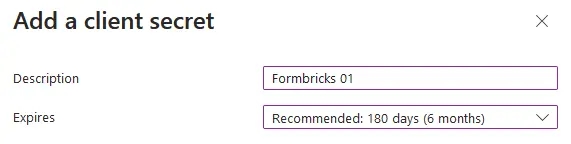
|
||||
@@ -149,9 +146,7 @@ Do you have a Microsoft Entra ID Tenant? Integrate it with your Formbricks insta
|
||||
- Copy the entry under **Value** to populate the `AZUREAD_CLIENT_SECRET` variable.
|
||||
|
||||
<Note>
|
||||
Microsoft will only show this value to you immediately after creation, and you
|
||||
will not be able to access it again. If you lose it, simply start from step 9
|
||||
to create a new secret.
|
||||
Microsoft will only show this value to you immediately after creation, and you will not be able to access it again. If you lose it, simply start from step 9 to create a new secret.
|
||||
</Note>
|
||||
|
||||

|
||||
@@ -159,19 +154,17 @@ Do you have a Microsoft Entra ID Tenant? Integrate it with your Formbricks insta
|
||||
- Update these environment variables in your `docker-compose.yml` or pass it like your other environment variables to the Formbricks container.
|
||||
|
||||
<Note>
|
||||
You must wrap the `AZUREAD_CLIENT_SECRET` value in double quotes (e.g.,
|
||||
"THis~iS4faKe.53CreTvALu3"`) to prevent issues with special characters.
|
||||
You must wrap the `AZUREAD_CLIENT_SECRET` value in double quotes (e.g., "THis~iS4faKe.53CreTvALu3"`) to prevent issues with special characters.
|
||||
</Note>
|
||||
|
||||
An example `.env` for Microsoft Entra ID in Formbricks would look like:
|
||||
|
||||
````yml Formbricks Env for Microsoft Entra ID SSO
|
||||
```yml Formbricks Env for Microsoft Entra ID SSO
|
||||
AZUREAD_CLIENT_ID=a25cadbd-f049-4690-ada3-56a163a72f4c
|
||||
AZUREAD_TENANT_ID=2746c29a-a3a6-4ea1-8762-37816d4b7885
|
||||
AZUREAD_CLIENT_SECRET="THis~iS4faKe.53CreTvALu3"
|
||||
```
|
||||
|
||||
|
||||
- Restart your Formbricks instance.
|
||||
|
||||
- You're all set! Users can now sign up & log in using their Microsoft credentials associated with your Entra ID Tenant.
|
||||
@@ -191,8 +184,7 @@ Integrating your own OIDC (OpenID Connect) instance with your Formbricks instanc
|
||||
- `OIDC_SIGNING_ALGORITHM`
|
||||
|
||||
<Note>
|
||||
Make sure the Redirect URI for your OIDC Client is set to `{WEBAPP_URL}
|
||||
/api/auth/callback/openid`.
|
||||
Make sure the Redirect URI for your OIDC Client is set to `{WEBAPP_URL}/api/auth/callback/openid`.
|
||||
</Note>
|
||||
|
||||
- Update these environment variables in your `docker-compose.yml` or pass it directly to the running container.
|
||||
@@ -203,7 +195,8 @@ An example configuration for a FusionAuth OpenID Connect in Formbricks would loo
|
||||
```yml Formbricks Env for FusionAuth OIDC
|
||||
OIDC_CLIENT_ID=59cada54-56d4-4aa8-a5e7-5823bbe0e5b7
|
||||
OIDC_CLIENT_SECRET=4f4dwP0ZoOAqMW8fM9290A7uIS3E8Xg29xe1umhlB_s
|
||||
OIDC_ISSUER=http://localhost:9011 OIDC_DISPLAY_NAME=FusionAuth
|
||||
OIDC_ISSUER=http://localhost:9011
|
||||
OIDC_DISPLAY_NAME=FusionAuth
|
||||
OIDC_SIGNING_ALGORITHM=HS256
|
||||
```
|
||||
|
||||
@@ -213,4 +206,3 @@ OIDC_SIGNING_ALGORITHM=HS256
|
||||
- Restart your Formbricks instance.
|
||||
|
||||
- You're all set! Users can now sign up & log in using their OIDC credentials.
|
||||
````
|
||||
|
||||
@@ -16,81 +16,81 @@ Make sure Docker and Docker Compose are installed on your system. These are usua
|
||||
|
||||
## Start
|
||||
|
||||
* **Create a New Directory for Formbricks**
|
||||
1. **Create a New Directory for Formbricks**
|
||||
|
||||
Open a terminal and run the following commands to create and enter a new directory for Formbricks:
|
||||
Open a terminal and run the following commands to create and enter a new directory for Formbricks:
|
||||
|
||||
```bash
|
||||
mkdir formbricks-quickstart && cd formbricks-quickstart
|
||||
```
|
||||
```bash
|
||||
mkdir formbricks-quickstart && cd formbricks-quickstart
|
||||
```
|
||||
|
||||
* **Download the Docker-Compose File**
|
||||
1. **Download the Docker-Compose File**
|
||||
|
||||
Get the docker-compose file from the Formbricks repository by running:
|
||||
Get the docker-compose file from the Formbricks repository by running:
|
||||
|
||||
```bash
|
||||
curl -o docker-compose.yml https://raw.githubusercontent.com/formbricks/formbricks/main/docker/docker-compose.yml
|
||||
```
|
||||
```bash
|
||||
curl -o docker-compose.yml https://raw.githubusercontent.com/formbricks/formbricks/main/docker/docker-compose.yml
|
||||
```
|
||||
|
||||
* **Generate NextAuth Secret**
|
||||
1. **Generate NextAuth Secret**
|
||||
|
||||
You need a NextAuth secret for session signing and encryption. Run the command below to generate a random string using `openssl` and automatically insert it into the `docker-compose.yml` file:
|
||||
You need a NextAuth secret for session signing and encryption. Run the command below to generate a random string using `openssl` and automatically insert it into the `docker-compose.yml` file:
|
||||
|
||||
```bash
|
||||
sed -i "/NEXTAUTH_SECRET:$/s/NEXTAUTH_SECRET:.*/NEXTAUTH_SECRET: $(openssl rand -hex 32)/" docker-compose.yml
|
||||
```
|
||||
```bash
|
||||
sed -i "/NEXTAUTH_SECRET:$/s/NEXTAUTH_SECRET:.*/NEXTAUTH_SECRET: $(openssl rand -hex 32)/" docker-compose.yml
|
||||
```
|
||||
|
||||
* **Generate Encryption Key**
|
||||
1. **Generate Encryption Key**
|
||||
|
||||
Next, you need to generate an Encryption Key. This will be used for authenticating and verifying 2 Factor Authentication. The `sed` command below generates a random string using `openssl`, then replaces the `ENCRYPTION_KEY:` placeholder in the `docker-compose.yml` file with this generated secret:
|
||||
Next, you need to generate an Encryption Key. This will be used for authenticating and verifying 2 Factor Authentication. The `sed` command below generates a random string using `openssl`, then replaces the `ENCRYPTION_KEY:` placeholder in the `docker-compose.yml` file with this generated secret:
|
||||
|
||||
```bash
|
||||
sed -i "/ENCRYPTION_KEY:$/s/ENCRYPTION_KEY:.*/ENCRYPTION_KEY: $(openssl rand -hex 32)/" docker-compose.yml
|
||||
```
|
||||
```bash
|
||||
sed -i "/ENCRYPTION_KEY:$/s/ENCRYPTION_KEY:.*/ENCRYPTION_KEY: $(openssl rand -hex 32)/" docker-compose.yml
|
||||
```
|
||||
|
||||
* **Generate Cron Secret**
|
||||
1. **Generate Cron Secret**
|
||||
|
||||
You require a Cron secret to secure API access for running cron jobs. Run the command below to generate a random string using `openssl` and automatically insert it into the `docker-compose.yml` file:
|
||||
You require a Cron secret to secure API access for running cron jobs. Run the command below to generate a random string using `openssl` and automatically insert it into the `docker-compose.yml` file:
|
||||
|
||||
```bash
|
||||
sed -i "/CRON_SECRET:$/s/CRON_SECRET:.*/CRON_SECRET: $(openssl rand -hex 32)/" docker-compose.yml
|
||||
```
|
||||
```bash
|
||||
sed -i "/CRON_SECRET:$/s/CRON_SECRET:.*/CRON_SECRET: $(openssl rand -hex 32)/" docker-compose.yml
|
||||
```
|
||||
|
||||
* **Start the Docker Setup**
|
||||
1. **Start the Docker Setup**
|
||||
|
||||
Now, you’re ready to run Formbricks with Docker. Use the command below to start Formbricks along with a PostgreSQL database using Docker Compose:
|
||||
Now, you’re ready to run Formbricks with Docker. Use the command below to start Formbricks along with a PostgreSQL database using Docker Compose:
|
||||
|
||||
```bash
|
||||
docker compose up -d
|
||||
```
|
||||
```bash
|
||||
docker compose up -d
|
||||
```
|
||||
|
||||
The `-d` flag runs the containers in the background, so they keep running even after you close the terminal.
|
||||
The `-d` flag runs the containers in the background, so they keep running even after you close the terminal.
|
||||
|
||||
* **Open Formbricks in Your Browser**
|
||||
1. **Open Formbricks in Your Browser**
|
||||
|
||||
Once the setup is running, open [**http://localhost:3000**](http://localhost:3000) in your browser to access Formbricks. The first time you visit, you'll see a setup wizard. Follow the steps to create your first user and start using Formbricks.
|
||||
Once the setup is running, open [**http://localhost:3000**](http://localhost:3000) in your browser to access Formbricks. The first time you visit, you'll see a setup wizard. Follow the steps to create your first user and start using Formbricks.
|
||||
|
||||
## Update
|
||||
|
||||
Please take a look at our [migration guide](/self-hosting/advanced/migration) for version specific steps to update Formbricks.
|
||||
|
||||
* Pull the latest Formbricks image
|
||||
1. Pull the latest Formbricks image
|
||||
|
||||
```bash
|
||||
docker compose pull
|
||||
```
|
||||
```bash
|
||||
docker compose pull
|
||||
```
|
||||
|
||||
* Stop the Formbricks stack
|
||||
1. Stop the Formbricks stack
|
||||
|
||||
```bash
|
||||
docker compose down
|
||||
```
|
||||
```bash
|
||||
docker compose down
|
||||
```
|
||||
|
||||
* Re-start the Formbricks stack with the updated image
|
||||
1. Re-start the Formbricks stack with the updated image
|
||||
|
||||
```bash
|
||||
docker compose up -d
|
||||
```
|
||||
```bash
|
||||
docker compose up -d
|
||||
```
|
||||
|
||||
## Debug
|
||||
|
||||
@@ -137,13 +137,10 @@ formbricks-quickstart-formbricks-1 | Listening on port 3000 url: http://<random
|
||||
|
||||
You can close the logs again by hitting `CTRL + C`.
|
||||
|
||||
## [](https://formbricks.com/docs/self-hosting/docker#customizing-environment-variables)
|
||||
|
||||
<Note>
|
||||
**Customizing environment variables**
|
||||
|
||||
To edit any of the available environment variables, check out our [Configure](/self-hosting/configuration) section!
|
||||
To edit any of the available environment variables, check out our [Configuration](/self-hosting/configuration/environment-variables) section!
|
||||
</Note>
|
||||
|
||||
If you have any questions or require help, feel free to reach out to us on [**GitHub Discussions**](https://github.com/formbricks/formbricks/discussions). 😃[
|
||||
](https://formbricks.com/docs/developer-docs/rest-api)
|
||||
If you have any questions or require help, feel free to reach out to us on [**GitHub Discussions**](https://github.com/formbricks/formbricks/discussions). 😃
|
||||
|
||||
@@ -1,7 +1,6 @@
|
||||
---
|
||||
title: "User Management"
|
||||
description:
|
||||
"Assign different roles to organization members to grant them specific rights like creating surveys, viewing responses, or managing organization members."
|
||||
description: "Assign different roles to organization members to grant them specific rights like creating surveys, viewing responses, or managing organization members."
|
||||
icon: "user"
|
||||
---
|
||||
|
||||
@@ -14,9 +13,8 @@ Learn about the different organization-level and team-level roles and how they a
|
||||
Permissions in Formbricks are broadly handled using organization-level roles, which apply to all teams and projects in the organization. Users on a self-hosting and Enterprise plan, have access to team-level roles, which enable more granular permissions.
|
||||
|
||||
<Note>
|
||||
Access Roles is a feature of the **Enterprise Edition**. In the **Community
|
||||
Edition** and on the **Free** and **Startup** plan in the Cloud you can invite
|
||||
unlimited organization members as `Owner`.
|
||||
Access Roles is a feature of the **Enterprise Edition**. In the **Community Edition** and on the **Free**
|
||||
and **Startup** plan in the Cloud you can invite unlimited organization members as `Owner`.
|
||||
</Note>
|
||||
|
||||
Here are the different access permissions, ranked from highest to lowest access
|
||||
@@ -30,16 +28,16 @@ Here are the different access permissions, ranked from highest to lowest access
|
||||
|
||||
All users and their organization-level roles are listed in **Organization Settings > General**. Users can hold any of the following org-level roles:
|
||||
|
||||
- **Owner** have full access to the organization, its data, and settings. Org Owners can perform Team Admin actions without needing to join the team.
|
||||
- **Manager** have full management access to all teams and projects. They can also manage the organization's membership. Org Managers can perform Team Admin actions without needing to join the team. They cannot change other organization settings.
|
||||
- **Billing** users can manage payment and compliance details in the organization.
|
||||
- **Org Members** can view most data in the organization and act in the projects they are members of. They cannot join projects on their own and need to be assigned.
|
||||
- **Org Managers** have full management access to all teams and projects. They can also manage the organization's membership. Org Managers can perform Team Admin actions without needing to join the team. They cannot change other organization settings.
|
||||
- **Org Owners** have full access to the organization, its data, and settings. Org Owners can perform Team Admin actions without needing to join the team.
|
||||
- **Member** can view most data in the organization and act in the projects they are members of. They cannot join projects on their own and need to be assigned.
|
||||
|
||||
### Permissions at project level
|
||||
|
||||
- **read**: read access to all resources (except settings) in the project.
|
||||
- **read & write**: read & write access to all resources (except settings) in the project.
|
||||
- **manage**: read & write access to all resources including settings in the project.
|
||||
- **Read**: Read access to all resources (except settings) in the project.
|
||||
- **Read & write**: Read & write access to all resources (except settings) in the project.
|
||||
- **Manage**: Read & write access to all resources including settings in the project.
|
||||
|
||||
### Team-level Roles
|
||||
|
||||
@@ -53,31 +51,32 @@ For more information on user roles & permissions, see below:
|
||||
| **Organization** | | | | |
|
||||
| Update organization | ✅ | ❌ | ❌ | ❌ |
|
||||
| Delete organization | ✅ | ❌ | ❌ | ❌ |
|
||||
| Add new Member | ✅ | ✅ | ❌ | ❌ |
|
||||
| Delete Member | ✅ | ✅ | ❌ | ❌ |
|
||||
| Update Member Access | ✅ | ✅ | ❌ | ❌ |
|
||||
| Update Billing | ✅ | ✅ | ✅ | ❌ |
|
||||
| Add new member | ✅ | ✅ | ❌ | ❌ |
|
||||
| Delete member | ✅ | ✅ | ❌ | ❌ |
|
||||
| Update member access | ✅ | ✅ | ❌ | ❌ |
|
||||
| Update billing | ✅ | ✅ | ✅ | ❌ |
|
||||
| **Project** | | | | |
|
||||
| Create Project | ✅ | ✅ | ❌ | ❌ |
|
||||
| Update Project Name | ✅ | ✅ | ❌ | ✅\*\* |
|
||||
| Update Project Recontact Options | ✅ | ✅ | ❌ | ✅\*\* |
|
||||
| Update Look & Feel | ✅ | ✅ | ❌ | ✅\*\* |
|
||||
| Update Survey Languages | ✅ | ✅ | ❌ | ✅\*\* |
|
||||
| Delete Project | ✅ | ✅ | ❌ | ❌ |
|
||||
| Create project | ✅ | ✅ | ❌ | ❌ |
|
||||
| Update project name | ✅ | ✅ | ❌ | ✅\*\* |
|
||||
| Update project recontact options | ✅ | ✅ | ❌ | ✅\*\* |
|
||||
| Update look & feel | ✅ | ✅ | ❌ | ✅\*\* |
|
||||
| Update survey languages | ✅ | ✅ | ❌ | ✅\*\* |
|
||||
| Delete project | ✅ | ✅ | ❌ | ❌ |
|
||||
| **Surveys** | | | | |
|
||||
| Create New Survey | ✅ | ✅ | ❌ | ✅\* |
|
||||
| Edit Survey | ✅ | ✅ | ❌ | ✅\* |
|
||||
| Delete Survey | ✅ | ✅ | ❌ | ✅\* |
|
||||
| Create new survey | ✅ | ✅ | ❌ | ✅\* |
|
||||
| Edit survey | ✅ | ✅ | ❌ | ✅\* |
|
||||
| Delete survey | ✅ | ✅ | ❌ | ✅\* |
|
||||
| View survey results | ✅ | ✅ | ❌ | ✅ |
|
||||
| **Response** | | | | |
|
||||
| Delete response | ✅ | ✅ | ❌ | ✅\* |
|
||||
| Add tags on response | ✅ | ✅ | ❌ | ✅\* |
|
||||
| Edit tags on response | ✅ | ✅ | ❌ | ✅\* |
|
||||
| Download survey responses (CSV) | ✅ | ✅ | ❌ | ✅\* |
|
||||
| **Actions** | | | | |
|
||||
| Create Action | ✅ | ✅ | ❌ | ✅\* |
|
||||
| Update Action | ✅ | ✅ | ❌ | ✅\* |
|
||||
| Delete Action | ✅ | ✅ | ❌ | ✅\* |
|
||||
| **API Keys** | | | | |
|
||||
| Create action | ✅ | ✅ | ❌ | ✅\* |
|
||||
| Update action | ✅ | ✅ | ❌ | ✅\* |
|
||||
| Delete action | ✅ | ✅ | ❌ | ✅\* |
|
||||
| **API keys** | | | | |
|
||||
| Create API key | ✅ | ✅ | ❌ | ✅\*\* |
|
||||
| Update API key | ✅ | ✅ | ❌ | ✅\*\* |
|
||||
| Delete API key | ✅ | ✅ | ❌ | ✅\*\* |
|
||||
@@ -85,10 +84,10 @@ For more information on user roles & permissions, see below:
|
||||
| Create tags | ✅ | ✅ | ❌ | ✅\* |
|
||||
| Update tags | ✅ | ✅ | ❌ | ✅\* |
|
||||
| Delete tags | ✅ | ✅ | ❌ | ✅\*\* |
|
||||
| **People** | | | | |
|
||||
| Delete Person | ✅ | ✅ | ❌ | ✅\* |
|
||||
| **Contacts** | | | | |
|
||||
| Delete contact | ✅ | ✅ | ❌ | ✅\* |
|
||||
| **Integrations** | | | | |
|
||||
| Manage Integrations | ✅ | ✅ | ❌ | ✅\* |
|
||||
| Manage integrations | ✅ | ✅ | ❌ | ✅\* |
|
||||
|
||||
\* - for the read & write permissions team members
|
||||
|
||||
@@ -108,16 +107,13 @@ There are two ways to invite organization members: One by one or in bulk.
|
||||
|
||||

|
||||
|
||||
|
||||
3. In the modal, add the Name, Email and Role of the organization member you want to invite:
|
||||
|
||||

|
||||
|
||||
|
||||
<Note>
|
||||
Access Roles is a feature of the **Enterprise Edition**. In the **Community
|
||||
Edition** and on the **Free** and **Startup** plan in the Cloud you can invite
|
||||
unlimited organization members as `Owners`.
|
||||
Access Roles is a feature of the **Enterprise Edition**. In the **Community Edition** and on the **Free**
|
||||
and **Startup** plan in the Cloud you can invite unlimited organization members as `Owners`.
|
||||
</Note>
|
||||
|
||||
Formbricks sends an email to the organization member with an invitation link. The organization member can accept the invitation or create a new account by clicking on the link.
|
||||
@@ -128,7 +124,6 @@ Formbricks sends an email to the organization member with an invitation link. Th
|
||||
|
||||

|
||||
|
||||
|
||||
2. Click on the `Add member` button:
|
||||
|
||||

|
||||
|
||||
@@ -71,11 +71,11 @@ window.addEventListener("message", (event) => {
|
||||
});
|
||||
```
|
||||
|
||||
## Emebd Mode
|
||||
## Embed Mode
|
||||
|
||||
Embed your survey with a minimalist design, disregarding padding and background.
|
||||
|
||||
### How to enable it?
|
||||
### How to enable Embed Mode
|
||||
|
||||
It can be enabled by simply appending **?embed=true** to your survey link or from UI
|
||||
|
||||
@@ -83,16 +83,15 @@ It can be enabled by simply appending **?embed=true** to your survey link or fro
|
||||
|
||||
2. Toggle **Embed mode**
|
||||
|
||||

|
||||

|
||||
|
||||
### With Embed mode enabled
|
||||
With Embed mode enabled:
|
||||
|
||||

|
||||

|
||||
|
||||
### With Embed mode disabled
|
||||
|
||||

|
||||
With Embed mode disabled:
|
||||
|
||||

|
||||
|
||||
## Embedding Surveys in Emails
|
||||
|
||||
@@ -128,22 +127,20 @@ Gmail does not support HTML embedding natively. It's a WYSIWYG (What You See Is
|
||||
- Open Gmail and compose a new email.
|
||||
- Write your email content after which you want to embed the survey.
|
||||
|
||||

|
||||

|
||||
|
||||
- Right next to the Send button you will see a new button called **HTML Editor**. Click on it.
|
||||
- This will open a new window with the **Design** tab active. Switch to the **Source** tab.
|
||||
|
||||

|
||||
|
||||

|
||||
|
||||
- Now paste the copied HTML code from Formbricks into this window. On the right, you will see a preview of how the email will look.
|
||||
|
||||

|
||||

|
||||
|
||||
- Click on the **Close Editor** button to save the changes & close the editor.
|
||||
|
||||

|
||||
|
||||

|
||||
|
||||
- Voila! You have successfully embedded the survey in your email.
|
||||
|
||||
|
||||
@@ -15,7 +15,7 @@ PIN protection can be applied to your surveys easily through the survey editor.
|
||||
|
||||
2. **Select Response Options**: Find and select **`Response Options`** to access settings related to survey responses.
|
||||
|
||||

|
||||

|
||||
|
||||
1. **Enable PIN Protection**: Find the option for "Protect Survey with a PIN" and
|
||||
activate it. You will be prompted to enter a PIN that respondents must use to access
|
||||
@@ -35,15 +35,15 @@ When a respondent attempts to access the survey, they are prompted to enter the
|
||||
|
||||
- **PIN Entry Prompt**: A screen will appear asking the respondent to enter the PIN to proceed. This acts as the first gatekeeping step before survey access is granted.
|
||||
|
||||

|
||||

|
||||
|
||||
- **Incorrect PIN Handling**: If an incorrect PIN is entered, the respondent will be informed and asked to try again, ensuring secure access to the survey.
|
||||
|
||||

|
||||

|
||||
|
||||
- **Correct PIN**: On entering the correct PIN, the user access the survey & can fill it accordingly.
|
||||
|
||||

|
||||

|
||||
|
||||
### **Benefits of PIN Protection**
|
||||
|
||||
|
||||
@@ -24,14 +24,13 @@ Using single-use links with Formbricks is quite straight-forward:
|
||||
|
||||
1. In the survey settings, toggle "Single Use Link" on:
|
||||
|
||||

|
||||
|
||||

|
||||
|
||||
2. When you publish your survey, the following modal will open:
|
||||
|
||||

|
||||

|
||||
|
||||
Here, you can copy and generate as many single-use links as you need.
|
||||
Here, you can copy and generate as many single-use links as you need.
|
||||
|
||||
## URL Encryption
|
||||
|
||||
@@ -45,7 +44,6 @@ You can find the suId of each submission in the submission meta data. To view it
|
||||
|
||||

|
||||
|
||||
|
||||
### 'Link used' message
|
||||
|
||||
You can customize the 'link used' messaging in the Survey Editor settings:
|
||||
|
||||
@@ -8,8 +8,7 @@ Understand the source a survey respondent comes from when responding to your sur
|
||||
|
||||
Check out this video to learn more about source tracking in link surveys:
|
||||
|
||||
<iframe width="560" height="315" src="https://www.youtube-nocookie.com/embed/CytWhuyEMVI?si=nxRrdMmlsQ5P6wwp&controls=0" frameborder="0" allow="accelerometer; autoplay; encrypted-media; gyroscope; picture-in-picture" allowfullscreen></iframe>
|
||||
|
||||
<iframe width="560" height="315" src="https://www.youtube-nocookie.com/embed/CytWhuyEMVI?si=nxRrdMmlsQ5P6wwp&controls=0" frameborder="0" allow="accelerometer; autoplay; encrypted-media; gyroscope; picture-in-picture" allowfullscreen></iframe>
|
||||
|
||||
## Purpose
|
||||
|
||||
@@ -38,8 +37,7 @@ https://formbricks.com/clin3dxja02k8l80hpwmx4bjy?source=Google
|
||||
|
||||
3. **View Responses**: Use the collected source data to analyze where your survey respondents are coming from. You can hover over the user icon in the responses tab to see the source of the user.
|
||||
|
||||

|
||||
|
||||

|
||||
|
||||
4. **Analyse Data**: Download all the responses as a CSV/Excel and get access to the source information. This can provide valuable insights into your audience.
|
||||
|
||||
|
||||
@@ -17,12 +17,11 @@ This feature, designed for link surveys, can be enabled or disabled directly fro
|
||||
2. **Access Settings**: Click on the **`Settings`** tab next to the Questions & Styling tab.
|
||||
3. **Select Response Options**: Find and select **`Response Options`** to access settings related to survey responses.
|
||||
|
||||

|
||||

|
||||
|
||||
4. **Activate Email Verification**: Find the "Verify Email Before Accessing Survey" option and use the toggle to activate email verification. Specify what details should be visible to the public when they access the survey.
|
||||
|
||||

|
||||
|
||||

|
||||
|
||||
### **User Experience Upon Accessing the Survey**
|
||||
|
||||
@@ -30,18 +29,17 @@ When email verification is enabled, the following process unfolds for the user:
|
||||
|
||||
1. **Email Entry Prompt**: Upon accessing the survey link, the user is prompted to verify their email before they can proceed.
|
||||
|
||||

|
||||

|
||||
|
||||
2. **Preview Option**: A "Preview survey questions" option is available for those who are just browsing or curious about the survey content without completing it. This allows a non-interactive view of the survey.
|
||||
|
||||

|
||||

|
||||
|
||||
3. **Verification Process**: After entering their email, respondents receive an email containing a survey link, which they can use to access the survey.
|
||||
|
||||

|
||||

|
||||
|
||||
|
||||
**4. Survey Access**: After verifying their email, respondents can access and respond to the survey.
|
||||
4. **Survey Access**: After verifying their email, respondents can access and respond to the survey.
|
||||
|
||||

|
||||
|
||||
|
||||
@@ -6,51 +6,77 @@ icon: "code"
|
||||
|
||||
## **How Do Actions Work?**
|
||||
|
||||
Actions in Formbricks App Surveys are deeply integrated with user activities within your app. When a user performs a specified action, the Formbricks widget detects this activity and can present a survey to that specific user if the trigger conditions match for that survey. This capability ensures that surveys are triggered at the right time. You can set up these actions through a user-friendly No-Code interface within the Formbricks dashboard.
|
||||
<Steps>
|
||||
<Step title="User performs action">
|
||||
The user performs an action in your application.
|
||||
</Step>
|
||||
|
||||
## **Why Are Actions Useful?**
|
||||
<Step title="Formbricks widget detects action">
|
||||
The embedded widget (SDK) detects the action, if you set up a [No Code Action](/xm-and-surveys/surveys/website-app-surveys/actions#setting-up-no-code-actions) or a [Code Action](/xm-and-surveys/surveys/website-app-surveys/actions#setting-up-code-actions) to do so.
|
||||
</Step>
|
||||
|
||||
Actions are invaluable for enhancing survey relevance and effectiveness:
|
||||
<Step title="Check for survey trigger">
|
||||
If a survey is set to trigger on that action, Formbricks checks if the user or visitor qualifies.
|
||||
</Step>
|
||||
|
||||
- **Personalized Engagement**: Surveys triggered by user actions ensure content is highly relevant and engaging, matching each user’s current context.
|
||||
<Step title="Check for user or visitor qualification">
|
||||
If the user or visitor already filled out a survey in the past couple of days (see [Global Waiting Time](/xm-and-surveys/surveys/website-app-surveys/recontact#project-wide-global-waiting-time)), the survey will not be shown to prevent survey fatigue.
|
||||
|
||||
- **User Attributes**: By tying surveys to specific user attributes, such as activity levels or feature usage, you can customize the survey experience to reflect individual user profiles.
|
||||
Also, if this user or visitor has seen this specific survey before, Formbricks might not show it as this is dependent on the [Recontact Options](/xm-and-surveys/surveys/website-app-surveys/recontact).
|
||||
</Step>
|
||||
|
||||
- **User Targeting**: Precise targeting based on user attributes ensures that surveys are shown only to users who meet certain criteria, enhancing the relevance and effectiveness of each survey.
|
||||
<Step title="Show survey">
|
||||
If all conditions match, the survey is shown.
|
||||
</Step>
|
||||
</Steps>
|
||||
|
||||
<Tip>
|
||||
Tying surveys to specific user actions enables **context-aware surveying**: You make sure that your user research is relevant to the current user context which leads to sign**ificantly higher response and completions rates** as well as lower survey fatigue.
|
||||
</Tip>
|
||||
|
||||
## **Setting Up No-Code Actions**
|
||||
|
||||
Formbricks offers an intuitive No-Code interface that allows you to configure actions without needing to write any code.
|
||||
|
||||
To add a No-Code Action:
|
||||
<Note>
|
||||
No Code Actions are **not available for surveys in mobile apps**. No Code Action tracking are heavily dependent on JavaScript and most mobile apps are compiled into a different programming language. To track user actions in mobile apps use [Code Actions.](/xm-and-surveys/surveys/website-app-surveys/actions#setting-up-code-actions)
|
||||
</Note>
|
||||
|
||||
1. Visit the Formbricks Dashboard & switch to the Actions tab:
|
||||
<Steps>
|
||||
<Step title="Visit the Actions tab via the main navigation">
|
||||

|
||||
</Step>
|
||||
|
||||

|
||||
<Step title="Click on 'Add Action' in the top right corner to see the following:">
|
||||

|
||||
</Step>
|
||||
</Steps>
|
||||
|
||||
1. Now click on “Add Action”
|
||||
|
||||

|
||||
|
||||
Here are four types of No-Code actions you can set up:
|
||||
There are four types of No-Code actions:
|
||||
|
||||
### **1. Click Action**
|
||||

|
||||
|
||||
Click Action is triggered when a user clicks on a specific element within your application. You can define the element's inner text or CSS selector to trigger the survey.
|
||||
A Click Action is triggered when a user clicks on a specific element within your application. You can define the element's inner text, CSS selector or both to trigger the survey.
|
||||
|
||||
- **Inner Text**: Checks if the innerText of a clicked HTML element, like a button label, matches a specific text. This action allows you to display a survey based on text interactions within your application.
|
||||
* **Inner Text**: Checks if the innerText of a clicked HTML element, like a button label, matches a specific text. This action allows you to display a survey based on text interactions within your application.
|
||||
|
||||
- **CSS Selector**: Verifies if a clicked HTML element matches a provided CSS selector, such as a class, ID, or any other CSS selector used in your website. It enables survey triggers based on element interactions.
|
||||
* **CSS Selector**: Verifies if a clicked HTML element matches a provided CSS selector, such as a class, ID, or any other CSS selector used in your website. It enables survey triggers based on element interactions.
|
||||
|
||||
### **2. Page view Action**
|
||||
* **Both**: Only if both is true, the action is triggered
|
||||
|
||||
### **2. Page View Action**
|
||||

|
||||
|
||||
This action is triggered when a user visits a page within your application.
|
||||
|
||||
### **3. Exit Intent Action**
|
||||

|
||||
|
||||
This action is triggered when a user is about to leave your application. It helps capture user feedback before they exit, providing valuable insights into user experiences and potential improvements.
|
||||
|
||||
### **4. 50% Scroll Action**
|
||||

|
||||
|
||||
This action is triggered when a user scrolls through 50% of a page within your application. It helps capture user feedback at a specific point in their journey, enabling you to gather insights based on user interactions.
|
||||
|
||||
@@ -58,39 +84,49 @@ This action is triggered when a user visits a specific page within your applicat
|
||||
|
||||
You can combine the url filters with any of the no-code actions to trigger the survey based on the URL match conditions.
|
||||
|
||||
### **URL Match Conditions**
|
||||
### **Page Filter**
|
||||
|
||||
- **exactMatch**: Triggers the action when the URL exactly matches the specified string.
|
||||
You can limit action tracking to specific subpages of your website or web app by using the Page Filter. Here you can use a variety of URL filter settings:
|
||||
|
||||
- **contains**: Activates when the URL contains the specified substring.
|
||||
* **exactMatch**: Triggers the action when the URL exactly matches the specified string.
|
||||
|
||||
- **startsWith**: Fires when the URL starts with the specified string.
|
||||
* **contains**: Activates when the URL contains the specified substring.
|
||||
|
||||
- **endsWith**: Executes when the URL ends with the specified string.
|
||||
* **startsWith**: Fires when the URL starts with the specified string.
|
||||
|
||||
- **notMatch**: Triggers when the URL does not match the specified condition.
|
||||
* **endsWith**: Executes when the URL ends with the specified string.
|
||||
|
||||
- **notContains**: Activates when the URL does not contain the specified substring.
|
||||
* **notMatch**: Triggers when the URL does not match the specified condition.
|
||||
|
||||
* **notContains**: Activates when the URL does not contain the specified substring.
|
||||
|
||||
## **Setting Up Code Actions**
|
||||
|
||||
For more granular control, you can implement actions directly in your codebase:
|
||||
For more granular control, you can implement actions directly in your code:
|
||||
|
||||
1. **Configure the Action**: First, add the action via the Formbricks web interface to make it available for survey configuration.
|
||||
After that you can fire an action using `formbricks.track()`
|
||||
<Steps>
|
||||
<Step title="Configure action in Formbricks">
|
||||
First, add the action via the Formbricks web interface to make it available for survey configuration:
|
||||
|
||||
2. **Track an Action**: Use formbricks.track() to send an action event to Formbricks.
|
||||

|
||||
|
||||
```javascript Track an action formbricks.track("Action Name");
|
||||
</Step>
|
||||
|
||||
```
|
||||
<Step title="Add action tracking to your code">
|
||||
Use formbricks.track() to send an action event to Formbricks:
|
||||
|
||||
Here is an example of how to fire an action when a user clicks a button:
|
||||
```
|
||||
formbricks.track("action");
|
||||
```
|
||||
|
||||
```javascript Track Button Click
|
||||
const handleClick = () => {
|
||||
formbricks.track("Button Clicked");
|
||||
};
|
||||
Here is an example of how to fire an action when a user clicks a button:
|
||||
|
||||
return <button onClick={handleClick}>Click Me</button>;
|
||||
```
|
||||
```javascript
|
||||
const handleClick = () => {
|
||||
formbricks.track("Button Clicked");
|
||||
};
|
||||
|
||||
return <button onClick={handleClick}>Click Me</button>;
|
||||
```
|
||||
</Step>
|
||||
</Steps>
|
||||
@@ -1,28 +1,67 @@
|
||||
---
|
||||
title: "Advanced Targeting"
|
||||
description: "Advanced Targeting allows you to show surveys to the right group of people. You can target surveys based on user attributes, device type, and more instead of spraying and praying. This helps you get more relevant feedback and make data-driven decisions. All of this without writing a single line of code."
|
||||
description: "Advanced Targeting allows you to show surveys to a specific segment of your users. You can target surveys based on user attributes, device type, and more. This helps you get more relevant insights while keeping survey fatigue at a minimum. After the initial setup, you can target any segment without touching code."
|
||||
icon: "bullseye"
|
||||
---
|
||||
|
||||
<Info>
|
||||
Advanced Targeting is available on paid plans for both Formbricks Cloud and On Premise.
|
||||
</Info>
|
||||
|
||||
## How to setup Advanced Targeting
|
||||
### When to use Advanced Targeting?
|
||||
|
||||
<Note>
|
||||
Advanced Targeting is only available on the Pro plan!
|
||||
</Note>
|
||||
Advanced Targeting helps you achieve a number of goals:
|
||||
|
||||
* On the Formbricks dashboard, click on **People** tab from the top navigation bar.
|
||||
1. **Relevance**: Keep survey content relevant to respondents.
|
||||
|
||||
* Switch to the **Segments** tab & click on **Create Segment**.
|
||||
2. **Cohort-analysis**: Survey specific user cohorts only.
|
||||
|
||||
* Give your segment a title & a description to help you remember what this segment is about.
|
||||
3. **Statistical Relevance:** When surveying a smaller subset of users, statistical relevance is reached with a lot less responses.
|
||||
|
||||
* Now click on the **Add Filter** button to add a filter. You can filter based on user attributes, other segments, devices, and more.
|
||||
## How does Advanced Targeting work?
|
||||
|
||||
* To group a set of filters together, click on the Three Dots icon on the right side of the filter and click on **Create Group**.
|
||||
<Steps>
|
||||
<Step title="Create Segment">
|
||||
To get started, go to the Contacts tab and create a new Segment:
|
||||
|
||||
* Try playing around with different filters & conditions that we have provided to see how the segment size changes.
|
||||

|
||||
|
||||
* Once you are happy with the segment, click on **Save Segment**.
|
||||
</Step>
|
||||
|
||||
* Now, when you create a survey, you can select this segment to target your survey to.
|
||||
<Step title="Configure Segment based on attributes">
|
||||
In the Segment editor, you can configure your Segment with a combination of Attributes, Segments and Devices. If a user matches either or all of the criteria, they become part of the Segment. See [Segment Configuration](/xm-and-surveys/surveys/website-app-surveys/advanced-targeting#segment-configuration) below.
|
||||
</Step>
|
||||
|
||||
<Step title="Create a survey of type Website & App">
|
||||
Create a new survey and go to Settings to change it to Website & App survey:
|
||||
|
||||

|
||||
</Step>
|
||||
|
||||
<Step title="Choose Segment in Targeting options">
|
||||

|
||||
|
||||
</Step>
|
||||
|
||||
<Step title="Publish your survey" icon="party-horn" iconType="solid" />
|
||||
</Steps>
|
||||
|
||||
### Segment Configuration
|
||||
|
||||
There are three means to move Contacts in or out of Segments: **Attributes**, other **Segments** and **Devices**:
|
||||
|
||||
1. **Attributes**: If the value of a specific attribute matches, the user becomes part of the Segment.
|
||||
|
||||

|
||||
|
||||
|
||||
2. **Segments**: You can nest Segments meaning that if a user is or is not part of another Segment, they can be included or excluded
|
||||
|
||||

|
||||
|
||||
|
||||
3. **Devices**: If a user uses a Phone or Desktop, you can include or exclude them
|
||||
|
||||

|
||||
|
||||
4. **Filter Groups:** You can group any of the above conditions in group and connect them logically with `AND` or `OR`. This allows for maximum granularity.
|
||||
@@ -165,6 +165,7 @@ export default function FormbricksProvider() {
|
||||
```typescript app/layout.tsx
|
||||
// other imports
|
||||
import FormbricksProvider from "./formbricks";
|
||||
import { Suspense } from "react";
|
||||
|
||||
export default function RootLayout({
|
||||
children,
|
||||
@@ -173,7 +174,9 @@ export default function RootLayout({
|
||||
}) {
|
||||
return (
|
||||
<html lang="en">
|
||||
<FormbricksProvider />
|
||||
<Suspense>
|
||||
<FormbricksProvider />
|
||||
</Suspense>
|
||||
<body>{children}</body>
|
||||
</html>
|
||||
);
|
||||
|
||||
@@ -1,41 +1,32 @@
|
||||
---
|
||||
title: "Show Survey to % of Users"
|
||||
description: "Formbricks allows you to display surveys to only a percentage of your targeted users."
|
||||
title: "Survey % of Users"
|
||||
description: "Formbricks allows you to display surveys to only a percentage of your targeted users. This is helpful for surveying on public facing website."
|
||||
icon: "percent"
|
||||
---
|
||||
|
||||
To target specific segments of your audience or manage survey exposure, Formbricks allows you to display surveys to only a percentage of your targeted users.
|
||||
To target specific segments of your audience or manage survey exposure, Formbricks allows you to display surveys to only a random selection of your targeted users.
|
||||
|
||||
<Note>
|
||||
This feature is applicable for website surveys and app surveys, where managing
|
||||
participant engagement and response volume is crucial.
|
||||
</Note>
|
||||
## How to set up percentage-based visibility
|
||||
|
||||
## **Enabling Percentage-Based Visibility**
|
||||
<Steps>
|
||||
<Step title="Open settings in survey editor">
|
||||
In the Survey Editor, click on the **`Settings`** tab
|
||||
</Step>
|
||||
|
||||
Set up this feature to control how many users see your survey, using a simple slider to specify the percentage of your targeted audience that should be prompted to participate.
|
||||
<Step title="Find 'Survey Trigger' card">
|
||||
Locate the 'Survey Trigger' card in the settings panel
|
||||
</Step>
|
||||
|
||||
### **Steps to Set Up Percentage-Based Visibility**
|
||||
<Step title="Enable percentage toggle">
|
||||
Find and enable the **`Show Survey to % of Users`** toggle
|
||||
</Step>
|
||||
|
||||
1. **Open Survey Editor**: Navigate to the survey where you wish to configure visibility settings & click on Edit.
|
||||
<Step title="Set percentage">
|
||||
Enter the desired percentage (from 0.01% to 100%) of users to whom the survey will be shown
|
||||
|
||||
2. **Access Settings**: In the Survey Editor, click on the **`Settings`** tab
|
||||
|
||||
3. **Navigate to Survey Trigger Options**:
|
||||
|
||||

|
||||
|
||||
- Select **`Survey Trigger`** from the menu options.
|
||||
|
||||
- Choose **`Survey Display Settings`** to access visibility controls.
|
||||
|
||||
4. **Adjust User Visibility Percentage**:
|
||||
|
||||
- Find the **`Show Survey to % of Users`** toggle. Enable it.
|
||||
|
||||
- Enter the desired percentage (from 0.01% to 100%) of users to whom the survey will be shown.
|
||||
|
||||

|
||||

|
||||
</Step>
|
||||
</Steps>
|
||||
|
||||
<Note>
|
||||
Please note that this feature operates based on mathematical probabilistic
|
||||
@@ -51,12 +42,12 @@ For instance, if you want to expose your survey to only half of your targeted us
|
||||
|
||||
It's effective for:
|
||||
|
||||
- **A/B Testing**: Compare different user experiences by showing different surveys or survey variations to different segments of your audience.
|
||||
* **A/B Testing**: Compare different user experiences by showing different surveys or survey variations to different segments of your audience.
|
||||
|
||||
- **Gradual Rollouts**: Gradually introduce a new survey to a portion of your users to monitor initial responses and adjust based on feedback before full deployment.
|
||||
* **Gradual Rollouts**: Gradually introduce a new survey to a portion of your users to monitor initial responses and adjust based on feedback before full deployment.
|
||||
|
||||
- **Load Management**: Manage server load and response processing by limiting the number of responses collected at any given time.
|
||||
* **Load Management**: Manage server load and response processing by limiting the number of responses collected at any given time.
|
||||
|
||||
## **Conclusion**
|
||||
|
||||
Using the **Show Survey to % of Users** feature allows for precise control over who sees your Formbricks surveys, making it an invaluable feature for targeted data collection and user experience management. By adjusting survey visibility settings, you can strategically engage segments of your audience, enhance survey testing phases, and optimize overall survey effectiveness.
|
||||
Using the **Show Survey to % of Users** feature allows for precise control over who sees your Formbricks surveys, making it an invaluable feature for targeted data collection and user experience management. By adjusting survey visibility settings, you can strategically engage segments of your audience, enhance survey testing phases, and optimize overall survey effectiveness.
|
||||
@@ -31,7 +31,7 @@
|
||||
"prepare": "husky install",
|
||||
"storybook": "turbo run storybook",
|
||||
"fb-migrate-dev": "pnpm --filter @formbricks/database create-migration && pnpm prisma generate",
|
||||
"tolgee-pull": "tolgee pull && prettier --write ./packages/lib/messages/*.json"
|
||||
"tolgee-pull": "BRANCH_NAME=$(node -p \"require('./branch.json').branchName\") && tolgee pull --tags \"draft:$BRANCH_NAME\" \"production\" && prettier --write ./packages/lib/messages/*.json"
|
||||
},
|
||||
"devDependencies": {
|
||||
"@azure/microsoft-playwright-testing": "1.0.0-beta.6",
|
||||
|
||||
@@ -107,6 +107,7 @@ const renderWidget = async (
|
||||
},
|
||||
surveyState
|
||||
);
|
||||
|
||||
const projectOverwrites = survey.projectOverwrites ?? {};
|
||||
const clickOutside = projectOverwrites.clickOutsideClose ?? project.clickOutsideClose;
|
||||
const darkOverlay = projectOverwrites.darkOverlay ?? project.darkOverlay;
|
||||
|
||||
@@ -8,8 +8,6 @@ export const IS_FORMBRICKS_CLOUD = env.IS_FORMBRICKS_CLOUD === "1";
|
||||
export const WEBAPP_URL =
|
||||
env.WEBAPP_URL || (env.VERCEL_URL ? `https://${env.VERCEL_URL}` : false) || "http://localhost:3000";
|
||||
|
||||
export const SHORT_URL_BASE = env.SHORT_URL_BASE ? env.SHORT_URL_BASE : WEBAPP_URL;
|
||||
|
||||
// encryption keys
|
||||
export const FORMBRICKS_ENCRYPTION_KEY = env.FORMBRICKS_ENCRYPTION_KEY || undefined;
|
||||
export const ENCRYPTION_KEY = env.ENCRYPTION_KEY;
|
||||
|
||||
@@ -73,7 +73,6 @@ export const env = createEnv({
|
||||
S3_SECRET_KEY: z.string().optional(),
|
||||
S3_ENDPOINT_URL: z.string().optional(),
|
||||
S3_FORCE_PATH_STYLE: z.enum(["1", "0"]).optional(),
|
||||
SHORT_URL_BASE: z.string().url().optional().or(z.string().length(0)),
|
||||
SIGNUP_DISABLED: z.enum(["1", "0"]).optional(),
|
||||
SLACK_CLIENT_ID: z.string().optional(),
|
||||
SLACK_CLIENT_SECRET: z.string().optional(),
|
||||
@@ -197,7 +196,6 @@ export const env = createEnv({
|
||||
S3_SECRET_KEY: process.env.S3_SECRET_KEY,
|
||||
S3_ENDPOINT_URL: process.env.S3_ENDPOINT_URL,
|
||||
S3_FORCE_PATH_STYLE: process.env.S3_FORCE_PATH_STYLE,
|
||||
SHORT_URL_BASE: process.env.SHORT_URL_BASE,
|
||||
SIGNUP_DISABLED: process.env.SIGNUP_DISABLED,
|
||||
SLACK_CLIENT_ID: process.env.SLACK_CLIENT_ID,
|
||||
SLACK_CLIENT_SECRET: process.env.SLACK_CLIENT_SECRET,
|
||||
|
||||
@@ -1472,7 +1472,9 @@
|
||||
"is_booked": "Ist gebucht",
|
||||
"is_clicked": "Wird geklickt",
|
||||
"is_completely_submitted": "Vollständig eingereicht",
|
||||
"is_not_set": "Ist nicht festgelegt",
|
||||
"is_partially_submitted": "Teilweise eingereicht",
|
||||
"is_set": "Ist festgelegt",
|
||||
"is_skipped": "Wird übersprungen",
|
||||
"is_submitted": "Wird eingereicht",
|
||||
"jump_to_question": "Zur Frage springen",
|
||||
|
||||
@@ -1472,7 +1472,9 @@
|
||||
"is_booked": "Is booked",
|
||||
"is_clicked": "Is clicked",
|
||||
"is_completely_submitted": "Is completely submitted",
|
||||
"is_not_set": "Is not set",
|
||||
"is_partially_submitted": "Is partially submitted",
|
||||
"is_set": "Is set",
|
||||
"is_skipped": "Is skipped",
|
||||
"is_submitted": "Is submitted",
|
||||
"jump_to_question": "Jump to question",
|
||||
|
||||
@@ -1472,7 +1472,9 @@
|
||||
"is_booked": "Est réservé",
|
||||
"is_clicked": "Est cliqué",
|
||||
"is_completely_submitted": "Est complètement soumis",
|
||||
"is_not_set": "N'est pas défini",
|
||||
"is_partially_submitted": "Est partiellement soumis",
|
||||
"is_set": "Est défini",
|
||||
"is_skipped": "Est ignoré",
|
||||
"is_submitted": "Est soumis",
|
||||
"jump_to_question": "Passer à la question",
|
||||
|
||||
@@ -1472,7 +1472,9 @@
|
||||
"is_booked": "Tá reservado",
|
||||
"is_clicked": "É clicado",
|
||||
"is_completely_submitted": "Está completamente submetido",
|
||||
"is_not_set": "Não está definido",
|
||||
"is_partially_submitted": "Parcialmente enviado",
|
||||
"is_set": "Está definido",
|
||||
"is_skipped": "é pulado",
|
||||
"is_submitted": "é submetido",
|
||||
"jump_to_question": "Pular para a pergunta",
|
||||
|
||||
@@ -1472,7 +1472,9 @@
|
||||
"is_booked": "已預訂",
|
||||
"is_clicked": "已點擊",
|
||||
"is_completely_submitted": "已完全提交",
|
||||
"is_not_set": "未設定",
|
||||
"is_partially_submitted": "已部分提交",
|
||||
"is_set": "已設定",
|
||||
"is_skipped": "已跳過",
|
||||
"is_submitted": "已提交",
|
||||
"jump_to_question": "跳至問題",
|
||||
|
||||
@@ -456,6 +456,10 @@ const evaluateSingleCondition = (
|
||||
const values = Object.values(leftValue);
|
||||
return values.length > 0 && !values.includes("");
|
||||
} else return false;
|
||||
case "isSet":
|
||||
return leftValue !== undefined && leftValue !== null && leftValue !== "";
|
||||
case "isNotSet":
|
||||
return leftValue === undefined || leftValue === null || leftValue === "";
|
||||
default:
|
||||
return false;
|
||||
}
|
||||
|
||||
@@ -1,6 +1,6 @@
|
||||
{
|
||||
"name": "@formbricks/react-native",
|
||||
"version": "2.0.0",
|
||||
"version": "2.0.1",
|
||||
"license": "MIT",
|
||||
"description": "Formbricks React Native SDK allows you to connect your app to Formbricks, display surveys and trigger events.",
|
||||
"homepage": "https://formbricks.com",
|
||||
|
||||
@@ -1,3 +1,4 @@
|
||||
/* eslint-disable @typescript-eslint/restrict-template-expressions -- required for template literals */
|
||||
/* eslint-disable @typescript-eslint/no-unsafe-call -- required */
|
||||
/* eslint-disable no-console -- debugging*/
|
||||
import React, { type JSX, useEffect, useMemo, useRef, useState } from "react";
|
||||
@@ -149,6 +150,10 @@ export function SurveyWebView({ survey }: SurveyWebViewProps): JSX.Element | und
|
||||
return await storage.uploadFile(file, params);
|
||||
};
|
||||
|
||||
const surveyPlacement = survey.projectOverwrites?.placement ?? project.placement;
|
||||
const clickOutside = survey.projectOverwrites?.clickOutsideClose ?? project.clickOutsideClose;
|
||||
const darkOverlay = survey.projectOverwrites?.darkOverlay ?? project.darkOverlay;
|
||||
|
||||
return (
|
||||
<Modal
|
||||
animationType="slide"
|
||||
@@ -168,7 +173,10 @@ export function SurveyWebView({ survey }: SurveyWebViewProps): JSX.Element | und
|
||||
isBrandingEnabled,
|
||||
styling,
|
||||
languageCode,
|
||||
placement: surveyPlacement,
|
||||
appUrl: appConfig.get().appUrl,
|
||||
clickOutside: surveyPlacement === "center" ? clickOutside : true,
|
||||
darkOverlay,
|
||||
}),
|
||||
}}
|
||||
style={{ backgroundColor: "transparent" }}
|
||||
@@ -333,6 +341,20 @@ export function SurveyWebView({ survey }: SurveyWebViewProps): JSX.Element | und
|
||||
}
|
||||
|
||||
const renderHtml = (options: Partial<SurveyInlineProps> & { appUrl?: string }): string => {
|
||||
const isCenter = options.placement === "center";
|
||||
|
||||
const getBackgroundColor = (): "rgba(51, 65, 85, 0.8)" | "rgba(255, 255, 255, 0.9)" | "transparent" => {
|
||||
if (isCenter) {
|
||||
if (options.darkOverlay) {
|
||||
return "rgba(51, 65, 85, 0.8)";
|
||||
}
|
||||
|
||||
return "rgba(255, 255, 255, 0.9)";
|
||||
}
|
||||
|
||||
return "transparent";
|
||||
};
|
||||
|
||||
return `
|
||||
<!doctype html>
|
||||
<html>
|
||||
@@ -341,10 +363,70 @@ const renderHtml = (options: Partial<SurveyInlineProps> & { appUrl?: string }):
|
||||
<title>Formbricks WebView Survey</title>
|
||||
<script src="https://cdn.tailwindcss.com"></script>
|
||||
</head>
|
||||
<body style="overflow: hidden; height: 100vh; display: flex; flex-direction: column; justify-content: flex-end;">
|
||||
<div id="formbricks-react-native" style="width: 100%;"></div>
|
||||
</body>
|
||||
<body style="overflow: hidden; height: 100vh; background: ${getBackgroundColor()}; margin: 0;">
|
||||
<style>
|
||||
.survey-container {
|
||||
position: fixed;
|
||||
top: 0;
|
||||
left: 0;
|
||||
right: 0;
|
||||
bottom: 0;
|
||||
display: flex;
|
||||
padding: 20px;
|
||||
box-sizing: border-box;
|
||||
pointer-events: none;
|
||||
}
|
||||
|
||||
#formbricks-react-native {
|
||||
width: 100%;
|
||||
max-width: 600px;
|
||||
pointer-events: auto;
|
||||
}
|
||||
|
||||
#formbricks-react-native > div {
|
||||
width: 100%;
|
||||
}
|
||||
|
||||
@media (max-width: 640px) {
|
||||
.survey-container {
|
||||
padding: 0;
|
||||
align-items: flex-end !important;
|
||||
justify-content: center !important;
|
||||
}
|
||||
|
||||
#formbricks-react-native {
|
||||
max-width: 100%;
|
||||
}
|
||||
}
|
||||
|
||||
/* Placement-specific styles */
|
||||
.placement-bottomLeft {
|
||||
align-items: flex-end;
|
||||
justify-content: flex-start;
|
||||
}
|
||||
.placement-bottomRight {
|
||||
align-items: flex-end;
|
||||
justify-content: flex-end;
|
||||
}
|
||||
.placement-topLeft {
|
||||
align-items: flex-start;
|
||||
justify-content: flex-start;
|
||||
}
|
||||
.placement-topRight {
|
||||
align-items: flex-start;
|
||||
justify-content: flex-end;
|
||||
}
|
||||
.placement-center {
|
||||
align-items: center;
|
||||
justify-content: center;
|
||||
}
|
||||
</style>
|
||||
<div class="survey-container placement-${options.placement ?? "center"}" id="survey-wrapper">
|
||||
<div id="formbricks-react-native">
|
||||
<div></div>
|
||||
</div>
|
||||
</div>
|
||||
</body>
|
||||
|
||||
<script type="text/javascript">
|
||||
const consoleLog = (type, log) => window.ReactNativeWebView.postMessage(JSON.stringify({'type': 'Console', 'data': {'type': type, 'log': log}}));
|
||||
@@ -424,7 +506,7 @@ const renderHtml = (options: Partial<SurveyInlineProps> & { appUrl?: string }):
|
||||
onClose,
|
||||
onFileUpload
|
||||
};
|
||||
|
||||
|
||||
window.formbricksSurveys.renderSurveyInline(surveyProps);
|
||||
}
|
||||
|
||||
@@ -435,7 +517,17 @@ const renderHtml = (options: Partial<SurveyInlineProps> & { appUrl?: string }):
|
||||
script.onerror = (error) => {
|
||||
console.error("Failed to load Formbricks Surveys library:", error);
|
||||
};
|
||||
|
||||
document.head.appendChild(script);
|
||||
|
||||
// Add click handler to close survey when clicking outside
|
||||
document.addEventListener('click', function(event) {
|
||||
if(!${options.clickOutside}) return;
|
||||
const surveyContainer = document.getElementById('formbricks-react-native');
|
||||
if (surveyContainer && !surveyContainer.contains(event.target)) {
|
||||
onClose();
|
||||
}
|
||||
});
|
||||
</script>
|
||||
</html>
|
||||
`;
|
||||
|
||||
@@ -25,6 +25,7 @@ export interface SurveyBaseProps {
|
||||
isCardBorderVisible?: boolean;
|
||||
startAtQuestionId?: string;
|
||||
clickOutside?: boolean;
|
||||
darkOverlay?: boolean;
|
||||
hiddenFieldsRecord?: TResponseData;
|
||||
shouldResetQuestionId?: boolean;
|
||||
fullSizeCards?: boolean;
|
||||
@@ -32,4 +33,5 @@ export interface SurveyBaseProps {
|
||||
|
||||
export interface SurveyInlineProps extends SurveyBaseProps {
|
||||
containerId: string;
|
||||
placement: "bottomLeft" | "bottomRight" | "topLeft" | "topRight" | "center";
|
||||
}
|
||||
|
||||
@@ -8,5 +8,5 @@
|
||||
},
|
||||
"exclude": ["dist", "build", "node_modules"],
|
||||
"extends": "@formbricks/config-typescript/react-native-library.json",
|
||||
"include": ["."]
|
||||
"include": [".", "../database/src/index.ts"]
|
||||
}
|
||||
|
||||
@@ -19,6 +19,7 @@ export const ZPlacement = z.enum(["bottomLeft", "bottomRight", "topLeft", "topRi
|
||||
export type TPlacement = z.infer<typeof ZPlacement>;
|
||||
|
||||
export const ZAllowedFileExtension = z.enum([
|
||||
"heic",
|
||||
"png",
|
||||
"jpeg",
|
||||
"jpg",
|
||||
|
||||
@@ -296,6 +296,8 @@ export const ZSurveyLogicConditionsOperator = z.enum([
|
||||
"isBooked",
|
||||
"isPartiallySubmitted",
|
||||
"isCompletelySubmitted",
|
||||
"isSet",
|
||||
"isNotSet",
|
||||
]);
|
||||
|
||||
const operatorsWithoutRightOperand = [
|
||||
@@ -306,6 +308,8 @@ const operatorsWithoutRightOperand = [
|
||||
ZSurveyLogicConditionsOperator.Enum.isBooked,
|
||||
ZSurveyLogicConditionsOperator.Enum.isPartiallySubmitted,
|
||||
ZSurveyLogicConditionsOperator.Enum.isCompletelySubmitted,
|
||||
ZSurveyLogicConditionsOperator.Enum.isSet,
|
||||
ZSurveyLogicConditionsOperator.Enum.isNotSet,
|
||||
] as const;
|
||||
|
||||
export const ZDynamicLogicField = z.enum(["question", "variable", "hiddenField"]);
|
||||
@@ -1517,6 +1521,8 @@ const isInvalidOperatorsForHiddenFieldType = (operator: TSurveyLogicConditionsOp
|
||||
"doesNotStartWith",
|
||||
"endsWith",
|
||||
"doesNotEndWith",
|
||||
"isSet",
|
||||
"isNotSet",
|
||||
].includes(operator)
|
||||
) {
|
||||
isInvalidOperator = true;
|
||||
|
||||
86
pnpm-lock.yaml
generated
@@ -387,6 +387,9 @@ importers:
|
||||
googleapis:
|
||||
specifier: 144.0.0
|
||||
version: 144.0.0(encoding@0.1.13)
|
||||
heic-convert:
|
||||
specifier: 2.1.0
|
||||
version: 2.1.0
|
||||
https-proxy-agent:
|
||||
specifier: 7.0.6
|
||||
version: 7.0.6
|
||||
@@ -520,6 +523,9 @@ importers:
|
||||
'@types/bcryptjs':
|
||||
specifier: 2.4.6
|
||||
version: 2.4.6
|
||||
'@types/heic-convert':
|
||||
specifier: 2.1.0
|
||||
version: 2.1.0
|
||||
'@types/lodash':
|
||||
specifier: 4.17.13
|
||||
version: 4.17.13
|
||||
@@ -591,7 +597,7 @@ importers:
|
||||
version: 8.18.0(eslint@8.57.0)(typescript@5.7.2)
|
||||
'@vercel/style-guide':
|
||||
specifier: 6.0.0
|
||||
version: 6.0.0(@next/eslint-plugin-next@15.1.0)(eslint@8.57.0)(prettier@3.4.2)(typescript@5.7.2)(vitest@3.0.5(tsx@4.19.2))
|
||||
version: 6.0.0(@next/eslint-plugin-next@15.1.0)(eslint@8.57.0)(prettier@3.4.2)(typescript@5.7.2)(vitest@3.0.5(@types/debug@4.1.12)(@types/node@22.10.2)(jiti@2.4.1)(jsdom@25.0.1)(lightningcss@1.27.0)(terser@5.37.0)(tsx@4.19.2)(yaml@2.7.0))
|
||||
eslint-config-next:
|
||||
specifier: 15.1.0
|
||||
version: 15.1.0(eslint@8.57.0)(typescript@5.7.2)
|
||||
@@ -5467,6 +5473,9 @@ packages:
|
||||
'@types/hast@3.0.4':
|
||||
resolution: {integrity: sha512-WPs+bbQw5aCj+x6laNGWLH3wviHtoCv/P3+otBhbOhJgG8qtpdAMlTCxLtsTWA7LH1Oh/bFCHsBn0TPS5m30EQ==}
|
||||
|
||||
'@types/heic-convert@2.1.0':
|
||||
resolution: {integrity: sha512-Cf5Sdc2Gm2pfZ0uN1zjj35wcf3mF1lJCMIzws5OdJynrdMJRTIRUGa5LegbVg0hatzOPkH2uAf2JRjPYgl9apg==}
|
||||
|
||||
'@types/istanbul-lib-coverage@2.0.6':
|
||||
resolution: {integrity: sha512-2QF/t/auWm0lsy8XtKVPG19v3sSOQlJe/YHZgfjb/KBBHOGSV+J2q/S671rcq9uTBrLAXmZpqJiaQbMT+zNU1w==}
|
||||
|
||||
@@ -8359,8 +8368,8 @@ packages:
|
||||
resolution: {integrity: sha512-0hJU9SCPvmMzIBdZFqNPXWa6dqh7WdH0cII9y+CyS8rG3nL48Bclra9HmKhVVUHyPWNH5Y7xDwAB7bfgSjkUMQ==}
|
||||
engines: {node: '>= 0.4'}
|
||||
|
||||
hast-util-to-jsx-runtime@2.3.2:
|
||||
resolution: {integrity: sha512-1ngXYb+V9UT5h+PxNRa1O1FYguZK/XL+gkeqvp7EdHlB9oHUG0eYRo/vY5inBdcqo3RkPMC58/H94HvkbfGdyg==}
|
||||
hast-util-to-jsx-runtime@2.3.3:
|
||||
resolution: {integrity: sha512-pdpkP8YD4v+qMKn2lnKSiJvZvb3FunDmFYQvVOsoO08+eTNWdaWKPMrC5wwNICtU3dQWHhElj5Sf5jPEnv4qJg==}
|
||||
|
||||
hast-util-whitespace@3.0.0:
|
||||
resolution: {integrity: sha512-88JUN06ipLwsnv+dVn+OIYOvAuvBMy/Qoi6O7mQHxdPXpjy+Cd6xRkWwux7DKO+4sYILtLBRIKgsdpS2gQc7qw==}
|
||||
@@ -8369,6 +8378,14 @@ packages:
|
||||
resolution: {integrity: sha512-F/1DnUGPopORZi0ni+CvrCgHQ5FyEAHRLSApuYWMmrbSwoN2Mn/7k+Gl38gJnR7yyDZk6WLXwiGod1JOWNDKGw==}
|
||||
hasBin: true
|
||||
|
||||
heic-convert@2.1.0:
|
||||
resolution: {integrity: sha512-1qDuRvEHifTVAj3pFIgkqGgJIr0M3X7cxEPjEp0oG4mo8GFjq99DpCo8Eg3kg17Cy0MTjxpFdoBHOatj7ZVKtg==}
|
||||
engines: {node: '>=12.0.0'}
|
||||
|
||||
heic-decode@2.0.0:
|
||||
resolution: {integrity: sha512-NU+zsiDvdL+EebyTjrEqjkO2XYI7FgLhQzsbmO8dnnYce3S0PBSDm/ZyI4KpcGPXYEdb5W72vp/AQFuc4F8ASg==}
|
||||
engines: {node: '>=8.0.0'}
|
||||
|
||||
help-me@3.0.0:
|
||||
resolution: {integrity: sha512-hx73jClhyk910sidBB7ERlnhMlFsJJIBqSVMFDwPN8o2v9nmp5KgLq1Xz1Bf1fCMMZ6mPrX159iG0VLy/fPMtQ==}
|
||||
|
||||
@@ -8944,6 +8961,9 @@ packages:
|
||||
resolution: {integrity: sha512-34wB/Y7MW7bzjKRjUKTa46I2Z7eV62Rkhva+KkopW7Qvv/OSWBqvkSY7vusOPrNuZcUG3tApvdVgNB8POj3SPw==}
|
||||
engines: {node: '>=10'}
|
||||
|
||||
jpeg-js@0.4.4:
|
||||
resolution: {integrity: sha512-WZzeDOEtTOBK4Mdsar0IqEU5sMr3vSV2RqkAIzUEV2BHnUfKGyswWFPFwK5EeDo93K3FohSHbLAjj0s1Wzd+dg==}
|
||||
|
||||
js-cookie@2.2.1:
|
||||
resolution: {integrity: sha512-HvdH2LzI/EAZcUwA8+0nKNtWHqS+ZmijLA30RwZA0bo7ToCckjK5MkGhjED9KoRcXO6BaGI3I9UIzSA1FKFPOQ==}
|
||||
|
||||
@@ -9133,6 +9153,10 @@ packages:
|
||||
engines: {node: '>=16'}
|
||||
hasBin: true
|
||||
|
||||
libheif-js@1.18.2:
|
||||
resolution: {integrity: sha512-4Nk0dKhhRfVS4mECcX2jSDpNU6gcHQLneJjkGQq61N8COGtjSpSA3CI+1Q3kUYv5Vf+SwIqUtaDSdU6JO37c6w==}
|
||||
engines: {node: '>=8.0.0'}
|
||||
|
||||
lighthouse-logger@1.4.2:
|
||||
resolution: {integrity: sha512-gPWxznF6TKmUHrOQjlVo2UbaL2EJ71mb2CCeRs/2qBpi4L/g4LUVc9+3lKQ6DTUZwJswfM7ainGrLO1+fOqa2g==}
|
||||
|
||||
@@ -10478,6 +10502,10 @@ packages:
|
||||
resolution: {integrity: sha512-40QW5YalBNfQo5yRYmiw7Yz6TKKVr3h6970B2YE+3fQpsWcrbj1PzJgxeJ19DRQjhMbKPIuMY8rFaXc8moolVw==}
|
||||
engines: {node: '>=10.13.0'}
|
||||
|
||||
pngjs@6.0.0:
|
||||
resolution: {integrity: sha512-TRzzuFRRmEoSW/p1KVAmiOgPco2Irlah+bGFCeNfJXxxYGwSw7YwAOAcd7X28K/m5bjBWKsC29KyoMfHbypayg==}
|
||||
engines: {node: '>=12.13.0'}
|
||||
|
||||
polished@4.3.1:
|
||||
resolution: {integrity: sha512-OBatVyC/N7SCW/FaDHrSd+vn0o5cS855TOmYi4OkdWUMSJCET/xip//ch8xGUvtr3i44X9LVyWwQlRMTN3pwSA==}
|
||||
engines: {node: '>=10'}
|
||||
@@ -10747,8 +10775,8 @@ packages:
|
||||
prop-types@15.8.1:
|
||||
resolution: {integrity: sha512-oj87CgZICdulUohogVAR7AjlC0327U4el4L6eAvOqCeudMDVU0NThNaV+b9Df4dXgSP1gXMTnPdhfe/2qDH5cg==}
|
||||
|
||||
property-information@6.5.0:
|
||||
resolution: {integrity: sha512-PgTgs/BlvHxOu8QuEN7wi5A0OmXaBcHpmCSTehcs6Uuu9IkDIEo13Hy7n898RHfrQ49vKCoGeWZSaAK01nwVig==}
|
||||
property-information@7.0.0:
|
||||
resolution: {integrity: sha512-7D/qOz/+Y4X/rzSB6jKxKUsQnphO046ei8qxG59mtM3RG3DHgTK81HrxrmoDVINJb8NKT5ZsRbwHvQ6B68Iyhg==}
|
||||
|
||||
proxy-from-env@1.1.0:
|
||||
resolution: {integrity: sha512-D+zkORCbA9f1tdWRK0RaCR3GPv50cMxcrz4X8k5LTSUD1Dkw47mKJEZQNunItRTkWwgtaUSo1RVFRIG9ZXiFYg==}
|
||||
@@ -18841,6 +18869,8 @@ snapshots:
|
||||
dependencies:
|
||||
'@types/unist': 3.0.3
|
||||
|
||||
'@types/heic-convert@2.1.0': {}
|
||||
|
||||
'@types/istanbul-lib-coverage@2.0.6': {}
|
||||
|
||||
'@types/istanbul-lib-report@3.0.3':
|
||||
@@ -19259,7 +19289,7 @@ snapshots:
|
||||
next: 15.1.2(@opentelemetry/api@1.9.0)(@playwright/test@1.49.1)(react-dom@19.0.0(react@19.0.0))(react@19.0.0)
|
||||
react: 19.0.0
|
||||
|
||||
'@vercel/style-guide@6.0.0(@next/eslint-plugin-next@15.1.0)(eslint@8.57.0)(prettier@3.4.2)(typescript@5.7.2)(vitest@3.0.5(tsx@4.19.2))':
|
||||
'@vercel/style-guide@6.0.0(@next/eslint-plugin-next@15.1.0)(eslint@8.57.0)(prettier@3.4.2)(typescript@5.7.2)(vitest@3.0.5(@types/debug@4.1.12)(@types/node@22.10.2)(jiti@2.4.1)(jsdom@25.0.1)(lightningcss@1.27.0)(terser@5.37.0)(tsx@4.19.2)(yaml@2.7.0))':
|
||||
dependencies:
|
||||
'@babel/core': 7.26.0
|
||||
'@babel/eslint-parser': 7.26.5(@babel/core@7.26.0)(eslint@8.57.0)
|
||||
@@ -19267,7 +19297,7 @@ snapshots:
|
||||
'@typescript-eslint/eslint-plugin': 7.18.0(@typescript-eslint/parser@7.18.0(eslint@8.57.0)(typescript@5.7.2))(eslint@8.57.0)(typescript@5.7.2)
|
||||
'@typescript-eslint/parser': 7.18.0(eslint@8.57.0)(typescript@5.7.2)
|
||||
eslint-config-prettier: 9.1.0(eslint@8.57.0)
|
||||
eslint-import-resolver-alias: 1.1.2(eslint-plugin-import@2.31.0(@typescript-eslint/parser@7.18.0(eslint@8.57.0)(typescript@5.7.2))(eslint-import-resolver-typescript@3.7.0)(eslint@8.57.0))
|
||||
eslint-import-resolver-alias: 1.1.2(eslint-plugin-import@2.31.0)
|
||||
eslint-import-resolver-typescript: 3.7.0(eslint-plugin-import@2.31.0)(eslint@8.57.0)
|
||||
eslint-plugin-eslint-comments: 3.2.0(eslint@8.57.0)
|
||||
eslint-plugin-import: 2.31.0(@typescript-eslint/parser@7.18.0(eslint@8.57.0)(typescript@5.7.2))(eslint-import-resolver-typescript@3.7.0)(eslint@8.57.0)
|
||||
@@ -19279,7 +19309,7 @@ snapshots:
|
||||
eslint-plugin-testing-library: 6.5.0(eslint@8.57.0)(typescript@5.7.2)
|
||||
eslint-plugin-tsdoc: 0.2.17
|
||||
eslint-plugin-unicorn: 51.0.1(eslint@8.57.0)
|
||||
eslint-plugin-vitest: 0.3.26(@typescript-eslint/eslint-plugin@7.18.0(@typescript-eslint/parser@7.18.0(eslint@8.57.0)(typescript@5.7.2))(eslint@8.57.0)(typescript@5.7.2))(eslint@8.57.0)(typescript@5.7.2)(vitest@3.0.5(tsx@4.19.2))
|
||||
eslint-plugin-vitest: 0.3.26(@typescript-eslint/eslint-plugin@7.18.0(@typescript-eslint/parser@7.18.0(eslint@8.57.0)(typescript@5.7.2))(eslint@8.57.0)(typescript@5.7.2))(eslint@8.57.0)(typescript@5.7.2)(vitest@3.0.5(@types/debug@4.1.12)(@types/node@22.10.2)(jiti@2.4.1)(jsdom@25.0.1)(lightningcss@1.27.0)(terser@5.37.0)(tsx@4.19.2)(yaml@2.7.0))
|
||||
prettier-plugin-packagejson: 2.5.8(prettier@3.4.2)
|
||||
optionalDependencies:
|
||||
'@next/eslint-plugin-next': 15.1.0
|
||||
@@ -19369,7 +19399,7 @@ snapshots:
|
||||
optionalDependencies:
|
||||
vite: 5.4.14(@types/node@22.10.2)(lightningcss@1.27.0)(terser@5.37.0)
|
||||
|
||||
'@vitest/mocker@3.0.5(vite@6.0.9(tsx@4.19.2))':
|
||||
'@vitest/mocker@3.0.5(vite@6.0.9(@types/node@22.10.2)(jiti@2.4.1)(lightningcss@1.27.0)(terser@5.37.0)(tsx@4.19.2)(yaml@2.7.0))':
|
||||
dependencies:
|
||||
'@vitest/spy': 3.0.5
|
||||
estree-walker: 3.0.3
|
||||
@@ -21378,9 +21408,9 @@ snapshots:
|
||||
eslint: 8.57.0
|
||||
eslint-plugin-turbo: 2.3.3(eslint@8.57.0)
|
||||
|
||||
eslint-import-resolver-alias@1.1.2(eslint-plugin-import@2.31.0(@typescript-eslint/parser@7.18.0(eslint@8.57.0)(typescript@5.7.2))(eslint-import-resolver-typescript@3.7.0)(eslint@8.57.0)):
|
||||
eslint-import-resolver-alias@1.1.2(eslint-plugin-import@2.31.0):
|
||||
dependencies:
|
||||
eslint-plugin-import: 2.31.0(@typescript-eslint/parser@7.18.0(eslint@8.57.0)(typescript@5.7.2))(eslint-import-resolver-typescript@3.7.0)(eslint@8.57.0)
|
||||
eslint-plugin-import: 2.31.0(@typescript-eslint/parser@8.18.0(eslint@8.57.0)(typescript@5.7.2))(eslint-import-resolver-typescript@3.7.0)(eslint@8.57.0)
|
||||
|
||||
eslint-import-resolver-node@0.3.9:
|
||||
dependencies:
|
||||
@@ -21402,11 +21432,11 @@ snapshots:
|
||||
is-glob: 4.0.3
|
||||
stable-hash: 0.0.4
|
||||
optionalDependencies:
|
||||
eslint-plugin-import: 2.31.0(@typescript-eslint/parser@7.18.0(eslint@8.57.0)(typescript@5.7.2))(eslint-import-resolver-typescript@3.7.0)(eslint@8.57.0)
|
||||
eslint-plugin-import: 2.31.0(@typescript-eslint/parser@8.18.0(eslint@8.57.0)(typescript@5.7.2))(eslint-import-resolver-typescript@3.7.0)(eslint@8.57.0)
|
||||
transitivePeerDependencies:
|
||||
- supports-color
|
||||
|
||||
eslint-module-utils@2.12.0(@typescript-eslint/parser@7.18.0(eslint@8.57.0)(typescript@5.7.2))(eslint-import-resolver-node@0.3.9)(eslint-import-resolver-typescript@3.7.0(eslint-plugin-import@2.31.0)(eslint@8.57.0))(eslint@8.57.0):
|
||||
eslint-module-utils@2.12.0(@typescript-eslint/parser@7.18.0(eslint@8.57.0)(typescript@5.7.2))(eslint-import-resolver-node@0.3.9)(eslint-import-resolver-typescript@3.7.0)(eslint@8.57.0):
|
||||
dependencies:
|
||||
debug: 3.2.7
|
||||
optionalDependencies:
|
||||
@@ -21461,7 +21491,7 @@ snapshots:
|
||||
doctrine: 2.1.0
|
||||
eslint: 8.57.0
|
||||
eslint-import-resolver-node: 0.3.9
|
||||
eslint-module-utils: 2.12.0(@typescript-eslint/parser@7.18.0(eslint@8.57.0)(typescript@5.7.2))(eslint-import-resolver-node@0.3.9)(eslint-import-resolver-typescript@3.7.0(eslint-plugin-import@2.31.0)(eslint@8.57.0))(eslint@8.57.0)
|
||||
eslint-module-utils: 2.12.0(@typescript-eslint/parser@7.18.0(eslint@8.57.0)(typescript@5.7.2))(eslint-import-resolver-node@0.3.9)(eslint-import-resolver-typescript@3.7.0)(eslint@8.57.0)
|
||||
hasown: 2.0.2
|
||||
is-core-module: 2.16.1
|
||||
is-glob: 4.0.3
|
||||
@@ -21628,7 +21658,7 @@ snapshots:
|
||||
transitivePeerDependencies:
|
||||
- supports-color
|
||||
|
||||
eslint-plugin-vitest@0.3.26(@typescript-eslint/eslint-plugin@7.18.0(@typescript-eslint/parser@7.18.0(eslint@8.57.0)(typescript@5.7.2))(eslint@8.57.0)(typescript@5.7.2))(eslint@8.57.0)(typescript@5.7.2)(vitest@3.0.5(tsx@4.19.2)):
|
||||
eslint-plugin-vitest@0.3.26(@typescript-eslint/eslint-plugin@7.18.0(@typescript-eslint/parser@7.18.0(eslint@8.57.0)(typescript@5.7.2))(eslint@8.57.0)(typescript@5.7.2))(eslint@8.57.0)(typescript@5.7.2)(vitest@3.0.5(@types/debug@4.1.12)(@types/node@22.10.2)(jiti@2.4.1)(jsdom@25.0.1)(lightningcss@1.27.0)(terser@5.37.0)(tsx@4.19.2)(yaml@2.7.0)):
|
||||
dependencies:
|
||||
'@typescript-eslint/utils': 7.18.0(eslint@8.57.0)(typescript@5.7.2)
|
||||
eslint: 8.57.0
|
||||
@@ -22399,7 +22429,7 @@ snapshots:
|
||||
dependencies:
|
||||
function-bind: 1.1.2
|
||||
|
||||
hast-util-to-jsx-runtime@2.3.2:
|
||||
hast-util-to-jsx-runtime@2.3.3:
|
||||
dependencies:
|
||||
'@types/estree': 1.0.6
|
||||
'@types/hast': 3.0.4
|
||||
@@ -22411,7 +22441,7 @@ snapshots:
|
||||
mdast-util-mdx-expression: 2.0.1
|
||||
mdast-util-mdx-jsx: 3.2.0
|
||||
mdast-util-mdxjs-esm: 2.0.1
|
||||
property-information: 6.5.0
|
||||
property-information: 7.0.0
|
||||
space-separated-tokens: 2.0.2
|
||||
style-to-object: 1.0.8
|
||||
unist-util-position: 5.0.0
|
||||
@@ -22425,6 +22455,16 @@ snapshots:
|
||||
|
||||
he@1.2.0: {}
|
||||
|
||||
heic-convert@2.1.0:
|
||||
dependencies:
|
||||
heic-decode: 2.0.0
|
||||
jpeg-js: 0.4.4
|
||||
pngjs: 6.0.0
|
||||
|
||||
heic-decode@2.0.0:
|
||||
dependencies:
|
||||
libheif-js: 1.18.2
|
||||
|
||||
help-me@3.0.0:
|
||||
dependencies:
|
||||
glob: 7.2.3
|
||||
@@ -23028,6 +23068,8 @@ snapshots:
|
||||
|
||||
joycon@3.1.1: {}
|
||||
|
||||
jpeg-js@0.4.4: {}
|
||||
|
||||
js-cookie@2.2.1: {}
|
||||
|
||||
js-sdsl@4.3.0: {}
|
||||
@@ -23245,6 +23287,8 @@ snapshots:
|
||||
dependencies:
|
||||
isomorphic.js: 0.2.5
|
||||
|
||||
libheif-js@1.18.2: {}
|
||||
|
||||
lighthouse-logger@1.4.2:
|
||||
dependencies:
|
||||
debug: 2.6.9
|
||||
@@ -24933,6 +24977,8 @@ snapshots:
|
||||
|
||||
pngjs@5.0.0: {}
|
||||
|
||||
pngjs@6.0.0: {}
|
||||
|
||||
polished@4.3.1:
|
||||
dependencies:
|
||||
'@babel/runtime': 7.26.7
|
||||
@@ -25137,7 +25183,7 @@ snapshots:
|
||||
object-assign: 4.1.1
|
||||
react-is: 16.13.1
|
||||
|
||||
property-information@6.5.0: {}
|
||||
property-information@7.0.0: {}
|
||||
|
||||
proxy-from-env@1.1.0: {}
|
||||
|
||||
@@ -25325,7 +25371,7 @@ snapshots:
|
||||
'@types/hast': 3.0.4
|
||||
'@types/react': 19.0.1
|
||||
devlop: 1.1.0
|
||||
hast-util-to-jsx-runtime: 2.3.2
|
||||
hast-util-to-jsx-runtime: 2.3.3
|
||||
html-url-attributes: 3.0.1
|
||||
mdast-util-to-hast: 13.2.0
|
||||
react: 19.0.0
|
||||
@@ -27274,7 +27320,7 @@ snapshots:
|
||||
vitest@3.0.5(@types/debug@4.1.12)(@types/node@22.10.2)(jiti@2.4.1)(jsdom@25.0.1)(lightningcss@1.27.0)(terser@5.37.0)(tsx@4.19.2)(yaml@2.7.0):
|
||||
dependencies:
|
||||
'@vitest/expect': 3.0.5
|
||||
'@vitest/mocker': 3.0.5(vite@6.0.9(tsx@4.19.2))
|
||||
'@vitest/mocker': 3.0.5(vite@6.0.9(@types/node@22.10.2)(jiti@2.4.1)(lightningcss@1.27.0)(terser@5.37.0)(tsx@4.19.2)(yaml@2.7.0))
|
||||
'@vitest/pretty-format': 3.0.5
|
||||
'@vitest/runner': 3.0.5
|
||||
'@vitest/snapshot': 3.0.5
|
||||
|
||||
@@ -159,7 +159,6 @@
|
||||
"S3_REGION",
|
||||
"S3_SECRET_KEY",
|
||||
"SENTRY_DSN",
|
||||
"SHORT_URL_BASE",
|
||||
"SIGNUP_DISABLED",
|
||||
"SLACK_CLIENT_ID",
|
||||
"SLACK_CLIENT_SECRET",
|
||||
|
||||