mirror of
https://github.com/formbricks/formbricks.git
synced 2025-12-26 08:20:29 -06:00
Compare commits
12 Commits
| Author | SHA1 | Date | |
|---|---|---|---|

|
ca5ea315d6 | ||
|
|
646fe9c67f | ||
|
|
6a123a2399 | ||
|
|
39aa9f0941 | ||
|
|
625a4dcfae | ||
|
|
7971681d02 | ||
|
|
3dea241d7a | ||
|
|
e5ce6532f5 | ||
|
|
aa910ca3f0 | ||
|
|
c2d237a99a | ||
|
|
a371bdaedd | ||
|
|
dbbd77a8eb |
@@ -97,6 +97,9 @@ PASSWORD_RESET_DISABLED=1
|
||||
# Organization Invite. Disable the ability for invited users to create an account.
|
||||
# INVITE_DISABLED=1
|
||||
|
||||
# Docker cron jobs. Disable the supercronic cron jobs in the Docker image (useful for cluster setups).
|
||||
# DOCKER_CRON_ENABLED=1
|
||||
|
||||
##########
|
||||
# Other #
|
||||
##########
|
||||
@@ -185,7 +188,7 @@ ENTERPRISE_LICENSE_KEY=
|
||||
UNSPLASH_ACCESS_KEY=
|
||||
|
||||
# The below is used for Next Caching (uses In-Memory from Next Cache if not provided)
|
||||
# REDIS_URL=redis://localhost:6379
|
||||
REDIS_URL=redis://localhost:6379
|
||||
|
||||
# The below is used for Rate Limiting (uses In-Memory LRU Cache if not provided) (You can use a service like Webdis for this)
|
||||
# REDIS_HTTP_URL:
|
||||
|
||||
@@ -19,7 +19,7 @@ jobs:
|
||||
runs-on: ubuntu-latest
|
||||
steps:
|
||||
- name: Harden the runner (Audit all outbound calls)
|
||||
uses: step-security/harden-runner@v2
|
||||
uses: step-security/harden-runner@4d991eb9b905ef189e4c376166672c3f2f230481 # v2.11.0
|
||||
with:
|
||||
egress-policy: audit
|
||||
|
||||
|
||||
2
.github/workflows/e2e.yml
vendored
2
.github/workflows/e2e.yml
vendored
@@ -142,7 +142,7 @@ jobs:
|
||||
path: playwright-report/
|
||||
retention-days: 30
|
||||
|
||||
- uses: actions/upload-artifact@v4
|
||||
- uses: actions/upload-artifact@4cec3d8aa04e39d1a68397de0c4cd6fb9dce8ec1 # v4.6.1
|
||||
if: failure()
|
||||
with:
|
||||
name: app-logs
|
||||
|
||||
67
.github/workflows/prepare-release.yml
vendored
67
.github/workflows/prepare-release.yml
vendored
@@ -1,67 +0,0 @@
|
||||
name: Prepare release
|
||||
run-name: Prepare release ${{ inputs.next_version }}
|
||||
|
||||
on:
|
||||
workflow_dispatch:
|
||||
inputs:
|
||||
next_version:
|
||||
required: true
|
||||
type: string
|
||||
description: "Version name"
|
||||
|
||||
permissions:
|
||||
contents: write
|
||||
pull-requests: write
|
||||
|
||||
jobs:
|
||||
prepare_release:
|
||||
runs-on: ubuntu-latest
|
||||
|
||||
steps:
|
||||
- name: Harden the runner (Audit all outbound calls)
|
||||
uses: step-security/harden-runner@4d991eb9b905ef189e4c376166672c3f2f230481 # v2.11.0
|
||||
with:
|
||||
egress-policy: audit
|
||||
|
||||
- uses: actions/checkout@11bd71901bbe5b1630ceea73d27597364c9af683
|
||||
|
||||
- uses: ./.github/actions/dangerous-git-checkout
|
||||
|
||||
- name: Configure git
|
||||
run: |
|
||||
git config --local user.email "github-actions@github.com"
|
||||
git config --local user.name "GitHub Actions"
|
||||
|
||||
- name: Setup Node.js 20.x
|
||||
uses: actions/setup-node@39370e3970a6d050c480ffad4ff0ed4d3fdee5af
|
||||
with:
|
||||
node-version: 20.x
|
||||
|
||||
- name: Install pnpm
|
||||
uses: pnpm/action-setup@fe02b34f77f8bc703788d5817da081398fad5dd2
|
||||
|
||||
- name: Install dependencies
|
||||
run: pnpm install --config.platform=linux --config.architecture=x64
|
||||
|
||||
- name: Bump version
|
||||
run: |
|
||||
cd apps/web
|
||||
pnpm version ${{ inputs.next_version }} --no-workspaces-update
|
||||
|
||||
- name: Commit changes and create a branch
|
||||
run: |
|
||||
branch_name="release-v${{ inputs.next_version }}"
|
||||
git checkout -b "$branch_name"
|
||||
git add .
|
||||
git commit -m "chore: release v${{ inputs.next_version }}"
|
||||
git push origin "$branch_name"
|
||||
|
||||
- name: Create pull request
|
||||
run: |
|
||||
gh pr create \
|
||||
--base main \
|
||||
--head "release-v${{ inputs.next_version }}" \
|
||||
--title "chore: bump version to v${{ inputs.next_version }}" \
|
||||
--body "This PR contains the changes for the v${{ inputs.next_version }} release."
|
||||
env:
|
||||
GITHUB_TOKEN: ${{ secrets.GITHUB_TOKEN }}
|
||||
12
.github/workflows/release-docker-github.yml
vendored
12
.github/workflows/release-docker-github.yml
vendored
@@ -42,6 +42,18 @@ jobs:
|
||||
- name: Checkout repository
|
||||
uses: actions/checkout@f43a0e5ff2bd294095638e18286ca9a3d1956744 # v3.6.0
|
||||
|
||||
- name: Get Release Tag
|
||||
id: extract_release_tag
|
||||
run: |
|
||||
TAG=${{ github.ref }}
|
||||
TAG=${TAG#refs/tags/v}
|
||||
echo "RELEASE_TAG=$TAG" >> $GITHUB_ENV
|
||||
|
||||
- name: Update package.json version
|
||||
run: |
|
||||
sed -i "s/\"version\": \"0.0.0\"/\"version\": \"${{ env.RELEASE_TAG }}\"/" ./apps/web/package.json
|
||||
cat ./apps/web/package.json | grep version
|
||||
|
||||
- name: Set up Depot CLI
|
||||
uses: depot/setup-action@b0b1ea4f69e92ebf5dea3f8713a1b0c37b2126a5 # v1.6.0
|
||||
|
||||
|
||||
19
.github/workflows/release-docker.yml
vendored
19
.github/workflows/release-docker.yml
vendored
@@ -27,6 +27,18 @@ jobs:
|
||||
- name: Checkout Repo
|
||||
uses: actions/checkout@ee0669bd1cc54295c223e0bb666b733df41de1c5 # v2.7.0
|
||||
|
||||
- name: Get Release Tag
|
||||
id: extract_release_tag
|
||||
run: |
|
||||
TAG=${{ github.ref }}
|
||||
TAG=${TAG#refs/tags/v}
|
||||
echo "RELEASE_TAG=$TAG" >> $GITHUB_ENV
|
||||
|
||||
- name: Update package.json version
|
||||
run: |
|
||||
sed -i "s/\"version\": \"0.0.0\"/\"version\": \"${{ env.RELEASE_TAG }}\"/" ./apps/web/package.json
|
||||
cat ./apps/web/package.json | grep version
|
||||
|
||||
- name: Log in to Docker Hub
|
||||
uses: docker/login-action@465a07811f14bebb1938fbed4728c6a1ff8901fc # v2.2.0
|
||||
with:
|
||||
@@ -36,13 +48,6 @@ jobs:
|
||||
- name: Set up Docker Buildx
|
||||
uses: docker/setup-buildx-action@885d1462b80bc1c1c7f0b00334ad271f09369c55 # v2.10.0
|
||||
|
||||
- name: Get Release Tag
|
||||
id: extract_release_tag
|
||||
run: |
|
||||
TAG=${{ github.ref }}
|
||||
TAG=${TAG#refs/tags/v}
|
||||
echo "RELEASE_TAG=$TAG" >> $GITHUB_ENV
|
||||
|
||||
- name: Build and push Docker image
|
||||
uses: docker/build-push-action@0a97817b6ade9f46837855d676c4cca3a2471fc9 # v4.2.1
|
||||
with:
|
||||
|
||||
51
.github/workflows/release-helm-chart.yml
vendored
Normal file
51
.github/workflows/release-helm-chart.yml
vendored
Normal file
@@ -0,0 +1,51 @@
|
||||
name: Publish Helm Chart
|
||||
|
||||
on:
|
||||
release:
|
||||
types:
|
||||
- published
|
||||
|
||||
permissions:
|
||||
contents: read
|
||||
|
||||
jobs:
|
||||
publish:
|
||||
runs-on: ubuntu-latest
|
||||
permissions:
|
||||
packages: write
|
||||
contents: read
|
||||
steps:
|
||||
- name: Harden the runner (Audit all outbound calls)
|
||||
uses: step-security/harden-runner@4d991eb9b905ef189e4c376166672c3f2f230481 # v2.11.0
|
||||
with:
|
||||
egress-policy: audit
|
||||
|
||||
- name: Checkout repository
|
||||
uses: actions/checkout@11bd71901bbe5b1630ceea73d27597364c9af683 # v4.2.2
|
||||
|
||||
- name: Extract release version
|
||||
run: echo "VERSION=${{ github.event.release.tag_name }}" >> $GITHUB_ENV
|
||||
|
||||
- name: Set up Helm
|
||||
uses: azure/setup-helm@5119fcb9089d432beecbf79bb2c7915207344b78 # v3.5
|
||||
with:
|
||||
version: latest
|
||||
|
||||
- name: Log in to GitHub Container Registry
|
||||
run: echo "${{ secrets.GITHUB_TOKEN }}" | helm registry login ghcr.io --username ${{ github.actor }} --password-stdin
|
||||
|
||||
- name: Install YQ
|
||||
uses: dcarbone/install-yq-action@4075b4dca348d74bd83f2bf82d30f25d7c54539b # v1.3.1
|
||||
|
||||
- name: Update Chart.yaml with new version
|
||||
run: |
|
||||
yq -i ".version = \"${VERSION#v}\"" helm-chart/Chart.yaml
|
||||
yq -i ".appVersion = \"${VERSION}\"" helm-chart/Chart.yaml
|
||||
|
||||
- name: Package Helm chart
|
||||
run: |
|
||||
helm package ./helm-chart
|
||||
|
||||
- name: Push Helm chart to GitHub Container Registry
|
||||
run: |
|
||||
helm push formbricks-${VERSION#v}.tgz oci://ghcr.io/formbricks/helm-charts
|
||||
74
.github/workflows/terrafrom-plan-and-apply.yml
vendored
Normal file
74
.github/workflows/terrafrom-plan-and-apply.yml
vendored
Normal file
@@ -0,0 +1,74 @@
|
||||
name: 'Terraform'
|
||||
|
||||
on:
|
||||
workflow_dispatch:
|
||||
push:
|
||||
branches:
|
||||
- main
|
||||
pull_request:
|
||||
branches:
|
||||
- main
|
||||
|
||||
permissions:
|
||||
id-token: write
|
||||
contents: write
|
||||
|
||||
jobs:
|
||||
terraform:
|
||||
runs-on: ubuntu-latest
|
||||
env:
|
||||
GITHUB_TOKEN: ${{ secrets.GITHUB_TOKEN }}
|
||||
steps:
|
||||
- name: Harden the runner (Audit all outbound calls)
|
||||
uses: step-security/harden-runner@4d991eb9b905ef189e4c376166672c3f2f230481 # v2.11.0
|
||||
with:
|
||||
egress-policy: audit
|
||||
|
||||
- name: Checkout
|
||||
uses: actions/checkout@11bd71901bbe5b1630ceea73d27597364c9af683 # v4.2.2
|
||||
|
||||
- name: Configure AWS Credentials
|
||||
uses: aws-actions/configure-aws-credentials@e3dd6a429d7300a6a4c196c26e071d42e0343502 # v4.0.2
|
||||
with:
|
||||
role-to-assume: ${{ secrets.AWS_ASSUME_ROLE_ARN }}
|
||||
aws-region: "eu-central-1"
|
||||
|
||||
- name: Setup Terraform
|
||||
uses: hashicorp/setup-terraform@b9cd54a3c349d3f38e8881555d616ced269862dd # v3.1.2
|
||||
|
||||
- name: Terraform Format
|
||||
id: fmt
|
||||
run: terraform fmt -check -recursive
|
||||
continue-on-error: true
|
||||
working-directory: infra/terraform
|
||||
|
||||
- name: Terraform Init
|
||||
id: init
|
||||
run: terraform init
|
||||
working-directory: infra/terraform
|
||||
|
||||
- name: Terraform Validate
|
||||
id: validate
|
||||
run: terraform validate
|
||||
working-directory: infra/terraform
|
||||
|
||||
- name: Terraform Plan
|
||||
id: plan
|
||||
run: terraform plan -out .planfile
|
||||
working-directory: infra/terraform
|
||||
|
||||
- name: Post PR comment
|
||||
uses: borchero/terraform-plan-comment@3399d8dbae8b05185e815e02361ede2949cd99c4 # v2.4.0
|
||||
if: always() && github.ref != 'refs/heads/main' && (steps.validate.outcome == 'success' || steps.validate.outcome == 'failure')
|
||||
with:
|
||||
token: ${{ github.token }}
|
||||
planfile: .planfile
|
||||
working-directory: "infra/terraform"
|
||||
skip-comment: true
|
||||
|
||||
- name: Terraform Apply
|
||||
id: apply
|
||||
if: github.ref == 'refs/heads/main' && github.event_name == 'push'
|
||||
run: terraform apply .planfile
|
||||
working-directory: "infra/terraform"
|
||||
|
||||
@@ -1,6 +1,6 @@
|
||||
#!/bin/bash
|
||||
|
||||
images=($(yq eval '.services.*.image' packages/database/docker-compose.yml))
|
||||
images=($(yq eval '.services.*.image' docker-compose.dev.yml))
|
||||
|
||||
pull_image() {
|
||||
docker pull "$1"
|
||||
|
||||
@@ -111,7 +111,12 @@ VOLUME /home/nextjs/apps/web/uploads/
|
||||
RUN mkdir -p /home/nextjs/apps/web/saml-connection
|
||||
VOLUME /home/nextjs/apps/web/saml-connection
|
||||
|
||||
CMD supercronic -quiet /app/docker/cronjobs & \
|
||||
CMD if [ "${DOCKER_CRON_ENABLED:-1}" = "1" ]; then \
|
||||
echo "Starting cron jobs..."; \
|
||||
supercronic -quiet /app/docker/cronjobs & \
|
||||
else \
|
||||
echo "Docker cron jobs are disabled via DOCKER_CRON_ENABLED=0"; \
|
||||
fi; \
|
||||
(cd packages/database && npm run db:migrate:deploy) && \
|
||||
(cd packages/database && npm run db:create-saml-database:deploy) && \
|
||||
exec node apps/web/server.js
|
||||
|
||||
@@ -1,25 +1,41 @@
|
||||
"use server";
|
||||
|
||||
import { authOptions } from "@/modules/auth/lib/authOptions";
|
||||
import { getServerSession } from "next-auth";
|
||||
import { hasUserEnvironmentAccess } from "@formbricks/lib/environment/auth";
|
||||
import { authenticatedActionClient } from "@/lib/utils/action-client";
|
||||
import { checkAuthorizationUpdated } from "@/lib/utils/action-client-middleware";
|
||||
import { getOrganizationIdFromEnvironmentId, getProjectIdFromEnvironmentId } from "@/lib/utils/helper";
|
||||
import { z } from "zod";
|
||||
import { getSpreadsheetNameById } from "@formbricks/lib/googleSheet/service";
|
||||
import { AuthorizationError } from "@formbricks/types/errors";
|
||||
import { TIntegrationGoogleSheets } from "@formbricks/types/integration/google-sheet";
|
||||
import { ZIntegrationGoogleSheets } from "@formbricks/types/integration/google-sheet";
|
||||
|
||||
export async function getSpreadsheetNameByIdAction(
|
||||
googleSheetIntegration: TIntegrationGoogleSheets,
|
||||
environmentId: string,
|
||||
spreadsheetId: string
|
||||
) {
|
||||
const session = await getServerSession(authOptions);
|
||||
if (!session) throw new AuthorizationError("Not authorized");
|
||||
const ZGetSpreadsheetNameByIdAction = z.object({
|
||||
googleSheetIntegration: ZIntegrationGoogleSheets,
|
||||
environmentId: z.string(),
|
||||
spreadsheetId: z.string(),
|
||||
});
|
||||
|
||||
const isAuthorized = await hasUserEnvironmentAccess(session.user.id, environmentId);
|
||||
if (!isAuthorized) throw new AuthorizationError("Not authorized");
|
||||
const integrationData = structuredClone(googleSheetIntegration);
|
||||
integrationData.config.data.forEach((data) => {
|
||||
data.createdAt = new Date(data.createdAt);
|
||||
export const getSpreadsheetNameByIdAction = authenticatedActionClient
|
||||
.schema(ZGetSpreadsheetNameByIdAction)
|
||||
.action(async ({ ctx, parsedInput }) => {
|
||||
await checkAuthorizationUpdated({
|
||||
userId: ctx.user.id,
|
||||
organizationId: await getOrganizationIdFromEnvironmentId(parsedInput.environmentId),
|
||||
access: [
|
||||
{
|
||||
type: "organization",
|
||||
roles: ["owner", "manager"],
|
||||
},
|
||||
{
|
||||
type: "projectTeam",
|
||||
projectId: await getProjectIdFromEnvironmentId(parsedInput.environmentId),
|
||||
minPermission: "readWrite",
|
||||
},
|
||||
],
|
||||
});
|
||||
|
||||
const integrationData = structuredClone(parsedInput.googleSheetIntegration);
|
||||
integrationData.config.data.forEach((data) => {
|
||||
data.createdAt = new Date(data.createdAt);
|
||||
});
|
||||
|
||||
return await getSpreadsheetNameById(integrationData, parsedInput.spreadsheetId);
|
||||
});
|
||||
return await getSpreadsheetNameById(integrationData, spreadsheetId);
|
||||
}
|
||||
|
||||
@@ -8,6 +8,7 @@ import {
|
||||
isValidGoogleSheetsUrl,
|
||||
} from "@/app/(app)/environments/[environmentId]/integrations/google-sheets/lib/util";
|
||||
import GoogleSheetLogo from "@/images/googleSheetsLogo.png";
|
||||
import { getFormattedErrorMessage } from "@/lib/utils/helper";
|
||||
import { AdditionalIntegrationSettings } from "@/modules/ui/components/additional-integration-settings";
|
||||
import { Button } from "@/modules/ui/components/button";
|
||||
import { Checkbox } from "@/modules/ui/components/checkbox";
|
||||
@@ -115,11 +116,18 @@ export const AddIntegrationModal = ({
|
||||
throw new Error(t("environments.integrations.select_at_least_one_question_error"));
|
||||
}
|
||||
const spreadsheetId = extractSpreadsheetIdFromUrl(spreadsheetUrl);
|
||||
const spreadsheetName = await getSpreadsheetNameByIdAction(
|
||||
const spreadsheetNameResponse = await getSpreadsheetNameByIdAction({
|
||||
googleSheetIntegration,
|
||||
environmentId,
|
||||
spreadsheetId
|
||||
);
|
||||
spreadsheetId,
|
||||
});
|
||||
|
||||
if (!spreadsheetNameResponse?.data) {
|
||||
const errorMessage = getFormattedErrorMessage(spreadsheetNameResponse);
|
||||
throw new Error(errorMessage);
|
||||
}
|
||||
|
||||
const spreadsheetName = spreadsheetNameResponse.data;
|
||||
|
||||
setIsLinkingSheet(true);
|
||||
integrationData.spreadsheetId = spreadsheetId;
|
||||
|
||||
@@ -11,7 +11,7 @@ const createTimeoutPromise = (ms, rejectReason) => {
|
||||
CacheHandler.onCreation(async () => {
|
||||
let client;
|
||||
|
||||
if (process.env.REDIS_URL && process.env.ENTERPRISE_LICENSE_KEY) {
|
||||
if (process.env.REDIS_URL) {
|
||||
try {
|
||||
// Create a Redis client.
|
||||
client = createClient({
|
||||
@@ -45,8 +45,6 @@ CacheHandler.onCreation(async () => {
|
||||
});
|
||||
}
|
||||
}
|
||||
} else if (process.env.REDIS_URL) {
|
||||
console.log("Redis clustering requires an Enterprise License. Falling back to LRU cache.");
|
||||
}
|
||||
|
||||
/** @type {import("@neshca/cache-handler").Handler | null} */
|
||||
|
||||
@@ -360,13 +360,11 @@ export const UploadContactsCSVButton = ({
|
||||
)}
|
||||
</div>
|
||||
{!csvResponse.length && (
|
||||
<p>
|
||||
<a
|
||||
onClick={handleDownloadExampleCSV}
|
||||
className="cursor-pointer text-right text-sm text-slate-500">
|
||||
{t("environments.contacts.upload_contacts_modal_download_example_csv")}{" "}
|
||||
</a>
|
||||
</p>
|
||||
<div className="flex justify-start">
|
||||
<Button onClick={handleDownloadExampleCSV} variant="secondary">
|
||||
{t("environments.contacts.upload_contacts_modal_download_example_csv")}
|
||||
</Button>
|
||||
</div>
|
||||
)}
|
||||
</div>
|
||||
|
||||
|
||||
@@ -1,6 +1,6 @@
|
||||
{
|
||||
"name": "@formbricks/web",
|
||||
"version": "3.4.0",
|
||||
"version": "0.0.0",
|
||||
"private": true,
|
||||
"scripts": {
|
||||
"clean": "rimraf .turbo node_modules .next",
|
||||
|
||||
44
docker-compose.dev.yml
Normal file
44
docker-compose.dev.yml
Normal file
@@ -0,0 +1,44 @@
|
||||
services:
|
||||
postgres:
|
||||
image: pgvector/pgvector:pg17
|
||||
volumes:
|
||||
- postgres:/var/lib/postgresql/data
|
||||
environment:
|
||||
- POSTGRES_DB=postgres
|
||||
- POSTGRES_USER=postgres
|
||||
- POSTGRES_PASSWORD=postgres
|
||||
ports:
|
||||
- 5432:5432
|
||||
|
||||
mailhog:
|
||||
image: arjenz/mailhog # Copy of mailhog/MailHog to support linux/arm64
|
||||
ports:
|
||||
- 8025:8025 # web ui
|
||||
- 1025:1025 # smtp server
|
||||
|
||||
redis:
|
||||
image: redis:7.0.11
|
||||
ports:
|
||||
- 6379:6379
|
||||
volumes:
|
||||
- redis-data:/data
|
||||
|
||||
minio:
|
||||
image: minio/minio:RELEASE.2025-02-28T09-55-16Z
|
||||
command: server /data --console-address ":9001"
|
||||
environment:
|
||||
- MINIO_ROOT_USER=devminio
|
||||
- MINIO_ROOT_PASSWORD=devminio123
|
||||
ports:
|
||||
- "9000:9000" # S3 API
|
||||
- "9001:9001" # Console
|
||||
volumes:
|
||||
- minio-data:/data
|
||||
|
||||
volumes:
|
||||
postgres:
|
||||
driver: local
|
||||
redis-data:
|
||||
driver: local
|
||||
minio-data:
|
||||
driver: local
|
||||
@@ -69,6 +69,9 @@ x-environment: &environment
|
||||
# Set the below to your Unsplash API Key for their Survey Backgrounds
|
||||
# UNSPLASH_ACCESS_KEY:
|
||||
|
||||
# Set the below to 0 to disable cron jobs
|
||||
# DOCKER_CRON_ENABLED: 1
|
||||
|
||||
################################################### OPTIONAL (STORAGE) ###################################################
|
||||
|
||||
# Set the below to set a custom Upload Directory
|
||||
|
||||
@@ -262,7 +262,9 @@
|
||||
"group": "Auth & SSO",
|
||||
"icon": "lock",
|
||||
"pages": [
|
||||
"self-hosting/configuration/auth-sso/oauth",
|
||||
"self-hosting/configuration/auth-sso/open-id-connect",
|
||||
"self-hosting/configuration/auth-sso/azure-ad-oauth",
|
||||
"self-hosting/configuration/auth-sso/google-oauth",
|
||||
"self-hosting/configuration/auth-sso/saml-sso"
|
||||
]
|
||||
},
|
||||
|
||||
109
docs/self-hosting/configuration/auth-sso/azure-ad-oauth.mdx
Normal file
109
docs/self-hosting/configuration/auth-sso/azure-ad-oauth.mdx
Normal file
@@ -0,0 +1,109 @@
|
||||
---
|
||||
title: Azure AD OAuth
|
||||
description: "Configure Microsoft Entra ID (Azure AD) OAuth for secure Single Sign-On with your Formbricks instance. Use enterprise-grade authentication for your survey platform."
|
||||
icon: "microsoft"
|
||||
---
|
||||
|
||||
<Note>
|
||||
Single Sign-On (SSO) functionality, including OAuth integrations with Google, Microsoft Azure AD, and OpenID Connect, requires is part of the [Enterprise Edition](/self-hosting/advanced/license).
|
||||
</Note>
|
||||
|
||||
### Microsoft Entra ID
|
||||
|
||||
Do you have a Microsoft Entra ID Tenant? Integrate it with your Formbricks instance to allow users to log in using their existing Microsoft credentials. This guide will walk you through the process of setting up an Application Registration for your Formbricks instance.
|
||||
|
||||
### Requirements
|
||||
|
||||
- A Microsoft Entra ID Tenant populated with users. [Create a tenant as per Microsoft's documentation](https://learn.microsoft.com/en-us/entra/fundamentals/create-new-tenant).
|
||||
|
||||
- A Formbricks instance running and accessible.
|
||||
|
||||
- The callback URI for your Formbricks instance: `{WEBAPP_URL}/api/auth/callback/azure-ad`
|
||||
|
||||
## How to connect your Formbricks instance to Microsoft Entra
|
||||
|
||||
<Steps>
|
||||
<Step title="Access the Microsoft Entra admin center">
|
||||
- Login to the [Microsoft Entra admin center](https://entra.microsoft.com/).
|
||||
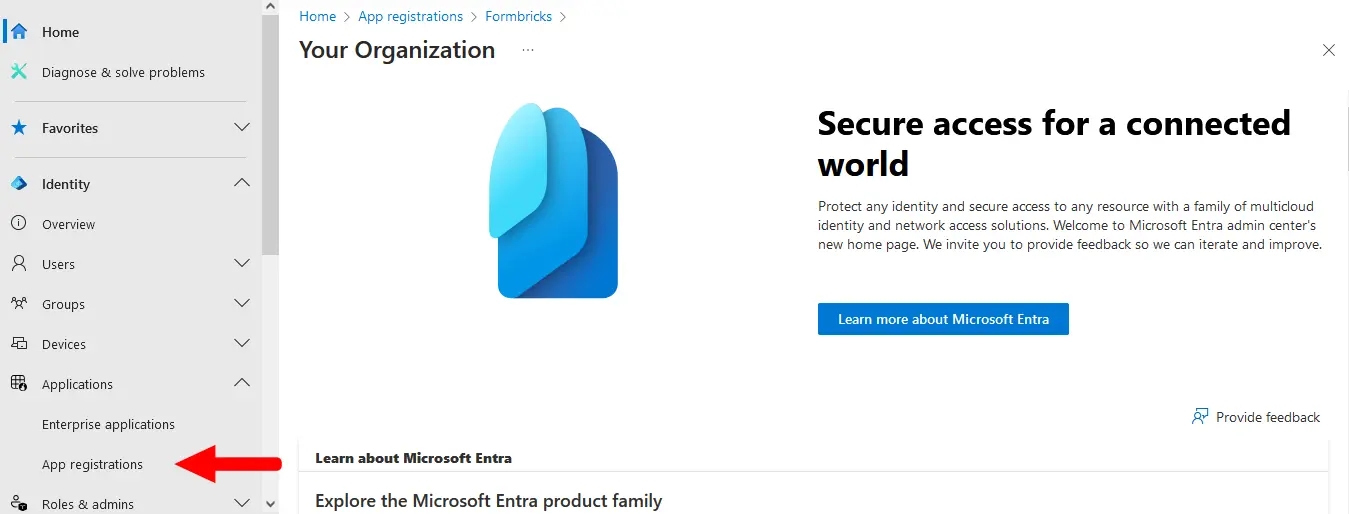
- Go to **Applications** > **App registrations** in the left menu.
|
||||
|
||||
|
||||
</Step>
|
||||
|
||||
<Step title="Create a new app registration">
|
||||
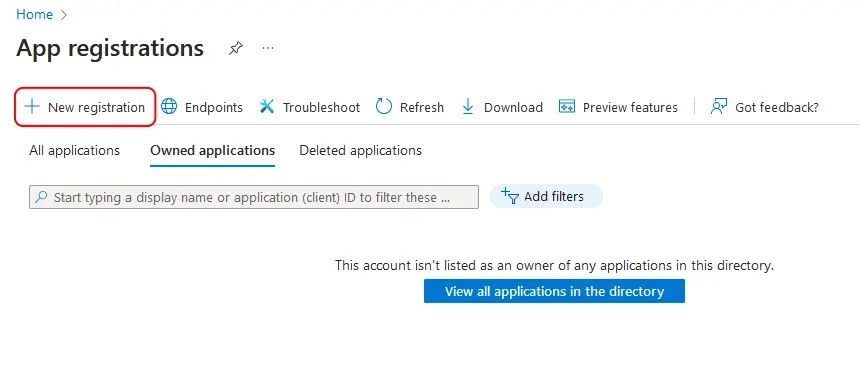
- Click the **New registration** button at the top.
|
||||
|
||||
|
||||
</Step>
|
||||
|
||||
<Step title="Configure the application">
|
||||
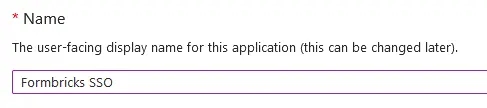
- Name your application something descriptive, such as `Formbricks SSO`.
|
||||
|
||||
|
||||
|
||||
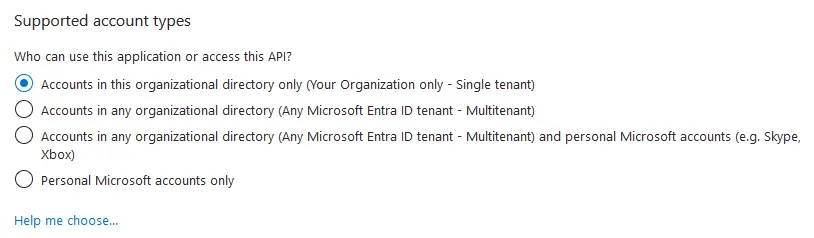
- If you have multiple tenants/organizations, choose the appropriate **Supported account types** option. Otherwise, leave the default option for _Single Tenant_.
|
||||
|
||||
|
||||
|
||||
- Under **Redirect URI**, select **Web** for the platform and paste your Formbricks callback URI (see Requirements above).
|
||||
|
||||

|
||||
|
||||
- Click **Register** to create the App registration. You will be redirected to your new app's _Overview_ page after it is created.
|
||||
</Step>
|
||||
|
||||
<Step title="Collect application credentials">
|
||||
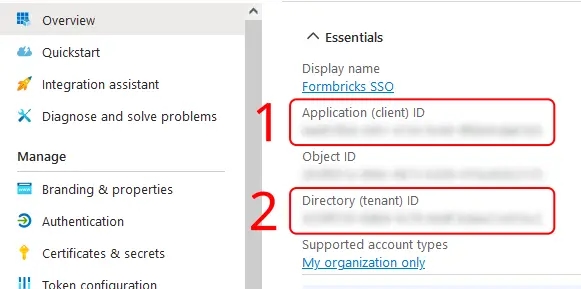
- On the _Overview_ page, under **Essentials**:
|
||||
- Copy the entry for **Application (client) ID** to populate the `AZUREAD_CLIENT_ID` variable.
|
||||
- Copy the entry for **Directory (tenant) ID** to populate the `AZUREAD_TENANT_ID` variable.
|
||||
|
||||
|
||||
</Step>
|
||||
|
||||
<Step title="Create a client secret">
|
||||
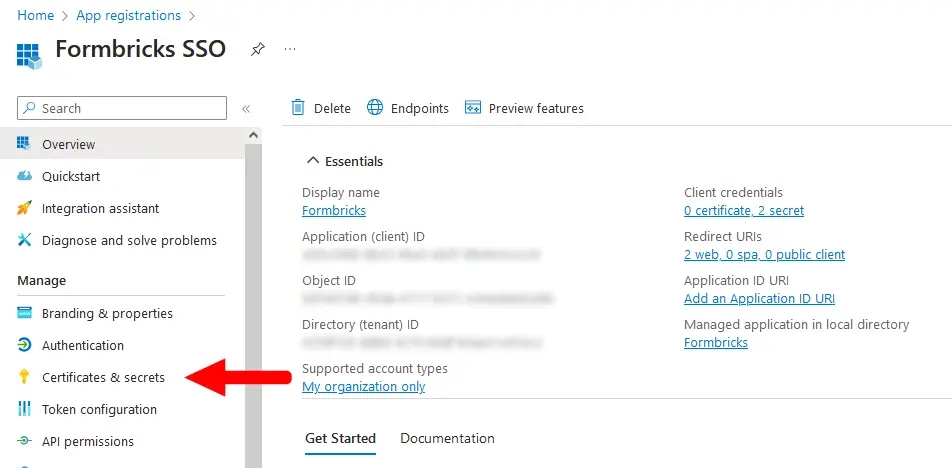
- From your App registration's _Overview_ page, go to **Manage** > **Certificates & secrets**.
|
||||
|
||||
|
||||
|
||||
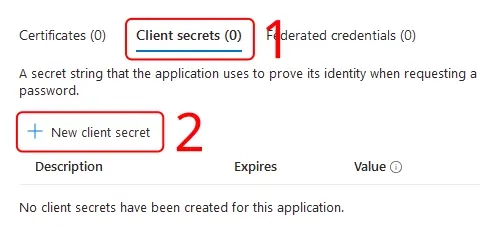
- Make sure you have the **Client secrets** tab active, and click **New client secret**.
|
||||
|
||||
|
||||
|
||||
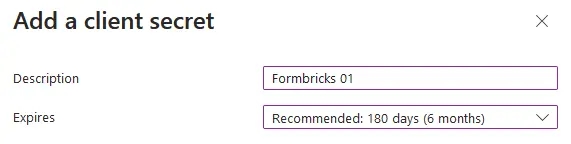
- Enter a **Description**, set an **Expires** period, then click **Add**.
|
||||
|
||||
<Note>
|
||||
You will need to create a new client secret using these steps whenever your chosen expiry period ends.
|
||||
</Note>
|
||||
|
||||
|
||||
|
||||
- Copy the entry under **Value** to populate the `AZUREAD_CLIENT_SECRET` variable.
|
||||
|
||||
<Note>
|
||||
Microsoft will only show this value to you immediately after creation, and you will not be able to access it again. If you lose it, simply create a new secret.
|
||||
</Note>
|
||||
|
||||

|
||||
</Step>
|
||||
|
||||
<Step title="Update environment variables">
|
||||
- Update these environment variables in your `docker-compose.yml` or pass it like your other environment variables to the Formbricks container.
|
||||
|
||||
<Note>
|
||||
You must wrap the `AZUREAD_CLIENT_SECRET` value in double quotes (e.g., "THis~iS4faKe.53CreTvALu3"`) to prevent issues with special characters.
|
||||
</Note>
|
||||
|
||||
An example `.env` for Microsoft Entra ID in Formbricks would look like this:
|
||||
|
||||
```yml Formbricks Env for Microsoft Entra ID SSO
|
||||
AZUREAD_CLIENT_ID=a25cadbd-f049-4690-ada3-56a163a72f4c
|
||||
AZUREAD_TENANT_ID=2746c29a-a3a6-4ea1-8762-37816d4b7885
|
||||
AZUREAD_CLIENT_SECRET="THis~iS4faKe.53CreTvALu3"
|
||||
```
|
||||
</Step>
|
||||
|
||||
<Step title="Restart and test">
|
||||
- Restart your Formbricks instance.
|
||||
- You're all set! Users can now sign up & log in using their Microsoft credentials associated with your Entra ID Tenant.
|
||||
</Step>
|
||||
</Steps>
|
||||
81
docs/self-hosting/configuration/auth-sso/google-oauth.mdx
Normal file
81
docs/self-hosting/configuration/auth-sso/google-oauth.mdx
Normal file
@@ -0,0 +1,81 @@
|
||||
---
|
||||
title: "Google OAuth"
|
||||
description: "Configure Google OAuth for secure Single Sign-On with your Formbricks instance. Implement enterprise-grade authentication for your survey platform with Google credentials."
|
||||
icon: "google"
|
||||
---
|
||||
|
||||
<Note>
|
||||
Single Sign-On (SSO) functionality, including OAuth integrations with Google, Microsoft Azure AD, and OpenID Connect, requires is part of the [Enterprise Edition](/self-hosting/advanced/license).
|
||||
</Note>
|
||||
|
||||
### Google OAuth
|
||||
|
||||
Integrating Google OAuth with your Formbricks instance allows users to log in using their Google credentials, ensuring a secure and streamlined user experience. This guide will walk you through the process of setting up Google OAuth for your Formbricks instance.
|
||||
|
||||
### Requirements
|
||||
|
||||
- A Google Cloud Platform (GCP) account
|
||||
|
||||
- A Formbricks instance running
|
||||
|
||||
### How to connect your Formbricks instance to Google
|
||||
|
||||
<Steps>
|
||||
<Step title="Create a GCP Project">
|
||||
- Navigate to the [GCP Console](https://console.cloud.google.com/).
|
||||
- From the projects list, select a project or create a new one.
|
||||
</Step>
|
||||
|
||||
<Step title="Setting up OAuth 2.0">
|
||||
- If the **APIs & services** page isn't already open, open the console left side menu and select **APIs & services**.
|
||||
- On the left, click **Credentials**.
|
||||
- Click **Create Credentials**, then select **OAuth client ID**.
|
||||
</Step>
|
||||
|
||||
<Step title="Configure OAuth Consent Screen">
|
||||
- If this is your first time creating a client ID, configure your consent screen by clicking **Consent Screen**.
|
||||
- Fill in the necessary details and under **Authorized domains**, add the domain where your Formbricks instance is hosted.
|
||||
</Step>
|
||||
|
||||
<Step title="Create OAuth 2.0 Client IDs">
|
||||
- Select the application type **Web application** for your project and enter any additional information required.
|
||||
- Ensure to specify authorized JavaScript origins and authorized redirect URIs.
|
||||
|
||||
```
|
||||
Authorized JavaScript origins: {WEBAPP_URL}
|
||||
Authorized redirect URIs: {WEBAPP_URL}/api/auth/callback/google
|
||||
```
|
||||
</Step>
|
||||
|
||||
<Step title="Update Environment Variables in Docker">
|
||||
- To integrate the Google OAuth, you have two options: either update the environment variables in the docker-compose file or directly add them to the running container.
|
||||
|
||||
- In your Docker setup directory, open the `.env` file, and add or update the following lines with the `Client ID` and `Client Secret` obtained from Google Cloud Platform:
|
||||
|
||||
```sh
|
||||
GOOGLE_CLIENT_ID=your-client-id-here
|
||||
GOOGLE_CLIENT_SECRET=your-client-secret-here
|
||||
```
|
||||
|
||||
- Alternatively, you can add the environment variables directly to the running container using the following commands (replace `container_id` with your actual Docker container ID):
|
||||
|
||||
```sh
|
||||
docker exec -it container_id /bin/bash
|
||||
export GOOGLE_CLIENT_ID=your-client-id-here
|
||||
export GOOGLE_CLIENT_SECRET=your-client-secret-here
|
||||
exit
|
||||
```
|
||||
</Step>
|
||||
|
||||
<Step title="Restart Your Formbricks Instance">
|
||||
<Note>
|
||||
Restarting your Docker containers may cause a brief period of downtime. Plan accordingly.
|
||||
</Note>
|
||||
|
||||
- Once the environment variables have been updated, it's crucial to restart your Docker containers to apply the changes. This ensures that your Formbricks instance can utilize the new Google OAuth configuration for user authentication.
|
||||
|
||||
- Navigate to your Docker setup directory where your `docker-compose.yml` file is located.
|
||||
|
||||
- Run the following command to bring down your current Docker containers and then bring them back up with the updated environment configuration.
|
||||
</Step>
|
||||
</Steps>
|
||||
@@ -1,208 +0,0 @@
|
||||
---
|
||||
title: OAuth
|
||||
description: "OAuth for Formbricks"
|
||||
icon: "key"
|
||||
---
|
||||
|
||||
<Note>
|
||||
Single Sign-On (SSO) functionality, including OAuth integrations with Google, Microsoft Entra ID, Github and OpenID Connect, requires a valid Formbricks Enterprise License.
|
||||
</Note>
|
||||
|
||||
### Google OAuth
|
||||
|
||||
Integrating Google OAuth with your Formbricks instance allows users to log in using their Google credentials, ensuring a secure and streamlined user experience. This guide will walk you through the process of setting up Google OAuth for your Formbricks instance.
|
||||
|
||||
#### Requirements:
|
||||
|
||||
- A Google Cloud Platform (GCP) account.
|
||||
|
||||
- A Formbricks instance running and accessible.
|
||||
|
||||
#### Steps:
|
||||
|
||||
1. **Create a GCP Project**:
|
||||
|
||||
- Navigate to the [GCP Console](https://console.cloud.google.com/).
|
||||
|
||||
- From the projects list, select a project or create a new one.
|
||||
|
||||
2. **Setting up OAuth 2.0**:
|
||||
|
||||
- If the **APIs & services** page isn't already open, open the console left side menu and select **APIs & services**.
|
||||
|
||||
- On the left, click **Credentials**.
|
||||
|
||||
- Click **Create Credentials**, then select **OAuth client ID**.
|
||||
|
||||
3. **Configure OAuth Consent Screen**:
|
||||
|
||||
- If this is your first time creating a client ID, configure your consent screen by clicking **Consent Screen**.
|
||||
|
||||
- Fill in the necessary details and under **Authorized domains**, add the domain where your Formbricks instance is hosted.
|
||||
|
||||
4. **Create OAuth 2.0 Client IDs**:
|
||||
|
||||
- Select the application type **Web application** for your project and enter any additional information required.
|
||||
|
||||
- Ensure to specify authorized JavaScript origins and authorized redirect URIs.
|
||||
|
||||
```{{ Redirect & Origin URLs
|
||||
Authorized JavaScript origins: {WEBAPP_URL}
|
||||
Authorized redirect URIs: {WEBAPP_URL}/api/auth/callback/google
|
||||
```
|
||||
|
||||
- **Update Environment Variables in Docker**:
|
||||
|
||||
- To integrate the Google OAuth, you have two options: either update the environment variables in the docker-compose file or directly add them to the running container.
|
||||
|
||||
- In your Docker setup directory, open the `.env` file, and add or update the following lines with the `Client ID` and `Client Secret` obtained from Google Cloud Platform:
|
||||
|
||||
- Alternatively, you can add the environment variables directly to the running container using the following commands (replace `container_id` with your actual Docker container ID):
|
||||
|
||||
```sh Shell commands
|
||||
docker exec -it container_id /bin/bash
|
||||
export GOOGLE_CLIENT_ID=your-client-id-here
|
||||
export GOOGLE_CLIENT_SECRET=your-client-secret-here
|
||||
exit
|
||||
```
|
||||
|
||||
```sh env file
|
||||
GOOGLE_CLIENT_ID=your-client-id-here
|
||||
GOOGLE_CLIENT_SECRET=your-client-secret-here
|
||||
```
|
||||
|
||||
1. **Restart Your Formbricks Instance**:
|
||||
|
||||
- **Note:** Restarting your Docker containers may cause a brief period of downtime. Plan accordingly.
|
||||
|
||||
- Once the environment variables have been updated, it's crucial to restart your Docker containers to apply the changes. This ensures that your Formbricks instance can utilize the new Google OAuth configuration for user authentication. Here's how you can do it:
|
||||
|
||||
- Navigate to your Docker setup directory where your `docker-compose.yml` file is located.
|
||||
|
||||
- Run the following command to bring down your current Docker containers and then bring them back up with the updated environment configuration:
|
||||
|
||||
### Microsoft Entra ID (Azure Active Directory) SSO OAuth
|
||||
|
||||
Do you have a Microsoft Entra ID Tenant? Integrate it with your Formbricks instance to allow users to log in using their existing Microsoft credentials. This guide will walk you through the process of setting up an Application Registration for your Formbricks instance.
|
||||
|
||||
#### Requirements
|
||||
|
||||
- A Microsoft Entra ID Tenant populated with users. [Create a tenant as per Microsoft's documentation](https://learn.microsoft.com/en-us/entra/fundamentals/create-new-tenant).
|
||||
|
||||
- A Formbricks instance running and accessible.
|
||||
|
||||
- The callback URI for your Formbricks instance: `{WEBAPP_URL}/api/auth/callback/azure-ad`
|
||||
|
||||
#### Creating an App Registration
|
||||
|
||||
- Login to the [Microsoft Entra admin center](https://entra.microsoft.com/).
|
||||
|
||||
- Go to **Applications** > **App registrations** in the left menu.
|
||||
|
||||

|
||||
|
||||
- Click the **New registration** button at the top.
|
||||
|
||||

|
||||
|
||||
- Name your application something descriptive, such as `Formbricks SSO`.
|
||||
|
||||

|
||||
|
||||
- If you have multiple tenants/organizations, choose the appropriate **Supported account types** option. Otherwise, leave the default option for _Single Tenant_.
|
||||
|
||||

|
||||
|
||||
- Under **Redirect URI**, select **Web** for the platform and paste your Formbricks callback URI (see Requirements above).
|
||||
|
||||

|
||||
|
||||
- Click **Register** to create the App registration. You will be redirected to your new app's _Overview_ page after it is created.
|
||||
|
||||
- On the _Overview_ page, under **Essentials**:
|
||||
|
||||
- Copy the entry for **Application (client) ID** to populate the `AZUREAD_CLIENT_ID` variable.
|
||||
|
||||
- Copy the entry for **Directory (tenant) ID** to populate the `AZUREAD_TENANT_ID` variable.
|
||||
|
||||

|
||||
|
||||
- From your App registration's _Overview_ page, go to **Manage** > **Certificates & secrets**.
|
||||
|
||||

|
||||
|
||||
- Make sure you have the **Client secrets** tab active, and click **New client secret**.
|
||||
|
||||

|
||||
|
||||
- Enter a **Description**, set an **Expires** period, then click **Add**.
|
||||
|
||||
<Note>
|
||||
You will need to create a new client secret using these steps whenever your chosen expiry period ends.
|
||||
</Note>
|
||||
|
||||

|
||||
|
||||
- Copy the entry under **Value** to populate the `AZUREAD_CLIENT_SECRET` variable.
|
||||
|
||||
<Note>
|
||||
Microsoft will only show this value to you immediately after creation, and you will not be able to access it again. If you lose it, simply start from step 9 to create a new secret.
|
||||
</Note>
|
||||
|
||||

|
||||
|
||||
- Update these environment variables in your `docker-compose.yml` or pass it like your other environment variables to the Formbricks container.
|
||||
|
||||
<Note>
|
||||
You must wrap the `AZUREAD_CLIENT_SECRET` value in double quotes (e.g., "THis~iS4faKe.53CreTvALu3"`) to prevent issues with special characters.
|
||||
</Note>
|
||||
|
||||
An example `.env` for Microsoft Entra ID in Formbricks would look like:
|
||||
|
||||
```yml Formbricks Env for Microsoft Entra ID SSO
|
||||
AZUREAD_CLIENT_ID=a25cadbd-f049-4690-ada3-56a163a72f4c
|
||||
AZUREAD_TENANT_ID=2746c29a-a3a6-4ea1-8762-37816d4b7885
|
||||
AZUREAD_CLIENT_SECRET="THis~iS4faKe.53CreTvALu3"
|
||||
```
|
||||
|
||||
- Restart your Formbricks instance.
|
||||
|
||||
- You're all set! Users can now sign up & log in using their Microsoft credentials associated with your Entra ID Tenant.
|
||||
|
||||
## OpenID Configuration
|
||||
|
||||
Integrating your own OIDC (OpenID Connect) instance with your Formbricks instance allows users to log in using their OIDC credentials, ensuring a secure and streamlined user experience. Please follow the steps below to set up OIDC for your Formbricks instance.
|
||||
|
||||
- Configure your OIDC provider & get the following variables:
|
||||
|
||||
- `OIDC_CLIENT_ID`
|
||||
|
||||
- `OIDC_CLIENT_SECRET`
|
||||
|
||||
- `OIDC_ISSUER`
|
||||
|
||||
- `OIDC_SIGNING_ALGORITHM`
|
||||
|
||||
<Note>
|
||||
Make sure the Redirect URI for your OIDC Client is set to `{WEBAPP_URL}/api/auth/callback/openid`.
|
||||
</Note>
|
||||
|
||||
- Update these environment variables in your `docker-compose.yml` or pass it directly to the running container.
|
||||
|
||||
An example configuration for a FusionAuth OpenID Connect in Formbricks would look like:
|
||||
|
||||
|
||||
```yml Formbricks Env for FusionAuth OIDC
|
||||
OIDC_CLIENT_ID=59cada54-56d4-4aa8-a5e7-5823bbe0e5b7
|
||||
OIDC_CLIENT_SECRET=4f4dwP0ZoOAqMW8fM9290A7uIS3E8Xg29xe1umhlB_s
|
||||
OIDC_ISSUER=http://localhost:9011
|
||||
OIDC_DISPLAY_NAME=FusionAuth
|
||||
OIDC_SIGNING_ALGORITHM=HS256
|
||||
```
|
||||
|
||||
|
||||
- Set an environment variable `OIDC_DISPLAY_NAME` to the display name of your OIDC provider.
|
||||
|
||||
- Restart your Formbricks instance.
|
||||
|
||||
- You're all set! Users can now sign up & log in using their OIDC credentials.
|
||||
45
docs/self-hosting/configuration/auth-sso/open-id-connect.mdx
Normal file
45
docs/self-hosting/configuration/auth-sso/open-id-connect.mdx
Normal file
@@ -0,0 +1,45 @@
|
||||
---
|
||||
title: "Open ID Connect"
|
||||
description: "Configure Open ID Connect for secure Single Sign-On with your Formbricks instance. Implement enterprise-grade authentication for your survey platform with Open ID Connect."
|
||||
icon: "key"
|
||||
---
|
||||
|
||||
<Note>
|
||||
Single Sign-On (SSO) functionality, including OAuth integrations with Google, Microsoft Azure AD, and OpenID Connect, requires is part of the [Enterprise Edition](/self-hosting/advanced/license).
|
||||
</Note>
|
||||
|
||||
Integrating your own OIDC (OpenID Connect) instance with your Formbricks instance allows users to log in using their OIDC credentials, ensuring a secure and streamlined user experience. Please follow the steps below to set up OIDC for your Formbricks instance.
|
||||
|
||||
- Configure your OIDC provider & get the following variables:
|
||||
|
||||
- `OIDC_CLIENT_ID`
|
||||
|
||||
- `OIDC_CLIENT_SECRET`
|
||||
|
||||
- `OIDC_ISSUER`
|
||||
|
||||
- `OIDC_SIGNING_ALGORITHM`
|
||||
|
||||
<Note>
|
||||
Make sure the Redirect URI for your OIDC Client is set to `{WEBAPP_URL}/api/auth/callback/openid`.
|
||||
</Note>
|
||||
|
||||
- Update these environment variables in your `docker-compose.yml` or pass it directly to the running container.
|
||||
|
||||
An example configuration for a FusionAuth OpenID Connect in Formbricks would look like:
|
||||
|
||||
|
||||
```yml Formbricks Env for FusionAuth OIDC
|
||||
OIDC_CLIENT_ID=59cada54-56d4-4aa8-a5e7-5823bbe0e5b7
|
||||
OIDC_CLIENT_SECRET=4f4dwP0ZoOAqMW8fM9290A7uIS3E8Xg29xe1umhlB_s
|
||||
OIDC_ISSUER=http://localhost:9011
|
||||
OIDC_DISPLAY_NAME=FusionAuth
|
||||
OIDC_SIGNING_ALGORITHM=HS256
|
||||
```
|
||||
|
||||
|
||||
- Set an environment variable `OIDC_DISPLAY_NAME` to the display name of your OIDC provider.
|
||||
|
||||
- Restart your Formbricks instance.
|
||||
|
||||
- You're all set! Users can now sign up & log in using their OIDC credentials.
|
||||
@@ -1,7 +1,7 @@
|
||||
---
|
||||
title: "SAML SSO"
|
||||
title: "SAML SSO - Self-hosted"
|
||||
icon: "user-shield"
|
||||
description: "How to set up SAML SSO for Formbricks"
|
||||
description: "Configure SAML Single Sign-On (SSO) for secure enterprise authentication with your Formbricks instance."
|
||||
---
|
||||
|
||||
<Note>You require an Enterprise License along with a SAML SSO add-on to avail this feature.</Note>
|
||||
@@ -12,7 +12,7 @@ Formbricks supports SAML Single Sign-On (SSO) to enable secure, centralized auth
|
||||
|
||||
To learn more about SAML Jackson, please refer to the [BoxyHQ SAML Jackson documentation](https://boxyhq.com/docs/jackson/deploy).
|
||||
|
||||
## How SAML Works in Formbricks
|
||||
## How SAML works in Formbricks
|
||||
|
||||
SAML (Security Assertion Markup Language) is an XML-based standard for exchanging authentication and authorization data between an Identity Provider (IdP) and Formbricks. Here's how the integration works with BoxyHQ Jackson embedded into the flow:
|
||||
|
||||
@@ -37,7 +37,7 @@ SAML (Security Assertion Markup Language) is an XML-based standard for exchangin
|
||||
7. **Access Granted:**
|
||||
Formbricks logs the user in using the verified information.
|
||||
|
||||
## SAML Authentication Flow Sequence Diagram
|
||||
## SAML Auth Flow Sequence Diagram
|
||||
|
||||
Below is a sequence diagram illustrating the complete SAML authentication flow with BoxyHQ Jackson integrated:
|
||||
|
||||
@@ -67,12 +67,31 @@ sequenceDiagram
|
||||
|
||||
To configure SAML SSO in Formbricks, follow these steps:
|
||||
|
||||
1. **Database Setup:** Configure a dedicated database for SAML by setting the `SAML_DATABASE_URL` environment variable in your `docker-compose.yml` file (e.g., `postgres://postgres:postgres@postgres:5432/formbricks-saml`). If you're using a self-signed certificate for Postgres, include the `sslmode=disable` parameter.
|
||||
2. **IdP Application:** Create a SAML application in your IdP by following your provider's instructions([SAML Setup](/development/guides/auth-and-provision/setup-saml-with-identity-providers))
|
||||
3. **User Provisioning:** Provision users in your IdP and configure access to the IdP SAML app for all your users (who need access to Formbricks).
|
||||
4. **Metadata:** Keep the XML metadata from your IdP handy for the next step.
|
||||
5. **Metadata Setup:** Create a file called `connection.xml` in your self-hosted Formbricks instance's `formbricks/saml-connection` directory and paste the XML metadata from your IdP into it. Please create the directory if it doesn't exist. Your metadata file should start with a tag like this: `<?xml version="1.0" encoding="UTF-8"?><...>` or `<md:EntityDescriptor entityID="...">`. Please remove any extra text from the metadata.
|
||||
6. **Restart Formbricks:** Restart Formbricks to apply the changes. You can do this by running `docker compose down` and then `docker compose up -d`.
|
||||
<Steps>
|
||||
<Step title="Database Setup">
|
||||
Configure a dedicated database for SAML by setting the `SAML_DATABASE_URL` environment variable in your `docker-compose.yml` file (e.g., `postgres://postgres:postgres@postgres:5432/formbricks-saml`). If you're using a self-signed certificate for Postgres, include the `sslmode=disable` parameter.
|
||||
</Step>
|
||||
|
||||
<Step title="IdP Application">
|
||||
Create a SAML application in your IdP by following your provider's instructions([SAML Setup](/development/guides/auth-and-provision/setup-saml-with-identity-providers))
|
||||
</Step>
|
||||
|
||||
<Step title="User Provisioning">
|
||||
Provision users in your IdP and configure access to the IdP SAML app for all your users (who need access to Formbricks).
|
||||
</Step>
|
||||
|
||||
<Step title="Metadata">
|
||||
Keep the XML metadata from your IdP handy for the next step.
|
||||
</Step>
|
||||
|
||||
<Step title="Metadata Setup">
|
||||
Create a file called `connection.xml` in your self-hosted Formbricks instance's `formbricks/saml-connection` directory and paste the XML metadata from your IdP into it. Please create the directory if it doesn't exist. Your metadata file should start with a tag like this: `<?xml version="1.0" encoding="UTF-8"?><...>` or `<md:EntityDescriptor entityID="...">`. Please remove any extra text from the metadata.
|
||||
</Step>
|
||||
|
||||
<Step title="Restart Formbricks">
|
||||
Restart Formbricks to apply the changes. You can do this by running `docker compose down` and then `docker compose up -d`.
|
||||
</Step>
|
||||
</Steps>
|
||||
|
||||
<Note>
|
||||
We don't support multiple SAML connections yet. You can only have one SAML connection at a time. If you
|
||||
|
||||
@@ -59,9 +59,10 @@ These variables are present inside your machine’s docker-compose file. Restart
|
||||
| OIDC_ISSUER | Issuer URL for Custom OpenID Connect Provider (should have .well-known configured at this) | optional (required if OIDC auth is enabled) | |
|
||||
| OIDC_SIGNING_ALGORITHM | Signing Algorithm for Custom OpenID Connect Provider | optional | RS256 |
|
||||
| OPENTELEMETRY_LISTENER_URL | URL for OpenTelemetry listener inside Formbricks. | optional | |
|
||||
| UNKEY_ROOT_KEY | Key for the [Unkey](https://www.unkey.com/) service. This is used for Rate Limiting for management API. | optional | |
|
||||
| UNKEY_ROOT_KEY | Key for the [Unkey](https://www.unkey.com/) service. This is used for Rate Limiting for management API. | optional | |
|
||||
| CUSTOM_CACHE_DISABLED | Disables custom cache handler if set to 1 (required for deployment on Vercel) | optional | |
|
||||
| PROMETHEUS_ENABLED | Enables Prometheus metrics if set to 1. | optional | |
|
||||
| PROMETHEUS_EXPORTER_PORT | Port for Prometheus metrics. | optional | 9090 | | optional | |
|
||||
| PROMETHEUS_EXPORTER_PORT | Port for Prometheus metrics. | optional | 9090 |
|
||||
| DOCKER_CRON_ENABLED | Controls whether cron jobs run in the Docker image. Set to 0 to disable (useful for cluster setups). | optional | 1 |
|
||||
|
||||
Note: If you want to configure something that is not possible via above, please open an issue on our GitHub repo here or reach out to us on Github Discussions and we’ll try our best to work out a solution with you.
|
||||
|
||||
@@ -160,6 +160,19 @@ When using S3 in a cluster setup, ensure that:
|
||||
- The bucket has appropriate CORS settings configured
|
||||
- IAM roles/users have sufficient permissions for read/write operations
|
||||
|
||||
## Disabling Docker Cron Jobs
|
||||
|
||||
When running Formbricks in a cluster setup, you should disable the built-in cron jobs in the Docker image to prevent them from running on multiple instances simultaneously. Instead, you should set up cron jobs in your orchestration system (like Kubernetes) to run on a single instance or as separate jobs.
|
||||
|
||||
To disable the Docker cron jobs, set the following environment variable:
|
||||
|
||||
```sh env
|
||||
# Disable Docker cron jobs (0 = disabled, 1 = enabled)
|
||||
DOCKER_CRON_ENABLED=0
|
||||
```
|
||||
|
||||
This will prevent the cron jobs from starting in the Docker container while still allowing all other Formbricks functionality to work normally.
|
||||
|
||||
## Kubernetes Setup
|
||||
|
||||
Formbricks provides an official Helm chart for deploying the entire cluster stack on Kubernetes. The Helm chart is available in the [Formbricks GitHub repository](https://github.com/formbricks/formbricks/tree/main/helm-chart).
|
||||
@@ -167,6 +180,7 @@ Formbricks provides an official Helm chart for deploying the entire cluster stac
|
||||
### Features of the Helm Chart
|
||||
|
||||
The Helm chart provides a complete deployment solution that includes:
|
||||
|
||||
- Formbricks application with configurable replicas
|
||||
- PostgreSQL database (with optional HA configuration)
|
||||
- Redis cluster for caching
|
||||
@@ -176,12 +190,14 @@ The Helm chart provides a complete deployment solution that includes:
|
||||
### Installation Steps
|
||||
|
||||
1. Add the Formbricks Helm repository:
|
||||
|
||||
```sh
|
||||
helm repo add formbricks https://raw.githubusercontent.com/formbricks/formbricks/main/helm-chart
|
||||
helm repo update
|
||||
```
|
||||
|
||||
2. Install the chart:
|
||||
|
||||
```sh
|
||||
helm install formbricks formbricks/formbricks
|
||||
```
|
||||
@@ -189,6 +205,7 @@ helm install formbricks formbricks/formbricks
|
||||
### Configuration Options
|
||||
|
||||
The Helm chart can be customized using a `values.yaml` file to configure:
|
||||
|
||||
- Number of Formbricks replicas
|
||||
- Resource limits and requests
|
||||
- Database configuration
|
||||
|
||||
@@ -1,5 +1,5 @@
|
||||
---
|
||||
title: "Overview"
|
||||
title: "Third-party Integrations"
|
||||
description: "Configure third-party integrations with Formbricks Cloud."
|
||||
---
|
||||
|
||||
|
||||
@@ -1,5 +1,5 @@
|
||||
---
|
||||
title: "Quickstart"
|
||||
title: "Quickstart - Link Surveys"
|
||||
description: "Create your first link survey in under 5 minutes."
|
||||
icon: "rocket"
|
||||
---
|
||||
|
||||
@@ -1,5 +1,5 @@
|
||||
---
|
||||
title: "Quickstart"
|
||||
title: "Quickstart - Web & App Surveys"
|
||||
description: "App surveys deliver 6–10x higher conversion rates compared to email surveys. If you are new to Formbricks, follow the steps in this guide to launch a survey in your web or mobile app (React Native) within 10–15 minutes."
|
||||
icon: "rocket"
|
||||
---
|
||||
|
||||
@@ -5,8 +5,7 @@ description: A Helm chart for Formbricks with PostgreSQL, Redis
|
||||
type: application
|
||||
|
||||
# Helm chart Version
|
||||
version: 3.4.0
|
||||
appVersion: v3.4.0
|
||||
version: 0.0.0-dev
|
||||
|
||||
keywords:
|
||||
- formbricks
|
||||
|
||||
@@ -1,6 +1,6 @@
|
||||
# formbricks
|
||||
|
||||
  
|
||||
 
|
||||
|
||||
A Helm chart for Formbricks with PostgreSQL, Redis
|
||||
|
||||
|
||||
@@ -1,49 +1,40 @@
|
||||
{{- if (.Values.cronJob).enabled }}
|
||||
{{- range $name, $job := .Values.cronJob.jobs }}
|
||||
---
|
||||
apiVersion: {{ if $.Capabilities.APIVersions.Has "batch/v1/CronJob" }}batch/v1{{ else }}batch/v1beta1{{ end }}
|
||||
{{ if $.Capabilities.APIVersions.Has "batch/v1/CronJob" -}}
|
||||
apiVersion: batch/v1
|
||||
{{- else -}}
|
||||
apiVersion: batch/v1beta1
|
||||
{{- end }}
|
||||
kind: CronJob
|
||||
metadata:
|
||||
name: {{ $name }}
|
||||
labels:
|
||||
# Standard labels for tracking CronJobs
|
||||
{{- include "formbricks.labels" $ | nindent 4 }}
|
||||
|
||||
# Additional labels if specified
|
||||
{{- if $job.additionalLabels }}
|
||||
{{- toYaml $job.additionalLabels | indent 4 }}
|
||||
{{- end }}
|
||||
|
||||
# Additional annotations if specified
|
||||
{{- if $job.annotations }}
|
||||
{{- include "formbricks.labels" $ | nindent 4 }}
|
||||
{{- if $job.additionalLabels }}
|
||||
{{ $job.additionalLabels | indent 4 }}
|
||||
{{- end }}
|
||||
{{- if $job.annotations }}
|
||||
annotations:
|
||||
{{- toYaml $job.annotations | indent 4 }}
|
||||
{{- end }}
|
||||
|
||||
{{ $job.annotations | indent 4 }}
|
||||
{{- end }}
|
||||
name: {{ $name }}
|
||||
namespace: {{ template "formbricks.namespace" $ }}
|
||||
spec:
|
||||
# Define the execution schedule for the job
|
||||
schedule: {{ $job.schedule | quote }}
|
||||
|
||||
# Kubernetes 1.27+ supports time zones for CronJobs
|
||||
{{- if ge (int $.Capabilities.KubeVersion.Minor) 27 }}
|
||||
{{- if $job.timeZone }}
|
||||
{{- if ge (int $.Capabilities.KubeVersion.Minor) 27 }}
|
||||
{{- if $job.timeZone }}
|
||||
timeZone: {{ $job.timeZone }}
|
||||
{{- end }}
|
||||
{{- end }}
|
||||
|
||||
# Define job retention policies
|
||||
{{- if $job.successfulJobsHistoryLimit }}
|
||||
{{ end }}
|
||||
{{- end }}
|
||||
{{- if $job.successfulJobsHistoryLimit }}
|
||||
successfulJobsHistoryLimit: {{ $job.successfulJobsHistoryLimit }}
|
||||
{{- end }}
|
||||
{{- if $job.failedJobsHistoryLimit }}
|
||||
failedJobsHistoryLimit: {{ $job.failedJobsHistoryLimit }}
|
||||
{{- end }}
|
||||
|
||||
# Define concurrency policy
|
||||
{{- if $job.concurrencyPolicy }}
|
||||
{{ end }}
|
||||
{{- if $job.concurrencyPolicy }}
|
||||
concurrencyPolicy: {{ $job.concurrencyPolicy }}
|
||||
{{- end }}
|
||||
|
||||
{{ end }}
|
||||
{{- if $job.failedJobsHistoryLimit }}
|
||||
failedJobsHistoryLimit: {{ $job.failedJobsHistoryLimit }}
|
||||
{{ end }}
|
||||
jobTemplate:
|
||||
spec:
|
||||
{{- with $job.activeDeadlineSeconds }}
|
||||
@@ -55,48 +46,101 @@ spec:
|
||||
template:
|
||||
metadata:
|
||||
labels:
|
||||
{{- include "formbricks.labels" $ | nindent 12 }}
|
||||
|
||||
# Additional pod-level labels
|
||||
{{- include "formbricks.labels" $ | nindent 12 }}
|
||||
{{- with $job.additionalPodLabels }}
|
||||
{{- toYaml . | nindent 12 }}
|
||||
{{- end }}
|
||||
|
||||
# Additional annotations
|
||||
{{- with $job.additionalPodAnnotations }}
|
||||
annotations: {{- toYaml . | nindent 12 }}
|
||||
annotations: {{ toYaml . | nindent 12 }}
|
||||
{{- end }}
|
||||
|
||||
spec:
|
||||
# Define the service account if RBAC is enabled
|
||||
{{- if $.Values.rbac.enabled }}
|
||||
{{- if $.Values.rbac.serviceAccount.name }}
|
||||
serviceAccountName: {{ $.Values.rbac.serviceAccount.name }}
|
||||
{{- else }}
|
||||
serviceAccountName: {{ template "formbricks.name" $ }}
|
||||
{{- end }}
|
||||
|
||||
# Define the job container
|
||||
{{- end }}
|
||||
containers:
|
||||
- name: {{ $name }}
|
||||
image: "{{ required "Image repository is undefined" $job.image.repository }}:{{ $job.image.tag | default "latest" }}"
|
||||
imagePullPolicy: {{ $job.image.imagePullPolicy | default "IfNotPresent" }}
|
||||
|
||||
# Environment variables from values
|
||||
- name: {{ $name }}
|
||||
{{- $image := required (print "Undefined image repo for container '" $name "'") $job.image.repository }}
|
||||
{{- with $job.image.tag }} {{- $image = print $image ":" . }} {{- end }}
|
||||
{{- with $job.image.digest }} {{- $image = print $image "@" . }} {{- end }}
|
||||
image: {{ $image }}
|
||||
{{- if $job.image.imagePullPolicy }}
|
||||
imagePullPolicy: {{ $job.image.imagePullPolicy }}
|
||||
{{ end }}
|
||||
{{- with $job.env }}
|
||||
env:
|
||||
env:
|
||||
{{- range $key, $value := $job.env }}
|
||||
- name: {{ $key }}
|
||||
value: {{ $value | quote }}
|
||||
- name: {{ include "formbricks.tplvalues.render" ( dict "value" $key "context" $ ) }}
|
||||
{{- if kindIs "string" $value }}
|
||||
value: {{ include "formbricks.tplvalues.render" ( dict "value" $value "context" $ ) | quote }}
|
||||
{{- else }}
|
||||
{{- toYaml $value | nindent 16 }}
|
||||
{{- end }}
|
||||
{{- end }}
|
||||
{{- end }}
|
||||
|
||||
# Define command and arguments if specified
|
||||
{{- with $job.command }}
|
||||
command: {{- toYaml . | indent 14 }}
|
||||
{{- with $job.envFrom }}
|
||||
envFrom:
|
||||
{{ toYaml . | indent 12 }}
|
||||
{{- end }}
|
||||
{{- if $job.command }}
|
||||
command: {{ $job.command }}
|
||||
{{- end }}
|
||||
|
||||
{{- with $job.args }}
|
||||
args: {{- toYaml . | indent 14 }}
|
||||
args:
|
||||
{{- range . }}
|
||||
- {{ . | quote }}
|
||||
{{- end }}
|
||||
{{- end }}
|
||||
{{- with $job.resources }}
|
||||
resources:
|
||||
{{ toYaml . | indent 14 }}
|
||||
{{- end }}
|
||||
|
||||
restartPolicy: {{ $job.restartPolicy | default "OnFailure" }}
|
||||
{{- with $job.volumeMounts }}
|
||||
volumeMounts:
|
||||
{{ toYaml . | indent 12 }}
|
||||
{{- end }}
|
||||
{{- with $job.securityContext }}
|
||||
securityContext: {{ toYaml . | nindent 14 }}
|
||||
{{- end }}
|
||||
{{- with $job.nodeSelector }}
|
||||
nodeSelector:
|
||||
{{ toYaml . | indent 12 }}
|
||||
{{- end }}
|
||||
{{- with $job.affinity }}
|
||||
affinity:
|
||||
{{ toYaml . | indent 12 }}
|
||||
{{- end }}
|
||||
{{- with $job.priorityClassName }}
|
||||
priorityClassName: {{ . }}
|
||||
{{- end }}
|
||||
{{- with $job.tolerations }}
|
||||
tolerations: {{ toYaml . | nindent 12 }}
|
||||
{{- end }}
|
||||
{{- with $job.topologySpreadConstraints }}
|
||||
topologySpreadConstraints: {{ toYaml . | nindent 12 }}
|
||||
{{- end }}
|
||||
{{- if $job.restartPolicy }}
|
||||
restartPolicy: {{ $job.restartPolicy }}
|
||||
{{ else }}
|
||||
restartPolicy: OnFailure
|
||||
{{ end }}
|
||||
{{- with $job.imagePullSecrets }}
|
||||
imagePullSecrets:
|
||||
{{ toYaml . | indent 12 }}
|
||||
{{ end }}
|
||||
{{- if $job.dnsConfig }}
|
||||
dnsConfig:
|
||||
{{ toYaml $job.dnsConfig | indent 12 }}
|
||||
{{- end }}
|
||||
{{- if $job.dnsPolicy }}
|
||||
dnsPolicy: {{ $job.dnsPolicy }}
|
||||
{{- end }}
|
||||
{{- with $job.volumes }}
|
||||
volumes:
|
||||
{{ toYaml . | indent 12 }}
|
||||
{{- end }}
|
||||
{{- end }}
|
||||
{{- end }}
|
||||
|
||||
@@ -13,6 +13,9 @@ metadata:
|
||||
{{- if .Values.deployment.annotations }}
|
||||
{{- toYaml .Values.deployment.annotations | nindent 4 }}
|
||||
{{- end }}
|
||||
{{- if .Values.deployment.reloadOnChange }}
|
||||
reloader.stakater.com/auto: "true"
|
||||
{{- end }}
|
||||
{{- end }}
|
||||
spec:
|
||||
{{- if .Values.deployment.replicas }}
|
||||
@@ -94,8 +97,12 @@ spec:
|
||||
protocol: {{ $config.protocol | default "TCP" | quote }}
|
||||
{{- end }}
|
||||
{{- end }}
|
||||
{{- if .Values.deployment.envFrom }}
|
||||
{{- if or .Values.deployment.envFrom (and .Values.externalSecret.enabled (index .Values.externalSecret.files "app-secrets")) }}
|
||||
envFrom:
|
||||
{{- if or .Values.secret.enabled (and .Values.externalSecret.enabled (index .Values.externalSecret.files "app-secrets")) }}
|
||||
- secretRef:
|
||||
name: {{ template "formbricks.name" . }}-app-secrets
|
||||
{{- end }}
|
||||
{{- range $value := .Values.deployment.envFrom }}
|
||||
{{- if (eq .type "configmap") }}
|
||||
- configMapRef:
|
||||
@@ -120,47 +127,13 @@ spec:
|
||||
{{- end }}
|
||||
{{- end }}
|
||||
env:
|
||||
{{- if and (.Values.enterprise.enabled) (ne .Values.enterprise.licenseKey "") }}
|
||||
- name: ENTERPRISE_LICENSE_KEY
|
||||
valueFrom:
|
||||
secretKeyRef:
|
||||
name: {{ template "formbricks.name" . }}-app-secrets
|
||||
key: ENTERPRISE_LICENSE_KEY
|
||||
{{- else if and (.Values.enterprise.enabled) (eq .Values.enterprise.licenseKey "") }}
|
||||
- name: ENTERPRISE_LICENSE_KEY
|
||||
valueFrom:
|
||||
secretKeyRef:
|
||||
name: {{ template "formbricks.name" . }}-app-secrets
|
||||
key: ENTERPRISE_LICENSE_KEY
|
||||
{{- end }}
|
||||
- name: REDIS_URL
|
||||
valueFrom:
|
||||
secretKeyRef:
|
||||
name: {{ template "formbricks.name" . }}-app-secrets
|
||||
key: REDIS_URL
|
||||
- name: DATABASE_URL
|
||||
valueFrom:
|
||||
secretKeyRef:
|
||||
name: {{ template "formbricks.name" . }}-app-secrets
|
||||
key: DATABASE_URL
|
||||
- name: CRON_SECRET
|
||||
valueFrom:
|
||||
secretKeyRef:
|
||||
name: {{ template "formbricks.name" . }}-app-secrets
|
||||
key: CRON_SECRET
|
||||
- name: ENCRYPTION_KEY
|
||||
valueFrom:
|
||||
secretKeyRef:
|
||||
name: {{ template "formbricks.name" . }}-app-secrets
|
||||
key: ENCRYPTION_KEY
|
||||
- name: NEXTAUTH_SECRET
|
||||
valueFrom:
|
||||
secretKeyRef:
|
||||
name: {{ template "formbricks.name" . }}-app-secrets
|
||||
key: NEXTAUTH_SECRET
|
||||
{{- range $key, $value := .Values.deployment.env }}
|
||||
- name: {{ include "formbricks.tplvalues.render" ( dict "value" $key "context" $ ) }}
|
||||
{{ include "formbricks.tplvalues.render" ( dict "value" $value "context" $ ) | indent 10 }}
|
||||
{{- if kindIs "string" $value }}
|
||||
value: {{ include "formbricks.tplvalues.render" ( dict "value" $value "context" $ ) | quote }}
|
||||
{{- else }}
|
||||
{{- toYaml $value | nindent 14 }}
|
||||
{{- end }}
|
||||
{{- end }}
|
||||
{{- if .Values.deployment.resources }}
|
||||
resources:
|
||||
|
||||
@@ -1,10 +1,6 @@
|
||||
{{- if .Values.autoscaling.enabled }}
|
||||
---
|
||||
{{- if .Capabilities.APIVersions.Has "autoscaling/v2/HorizontalPodAutoscaler" }}
|
||||
apiVersion: autoscaling/v2
|
||||
{{- else }}
|
||||
apiVersion: autoscaling/v2beta2
|
||||
{{- end }}
|
||||
kind: HorizontalPodAutoscaler
|
||||
metadata:
|
||||
name: {{ template "formbricks.name" . }}
|
||||
|
||||
@@ -54,16 +54,14 @@ deployment:
|
||||
|
||||
# Environment variables from ConfigMaps or Secrets
|
||||
envFrom:
|
||||
# app-secrets:
|
||||
# type: secret
|
||||
# nameSuffix: app-secrets
|
||||
# app-secrets:
|
||||
# type: secret
|
||||
# nameSuffix: app-secrets
|
||||
|
||||
# Environment variables passed to the app container
|
||||
env:
|
||||
EMAIL_VERIFICATION_DISABLED:
|
||||
value: "1"
|
||||
PASSWORD_RESET_DISABLED:
|
||||
value: "1"
|
||||
DOCKER_CRON_ENABLED:
|
||||
value: "0"
|
||||
|
||||
# Tolerations for scheduling pods on tainted nodes
|
||||
tolerations: []
|
||||
@@ -298,4 +296,4 @@ postgresql:
|
||||
containerSecurityContext:
|
||||
enabled: true
|
||||
runAsUser: 1001
|
||||
readOnlyRootFilesystem: false
|
||||
readOnlyRootFilesystem: false
|
||||
27
infra/terraform/clouwatch.tf
Normal file
27
infra/terraform/clouwatch.tf
Normal file
@@ -0,0 +1,27 @@
|
||||
data "aws_ssm_parameter" "slack_notification_channel" {
|
||||
name = "/prod/formbricks/slack-webhook-url"
|
||||
with_decryption = true
|
||||
}
|
||||
|
||||
resource "aws_cloudwatch_log_group" "cloudwatch_cis_benchmark" {
|
||||
name = "/aws/cis-benchmark-group"
|
||||
retention_in_days = 365
|
||||
}
|
||||
|
||||
module "notify-slack" {
|
||||
source = "terraform-aws-modules/notify-slack/aws"
|
||||
version = "6.6.0"
|
||||
|
||||
slack_channel = "kubernetes"
|
||||
slack_username = "formbricks-cloudwatch"
|
||||
slack_webhook_url = data.aws_ssm_parameter.slack_notification_channel.value
|
||||
sns_topic_name = "cloudwatch-alarms"
|
||||
create_sns_topic = true
|
||||
}
|
||||
|
||||
module "cloudwatch_cis-alarms" {
|
||||
source = "terraform-aws-modules/cloudwatch/aws//modules/cis-alarms"
|
||||
version = "5.7.1"
|
||||
log_group_name = aws_cloudwatch_log_group.cloudwatch_cis_benchmark.name
|
||||
alarm_actions = [module.notify-slack.slack_topic_arn]
|
||||
}
|
||||
@@ -10,3 +10,11 @@ data "aws_eks_cluster_auth" "eks" {
|
||||
data "aws_ecrpublic_authorization_token" "token" {
|
||||
provider = aws.virginia
|
||||
}
|
||||
|
||||
data "aws_iam_roles" "administrator" {
|
||||
name_regex = "AWSReservedSSO_AdministratorAccess"
|
||||
}
|
||||
|
||||
data "aws_iam_roles" "github" {
|
||||
name_regex = "formbricks-prod-github"
|
||||
}
|
||||
|
||||
@@ -23,7 +23,7 @@ module "iam_github_oidc_role" {
|
||||
"repo:formbricks/*:*",
|
||||
]
|
||||
policies = {
|
||||
Administrator = "arn:aws:iam::aws:policy/AmazonS3ReadOnlyAccess"
|
||||
Administrator = "arn:aws:iam::aws:policy/AdministratorAccess"
|
||||
}
|
||||
|
||||
tags = local.tags
|
||||
|
||||
@@ -32,11 +32,6 @@ module "route53_zones" {
|
||||
}
|
||||
}
|
||||
|
||||
output "route53_ns_records" {
|
||||
value = module.route53_zones.route53_zone_name_servers
|
||||
}
|
||||
|
||||
|
||||
module "acm" {
|
||||
source = "terraform-aws-modules/acm/aws"
|
||||
version = "5.1.1"
|
||||
@@ -249,7 +244,7 @@ module "eks" {
|
||||
cluster_name = "${local.name}-eks"
|
||||
cluster_version = "1.32"
|
||||
|
||||
enable_cluster_creator_admin_permissions = true
|
||||
enable_cluster_creator_admin_permissions = false
|
||||
cluster_endpoint_public_access = true
|
||||
|
||||
cluster_addons = {
|
||||
@@ -271,6 +266,41 @@ module "eks" {
|
||||
}
|
||||
}
|
||||
|
||||
kms_key_administrators = [
|
||||
tolist(data.aws_iam_roles.github.arns)[0],
|
||||
tolist(data.aws_iam_roles.administrator.arns)[0]
|
||||
]
|
||||
|
||||
kms_key_users = [
|
||||
tolist(data.aws_iam_roles.github.arns)[0],
|
||||
tolist(data.aws_iam_roles.administrator.arns)[0]
|
||||
]
|
||||
|
||||
access_entries = {
|
||||
administrator = {
|
||||
principal_arn = tolist(data.aws_iam_roles.administrator.arns)[0]
|
||||
policy_associations = {
|
||||
Admin = {
|
||||
policy_arn = "arn:aws:eks::aws:cluster-access-policy/AmazonEKSClusterAdminPolicy"
|
||||
access_scope = {
|
||||
type = "cluster"
|
||||
}
|
||||
}
|
||||
}
|
||||
}
|
||||
github = {
|
||||
principal_arn = tolist(data.aws_iam_roles.github.arns)[0]
|
||||
policy_associations = {
|
||||
Admin = {
|
||||
policy_arn = "arn:aws:eks::aws:cluster-access-policy/AmazonEKSClusterAdminPolicy"
|
||||
access_scope = {
|
||||
type = "cluster"
|
||||
}
|
||||
}
|
||||
}
|
||||
}
|
||||
}
|
||||
|
||||
vpc_id = module.vpc.vpc_id
|
||||
subnet_ids = module.vpc.private_subnets
|
||||
control_plane_subnet_ids = module.vpc.intra_subnets
|
||||
@@ -573,95 +603,136 @@ resource "helm_release" "formbricks" {
|
||||
|
||||
values = [
|
||||
<<-EOT
|
||||
postgresql:
|
||||
enabled: false
|
||||
redis:
|
||||
enabled: false
|
||||
ingress:
|
||||
postgresql:
|
||||
enabled: false
|
||||
redis:
|
||||
enabled: false
|
||||
ingress:
|
||||
enabled: true
|
||||
ingressClassName: alb
|
||||
hosts:
|
||||
- host: "app.${local.domain}"
|
||||
paths:
|
||||
- path: /
|
||||
pathType: "Prefix"
|
||||
serviceName: "formbricks"
|
||||
annotations:
|
||||
alb.ingress.kubernetes.io/scheme: internet-facing
|
||||
alb.ingress.kubernetes.io/target-type: ip
|
||||
alb.ingress.kubernetes.io/listen-ports: '[{"HTTP": 80}, {"HTTPS": 443}]'
|
||||
alb.ingress.kubernetes.io/ssl-redirect: "443"
|
||||
alb.ingress.kubernetes.io/certificate-arn: ${module.acm.acm_certificate_arn}
|
||||
alb.ingress.kubernetes.io/healthcheck-path: "/health"
|
||||
alb.ingress.kubernetes.io/group.name: formbricks
|
||||
alb.ingress.kubernetes.io/ssl-policy: "ELBSecurityPolicy-TLS13-1-2-2021-06"
|
||||
secret:
|
||||
enabled: false
|
||||
rbac:
|
||||
enabled: true
|
||||
serviceAccount:
|
||||
enabled: true
|
||||
ingressClassName: alb
|
||||
hosts:
|
||||
- host: "app.${local.domain}"
|
||||
paths:
|
||||
- path: /
|
||||
pathType: "Prefix"
|
||||
serviceName: "formbricks"
|
||||
name: formbricks
|
||||
annotations:
|
||||
alb.ingress.kubernetes.io/scheme: internet-facing
|
||||
alb.ingress.kubernetes.io/target-type: ip
|
||||
alb.ingress.kubernetes.io/listen-ports: '[{"HTTP": 80}, {"HTTPS": 443}]'
|
||||
alb.ingress.kubernetes.io/ssl-redirect: "443"
|
||||
alb.ingress.kubernetes.io/certificate-arn: ${module.acm.acm_certificate_arn}
|
||||
alb.ingress.kubernetes.io/healthcheck-path: "/health"
|
||||
alb.ingress.kubernetes.io/group.name: formbricks
|
||||
alb.ingress.kubernetes.io/ssl-policy: "ELBSecurityPolicy-TLS13-1-2-2021-06"
|
||||
secret:
|
||||
enabled: false
|
||||
rbac:
|
||||
enabled: true
|
||||
serviceAccount:
|
||||
enabled: true
|
||||
name: formbricks
|
||||
annotations:
|
||||
eks.amazonaws.com/role-arn: ${module.formkey-aws-access.iam_role_arn}
|
||||
serviceMonitor:
|
||||
enabled: true
|
||||
deployment:
|
||||
image:
|
||||
repository: "ghcr.io/formbricks/formbricks-experimental"
|
||||
tag: "open-telemetry-for-prometheus"
|
||||
pullPolicy: Always
|
||||
env:
|
||||
S3_BUCKET_NAME:
|
||||
value: ${module.s3-bucket.s3_bucket_id}
|
||||
RATE_LIMITING_DISABLED:
|
||||
value: "1"
|
||||
envFrom:
|
||||
app-parameters:
|
||||
type: secret
|
||||
nameSuffix: {RELEASE.name}-app-parameters
|
||||
annotations:
|
||||
deployed_at: ${timestamp()}
|
||||
externalSecret:
|
||||
enabled: true # Enable/disable ExternalSecrets
|
||||
secretStore:
|
||||
name: aws-secrets-manager
|
||||
kind: ClusterSecretStore
|
||||
refreshInterval: "1h"
|
||||
files:
|
||||
app-parameters:
|
||||
dataFrom:
|
||||
key: "/prod/formbricks/env"
|
||||
secretStore:
|
||||
name: aws-parameter-store
|
||||
kind: ClusterSecretStore
|
||||
app-secrets:
|
||||
data:
|
||||
DATABASE_URL:
|
||||
remoteRef:
|
||||
key: "prod/formbricks/secrets"
|
||||
property: DATABASE_URL
|
||||
REDIS_URL:
|
||||
remoteRef:
|
||||
key: "prod/formbricks/secrets"
|
||||
property: REDIS_URL
|
||||
CRON_SECRET:
|
||||
remoteRef:
|
||||
key: "prod/formbricks/secrets"
|
||||
property: CRON_SECRET
|
||||
ENCRYPTION_KEY:
|
||||
remoteRef:
|
||||
key: "prod/formbricks/secrets"
|
||||
property: ENCRYPTION_KEY
|
||||
NEXTAUTH_SECRET:
|
||||
remoteRef:
|
||||
key: "prod/formbricks/secrets"
|
||||
property: NEXTAUTH_SECRET
|
||||
ENTERPRISE_LICENSE_KEY:
|
||||
remoteRef:
|
||||
key: "prod/formbricks/enterprise"
|
||||
property: ENTERPRISE_LICENSE_KEY
|
||||
EOT
|
||||
eks.amazonaws.com/role-arn: ${module.formkey-aws-access.iam_role_arn}
|
||||
serviceMonitor:
|
||||
enabled: true
|
||||
reloadOnChange: true
|
||||
deployment:
|
||||
image:
|
||||
repository: "ghcr.io/formbricks/formbricks-experimental"
|
||||
tag: "open-telemetry-for-prometheus"
|
||||
pullPolicy: Always
|
||||
env:
|
||||
S3_BUCKET_NAME:
|
||||
value: ${module.s3-bucket.s3_bucket_id}
|
||||
RATE_LIMITING_DISABLED:
|
||||
value: "1"
|
||||
envFrom:
|
||||
app-env:
|
||||
type: secret
|
||||
nameSuffix: app-env
|
||||
annotations:
|
||||
last_updated_at: ${timestamp()}
|
||||
externalSecret:
|
||||
enabled: true # Enable/disable ExternalSecrets
|
||||
secretStore:
|
||||
name: aws-secrets-manager
|
||||
kind: ClusterSecretStore
|
||||
refreshInterval: "1m"
|
||||
files:
|
||||
app-env:
|
||||
dataFrom:
|
||||
key: "prod/formbricks/environment"
|
||||
app-secrets:
|
||||
dataFrom:
|
||||
key: "prod/formbricks/secrets"
|
||||
cronJob:
|
||||
enabled: true
|
||||
jobs:
|
||||
survey-status:
|
||||
schedule: "0 0 * * *"
|
||||
env:
|
||||
CRON_SECRET:
|
||||
valueFrom:
|
||||
secretKeyRef:
|
||||
name: "formbricks-app-env"
|
||||
key: "CRON_SECRET"
|
||||
WEBAPP_URL:
|
||||
valueFrom:
|
||||
secretKeyRef:
|
||||
name: "formbricks-app-env"
|
||||
key: "WEBAPP_URL"
|
||||
image:
|
||||
repository: curlimages/curl
|
||||
tag: latest
|
||||
imagePullPolicy: IfNotPresent
|
||||
args:
|
||||
- "/bin/sh"
|
||||
- "-c"
|
||||
- 'curl -X POST -H "content-type: application/json" -H "x-api-key: $CRON_SECRET" "$WEBAPP_URL/api/cron/survey-status"'
|
||||
weekely-summary:
|
||||
schedule: "0 8 * * 1"
|
||||
env:
|
||||
CRON_SECRET:
|
||||
valueFrom:
|
||||
secretKeyRef:
|
||||
name: "formbricks-app-env"
|
||||
key: "CRON_SECRET"
|
||||
WEBAPP_URL:
|
||||
valueFrom:
|
||||
secretKeyRef:
|
||||
name: "formbricks-app-env"
|
||||
key: "WEBAPP_URL"
|
||||
image:
|
||||
repository: curlimages/curl
|
||||
tag: latest
|
||||
imagePullPolicy: IfNotPresent
|
||||
args:
|
||||
- "/bin/sh"
|
||||
- "-c"
|
||||
- 'curl -X POST -H "content-type: application/json" -H "x-api-key: $CRON_SECRET" "$WEBAPP_URL/api/cron/weekly-summary"'
|
||||
ping:
|
||||
schedule: "0 9 * * *"
|
||||
env:
|
||||
CRON_SECRET:
|
||||
valueFrom:
|
||||
secretKeyRef:
|
||||
name: "formbricks-app-env"
|
||||
key: "CRON_SECRET"
|
||||
WEBAPP_URL:
|
||||
valueFrom:
|
||||
secretKeyRef:
|
||||
name: "formbricks-app-env"
|
||||
key: "WEBAPP_URL"
|
||||
image:
|
||||
repository: curlimages/curl
|
||||
tag: latest
|
||||
imagePullPolicy: IfNotPresent
|
||||
args:
|
||||
- "/bin/sh"
|
||||
- "-c"
|
||||
- 'curl -X POST -H "content-type: application/json" -H "x-api-key: $CRON_SECRET" "$WEBAPP_URL/api/cron/ping"'
|
||||
EOT
|
||||
]
|
||||
}
|
||||
|
||||
|
||||
@@ -1,19 +1,3 @@
|
||||
# Generate random secrets for formbricks
|
||||
resource "random_password" "nextauth_secret" {
|
||||
length = 32
|
||||
special = false
|
||||
}
|
||||
|
||||
resource "random_password" "encryption_key" {
|
||||
length = 32
|
||||
special = false
|
||||
}
|
||||
|
||||
resource "random_password" "cron_secret" {
|
||||
length = 32
|
||||
special = false
|
||||
}
|
||||
|
||||
# Create the first AWS Secrets Manager secret for environment variables
|
||||
resource "aws_secretsmanager_secret" "formbricks_app_secrets" {
|
||||
name = "prod/formbricks/secrets"
|
||||
@@ -24,10 +8,7 @@ resource "aws_secretsmanager_secret" "formbricks_app_secrets" {
|
||||
resource "aws_secretsmanager_secret_version" "formbricks_app_secrets" {
|
||||
secret_id = aws_secretsmanager_secret.formbricks_app_secrets.id
|
||||
secret_string = jsonencode({
|
||||
NEXTAUTH_SECRET = random_password.nextauth_secret.result
|
||||
ENCRYPTION_KEY = random_password.encryption_key.result
|
||||
CRON_SECRET = random_password.cron_secret.result
|
||||
DATABASE_URL = "postgres://formbricks:${random_password.postgres.result}@${module.rds-aurora.cluster_endpoint}/formbricks"
|
||||
REDIS_URL = "rediss://:${random_password.valkey.result}@${module.elasticache.replication_group_primary_endpoint_address}:6379"
|
||||
DATABASE_URL = "postgres://formbricks:${random_password.postgres.result}@${module.rds-aurora.cluster_endpoint}/formbricks"
|
||||
REDIS_URL = "rediss://:${random_password.valkey.result}@${module.elasticache.replication_group_primary_endpoint_address}:6379"
|
||||
})
|
||||
}
|
||||
|
||||
@@ -17,7 +17,9 @@
|
||||
"db:migrate:deploy": "turbo run db:migrate:deploy",
|
||||
"db:start": "turbo run db:start",
|
||||
"db:push": "turbo run db:push",
|
||||
"go": "turbo run go --concurrency 20",
|
||||
"db:up": "docker compose -f docker-compose.dev.yml up -d",
|
||||
"db:down": "docker compose -f docker-compose.dev.yml down",
|
||||
"go": "pnpm db:up && turbo run go --concurrency 20",
|
||||
"dev": "turbo run dev --parallel",
|
||||
"pre-commit": "lint-staged",
|
||||
"start": "turbo run start --parallel",
|
||||
|
||||
@@ -11,7 +11,7 @@ android {
|
||||
|
||||
defaultConfig {
|
||||
applicationId = "com.formbricks.demo"
|
||||
minSdk = 26
|
||||
minSdk = 24
|
||||
targetSdk = 35
|
||||
versionCode = 1
|
||||
versionName = "1.0"
|
||||
|
||||
@@ -9,7 +9,6 @@
|
||||
android:icon="@mipmap/ic_launcher"
|
||||
android:label="@string/app_name"
|
||||
android:networkSecurityConfig="@xml/network_security_config"
|
||||
android:roundIcon="@mipmap/ic_launcher_round"
|
||||
android:supportsRtl="true"
|
||||
android:theme="@style/Theme.Demo"
|
||||
tools:targetApi="31">
|
||||
|
||||
@@ -1,6 +0,0 @@
|
||||
<?xml version="1.0" encoding="utf-8"?>
|
||||
<adaptive-icon xmlns:android="http://schemas.android.com/apk/res/android">
|
||||
<background android:drawable="@drawable/ic_launcher_background" />
|
||||
<foreground android:drawable="@drawable/ic_launcher_foreground" />
|
||||
<monochrome android:drawable="@drawable/ic_launcher_foreground" />
|
||||
</adaptive-icon>
|
||||
@@ -1,6 +0,0 @@
|
||||
<?xml version="1.0" encoding="utf-8"?>
|
||||
<adaptive-icon xmlns:android="http://schemas.android.com/apk/res/android">
|
||||
<background android:drawable="@drawable/ic_launcher_background" />
|
||||
<foreground android:drawable="@drawable/ic_launcher_foreground" />
|
||||
<monochrome android:drawable="@drawable/ic_launcher_foreground" />
|
||||
</adaptive-icon>
|
||||

Binary file not shown.
|
Before Width: | Height: | Size: 2.8 KiB |

Binary file not shown.
|
Before Width: | Height: | Size: 1.7 KiB |

Binary file not shown.
|
Before Width: | Height: | Size: 3.8 KiB |

Binary file not shown.
|
Before Width: | Height: | Size: 5.8 KiB |

Binary file not shown.
|
Before Width: | Height: | Size: 7.6 KiB |
@@ -12,7 +12,7 @@ android {
|
||||
compileSdk = 35
|
||||
|
||||
defaultConfig {
|
||||
minSdk = 26
|
||||
minSdk = 24
|
||||
|
||||
testInstrumentationRunner = "androidx.test.runner.AndroidJUnitRunner"
|
||||
consumerProguardFiles("consumer-rules.pro")
|
||||
@@ -30,6 +30,24 @@ android {
|
||||
)
|
||||
}
|
||||
}
|
||||
|
||||
packaging {
|
||||
resources {
|
||||
excludes += "META-INF/library_release.kotlin_module"
|
||||
excludes += "classes.dex"
|
||||
excludes += "**.**"
|
||||
pickFirsts += "**/DataBinderMapperImpl.java"
|
||||
pickFirsts += "**/DataBinderMapperImpl.class"
|
||||
pickFirsts += "**/formbrickssdk/DataBinderMapperImpl.java"
|
||||
pickFirsts += "**/formbrickssdk/DataBinderMapperImpl.class"
|
||||
}
|
||||
}
|
||||
viewBinding {
|
||||
enable = true
|
||||
}
|
||||
dataBinding {
|
||||
enable = true
|
||||
}
|
||||
buildFeatures {
|
||||
dataBinding = true
|
||||
viewBinding = true
|
||||
@@ -65,8 +83,6 @@ dependencies {
|
||||
|
||||
implementation(libs.material)
|
||||
|
||||
implementation(libs.timber)
|
||||
|
||||
implementation(libs.kotlinx.serialization.json)
|
||||
implementation(libs.androidx.legacy.support.v4)
|
||||
implementation(libs.androidx.lifecycle.livedata.ktx)
|
||||
|
||||
@@ -0,0 +1,2 @@
|
||||
-keep class com.formbricks.formbrickssdk.DataBinderMapperImpl { *; }
|
||||
-keep class com.formbricks.formbrickssdk.Formbricks { *; }
|
||||
@@ -7,12 +7,11 @@ import androidx.annotation.Keep
|
||||
import androidx.fragment.app.FragmentManager
|
||||
import com.formbricks.formbrickssdk.api.FormbricksApi
|
||||
import com.formbricks.formbrickssdk.helper.FormbricksConfig
|
||||
import com.formbricks.formbrickssdk.logger.Logger
|
||||
import com.formbricks.formbrickssdk.manager.SurveyManager
|
||||
import com.formbricks.formbrickssdk.manager.UserManager
|
||||
import com.formbricks.formbrickssdk.model.error.SDKError
|
||||
import com.formbricks.formbrickssdk.webview.FormbricksFragment
|
||||
import timber.log.Timber
|
||||
|
||||
|
||||
@Keep
|
||||
object Formbricks {
|
||||
@@ -61,10 +60,6 @@ object Formbricks {
|
||||
SurveyManager.refreshEnvironmentIfNeeded()
|
||||
UserManager.syncUserStateIfNeeded()
|
||||
|
||||
if (loggingEnabled) {
|
||||
Timber.plant(Timber.DebugTree())
|
||||
}
|
||||
|
||||
isInitialized = true
|
||||
}
|
||||
|
||||
@@ -79,7 +74,7 @@ object Formbricks {
|
||||
*/
|
||||
fun setUserId(userId: String) {
|
||||
if (!isInitialized) {
|
||||
Timber.e(SDKError.sdkIsNotInitialized)
|
||||
Logger.e(exception = SDKError.sdkIsNotInitialized)
|
||||
return
|
||||
}
|
||||
UserManager.set(userId)
|
||||
@@ -96,7 +91,7 @@ object Formbricks {
|
||||
*/
|
||||
fun setAttribute(attribute: String, key: String) {
|
||||
if (!isInitialized) {
|
||||
Timber.e(SDKError.sdkIsNotInitialized)
|
||||
Logger.e(exception = SDKError.sdkIsNotInitialized)
|
||||
return
|
||||
}
|
||||
UserManager.addAttribute(attribute, key)
|
||||
@@ -113,7 +108,7 @@ object Formbricks {
|
||||
*/
|
||||
fun setAttributes(attributes: Map<String, String>) {
|
||||
if (!isInitialized) {
|
||||
Timber.e(SDKError.sdkIsNotInitialized)
|
||||
Logger.e(exception = SDKError.sdkIsNotInitialized)
|
||||
return
|
||||
}
|
||||
UserManager.setAttributes(attributes)
|
||||
@@ -130,7 +125,7 @@ object Formbricks {
|
||||
*/
|
||||
fun setLanguage(language: String) {
|
||||
if (!isInitialized) {
|
||||
Timber.e(SDKError.sdkIsNotInitialized)
|
||||
Logger.e(exception = SDKError.sdkIsNotInitialized)
|
||||
return
|
||||
}
|
||||
Formbricks.language = language
|
||||
@@ -148,12 +143,12 @@ object Formbricks {
|
||||
*/
|
||||
fun track(action: String) {
|
||||
if (!isInitialized) {
|
||||
Timber.e(SDKError.sdkIsNotInitialized)
|
||||
Logger.e(exception = SDKError.sdkIsNotInitialized)
|
||||
return
|
||||
}
|
||||
|
||||
if (!isInternetAvailable()) {
|
||||
Timber.w(SDKError.connectionIsNotAvailable)
|
||||
Logger.w(exception = SDKError.connectionIsNotAvailable)
|
||||
return
|
||||
}
|
||||
|
||||
@@ -171,7 +166,7 @@ object Formbricks {
|
||||
*/
|
||||
fun logout() {
|
||||
if (!isInitialized) {
|
||||
Timber.e(SDKError.sdkIsNotInitialized)
|
||||
Logger.e(exception = SDKError.sdkIsNotInitialized)
|
||||
return
|
||||
}
|
||||
|
||||
@@ -195,7 +190,7 @@ object Formbricks {
|
||||
/// Assembles the survey fragment and presents it
|
||||
internal fun showSurvey(id: String) {
|
||||
if (fragmentManager == null) {
|
||||
Timber.e(SDKError.fragmentManagerIsNotSet)
|
||||
Logger.e(exception = SDKError.fragmentManagerIsNotSet)
|
||||
return
|
||||
}
|
||||
|
||||
|
||||
@@ -4,9 +4,6 @@ import com.formbricks.formbrickssdk.model.environment.EnvironmentDataHolder
|
||||
import com.formbricks.formbrickssdk.model.user.UserState
|
||||
import com.formbricks.formbrickssdk.model.user.UserStateData
|
||||
import java.text.SimpleDateFormat
|
||||
import java.time.LocalDateTime
|
||||
import java.time.ZoneId
|
||||
import java.time.format.DateTimeFormatter
|
||||
import java.util.Date
|
||||
import java.util.Locale
|
||||
import java.util.TimeZone
|
||||
@@ -22,9 +19,9 @@ fun Date.dateString(): String {
|
||||
fun UserStateData.lastDisplayAt(): Date? {
|
||||
lastDisplayAt?.let {
|
||||
try {
|
||||
val formatter = DateTimeFormatter.ofPattern(dateFormatPattern)
|
||||
val dateTime = LocalDateTime.parse(it, formatter)
|
||||
return Date.from(dateTime.atZone(ZoneId.of("GMT")).toInstant())
|
||||
val formatter = SimpleDateFormat(dateFormatPattern, Locale.getDefault())
|
||||
formatter.timeZone = TimeZone.getTimeZone("UTC")
|
||||
return formatter.parse(it)
|
||||
} catch (e: Exception) {
|
||||
return null
|
||||
}
|
||||
@@ -36,9 +33,9 @@ fun UserStateData.lastDisplayAt(): Date? {
|
||||
fun UserState.expiresAt(): Date? {
|
||||
expiresAt?.let {
|
||||
try {
|
||||
val formatter = DateTimeFormatter.ofPattern(dateFormatPattern)
|
||||
val dateTime = LocalDateTime.parse(it, formatter)
|
||||
return Date.from(dateTime.atZone(ZoneId.of("GMT")).toInstant())
|
||||
val formatter = SimpleDateFormat(dateFormatPattern, Locale.getDefault())
|
||||
formatter.timeZone = TimeZone.getTimeZone("UTC")
|
||||
return formatter.parse(it)
|
||||
} catch (e: Exception) {
|
||||
return null
|
||||
}
|
||||
@@ -50,9 +47,9 @@ fun UserState.expiresAt(): Date? {
|
||||
fun EnvironmentDataHolder.expiresAt(): Date? {
|
||||
data?.expiresAt?.let {
|
||||
try {
|
||||
val formatter = DateTimeFormatter.ofPattern(dateFormatPattern)
|
||||
val dateTime = LocalDateTime.parse(it, formatter)
|
||||
return Date.from(dateTime.atZone(ZoneId.of("GMT")).toInstant())
|
||||
val formatter = SimpleDateFormat(dateFormatPattern, Locale.getDefault())
|
||||
formatter.timeZone = TimeZone.getTimeZone("UTC")
|
||||
return formatter.parse(it)
|
||||
} catch (e: Exception) {
|
||||
return null
|
||||
}
|
||||
|
||||
@@ -0,0 +1,24 @@
|
||||
package com.formbricks.formbrickssdk.logger
|
||||
|
||||
import android.util.Log
|
||||
import com.formbricks.formbrickssdk.Formbricks
|
||||
|
||||
object Logger {
|
||||
fun d(message: String) {
|
||||
if (Formbricks.loggingEnabled) {
|
||||
Log.d("FormbricksSDK", message)
|
||||
}
|
||||
}
|
||||
|
||||
fun e(message: String? = "Exception", exception: RuntimeException? = null) {
|
||||
if (Formbricks.loggingEnabled) {
|
||||
Log.e("FormbricksSDK", message, exception)
|
||||
}
|
||||
}
|
||||
|
||||
fun w(message: String? = "Warning", exception: RuntimeException? = null) {
|
||||
if (Formbricks.loggingEnabled) {
|
||||
Log.w("FormbricksSDK", message, exception)
|
||||
}
|
||||
}
|
||||
}
|
||||
@@ -5,6 +5,7 @@ import com.formbricks.formbrickssdk.Formbricks
|
||||
import com.formbricks.formbrickssdk.api.FormbricksApi
|
||||
import com.formbricks.formbrickssdk.extensions.expiresAt
|
||||
import com.formbricks.formbrickssdk.extensions.guard
|
||||
import com.formbricks.formbrickssdk.logger.Logger
|
||||
import com.formbricks.formbrickssdk.model.environment.EnvironmentDataHolder
|
||||
import com.formbricks.formbrickssdk.model.environment.Survey
|
||||
import com.formbricks.formbrickssdk.model.user.Display
|
||||
@@ -12,12 +13,10 @@ import com.google.gson.Gson
|
||||
import kotlinx.coroutines.CoroutineScope
|
||||
import kotlinx.coroutines.Dispatchers
|
||||
import kotlinx.coroutines.launch
|
||||
import timber.log.Timber
|
||||
import java.time.Instant
|
||||
import java.time.temporal.ChronoUnit
|
||||
import java.util.Date
|
||||
import java.util.Timer
|
||||
import java.util.TimerTask
|
||||
import java.util.concurrent.TimeUnit
|
||||
|
||||
/**
|
||||
* The SurveyManager is responsible for managing the surveys that are displayed to the user.
|
||||
@@ -58,7 +57,7 @@ object SurveyManager {
|
||||
try {
|
||||
Gson().fromJson(json, EnvironmentDataHolder::class.java)
|
||||
} catch (e: Exception) {
|
||||
Timber.tag("SurveyManager").e("Unable to retrieve environment data from the local storage.")
|
||||
Logger.e("Unable to retrieve environment data from the local storage.")
|
||||
null
|
||||
}
|
||||
}
|
||||
@@ -102,7 +101,7 @@ object SurveyManager {
|
||||
if (!force) {
|
||||
environmentDataHolder?.expiresAt()?.let {
|
||||
if (it.after(Date())) {
|
||||
Timber.tag("SurveyManager").d("Environment state is still valid until $it")
|
||||
Logger.d("Environment state is still valid until $it")
|
||||
filterSurveys()
|
||||
return
|
||||
}
|
||||
@@ -117,7 +116,7 @@ object SurveyManager {
|
||||
hasApiError = false
|
||||
} catch (e: Exception) {
|
||||
hasApiError = true
|
||||
Timber.tag("SurveyManager").e(e, "Unable to refresh environment state.")
|
||||
Logger.e("Unable to refresh environment state.")
|
||||
startErrorTimer()
|
||||
}
|
||||
}
|
||||
@@ -148,7 +147,7 @@ object SurveyManager {
|
||||
Formbricks.showSurvey(it)
|
||||
}
|
||||
|
||||
}, Date.from(Instant.now().plusSeconds(timeout.toLong())))
|
||||
}, Date(System.currentTimeMillis() + timeout.toLong() * 1000))
|
||||
}
|
||||
}
|
||||
}
|
||||
@@ -167,7 +166,7 @@ object SurveyManager {
|
||||
*/
|
||||
fun postResponse(surveyId: String?) {
|
||||
val id = surveyId.guard {
|
||||
Timber.tag("SurveyManager").e("Survey id is mandatory to set.")
|
||||
Logger.e("Survey id is mandatory to set.")
|
||||
return
|
||||
}
|
||||
|
||||
@@ -179,7 +178,7 @@ object SurveyManager {
|
||||
*/
|
||||
fun onNewDisplay(surveyId: String?) {
|
||||
val id = surveyId.guard {
|
||||
Timber.tag("SurveyManager").e("Survey id is mandatory to set.")
|
||||
Logger.e("Survey id is mandatory to set.")
|
||||
return
|
||||
}
|
||||
|
||||
@@ -193,7 +192,7 @@ object SurveyManager {
|
||||
val date = expiresAt.guard { return }
|
||||
refreshTimer.schedule(object: TimerTask() {
|
||||
override fun run() {
|
||||
Timber.tag("SurveyManager").d("Refreshing environment state.")
|
||||
Logger.d("Refreshing environment state.")
|
||||
refreshEnvironmentIfNeeded()
|
||||
}
|
||||
|
||||
@@ -207,7 +206,7 @@ object SurveyManager {
|
||||
val targetDate = Date(System.currentTimeMillis() + 1000 * 60 * REFRESH_STATE_ON_ERROR_TIMEOUT_IN_MINUTES)
|
||||
refreshTimer.schedule(object: TimerTask() {
|
||||
override fun run() {
|
||||
Timber.tag("SurveyManager").d("Refreshing environment state after an error")
|
||||
Logger.d("Refreshing environment state after an error")
|
||||
refreshEnvironmentIfNeeded()
|
||||
}
|
||||
|
||||
@@ -240,7 +239,7 @@ object SurveyManager {
|
||||
}
|
||||
|
||||
else -> {
|
||||
Timber.tag("SurveyManager").e("Invalid Display Option")
|
||||
Logger.e("Invalid Display Option")
|
||||
false
|
||||
}
|
||||
}
|
||||
@@ -257,7 +256,7 @@ object SurveyManager {
|
||||
val recontactDays = survey.recontactDays ?: defaultRecontactDays
|
||||
|
||||
if (recontactDays != null) {
|
||||
val daysBetween = ChronoUnit.DAYS.between(lastDisplayedAt.toInstant(), Instant.now())
|
||||
val daysBetween = TimeUnit.MILLISECONDS.toDays(Date().time - lastDisplayedAt.time)
|
||||
return@filter daysBetween >= recontactDays.toInt()
|
||||
}
|
||||
|
||||
|
||||
@@ -7,13 +7,13 @@ import com.formbricks.formbrickssdk.extensions.dateString
|
||||
import com.formbricks.formbrickssdk.extensions.expiresAt
|
||||
import com.formbricks.formbrickssdk.extensions.guard
|
||||
import com.formbricks.formbrickssdk.extensions.lastDisplayAt
|
||||
import com.formbricks.formbrickssdk.logger.Logger
|
||||
import com.formbricks.formbrickssdk.model.user.Display
|
||||
import com.formbricks.formbrickssdk.network.queue.UpdateQueue
|
||||
import com.google.gson.Gson
|
||||
import kotlinx.coroutines.CoroutineScope
|
||||
import kotlinx.coroutines.Dispatchers
|
||||
import kotlinx.coroutines.launch
|
||||
import timber.log.Timber
|
||||
import java.util.Date
|
||||
import java.util.Timer
|
||||
import java.util.TimerTask
|
||||
@@ -140,7 +140,7 @@ object UserManager {
|
||||
SurveyManager.filterSurveys()
|
||||
startSyncTimer()
|
||||
} catch (e: Exception) {
|
||||
Timber.tag("SurveyManager").e(e, "Unable to post survey response.")
|
||||
Logger.e("Unable to post survey response.")
|
||||
}
|
||||
}
|
||||
}
|
||||
|
||||
@@ -1,7 +1,7 @@
|
||||
package com.formbricks.formbrickssdk.network.queue
|
||||
|
||||
import com.formbricks.formbrickssdk.logger.Logger
|
||||
import com.formbricks.formbrickssdk.manager.UserManager
|
||||
import timber.log.Timber
|
||||
import java.util.*
|
||||
import kotlin.concurrent.timer
|
||||
|
||||
@@ -57,11 +57,11 @@ class UpdateQueue private constructor() {
|
||||
private fun commit() {
|
||||
val currentUserId = userId
|
||||
if (currentUserId == null) {
|
||||
Timber.d("Error: User ID is not set yet")
|
||||
Logger.d("Error: User ID is not set yet")
|
||||
return
|
||||
}
|
||||
|
||||
Timber.d("UpdateQueue - commit() called on UpdateQueue with $currentUserId and $attributes")
|
||||
Logger.d("UpdateQueue - commit() called on UpdateQueue with $currentUserId and $attributes")
|
||||
UserManager.syncUser(currentUserId, attributes)
|
||||
}
|
||||
|
||||
|
||||
@@ -6,14 +6,12 @@ import android.app.Dialog
|
||||
import android.content.Intent
|
||||
import android.graphics.Color
|
||||
import android.net.Uri
|
||||
import android.os.Build
|
||||
import android.os.Bundle
|
||||
import android.provider.OpenableColumns
|
||||
import android.util.Base64
|
||||
import android.view.LayoutInflater
|
||||
import android.view.View
|
||||
import android.view.ViewGroup
|
||||
import android.view.WindowInsets
|
||||
import android.view.WindowManager
|
||||
import android.webkit.ConsoleMessage
|
||||
import android.webkit.WebChromeClient
|
||||
@@ -25,16 +23,14 @@ import androidx.fragment.app.viewModels
|
||||
import com.formbricks.formbrickssdk.Formbricks
|
||||
import com.formbricks.formbrickssdk.R
|
||||
import com.formbricks.formbrickssdk.databinding.FragmentFormbricksBinding
|
||||
import com.formbricks.formbrickssdk.logger.Logger
|
||||
import com.formbricks.formbrickssdk.manager.SurveyManager
|
||||
import com.formbricks.formbrickssdk.model.javascript.FileUploadData
|
||||
import com.google.android.material.bottomsheet.BottomSheetBehavior
|
||||
import com.google.android.material.bottomsheet.BottomSheetDialogFragment
|
||||
import com.google.gson.JsonObject
|
||||
import kotlinx.serialization.json.JsonArray
|
||||
import timber.log.Timber
|
||||
import java.io.ByteArrayOutputStream
|
||||
import java.io.InputStream
|
||||
import java.time.Instant
|
||||
import java.util.Date
|
||||
import java.util.Timer
|
||||
import java.util.TimerTask
|
||||
@@ -58,7 +54,8 @@ class FormbricksFragment : BottomSheetDialogFragment() {
|
||||
dismiss()
|
||||
}
|
||||
|
||||
}, Date.from(Instant.now().plusSeconds(CLOSING_TIMEOUT_IN_SECONDS)))
|
||||
}, Date(System.currentTimeMillis() + CLOSING_TIMEOUT_IN_SECONDS * 1000)
|
||||
)
|
||||
}
|
||||
|
||||
override fun onDisplayCreated() {
|
||||
@@ -158,7 +155,7 @@ class FormbricksFragment : BottomSheetDialogFragment() {
|
||||
override fun onConsoleMessage(consoleMessage: ConsoleMessage?): Boolean {
|
||||
consoleMessage?.let { cm ->
|
||||
val log = "[CONSOLE:${cm.messageLevel()}] \"${cm.message()}\", source: ${cm.sourceId()} (${cm.lineNumber()})"
|
||||
Timber.tag("Javascript message").d(log)
|
||||
Logger.d(log)
|
||||
}
|
||||
return super.onConsoleMessage(consoleMessage)
|
||||
}
|
||||
@@ -229,4 +226,3 @@ class FormbricksFragment : BottomSheetDialogFragment() {
|
||||
private const val CLOSING_TIMEOUT_IN_SECONDS = 5L
|
||||
}
|
||||
}
|
||||
|
||||
|
||||
@@ -1,11 +1,11 @@
|
||||
package com.formbricks.formbrickssdk.webview
|
||||
|
||||
import android.webkit.JavascriptInterface
|
||||
import com.formbricks.formbrickssdk.logger.Logger
|
||||
import com.formbricks.formbrickssdk.model.javascript.JsMessageData
|
||||
import com.formbricks.formbrickssdk.model.javascript.EventType
|
||||
import com.formbricks.formbrickssdk.model.javascript.FileUploadData
|
||||
import com.google.gson.JsonParseException
|
||||
import timber.log.Timber
|
||||
|
||||
class WebAppInterface(private val callback: WebAppCallback?) {
|
||||
|
||||
@@ -22,7 +22,7 @@ class WebAppInterface(private val callback: WebAppCallback?) {
|
||||
*/
|
||||
@JavascriptInterface
|
||||
fun message(data: String) {
|
||||
Timber.tag("WebAppInterface message").d(data)
|
||||
Logger.d(data)
|
||||
|
||||
try {
|
||||
val jsMessage = JsMessageData.from(data)
|
||||
@@ -34,13 +34,13 @@ class WebAppInterface(private val callback: WebAppCallback?) {
|
||||
EventType.ON_FILE_PICK -> { callback?.onFilePick(FileUploadData.from(data)) }
|
||||
}
|
||||
} catch (e: Exception) {
|
||||
Timber.tag("WebAppInterface error").e(e)
|
||||
Logger.e(e.message)
|
||||
} catch (e: JsonParseException) {
|
||||
Timber.tag("WebAppInterface error").e(e, "Failed to parse JSON message: $data")
|
||||
Logger.e("Failed to parse JSON message: $data")
|
||||
} catch (e: IllegalArgumentException) {
|
||||
Timber.tag("WebAppInterface error").e(e, "Invalid message format: $data")
|
||||
Logger.e("Invalid message format: $data")
|
||||
} catch (e: Exception) {
|
||||
Timber.tag("WebAppInterface error").e(e, "Unexpected error processing message: $data")
|
||||
Logger.e("Unexpected error processing message: $data")
|
||||
}
|
||||
}
|
||||
|
||||
|
||||
@@ -27,8 +27,6 @@ lifecycleViewmodelKtx = "2.8.7"
|
||||
fragmentKtx = "1.8.5"
|
||||
databindingCommon = "8.8.0"
|
||||
|
||||
timber = "5.0.1"
|
||||
|
||||
[libraries]
|
||||
androidx-core-ktx = { group = "androidx.core", name = "core-ktx", version.ref = "coreKtx" }
|
||||
junit = { group = "junit", name = "junit", version.ref = "junit" }
|
||||
@@ -53,7 +51,6 @@ retrofit-converter-gson = { module = "com.squareup.retrofit2:converter-gson", ve
|
||||
retrofit-converter-scalars = { module = "com.squareup.retrofit2:converter-scalars", version.ref = "retrofit" }
|
||||
okhttp3-logging-interceptor = { module = "com.squareup.okhttp3:logging-interceptor", version.ref = "okhttp3" }
|
||||
gson = { module = "com.google.code.gson:gson", version.ref = "gson" }
|
||||
timber = { module = "com.jakewharton.timber:timber", version.ref = "timber" }
|
||||
|
||||
material = { group = "com.google.android.material", name = "material", version.ref = "material" }
|
||||
androidx-legacy-support-v4 = { group = "androidx.legacy", name = "legacy-support-v4", version.ref = "legacySupportV4" }
|
||||
|
||||
@@ -1,21 +0,0 @@
|
||||
services:
|
||||
postgres:
|
||||
image: pgvector/pgvector:pg17
|
||||
volumes:
|
||||
- postgres:/var/lib/postgresql/data
|
||||
environment:
|
||||
- POSTGRES_DB=postgres
|
||||
- POSTGRES_USER=postgres
|
||||
- POSTGRES_PASSWORD=postgres
|
||||
ports:
|
||||
- 5432:5432
|
||||
|
||||
mailhog:
|
||||
image: arjenz/mailhog # Copy of mailhog/MailHog to support linux/arm64
|
||||
ports:
|
||||
- 8025:8025 # web ui
|
||||
- 1025:1025 # smtp server
|
||||
|
||||
volumes:
|
||||
postgres:
|
||||
driver: local
|
||||
@@ -13,10 +13,8 @@
|
||||
"db:create-saml-database:deploy": "env SAML_DATABASE_URL=\"${SAML_DATABASE_URL}\" tsx ./src/scripts/create-saml-database.ts",
|
||||
"db:create-saml-database:dev": "dotenv -e ../../.env -- tsx ./src/scripts/create-saml-database.ts",
|
||||
"db:push": "prisma db push --accept-data-loss",
|
||||
"db:up": "docker compose up -d",
|
||||
"db:setup": "pnpm db:up && pnpm db:migrate:dev && pnpm db:create-saml-database:dev",
|
||||
"db:setup": "pnpm db:migrate:dev && pnpm db:create-saml-database:dev",
|
||||
"db:start": "pnpm db:setup",
|
||||
"db:down": "docker compose down",
|
||||
"format": "prisma format",
|
||||
"generate": "prisma generate",
|
||||
"lint": "eslint ./src --fix",
|
||||
|
||||
@@ -22,6 +22,7 @@ export const env = createEnv({
|
||||
BREVO_LIST_ID: z.string().optional(),
|
||||
DATABASE_URL: z.string().url(),
|
||||
DEBUG: z.enum(["1", "0"]).optional(),
|
||||
DOCKER_CRON_ENABLED: z.enum(["1", "0"]).optional(),
|
||||
DEFAULT_ORGANIZATION_ID: z.string().optional(),
|
||||
DEFAULT_ORGANIZATION_ROLE: z.enum(["owner", "manager", "member", "billing"]).optional(),
|
||||
E2E_TESTING: z.enum(["1", "0"]).optional(),
|
||||
@@ -153,6 +154,7 @@ export const env = createEnv({
|
||||
DEBUG: process.env.DEBUG,
|
||||
DEFAULT_ORGANIZATION_ID: process.env.DEFAULT_ORGANIZATION_ID,
|
||||
DEFAULT_ORGANIZATION_ROLE: process.env.DEFAULT_ORGANIZATION_ROLE,
|
||||
DOCKER_CRON_ENABLED: process.env.DOCKER_CRON_ENABLED,
|
||||
E2E_TESTING: process.env.E2E_TESTING,
|
||||
EMAIL_AUTH_DISABLED: process.env.EMAIL_AUTH_DISABLED,
|
||||
EMAIL_VERIFICATION_DISABLED: process.env.EMAIL_VERIFICATION_DISABLED,
|
||||
|
||||
@@ -10,6 +10,9 @@
|
||||
"dependsOn": ["@formbricks/api#build"],
|
||||
"persistent": true
|
||||
},
|
||||
"@formbricks/database#setup": {
|
||||
"dependsOn": ["db:up"]
|
||||
},
|
||||
"@formbricks/demo#go": {
|
||||
"cache": false,
|
||||
"dependsOn": ["@formbricks/js#build"],
|
||||
@@ -91,6 +94,7 @@
|
||||
"BREVO_LIST_ID",
|
||||
"DEFAULT_ORGANIZATION_ID",
|
||||
"DEFAULT_ORGANIZATION_ROLE",
|
||||
"DOCKER_CRON_ENABLED",
|
||||
"CRON_SECRET",
|
||||
"CUSTOM_CACHE_DISABLED",
|
||||
"DATABASE_URL",
|
||||
@@ -224,6 +228,10 @@
|
||||
"db:start": {
|
||||
"cache": false
|
||||
},
|
||||
"db:up": {
|
||||
"cache": false,
|
||||
"outputs": []
|
||||
},
|
||||
"dev": {
|
||||
"cache": false,
|
||||
"persistent": true
|
||||
|
||||
Reference in New Issue
Block a user