mirror of
https://github.com/formbricks/formbricks.git
synced 2026-03-22 00:21:18 -05:00
Compare commits
3 Commits
v3.5.0
...
randomize-
| Author | SHA1 | Date | |
|---|---|---|---|

|
928c586e75 | ||
|
|
fc066551b5 | ||
|
|
7b1c7f95de |
11
.env.example
11
.env.example
@@ -39,7 +39,6 @@ DATABASE_URL='postgresql://postgres:postgres@localhost:5432/formbricks?schema=pu
|
||||
# See optional configurations below if you want to disable these features.
|
||||
|
||||
MAIL_FROM=noreply@example.com
|
||||
MAIL_FROM_NAME=Formbricks
|
||||
SMTP_HOST=localhost
|
||||
SMTP_PORT=1025
|
||||
# Enable SMTP_SECURE_ENABLED for TLS (port 465)
|
||||
@@ -97,9 +96,6 @@ PASSWORD_RESET_DISABLED=1
|
||||
# Organization Invite. Disable the ability for invited users to create an account.
|
||||
# INVITE_DISABLED=1
|
||||
|
||||
# Docker cron jobs. Disable the supercronic cron jobs in the Docker image (useful for cluster setups).
|
||||
# DOCKER_CRON_ENABLED=1
|
||||
|
||||
##########
|
||||
# Other #
|
||||
##########
|
||||
@@ -188,9 +184,7 @@ ENTERPRISE_LICENSE_KEY=
|
||||
UNSPLASH_ACCESS_KEY=
|
||||
|
||||
# The below is used for Next Caching (uses In-Memory from Next Cache if not provided)
|
||||
# You can also add more configuration to Redis using the redis.conf file in the root directory
|
||||
REDIS_URL=redis://localhost:6379
|
||||
REDIS_DEFAULT_TTL=86400 # 1 day
|
||||
# REDIS_URL=redis://localhost:6379
|
||||
|
||||
# The below is used for Rate Limiting (uses In-Memory LRU Cache if not provided) (You can use a service like Webdis for this)
|
||||
# REDIS_HTTP_URL:
|
||||
@@ -207,10 +201,9 @@ UNKEY_ROOT_KEY=
|
||||
# AI_AZURE_EMBEDDINGS_DEPLOYMENT_ID=
|
||||
# AI_AZURE_LLM_DEPLOYMENT_ID=
|
||||
|
||||
# INTERCOM_APP_ID=
|
||||
# NEXT_PUBLIC_INTERCOM_APP_ID=
|
||||
# INTERCOM_SECRET_KEY=
|
||||
|
||||
# Enable Prometheus metrics
|
||||
# PROMETHEUS_ENABLED=
|
||||
# PROMETHEUS_EXPORTER_PORT=
|
||||
|
||||
|
||||
@@ -19,7 +19,7 @@ jobs:
|
||||
runs-on: ubuntu-latest
|
||||
steps:
|
||||
- name: Harden the runner (Audit all outbound calls)
|
||||
uses: step-security/harden-runner@4d991eb9b905ef189e4c376166672c3f2f230481 # v2.11.0
|
||||
uses: step-security/harden-runner@v2
|
||||
with:
|
||||
egress-policy: audit
|
||||
|
||||
|
||||
2
.github/workflows/e2e.yml
vendored
2
.github/workflows/e2e.yml
vendored
@@ -142,7 +142,7 @@ jobs:
|
||||
path: playwright-report/
|
||||
retention-days: 30
|
||||
|
||||
- uses: actions/upload-artifact@4cec3d8aa04e39d1a68397de0c4cd6fb9dce8ec1 # v4.6.1
|
||||
- uses: actions/upload-artifact@v4
|
||||
if: failure()
|
||||
with:
|
||||
name: app-logs
|
||||
|
||||
67
.github/workflows/prepare-release.yml
vendored
Normal file
67
.github/workflows/prepare-release.yml
vendored
Normal file
@@ -0,0 +1,67 @@
|
||||
name: Prepare release
|
||||
run-name: Prepare release ${{ inputs.next_version }}
|
||||
|
||||
on:
|
||||
workflow_dispatch:
|
||||
inputs:
|
||||
next_version:
|
||||
required: true
|
||||
type: string
|
||||
description: "Version name"
|
||||
|
||||
permissions:
|
||||
contents: write
|
||||
pull-requests: write
|
||||
|
||||
jobs:
|
||||
prepare_release:
|
||||
runs-on: ubuntu-latest
|
||||
|
||||
steps:
|
||||
- name: Harden the runner (Audit all outbound calls)
|
||||
uses: step-security/harden-runner@4d991eb9b905ef189e4c376166672c3f2f230481 # v2.11.0
|
||||
with:
|
||||
egress-policy: audit
|
||||
|
||||
- uses: actions/checkout@11bd71901bbe5b1630ceea73d27597364c9af683
|
||||
|
||||
- uses: ./.github/actions/dangerous-git-checkout
|
||||
|
||||
- name: Configure git
|
||||
run: |
|
||||
git config --local user.email "github-actions@github.com"
|
||||
git config --local user.name "GitHub Actions"
|
||||
|
||||
- name: Setup Node.js 20.x
|
||||
uses: actions/setup-node@39370e3970a6d050c480ffad4ff0ed4d3fdee5af
|
||||
with:
|
||||
node-version: 20.x
|
||||
|
||||
- name: Install pnpm
|
||||
uses: pnpm/action-setup@fe02b34f77f8bc703788d5817da081398fad5dd2
|
||||
|
||||
- name: Install dependencies
|
||||
run: pnpm install --config.platform=linux --config.architecture=x64
|
||||
|
||||
- name: Bump version
|
||||
run: |
|
||||
cd apps/web
|
||||
pnpm version ${{ inputs.next_version }} --no-workspaces-update
|
||||
|
||||
- name: Commit changes and create a branch
|
||||
run: |
|
||||
branch_name="release-v${{ inputs.next_version }}"
|
||||
git checkout -b "$branch_name"
|
||||
git add .
|
||||
git commit -m "chore: release v${{ inputs.next_version }}"
|
||||
git push origin "$branch_name"
|
||||
|
||||
- name: Create pull request
|
||||
run: |
|
||||
gh pr create \
|
||||
--base main \
|
||||
--head "release-v${{ inputs.next_version }}" \
|
||||
--title "chore: bump version to v${{ inputs.next_version }}" \
|
||||
--body "This PR contains the changes for the v${{ inputs.next_version }} release."
|
||||
env:
|
||||
GITHUB_TOKEN: ${{ secrets.GITHUB_TOKEN }}
|
||||
12
.github/workflows/release-docker-github.yml
vendored
12
.github/workflows/release-docker-github.yml
vendored
@@ -42,18 +42,6 @@ jobs:
|
||||
- name: Checkout repository
|
||||
uses: actions/checkout@f43a0e5ff2bd294095638e18286ca9a3d1956744 # v3.6.0
|
||||
|
||||
- name: Get Release Tag
|
||||
id: extract_release_tag
|
||||
run: |
|
||||
TAG=${{ github.ref }}
|
||||
TAG=${TAG#refs/tags/v}
|
||||
echo "RELEASE_TAG=$TAG" >> $GITHUB_ENV
|
||||
|
||||
- name: Update package.json version
|
||||
run: |
|
||||
sed -i "s/\"version\": \"0.0.0\"/\"version\": \"${{ env.RELEASE_TAG }}\"/" ./apps/web/package.json
|
||||
cat ./apps/web/package.json | grep version
|
||||
|
||||
- name: Set up Depot CLI
|
||||
uses: depot/setup-action@b0b1ea4f69e92ebf5dea3f8713a1b0c37b2126a5 # v1.6.0
|
||||
|
||||
|
||||
19
.github/workflows/release-docker.yml
vendored
19
.github/workflows/release-docker.yml
vendored
@@ -27,18 +27,6 @@ jobs:
|
||||
- name: Checkout Repo
|
||||
uses: actions/checkout@ee0669bd1cc54295c223e0bb666b733df41de1c5 # v2.7.0
|
||||
|
||||
- name: Get Release Tag
|
||||
id: extract_release_tag
|
||||
run: |
|
||||
TAG=${{ github.ref }}
|
||||
TAG=${TAG#refs/tags/v}
|
||||
echo "RELEASE_TAG=$TAG" >> $GITHUB_ENV
|
||||
|
||||
- name: Update package.json version
|
||||
run: |
|
||||
sed -i "s/\"version\": \"0.0.0\"/\"version\": \"${{ env.RELEASE_TAG }}\"/" ./apps/web/package.json
|
||||
cat ./apps/web/package.json | grep version
|
||||
|
||||
- name: Log in to Docker Hub
|
||||
uses: docker/login-action@465a07811f14bebb1938fbed4728c6a1ff8901fc # v2.2.0
|
||||
with:
|
||||
@@ -48,6 +36,13 @@ jobs:
|
||||
- name: Set up Docker Buildx
|
||||
uses: docker/setup-buildx-action@885d1462b80bc1c1c7f0b00334ad271f09369c55 # v2.10.0
|
||||
|
||||
- name: Get Release Tag
|
||||
id: extract_release_tag
|
||||
run: |
|
||||
TAG=${{ github.ref }}
|
||||
TAG=${TAG#refs/tags/v}
|
||||
echo "RELEASE_TAG=$TAG" >> $GITHUB_ENV
|
||||
|
||||
- name: Build and push Docker image
|
||||
uses: docker/build-push-action@0a97817b6ade9f46837855d676c4cca3a2471fc9 # v4.2.1
|
||||
with:
|
||||
|
||||
51
.github/workflows/release-helm-chart.yml
vendored
51
.github/workflows/release-helm-chart.yml
vendored
@@ -1,51 +0,0 @@
|
||||
name: Publish Helm Chart
|
||||
|
||||
on:
|
||||
release:
|
||||
types:
|
||||
- published
|
||||
|
||||
permissions:
|
||||
contents: read
|
||||
|
||||
jobs:
|
||||
publish:
|
||||
runs-on: ubuntu-latest
|
||||
permissions:
|
||||
packages: write
|
||||
contents: read
|
||||
steps:
|
||||
- name: Harden the runner (Audit all outbound calls)
|
||||
uses: step-security/harden-runner@4d991eb9b905ef189e4c376166672c3f2f230481 # v2.11.0
|
||||
with:
|
||||
egress-policy: audit
|
||||
|
||||
- name: Checkout repository
|
||||
uses: actions/checkout@11bd71901bbe5b1630ceea73d27597364c9af683 # v4.2.2
|
||||
|
||||
- name: Extract release version
|
||||
run: echo "VERSION=${{ github.event.release.tag_name }}" >> $GITHUB_ENV
|
||||
|
||||
- name: Set up Helm
|
||||
uses: azure/setup-helm@5119fcb9089d432beecbf79bb2c7915207344b78 # v3.5
|
||||
with:
|
||||
version: latest
|
||||
|
||||
- name: Log in to GitHub Container Registry
|
||||
run: echo "${{ secrets.GITHUB_TOKEN }}" | helm registry login ghcr.io --username ${{ github.actor }} --password-stdin
|
||||
|
||||
- name: Install YQ
|
||||
uses: dcarbone/install-yq-action@4075b4dca348d74bd83f2bf82d30f25d7c54539b # v1.3.1
|
||||
|
||||
- name: Update Chart.yaml with new version
|
||||
run: |
|
||||
yq -i ".version = \"${VERSION#v}\"" helm-chart/Chart.yaml
|
||||
yq -i ".appVersion = \"${VERSION}\"" helm-chart/Chart.yaml
|
||||
|
||||
- name: Package Helm chart
|
||||
run: |
|
||||
helm package ./helm-chart
|
||||
|
||||
- name: Push Helm chart to GitHub Container Registry
|
||||
run: |
|
||||
helm push formbricks-${VERSION#v}.tgz oci://ghcr.io/formbricks/helm-charts
|
||||
74
.github/workflows/terrafrom-plan-and-apply.yml
vendored
74
.github/workflows/terrafrom-plan-and-apply.yml
vendored
@@ -1,74 +0,0 @@
|
||||
name: 'Terraform'
|
||||
|
||||
on:
|
||||
workflow_dispatch:
|
||||
push:
|
||||
branches:
|
||||
- main
|
||||
pull_request:
|
||||
branches:
|
||||
- main
|
||||
|
||||
permissions:
|
||||
id-token: write
|
||||
contents: write
|
||||
|
||||
jobs:
|
||||
terraform:
|
||||
runs-on: ubuntu-latest
|
||||
env:
|
||||
GITHUB_TOKEN: ${{ secrets.GITHUB_TOKEN }}
|
||||
steps:
|
||||
- name: Harden the runner (Audit all outbound calls)
|
||||
uses: step-security/harden-runner@4d991eb9b905ef189e4c376166672c3f2f230481 # v2.11.0
|
||||
with:
|
||||
egress-policy: audit
|
||||
|
||||
- name: Checkout
|
||||
uses: actions/checkout@11bd71901bbe5b1630ceea73d27597364c9af683 # v4.2.2
|
||||
|
||||
- name: Configure AWS Credentials
|
||||
uses: aws-actions/configure-aws-credentials@e3dd6a429d7300a6a4c196c26e071d42e0343502 # v4.0.2
|
||||
with:
|
||||
role-to-assume: ${{ secrets.AWS_ASSUME_ROLE_ARN }}
|
||||
aws-region: "eu-central-1"
|
||||
|
||||
- name: Setup Terraform
|
||||
uses: hashicorp/setup-terraform@b9cd54a3c349d3f38e8881555d616ced269862dd # v3.1.2
|
||||
|
||||
- name: Terraform Format
|
||||
id: fmt
|
||||
run: terraform fmt -check -recursive
|
||||
continue-on-error: true
|
||||
working-directory: infra/terraform
|
||||
|
||||
- name: Terraform Init
|
||||
id: init
|
||||
run: terraform init
|
||||
working-directory: infra/terraform
|
||||
|
||||
- name: Terraform Validate
|
||||
id: validate
|
||||
run: terraform validate
|
||||
working-directory: infra/terraform
|
||||
|
||||
- name: Terraform Plan
|
||||
id: plan
|
||||
run: terraform plan -out .planfile
|
||||
working-directory: infra/terraform
|
||||
|
||||
- name: Post PR comment
|
||||
uses: borchero/terraform-plan-comment@3399d8dbae8b05185e815e02361ede2949cd99c4 # v2.4.0
|
||||
if: always() && github.ref != 'refs/heads/main' && (steps.validate.outcome == 'success' || steps.validate.outcome == 'failure')
|
||||
with:
|
||||
token: ${{ github.token }}
|
||||
planfile: .planfile
|
||||
working-directory: "infra/terraform"
|
||||
skip-comment: true
|
||||
|
||||
- name: Terraform Apply
|
||||
id: apply
|
||||
if: github.ref == 'refs/heads/main' && github.event_name == 'push'
|
||||
run: terraform apply .planfile
|
||||
working-directory: "infra/terraform"
|
||||
|
||||
@@ -1,6 +1,6 @@
|
||||
#!/bin/bash
|
||||
|
||||
images=($(yq eval '.services.*.image' docker-compose.dev.yml))
|
||||
images=($(yq eval '.services.*.image' packages/database/docker-compose.yml))
|
||||
|
||||
pull_image() {
|
||||
docker pull "$1"
|
||||
|
||||
@@ -9,12 +9,6 @@ declare const window: Window;
|
||||
export default function AppPage(): React.JSX.Element {
|
||||
const [darkMode, setDarkMode] = useState(false);
|
||||
const router = useRouter();
|
||||
const userId = "THIS-IS-A-VERY-LONG-USER-ID-FOR-TESTING";
|
||||
const userAttributes = {
|
||||
"Attribute 1": "one",
|
||||
"Attribute 2": "two",
|
||||
"Attribute 3": "three",
|
||||
};
|
||||
|
||||
useEffect(() => {
|
||||
if (darkMode) {
|
||||
@@ -39,9 +33,18 @@ export default function AppPage(): React.JSX.Element {
|
||||
addFormbricksDebugParam();
|
||||
|
||||
if (process.env.NEXT_PUBLIC_FORMBRICKS_ENVIRONMENT_ID && process.env.NEXT_PUBLIC_FORMBRICKS_API_HOST) {
|
||||
void formbricks.setup({
|
||||
const userId = "THIS-IS-A-VERY-LONG-USER-ID-FOR-TESTING";
|
||||
const userInitAttributes = {
|
||||
language: "de",
|
||||
"Init Attribute 1": "eight",
|
||||
"Init Attribute 2": "two",
|
||||
};
|
||||
|
||||
void formbricks.init({
|
||||
environmentId: process.env.NEXT_PUBLIC_FORMBRICKS_ENVIRONMENT_ID,
|
||||
appUrl: process.env.NEXT_PUBLIC_FORMBRICKS_API_HOST,
|
||||
apiHost: process.env.NEXT_PUBLIC_FORMBRICKS_API_HOST,
|
||||
userId,
|
||||
attributes: userInitAttributes,
|
||||
});
|
||||
}
|
||||
|
||||
@@ -123,19 +126,19 @@ export default function AppPage(): React.JSX.Element {
|
||||
<div className="md:grid md:grid-cols-3">
|
||||
<div className="col-span-3 self-start rounded-lg border border-slate-300 bg-slate-100 p-6 dark:border-slate-600 dark:bg-slate-900">
|
||||
<h3 className="text-lg font-semibold dark:text-white">
|
||||
Set a user ID / pull data from Formbricks app
|
||||
Reset person / pull data from Formbricks app
|
||||
</h3>
|
||||
<p className="text-slate-700 dark:text-slate-300">
|
||||
On formbricks.setUserId() the user state will <strong>be fetched from Formbricks</strong> and
|
||||
the local state gets <strong>updated with the user state</strong>.
|
||||
On formbricks.reset() the local state will <strong>be deleted</strong> and formbricks gets{" "}
|
||||
<strong>reinitialized</strong>.
|
||||
</p>
|
||||
<button
|
||||
className="my-4 rounded-lg bg-slate-500 px-6 py-3 text-white hover:bg-slate-700 dark:bg-slate-700 dark:hover:bg-slate-600"
|
||||
type="button"
|
||||
onClick={() => {
|
||||
void formbricks.setUserId(userId);
|
||||
void formbricks.reset();
|
||||
}}>
|
||||
Set user ID
|
||||
Reset
|
||||
</button>
|
||||
<p className="text-xs text-slate-700 dark:text-slate-300">
|
||||
If you made a change in Formbricks app and it does not seem to work, hit 'Reset' and
|
||||
@@ -155,7 +158,7 @@ export default function AppPage(): React.JSX.Element {
|
||||
<p className="text-xs text-slate-700 dark:text-slate-300">
|
||||
This button sends a{" "}
|
||||
<a
|
||||
href="https://formbricks.com/docs/xm-and-surveys/surveys/website-app-surveys/actions#setting-up-no-code-actions"
|
||||
href="https://formbricks.com/docs/actions/no-code"
|
||||
rel="noopener noreferrer"
|
||||
className="underline dark:text-blue-500"
|
||||
target="_blank">
|
||||
@@ -163,7 +166,7 @@ export default function AppPage(): React.JSX.Element {
|
||||
</a>{" "}
|
||||
as long as you created it beforehand in the Formbricks App.{" "}
|
||||
<a
|
||||
href="https://formbricks.com/docs/xm-and-surveys/surveys/website-app-surveys/actions#setting-up-no-code-actions"
|
||||
href="https://formbricks.com/docs/actions/no-code"
|
||||
rel="noopener noreferrer"
|
||||
target="_blank"
|
||||
className="underline dark:text-blue-500">
|
||||
@@ -172,7 +175,6 @@ export default function AppPage(): React.JSX.Element {
|
||||
</p>
|
||||
</div>
|
||||
</div>
|
||||
|
||||
<div className="p-6">
|
||||
<div>
|
||||
<button
|
||||
@@ -188,7 +190,7 @@ export default function AppPage(): React.JSX.Element {
|
||||
<p className="text-xs text-slate-700 dark:text-slate-300">
|
||||
This button sets the{" "}
|
||||
<a
|
||||
href="https://formbricks.com/docs/xm-and-surveys/surveys/website-app-surveys/user-identification#setting-custom-user-attributes"
|
||||
href="https://formbricks.com/docs/attributes/custom-attributes"
|
||||
target="_blank"
|
||||
rel="noopener noreferrer"
|
||||
className="underline dark:text-blue-500">
|
||||
@@ -213,7 +215,7 @@ export default function AppPage(): React.JSX.Element {
|
||||
<p className="text-xs text-slate-700 dark:text-slate-300">
|
||||
This button sets the{" "}
|
||||
<a
|
||||
href="https://formbricks.com/docs/xm-and-surveys/surveys/website-app-surveys/user-identification#setting-custom-user-attributes"
|
||||
href="https://formbricks.com/docs/attributes/custom-attributes"
|
||||
target="_blank"
|
||||
rel="noopener noreferrer"
|
||||
className="underline dark:text-blue-500">
|
||||
@@ -238,7 +240,7 @@ export default function AppPage(): React.JSX.Element {
|
||||
<p className="text-xs text-slate-700 dark:text-slate-300">
|
||||
This button sets the{" "}
|
||||
<a
|
||||
href="https://formbricks.com/docs/xm-and-surveys/surveys/website-app-surveys/user-identification"
|
||||
href="https://formbricks.com/docs/attributes/identify-users"
|
||||
target="_blank"
|
||||
rel="noopener noreferrer"
|
||||
className="underline dark:text-blue-500">
|
||||
@@ -248,110 +250,6 @@ export default function AppPage(): React.JSX.Element {
|
||||
</p>
|
||||
</div>
|
||||
</div>
|
||||
|
||||
<div className="p-6">
|
||||
<div>
|
||||
<button
|
||||
type="button"
|
||||
onClick={() => {
|
||||
void formbricks.setAttributes(userAttributes);
|
||||
}}
|
||||
className="mb-4 rounded-lg bg-slate-800 px-6 py-3 text-white hover:bg-slate-700 dark:bg-slate-700 dark:hover:bg-slate-600">
|
||||
Set Multiple Attributes
|
||||
</button>
|
||||
</div>
|
||||
<div>
|
||||
<p className="text-xs text-slate-700 dark:text-slate-300">
|
||||
This button sets the{" "}
|
||||
<a
|
||||
href="https://formbricks.com/docs/xm-and-surveys/surveys/website-app-surveys/user-identification#setting-custom-user-attributes"
|
||||
target="_blank"
|
||||
rel="noopener noreferrer"
|
||||
className="underline dark:text-blue-500">
|
||||
user attributes
|
||||
</a>{" "}
|
||||
to 'one', 'two', 'three'.
|
||||
</p>
|
||||
</div>
|
||||
</div>
|
||||
|
||||
<div className="p-6">
|
||||
<div>
|
||||
<button
|
||||
type="button"
|
||||
onClick={() => {
|
||||
void formbricks.setLanguage("de");
|
||||
}}
|
||||
className="mb-4 rounded-lg bg-slate-800 px-6 py-3 text-white hover:bg-slate-700 dark:bg-slate-700 dark:hover:bg-slate-600">
|
||||
Set Language to 'de'
|
||||
</button>
|
||||
</div>
|
||||
<div>
|
||||
<p className="text-xs text-slate-700 dark:text-slate-300">
|
||||
This button sets the{" "}
|
||||
<a
|
||||
href="https://formbricks.com/docs/xm-and-surveys/surveys/general-features/multi-language-surveys"
|
||||
target="_blank"
|
||||
rel="noopener noreferrer"
|
||||
className="underline dark:text-blue-500">
|
||||
language
|
||||
</a>{" "}
|
||||
to 'de'.
|
||||
</p>
|
||||
</div>
|
||||
</div>
|
||||
|
||||
<div className="p-6">
|
||||
<div>
|
||||
<button
|
||||
type="button"
|
||||
className="mb-4 rounded-lg bg-slate-800 px-6 py-3 text-white hover:bg-slate-700 dark:bg-slate-700 dark:hover:bg-slate-600"
|
||||
onClick={() => {
|
||||
void formbricks.track("code");
|
||||
}}>
|
||||
Code Action
|
||||
</button>
|
||||
</div>
|
||||
<div>
|
||||
<p className="text-xs text-slate-700 dark:text-slate-300">
|
||||
This button sends a{" "}
|
||||
<a
|
||||
href="https://formbricks.com/docs/xm-and-surveys/surveys/website-app-surveys/actions#setting-up-code-actions"
|
||||
rel="noopener noreferrer"
|
||||
className="underline dark:text-blue-500"
|
||||
target="_blank">
|
||||
Code Action
|
||||
</a>{" "}
|
||||
as long as you created it beforehand in the Formbricks App.{" "}
|
||||
<a
|
||||
href="https://formbricks.com/docs/xm-and-surveys/surveys/website-app-surveys/actions#setting-up-code-actions"
|
||||
rel="noopener noreferrer"
|
||||
target="_blank"
|
||||
className="underline dark:text-blue-500">
|
||||
Here are instructions on how to do it.
|
||||
</a>
|
||||
</p>
|
||||
</div>
|
||||
</div>
|
||||
|
||||
<div className="p-6">
|
||||
<div>
|
||||
<button
|
||||
type="button"
|
||||
className="mb-4 rounded-lg bg-slate-800 px-6 py-3 text-white hover:bg-slate-700 dark:bg-slate-700 dark:hover:bg-slate-600"
|
||||
onClick={() => {
|
||||
void formbricks.logout();
|
||||
}}>
|
||||
Logout
|
||||
</button>
|
||||
</div>
|
||||
<div>
|
||||
<p className="text-xs text-slate-700 dark:text-slate-300">
|
||||
This button logs out the user and syncs the local state with Formbricks. (Only works if a
|
||||
userId is set)
|
||||
</p>
|
||||
</div>
|
||||
</div>
|
||||
</div>
|
||||
</div>
|
||||
</div>
|
||||
|
||||
@@ -111,12 +111,7 @@ VOLUME /home/nextjs/apps/web/uploads/
|
||||
RUN mkdir -p /home/nextjs/apps/web/saml-connection
|
||||
VOLUME /home/nextjs/apps/web/saml-connection
|
||||
|
||||
CMD if [ "${DOCKER_CRON_ENABLED:-1}" = "1" ]; then \
|
||||
echo "Starting cron jobs..."; \
|
||||
supercronic -quiet /app/docker/cronjobs & \
|
||||
else \
|
||||
echo "Docker cron jobs are disabled via DOCKER_CRON_ENABLED=0"; \
|
||||
fi; \
|
||||
CMD supercronic -quiet /app/docker/cronjobs & \
|
||||
(cd packages/database && npm run db:migrate:deploy) && \
|
||||
(cd packages/database && npm run db:create-saml-database:deploy) && \
|
||||
exec node apps/web/server.js
|
||||
|
||||
@@ -34,9 +34,10 @@ export const OnboardingSetupInstructions = ({
|
||||
const htmlSnippetForAppSurveys = `<!-- START Formbricks Surveys -->
|
||||
<script type="text/javascript">
|
||||
!function(){
|
||||
var appUrl = "${webAppUrl}";
|
||||
var apiHost = "${webAppUrl}";
|
||||
var environmentId = "${environmentId}";
|
||||
var t=document.createElement("script");t.type="text/javascript",t.async=!0,t.src=appUrl+"/js/formbricks.umd.cjs";var e=document.getElementsByTagName("script")[0];e.parentNode.insertBefore(t,e),setTimeout(function(){window.formbricks.setup({environmentId: environmentId, appUrl: appUrl})},500)}();
|
||||
var userId = "testUser";
|
||||
var t=document.createElement("script");t.type="text/javascript",t.async=!0,t.src=apiHost+"/js/formbricks.umd.cjs";var e=document.getElementsByTagName("script")[0];e.parentNode.insertBefore(t,e),setTimeout(function(){window.formbricks.init({environmentId: environmentId, apiHost: apiHost, userId: userId})},500)}();
|
||||
</script>
|
||||
<!-- END Formbricks Surveys -->
|
||||
`;
|
||||
@@ -44,9 +45,9 @@ export const OnboardingSetupInstructions = ({
|
||||
const htmlSnippetForWebsiteSurveys = `<!-- START Formbricks Surveys -->
|
||||
<script type="text/javascript">
|
||||
!function(){
|
||||
var appUrl = "${webAppUrl}";
|
||||
var apiHost = "${webAppUrl}";
|
||||
var environmentId = "${environmentId}";
|
||||
var t=document.createElement("script");t.type="text/javascript",t.async=!0,t.src=appUrl+"/js/formbricks.umd.cjs";var e=document.getElementsByTagName("script")[0];e.parentNode.insertBefore(t,e),setTimeout(function(){window.formbricks.setup({environmentId: environmentId, appUrl: appUrl })},500)}();
|
||||
var t=document.createElement("script");t.type="text/javascript",t.async=!0,t.src=apiHost+"/js/formbricks.umd.cjs";var e=document.getElementsByTagName("script")[0];e.parentNode.insertBefore(t,e),setTimeout(function(){window.formbricks.init({environmentId: environmentId, apiHost: apiHost})},500)}();
|
||||
</script>
|
||||
<!-- END Formbricks Surveys -->
|
||||
`;
|
||||
@@ -55,9 +56,10 @@ export const OnboardingSetupInstructions = ({
|
||||
import formbricks from "@formbricks/js";
|
||||
|
||||
if (typeof window !== "undefined") {
|
||||
formbricks.setup({
|
||||
formbricks.init({
|
||||
environmentId: "${environmentId}",
|
||||
appUrl: "${webAppUrl}",
|
||||
apiHost: "${webAppUrl}",
|
||||
userId: "testUser",
|
||||
});
|
||||
}
|
||||
|
||||
@@ -73,9 +75,9 @@ export const OnboardingSetupInstructions = ({
|
||||
import formbricks from "@formbricks/js";
|
||||
|
||||
if (typeof window !== "undefined") {
|
||||
formbricks.setup({
|
||||
formbricks.init({
|
||||
environmentId: "${environmentId}",
|
||||
appUrl: "${webAppUrl}",
|
||||
apiHost: "${webAppUrl}",
|
||||
});
|
||||
}
|
||||
|
||||
|
||||
@@ -231,7 +231,6 @@ export const ProjectSettings = ({
|
||||
<p className="text-sm text-slate-400">{t("common.preview")}</p>
|
||||
<div className="z-0 h-3/4 w-3/4">
|
||||
<SurveyInline
|
||||
isPreviewMode={true}
|
||||
survey={previewSurvey(projectName || "my Product", t)}
|
||||
styling={{ brandColor: { light: brandColor } }}
|
||||
isBrandingEnabled={false}
|
||||
|
||||
@@ -12,12 +12,12 @@ export const FormbricksClient = ({ userId, email }: { userId: string; email: str
|
||||
|
||||
useEffect(() => {
|
||||
if (formbricksEnabled && userId) {
|
||||
formbricks.setup({
|
||||
formbricks.init({
|
||||
environmentId: env.NEXT_PUBLIC_FORMBRICKS_ENVIRONMENT_ID || "",
|
||||
appUrl: env.NEXT_PUBLIC_FORMBRICKS_API_HOST || "",
|
||||
apiHost: env.NEXT_PUBLIC_FORMBRICKS_API_HOST || "",
|
||||
userId,
|
||||
});
|
||||
|
||||
formbricks.setUserId(userId);
|
||||
formbricks.setEmail(email);
|
||||
}
|
||||
}, [userId, email]);
|
||||
|
||||
@@ -1,41 +1,25 @@
|
||||
"use server";
|
||||
|
||||
import { authenticatedActionClient } from "@/lib/utils/action-client";
|
||||
import { checkAuthorizationUpdated } from "@/lib/utils/action-client-middleware";
|
||||
import { getOrganizationIdFromEnvironmentId, getProjectIdFromEnvironmentId } from "@/lib/utils/helper";
|
||||
import { z } from "zod";
|
||||
import { authOptions } from "@/modules/auth/lib/authOptions";
|
||||
import { getServerSession } from "next-auth";
|
||||
import { hasUserEnvironmentAccess } from "@formbricks/lib/environment/auth";
|
||||
import { getSpreadsheetNameById } from "@formbricks/lib/googleSheet/service";
|
||||
import { ZIntegrationGoogleSheets } from "@formbricks/types/integration/google-sheet";
|
||||
import { AuthorizationError } from "@formbricks/types/errors";
|
||||
import { TIntegrationGoogleSheets } from "@formbricks/types/integration/google-sheet";
|
||||
|
||||
const ZGetSpreadsheetNameByIdAction = z.object({
|
||||
googleSheetIntegration: ZIntegrationGoogleSheets,
|
||||
environmentId: z.string(),
|
||||
spreadsheetId: z.string(),
|
||||
});
|
||||
export async function getSpreadsheetNameByIdAction(
|
||||
googleSheetIntegration: TIntegrationGoogleSheets,
|
||||
environmentId: string,
|
||||
spreadsheetId: string
|
||||
) {
|
||||
const session = await getServerSession(authOptions);
|
||||
if (!session) throw new AuthorizationError("Not authorized");
|
||||
|
||||
export const getSpreadsheetNameByIdAction = authenticatedActionClient
|
||||
.schema(ZGetSpreadsheetNameByIdAction)
|
||||
.action(async ({ ctx, parsedInput }) => {
|
||||
await checkAuthorizationUpdated({
|
||||
userId: ctx.user.id,
|
||||
organizationId: await getOrganizationIdFromEnvironmentId(parsedInput.environmentId),
|
||||
access: [
|
||||
{
|
||||
type: "organization",
|
||||
roles: ["owner", "manager"],
|
||||
},
|
||||
{
|
||||
type: "projectTeam",
|
||||
projectId: await getProjectIdFromEnvironmentId(parsedInput.environmentId),
|
||||
minPermission: "readWrite",
|
||||
},
|
||||
],
|
||||
});
|
||||
|
||||
const integrationData = structuredClone(parsedInput.googleSheetIntegration);
|
||||
integrationData.config.data.forEach((data) => {
|
||||
data.createdAt = new Date(data.createdAt);
|
||||
});
|
||||
|
||||
return await getSpreadsheetNameById(integrationData, parsedInput.spreadsheetId);
|
||||
const isAuthorized = await hasUserEnvironmentAccess(session.user.id, environmentId);
|
||||
if (!isAuthorized) throw new AuthorizationError("Not authorized");
|
||||
const integrationData = structuredClone(googleSheetIntegration);
|
||||
integrationData.config.data.forEach((data) => {
|
||||
data.createdAt = new Date(data.createdAt);
|
||||
});
|
||||
return await getSpreadsheetNameById(integrationData, spreadsheetId);
|
||||
}
|
||||
|
||||
@@ -8,7 +8,6 @@ import {
|
||||
isValidGoogleSheetsUrl,
|
||||
} from "@/app/(app)/environments/[environmentId]/integrations/google-sheets/lib/util";
|
||||
import GoogleSheetLogo from "@/images/googleSheetsLogo.png";
|
||||
import { getFormattedErrorMessage } from "@/lib/utils/helper";
|
||||
import { AdditionalIntegrationSettings } from "@/modules/ui/components/additional-integration-settings";
|
||||
import { Button } from "@/modules/ui/components/button";
|
||||
import { Checkbox } from "@/modules/ui/components/checkbox";
|
||||
@@ -116,18 +115,11 @@ export const AddIntegrationModal = ({
|
||||
throw new Error(t("environments.integrations.select_at_least_one_question_error"));
|
||||
}
|
||||
const spreadsheetId = extractSpreadsheetIdFromUrl(spreadsheetUrl);
|
||||
const spreadsheetNameResponse = await getSpreadsheetNameByIdAction({
|
||||
const spreadsheetName = await getSpreadsheetNameByIdAction(
|
||||
googleSheetIntegration,
|
||||
environmentId,
|
||||
spreadsheetId,
|
||||
});
|
||||
|
||||
if (!spreadsheetNameResponse?.data) {
|
||||
const errorMessage = getFormattedErrorMessage(spreadsheetNameResponse);
|
||||
throw new Error(errorMessage);
|
||||
}
|
||||
|
||||
const spreadsheetName = spreadsheetNameResponse.data;
|
||||
spreadsheetId
|
||||
);
|
||||
|
||||
setIsLinkingSheet(true);
|
||||
integrationData.spreadsheetId = spreadsheetId;
|
||||
|
||||
@@ -12,6 +12,7 @@ import { PageHeader } from "@/modules/ui/components/page-header";
|
||||
import { SettingsId } from "@/modules/ui/components/settings-id";
|
||||
import { getTranslate } from "@/tolgee/server";
|
||||
import { getServerSession } from "next-auth";
|
||||
import React from "react";
|
||||
import { FB_LOGO_URL, IS_FORMBRICKS_CLOUD } from "@formbricks/lib/constants";
|
||||
import { getMembershipByUserIdOrganizationId } from "@formbricks/lib/membership/service";
|
||||
import { getAccessFlags } from "@formbricks/lib/membership/utils";
|
||||
|
||||
@@ -2,6 +2,7 @@
|
||||
|
||||
import { Badge } from "@/modules/ui/components/badge";
|
||||
import { useTranslate } from "@tolgee/react";
|
||||
import React from "react";
|
||||
import { cn } from "@formbricks/lib/cn";
|
||||
|
||||
export const SettingsCard = ({
|
||||
|
||||
@@ -16,7 +16,6 @@ interface LinkTabProps {
|
||||
|
||||
export const LinkTab = ({ survey, webAppUrl, surveyUrl, setSurveyUrl, locale }: LinkTabProps) => {
|
||||
const { t } = useTranslate();
|
||||
|
||||
const docsLinks = [
|
||||
{
|
||||
title: t("environments.surveys.summary.data_prefilling"),
|
||||
@@ -49,7 +48,6 @@ export const LinkTab = ({ survey, webAppUrl, surveyUrl, setSurveyUrl, locale }:
|
||||
locale={locale}
|
||||
/>
|
||||
</div>
|
||||
|
||||
<div className="flex flex-wrap justify-between gap-2">
|
||||
<p className="pt-2 font-semibold text-slate-700">
|
||||
{t("environments.surveys.summary.you_can_do_a_lot_more_with_links_surveys")} 💡
|
||||
|
||||
@@ -1,36 +0,0 @@
|
||||
import { Options } from "qr-code-styling";
|
||||
|
||||
export const getQRCodeOptions = (width: number, height: number): Options => ({
|
||||
width,
|
||||
height,
|
||||
type: "svg",
|
||||
data: "",
|
||||
margin: 0,
|
||||
qrOptions: {
|
||||
typeNumber: 0,
|
||||
mode: "Byte",
|
||||
errorCorrectionLevel: "L",
|
||||
},
|
||||
imageOptions: {
|
||||
saveAsBlob: true,
|
||||
hideBackgroundDots: false,
|
||||
imageSize: 0,
|
||||
margin: 0,
|
||||
},
|
||||
dotsOptions: {
|
||||
type: "extra-rounded",
|
||||
color: "#000000",
|
||||
roundSize: true,
|
||||
},
|
||||
backgroundOptions: {
|
||||
color: "#ffffff",
|
||||
},
|
||||
cornersSquareOptions: {
|
||||
type: "dot",
|
||||
color: "#000000",
|
||||
},
|
||||
cornersDotOptions: {
|
||||
type: "dot",
|
||||
color: "#000000",
|
||||
},
|
||||
});
|
||||
@@ -1,44 +0,0 @@
|
||||
"use client";
|
||||
|
||||
import { getQRCodeOptions } from "@/app/(app)/environments/[environmentId]/surveys/[surveyId]/(analysis)/summary/lib/get-qr-code-options";
|
||||
import { useTranslate } from "@tolgee/react";
|
||||
import QRCodeStyling from "qr-code-styling";
|
||||
import { useEffect, useRef } from "react";
|
||||
import { toast } from "react-hot-toast";
|
||||
|
||||
export const useSurveyQRCode = (surveyUrl: string) => {
|
||||
const qrCodeRef = useRef<HTMLDivElement>(null);
|
||||
const qrInstance = useRef<QRCodeStyling | null>(null);
|
||||
const { t } = useTranslate();
|
||||
|
||||
useEffect(() => {
|
||||
try {
|
||||
if (!qrInstance.current) {
|
||||
qrInstance.current = new QRCodeStyling(getQRCodeOptions(70, 70));
|
||||
}
|
||||
|
||||
if (surveyUrl && qrInstance.current) {
|
||||
qrInstance.current.update({ data: surveyUrl });
|
||||
|
||||
if (qrCodeRef.current) {
|
||||
qrCodeRef.current.innerHTML = "";
|
||||
qrInstance.current.append(qrCodeRef.current);
|
||||
}
|
||||
}
|
||||
} catch (error) {
|
||||
toast.error(t("environments.surveys.summary.failed_to_generate_qr_code"));
|
||||
}
|
||||
}, [surveyUrl]);
|
||||
|
||||
const downloadQRCode = () => {
|
||||
try {
|
||||
const downloadInstance = new QRCodeStyling(getQRCodeOptions(500, 500));
|
||||
downloadInstance.update({ data: surveyUrl });
|
||||
downloadInstance.download({ name: "survey-qr", extension: "png" });
|
||||
} catch (error) {
|
||||
toast.error(t("environments.surveys.summary.failed_to_generate_qr_code"));
|
||||
}
|
||||
};
|
||||
|
||||
return { qrCodeRef, downloadQRCode };
|
||||
};
|
||||
@@ -1,92 +0,0 @@
|
||||
import "@testing-library/jest-dom/vitest";
|
||||
import { cleanup, render, screen } from "@testing-library/react";
|
||||
import { getServerSession } from "next-auth";
|
||||
import { afterEach, describe, expect, it, vi } from "vitest";
|
||||
import { getUser } from "@formbricks/lib/user/service";
|
||||
import { TUser } from "@formbricks/types/user";
|
||||
import AppLayout from "./layout";
|
||||
|
||||
vi.mock("next-auth", () => ({
|
||||
getServerSession: vi.fn(),
|
||||
}));
|
||||
|
||||
vi.mock("@formbricks/lib/user/service", () => ({
|
||||
getUser: vi.fn(),
|
||||
}));
|
||||
|
||||
vi.mock("@formbricks/lib/constants", () => ({
|
||||
INTERCOM_SECRET_KEY: "test-secret-key",
|
||||
IS_INTERCOM_CONFIGURED: true,
|
||||
INTERCOM_APP_ID: "test-app-id",
|
||||
ENCRYPTION_KEY: "test-encryption-key",
|
||||
ENTERPRISE_LICENSE_KEY: "test-enterprise-license-key",
|
||||
GITHUB_ID: "test-github-id",
|
||||
GITHUB_SECRET: "test-githubID",
|
||||
GOOGLE_CLIENT_ID: "test-google-client-id",
|
||||
GOOGLE_CLIENT_SECRET: "test-google-client-secret",
|
||||
AZUREAD_CLIENT_ID: "test-azuread-client-id",
|
||||
AZUREAD_CLIENT_SECRET: "test-azure",
|
||||
AZUREAD_TENANT_ID: "test-azuread-tenant-id",
|
||||
OIDC_DISPLAY_NAME: "test-oidc-display-name",
|
||||
OIDC_CLIENT_ID: "test-oidc-client-id",
|
||||
OIDC_ISSUER: "test-oidc-issuer",
|
||||
OIDC_CLIENT_SECRET: "test-oidc-client-secret",
|
||||
OIDC_SIGNING_ALGORITHM: "test-oidc-signing-algorithm",
|
||||
WEBAPP_URL: "test-webapp-url",
|
||||
}));
|
||||
|
||||
vi.mock("@/app/(app)/components/FormbricksClient", () => ({
|
||||
FormbricksClient: () => <div data-testid="formbricks-client" />,
|
||||
}));
|
||||
vi.mock("@/app/intercom/IntercomClientWrapper", () => ({
|
||||
IntercomClientWrapper: () => <div data-testid="mock-intercom-wrapper" />,
|
||||
}));
|
||||
vi.mock("@/modules/ui/components/no-mobile-overlay", () => ({
|
||||
NoMobileOverlay: () => <div data-testid="no-mobile-overlay" />,
|
||||
}));
|
||||
vi.mock("@/modules/ui/components/post-hog-client", () => ({
|
||||
PHProvider: ({ children }: { children: React.ReactNode }) => (
|
||||
<div data-testid="ph-provider">{children}</div>
|
||||
),
|
||||
PostHogPageview: () => <div data-testid="ph-pageview" />,
|
||||
}));
|
||||
vi.mock("@/modules/ui/components/toaster-client", () => ({
|
||||
ToasterClient: () => <div data-testid="toaster-client" />,
|
||||
}));
|
||||
|
||||
describe("(app) AppLayout", () => {
|
||||
afterEach(() => {
|
||||
cleanup();
|
||||
});
|
||||
|
||||
it("renders child content and all sub-components when user exists", async () => {
|
||||
vi.mocked(getServerSession).mockResolvedValueOnce({ user: { id: "user-123" } });
|
||||
vi.mocked(getUser).mockResolvedValueOnce({ id: "user-123", email: "test@example.com" } as TUser);
|
||||
|
||||
// Because AppLayout is async, call it like a function
|
||||
const element = await AppLayout({
|
||||
children: <div data-testid="child-content">Hello from children</div>,
|
||||
});
|
||||
|
||||
render(element);
|
||||
|
||||
expect(screen.getByTestId("no-mobile-overlay")).toBeInTheDocument();
|
||||
expect(screen.getByTestId("ph-pageview")).toBeInTheDocument();
|
||||
expect(screen.getByTestId("ph-provider")).toBeInTheDocument();
|
||||
expect(screen.getByTestId("mock-intercom-wrapper")).toBeInTheDocument();
|
||||
expect(screen.getByTestId("toaster-client")).toBeInTheDocument();
|
||||
expect(screen.getByTestId("child-content")).toHaveTextContent("Hello from children");
|
||||
expect(screen.getByTestId("formbricks-client")).toBeInTheDocument();
|
||||
});
|
||||
|
||||
it("skips FormbricksClient if no user is present", async () => {
|
||||
vi.mocked(getServerSession).mockResolvedValueOnce(null);
|
||||
|
||||
const element = await AppLayout({
|
||||
children: <div data-testid="child-content">Hello from children</div>,
|
||||
});
|
||||
render(element);
|
||||
|
||||
expect(screen.queryByTestId("formbricks-client")).not.toBeInTheDocument();
|
||||
});
|
||||
});
|
||||
@@ -1,11 +1,12 @@
|
||||
import { FormbricksClient } from "@/app/(app)/components/FormbricksClient";
|
||||
import { IntercomClientWrapper } from "@/app/intercom/IntercomClientWrapper";
|
||||
import { IntercomClient } from "@/app/IntercomClient";
|
||||
import { authOptions } from "@/modules/auth/lib/authOptions";
|
||||
import { NoMobileOverlay } from "@/modules/ui/components/no-mobile-overlay";
|
||||
import { PHProvider, PostHogPageview } from "@/modules/ui/components/post-hog-client";
|
||||
import { ToasterClient } from "@/modules/ui/components/toaster-client";
|
||||
import { getServerSession } from "next-auth";
|
||||
import { Suspense } from "react";
|
||||
import { INTERCOM_SECRET_KEY, IS_INTERCOM_CONFIGURED } from "@formbricks/lib/constants";
|
||||
import { getUser } from "@formbricks/lib/user/service";
|
||||
|
||||
const AppLayout = async ({ children }) => {
|
||||
@@ -21,7 +22,11 @@ const AppLayout = async ({ children }) => {
|
||||
<PHProvider>
|
||||
<>
|
||||
{user ? <FormbricksClient userId={user.id} email={user.email} /> : null}
|
||||
<IntercomClientWrapper user={user} />
|
||||
<IntercomClient
|
||||
isIntercomConfigured={IS_INTERCOM_CONFIGURED}
|
||||
intercomSecretKey={INTERCOM_SECRET_KEY}
|
||||
user={user}
|
||||
/>
|
||||
<ToasterClient />
|
||||
{children}
|
||||
</>
|
||||
|
||||
@@ -1,34 +0,0 @@
|
||||
import "@testing-library/jest-dom/vitest";
|
||||
import { render, screen } from "@testing-library/react";
|
||||
import { describe, expect, it, vi } from "vitest";
|
||||
import AppLayout from "../(auth)/layout";
|
||||
|
||||
vi.mock("@formbricks/lib/constants", () => ({
|
||||
IS_FORMBRICKS_CLOUD: false,
|
||||
IS_INTERCOM_CONFIGURED: true,
|
||||
INTERCOM_SECRET_KEY: "mock-intercom-secret-key",
|
||||
INTERCOM_APP_ID: "mock-intercom-app-id",
|
||||
}));
|
||||
|
||||
vi.mock("@/app/intercom/IntercomClientWrapper", () => ({
|
||||
IntercomClientWrapper: () => <div data-testid="mock-intercom-wrapper" />,
|
||||
}));
|
||||
vi.mock("@/modules/ui/components/no-mobile-overlay", () => ({
|
||||
NoMobileOverlay: () => <div data-testid="mock-no-mobile-overlay" />,
|
||||
}));
|
||||
|
||||
describe("(auth) AppLayout", () => {
|
||||
it("renders the NoMobileOverlay and IntercomClient, plus children", async () => {
|
||||
const appLayoutElement = await AppLayout({
|
||||
children: <div data-testid="child-content">Hello from children!</div>,
|
||||
});
|
||||
|
||||
const childContentText = "Hello from children!";
|
||||
|
||||
render(appLayoutElement);
|
||||
|
||||
expect(screen.getByTestId("mock-no-mobile-overlay")).toBeInTheDocument();
|
||||
expect(screen.getByTestId("mock-intercom-wrapper")).toBeInTheDocument();
|
||||
expect(screen.getByTestId("child-content")).toHaveTextContent(childContentText);
|
||||
});
|
||||
});
|
||||
@@ -1,11 +1,12 @@
|
||||
import { IntercomClientWrapper } from "@/app/intercom/IntercomClientWrapper";
|
||||
import { IntercomClient } from "@/app/IntercomClient";
|
||||
import { NoMobileOverlay } from "@/modules/ui/components/no-mobile-overlay";
|
||||
import { INTERCOM_SECRET_KEY, IS_INTERCOM_CONFIGURED } from "@formbricks/lib/constants";
|
||||
|
||||
const AppLayout = async ({ children }) => {
|
||||
return (
|
||||
<>
|
||||
<NoMobileOverlay />
|
||||
<IntercomClientWrapper />
|
||||
<IntercomClient isIntercomConfigured={IS_INTERCOM_CONFIGURED} intercomSecretKey={INTERCOM_SECRET_KEY} />
|
||||
{children}
|
||||
</>
|
||||
);
|
||||
|
||||
@@ -1,31 +1,30 @@
|
||||
"use client";
|
||||
|
||||
import Intercom from "@intercom/messenger-js-sdk";
|
||||
import { createHmac } from "crypto";
|
||||
import { useCallback, useEffect } from "react";
|
||||
import { env } from "@formbricks/lib/env";
|
||||
import { TUser } from "@formbricks/types/user";
|
||||
|
||||
const intercomAppId = env.NEXT_PUBLIC_INTERCOM_APP_ID;
|
||||
|
||||
interface IntercomClientProps {
|
||||
isIntercomConfigured: boolean;
|
||||
intercomUserHash?: string;
|
||||
intercomSecretKey?: string;
|
||||
user?: TUser | null;
|
||||
intercomAppId?: string;
|
||||
}
|
||||
|
||||
export const IntercomClient = ({
|
||||
user,
|
||||
intercomUserHash,
|
||||
isIntercomConfigured,
|
||||
intercomAppId,
|
||||
}: IntercomClientProps) => {
|
||||
export const IntercomClient = ({ user, intercomSecretKey, isIntercomConfigured }: IntercomClientProps) => {
|
||||
const initializeIntercom = useCallback(() => {
|
||||
let initParams = {};
|
||||
|
||||
if (user && intercomUserHash) {
|
||||
if (user) {
|
||||
const { id, name, email, createdAt } = user;
|
||||
const hash = createHmac("sha256", intercomSecretKey!).update(user?.id).digest("hex");
|
||||
|
||||
initParams = {
|
||||
user_id: id,
|
||||
user_hash: intercomUserHash,
|
||||
user_hash: hash,
|
||||
name,
|
||||
email,
|
||||
created_at: createdAt ? Math.floor(createdAt.getTime() / 1000) : undefined,
|
||||
@@ -36,21 +35,11 @@ export const IntercomClient = ({
|
||||
app_id: intercomAppId!,
|
||||
...initParams,
|
||||
});
|
||||
}, [user, intercomUserHash, intercomAppId]);
|
||||
}, [user, intercomSecretKey]);
|
||||
|
||||
useEffect(() => {
|
||||
try {
|
||||
if (isIntercomConfigured) {
|
||||
if (!intercomAppId) {
|
||||
throw new Error("Intercom app ID is required");
|
||||
}
|
||||
|
||||
if (user && !intercomUserHash) {
|
||||
throw new Error("Intercom user hash is required");
|
||||
}
|
||||
|
||||
initializeIntercom();
|
||||
}
|
||||
if (isIntercomConfigured) initializeIntercom();
|
||||
|
||||
return () => {
|
||||
// Shutdown Intercom when component unmounts
|
||||
@@ -61,7 +50,7 @@ export const IntercomClient = ({
|
||||
} catch (error) {
|
||||
console.error("Failed to initialize Intercom:", error);
|
||||
}
|
||||
}, [isIntercomConfigured, initializeIntercom, intercomAppId, intercomUserHash, user]);
|
||||
}, [isIntercomConfigured, initializeIntercom]);
|
||||
|
||||
return null;
|
||||
};
|
||||
@@ -1,186 +0,0 @@
|
||||
import Intercom from "@intercom/messenger-js-sdk";
|
||||
import "@testing-library/jest-dom/vitest";
|
||||
import { cleanup, render } from "@testing-library/react";
|
||||
import { afterEach, beforeEach, describe, expect, it, vi } from "vitest";
|
||||
import { TUser } from "@formbricks/types/user";
|
||||
import { IntercomClient } from "./IntercomClient";
|
||||
|
||||
// Mock the Intercom package
|
||||
vi.mock("@intercom/messenger-js-sdk", () => ({
|
||||
default: vi.fn(),
|
||||
}));
|
||||
|
||||
describe("IntercomClient", () => {
|
||||
let originalWindowIntercom: any;
|
||||
let mockWindowIntercom = vi.fn();
|
||||
|
||||
beforeEach(() => {
|
||||
// Save original window.Intercom so we can restore it later
|
||||
originalWindowIntercom = global.window?.Intercom;
|
||||
// Mock window.Intercom so we can verify the shutdown call on unmount
|
||||
global.window.Intercom = mockWindowIntercom;
|
||||
});
|
||||
|
||||
afterEach(() => {
|
||||
cleanup();
|
||||
// Restore the original window.Intercom
|
||||
global.window.Intercom = originalWindowIntercom;
|
||||
});
|
||||
|
||||
it("calls Intercom with user data when isIntercomConfigured is true and user is provided", () => {
|
||||
const testUser = {
|
||||
id: "test-id",
|
||||
name: "Test User",
|
||||
email: "test@example.com",
|
||||
createdAt: new Date("2020-01-01T00:00:00Z"),
|
||||
} as TUser;
|
||||
|
||||
render(
|
||||
<IntercomClient
|
||||
isIntercomConfigured={true}
|
||||
intercomUserHash="my-user-hash"
|
||||
intercomAppId="my-app-id"
|
||||
user={testUser}
|
||||
/>
|
||||
);
|
||||
|
||||
// Verify Intercom was called with the expected params
|
||||
expect(Intercom).toHaveBeenCalledTimes(1);
|
||||
expect(Intercom).toHaveBeenCalledWith({
|
||||
app_id: "my-app-id",
|
||||
user_id: "test-id",
|
||||
user_hash: "my-user-hash",
|
||||
name: "Test User",
|
||||
email: "test@example.com",
|
||||
created_at: 1577836800, // Epoch for 2020-01-01T00:00:00Z
|
||||
});
|
||||
});
|
||||
|
||||
it("calls Intercom with user data without createdAt", () => {
|
||||
const testUser = {
|
||||
id: "test-id",
|
||||
name: "Test User",
|
||||
email: "test@example.com",
|
||||
} as TUser;
|
||||
|
||||
render(
|
||||
<IntercomClient
|
||||
isIntercomConfigured={true}
|
||||
intercomUserHash="my-user-hash"
|
||||
intercomAppId="my-app-id"
|
||||
user={testUser}
|
||||
/>
|
||||
);
|
||||
|
||||
// Verify Intercom was called with the expected params
|
||||
expect(Intercom).toHaveBeenCalledTimes(1);
|
||||
expect(Intercom).toHaveBeenCalledWith({
|
||||
app_id: "my-app-id",
|
||||
user_id: "test-id",
|
||||
user_hash: "my-user-hash",
|
||||
name: "Test User",
|
||||
email: "test@example.com",
|
||||
created_at: undefined,
|
||||
});
|
||||
});
|
||||
|
||||
it("calls Intercom with minimal params if user is not provided", () => {
|
||||
render(
|
||||
<IntercomClient isIntercomConfigured={true} intercomAppId="my-app-id" intercomUserHash="my-user-hash" />
|
||||
);
|
||||
|
||||
expect(Intercom).toHaveBeenCalledTimes(1);
|
||||
expect(Intercom).toHaveBeenCalledWith({
|
||||
app_id: "my-app-id",
|
||||
});
|
||||
});
|
||||
|
||||
it("does not call Intercom if isIntercomConfigured is false", () => {
|
||||
render(
|
||||
<IntercomClient
|
||||
isIntercomConfigured={false}
|
||||
intercomAppId="my-app-id"
|
||||
user={{ id: "whatever" } as TUser}
|
||||
/>
|
||||
);
|
||||
|
||||
expect(Intercom).not.toHaveBeenCalled();
|
||||
});
|
||||
|
||||
it("shuts down Intercom on unmount", () => {
|
||||
const { unmount } = render(
|
||||
<IntercomClient isIntercomConfigured={true} intercomAppId="my-app-id" intercomUserHash="my-user-hash" />
|
||||
);
|
||||
|
||||
// Reset call count; we only care about the shutdown after unmount
|
||||
mockWindowIntercom.mockClear();
|
||||
|
||||
unmount();
|
||||
|
||||
// Intercom should be shut down on unmount
|
||||
expect(mockWindowIntercom).toHaveBeenCalledWith("shutdown");
|
||||
});
|
||||
|
||||
it("logs an error if Intercom initialization fails", () => {
|
||||
// Spy on console.error
|
||||
const consoleErrorSpy = vi.spyOn(console, "error").mockImplementation(() => {});
|
||||
|
||||
// Force Intercom to throw an error on invocation
|
||||
vi.mocked(Intercom).mockImplementationOnce(() => {
|
||||
throw new Error("Intercom test error");
|
||||
});
|
||||
|
||||
// Render the component with isIntercomConfigured=true so it tries to initialize
|
||||
render(
|
||||
<IntercomClient isIntercomConfigured={true} intercomAppId="my-app-id" intercomUserHash="my-user-hash" />
|
||||
);
|
||||
|
||||
// Verify that console.error was called with the correct message
|
||||
expect(consoleErrorSpy).toHaveBeenCalledWith("Failed to initialize Intercom:", expect.any(Error));
|
||||
|
||||
// Clean up the spy
|
||||
consoleErrorSpy.mockRestore();
|
||||
});
|
||||
|
||||
it("logs an error if isIntercomConfigured is true but no intercomAppId is provided", () => {
|
||||
const consoleErrorSpy = vi.spyOn(console, "error").mockImplementation(() => {});
|
||||
|
||||
render(
|
||||
<IntercomClient
|
||||
isIntercomConfigured={true}
|
||||
// missing intercomAppId
|
||||
intercomUserHash="my-user-hash"
|
||||
/>
|
||||
);
|
||||
|
||||
// We expect a caught error: "Intercom app ID is required"
|
||||
expect(consoleErrorSpy).toHaveBeenCalledWith("Failed to initialize Intercom:", expect.any(Error));
|
||||
const [, caughtError] = consoleErrorSpy.mock.calls[0];
|
||||
expect((caughtError as Error).message).toBe("Intercom app ID is required");
|
||||
consoleErrorSpy.mockRestore();
|
||||
});
|
||||
|
||||
it("logs an error if isIntercomConfigured is true but no intercomUserHash is provided", () => {
|
||||
const consoleErrorSpy = vi.spyOn(console, "error").mockImplementation(() => {});
|
||||
const testUser = {
|
||||
id: "test-id",
|
||||
name: "Test User",
|
||||
email: "test@example.com",
|
||||
} as TUser;
|
||||
|
||||
render(
|
||||
<IntercomClient
|
||||
isIntercomConfigured={true}
|
||||
intercomAppId="some-app-id"
|
||||
user={testUser}
|
||||
// missing intercomUserHash
|
||||
/>
|
||||
);
|
||||
|
||||
// We expect a caught error: "Intercom user hash is required"
|
||||
expect(consoleErrorSpy).toHaveBeenCalledWith("Failed to initialize Intercom:", expect.any(Error));
|
||||
const [, caughtError] = consoleErrorSpy.mock.calls[0];
|
||||
expect((caughtError as Error).message).toBe("Intercom user hash is required");
|
||||
consoleErrorSpy.mockRestore();
|
||||
});
|
||||
});
|
||||
@@ -1,64 +0,0 @@
|
||||
import { cleanup, render, screen } from "@testing-library/react";
|
||||
import { afterEach, describe, expect, it, vi } from "vitest";
|
||||
import { TUser } from "@formbricks/types/user";
|
||||
import { IntercomClientWrapper } from "./IntercomClientWrapper";
|
||||
|
||||
vi.mock("@formbricks/lib/constants", () => ({
|
||||
IS_INTERCOM_CONFIGURED: true,
|
||||
INTERCOM_APP_ID: "mock-intercom-app-id",
|
||||
INTERCOM_SECRET_KEY: "mock-intercom-secret-key",
|
||||
}));
|
||||
|
||||
// Mock the crypto createHmac function to return a fake hash.
|
||||
// Vite global setup doesn't work here due to Intercom probably using crypto themselves.
|
||||
vi.mock("crypto", () => ({
|
||||
default: {
|
||||
createHmac: vi.fn(() => ({
|
||||
update: vi.fn().mockReturnThis(),
|
||||
digest: vi.fn().mockReturnValue("fake-hash"),
|
||||
})),
|
||||
},
|
||||
}));
|
||||
|
||||
vi.mock("./IntercomClient", () => ({
|
||||
IntercomClient: (props: any) => (
|
||||
<div data-testid="mock-intercom-client" data-props={JSON.stringify(props)} />
|
||||
),
|
||||
}));
|
||||
|
||||
describe("IntercomClientWrapper", () => {
|
||||
afterEach(() => {
|
||||
cleanup();
|
||||
});
|
||||
|
||||
it("renders IntercomClient with computed user hash when user is provided", () => {
|
||||
const testUser = { id: "user-123", name: "Test User", email: "test@example.com" } as TUser;
|
||||
|
||||
render(<IntercomClientWrapper user={testUser} />);
|
||||
|
||||
const intercomClientEl = screen.getByTestId("mock-intercom-client");
|
||||
expect(intercomClientEl).toBeInTheDocument();
|
||||
|
||||
const props = JSON.parse(intercomClientEl.getAttribute("data-props") ?? "{}");
|
||||
|
||||
// Check that the computed hash equals "fake-hash" (as per our crypto mock)
|
||||
expect(props.intercomUserHash).toBe("fake-hash");
|
||||
expect(props.intercomAppId).toBe("mock-intercom-app-id");
|
||||
expect(props.isIntercomConfigured).toBe(true);
|
||||
expect(props.user).toEqual(testUser);
|
||||
});
|
||||
|
||||
it("renders IntercomClient without computing a hash when no user is provided", () => {
|
||||
render(<IntercomClientWrapper user={null} />);
|
||||
|
||||
const intercomClientEl = screen.getByTestId("mock-intercom-client");
|
||||
expect(intercomClientEl).toBeInTheDocument();
|
||||
|
||||
const props = JSON.parse(intercomClientEl.getAttribute("data-props") ?? "{}");
|
||||
|
||||
expect(props.intercomUserHash).toBeUndefined();
|
||||
expect(props.intercomAppId).toBe("mock-intercom-app-id");
|
||||
expect(props.isIntercomConfigured).toBe(true);
|
||||
expect(props.user).toBeNull();
|
||||
});
|
||||
});
|
||||
@@ -1,26 +0,0 @@
|
||||
import { createHmac } from "crypto";
|
||||
import { INTERCOM_APP_ID, INTERCOM_SECRET_KEY, IS_INTERCOM_CONFIGURED } from "@formbricks/lib/constants";
|
||||
import type { TUser } from "@formbricks/types/user";
|
||||
import { IntercomClient } from "./IntercomClient";
|
||||
|
||||
interface IntercomClientWrapperProps {
|
||||
user?: TUser | null;
|
||||
}
|
||||
|
||||
export const IntercomClientWrapper = ({ user }: IntercomClientWrapperProps) => {
|
||||
let intercomUserHash: string | undefined;
|
||||
if (user) {
|
||||
const secretKey = INTERCOM_SECRET_KEY;
|
||||
if (secretKey) {
|
||||
intercomUserHash = createHmac("sha256", secretKey).update(user.id).digest("hex");
|
||||
}
|
||||
}
|
||||
return (
|
||||
<IntercomClient
|
||||
isIntercomConfigured={IS_INTERCOM_CONFIGURED}
|
||||
user={user}
|
||||
intercomAppId={INTERCOM_APP_ID}
|
||||
intercomUserHash={intercomUserHash}
|
||||
/>
|
||||
);
|
||||
};
|
||||
@@ -11,7 +11,7 @@ const createTimeoutPromise = (ms, rejectReason) => {
|
||||
CacheHandler.onCreation(async () => {
|
||||
let client;
|
||||
|
||||
if (process.env.REDIS_URL) {
|
||||
if (process.env.REDIS_URL && process.env.ENTERPRISE_LICENSE_KEY) {
|
||||
try {
|
||||
// Create a Redis client.
|
||||
client = createClient({
|
||||
@@ -45,22 +45,20 @@ CacheHandler.onCreation(async () => {
|
||||
});
|
||||
}
|
||||
}
|
||||
} else if (process.env.REDIS_URL) {
|
||||
console.log("Redis clustering requires an Enterprise License. Falling back to LRU cache.");
|
||||
}
|
||||
|
||||
/** @type {import("@neshca/cache-handler").Handler | null} */
|
||||
let handler;
|
||||
|
||||
if (client?.isReady) {
|
||||
const redisHandlerOptions = {
|
||||
// Create the `redis-stack` Handler if the client is available and connected.
|
||||
handler = await createRedisHandler({
|
||||
client,
|
||||
keyPrefix: "fb:",
|
||||
timeoutMs: 1000,
|
||||
};
|
||||
|
||||
redisHandlerOptions.ttl = Number(process.env.REDIS_DEFAULT_TTL) || 86400; // 1 day
|
||||
|
||||
// Create the `redis-stack` Handler if the client is available and connected.
|
||||
handler = await createRedisHandler(redisHandlerOptions);
|
||||
});
|
||||
} else {
|
||||
// Fallback to LRU handler if Redis client is not available.
|
||||
// The application will still work, but the cache will be in memory only and not shared.
|
||||
|
||||
@@ -1,11 +1,10 @@
|
||||
"use client";
|
||||
|
||||
import { useSurveyQRCode } from "@/app/(app)/environments/[environmentId]/surveys/[surveyId]/(analysis)/summary/lib/survey-qr-code";
|
||||
import { getFormattedErrorMessage } from "@/lib/utils/helper";
|
||||
import { generateSingleUseIdAction } from "@/modules/survey/list/actions";
|
||||
import { Button } from "@/modules/ui/components/button";
|
||||
import { useTranslate } from "@tolgee/react";
|
||||
import { Copy, QrCode, RefreshCcw, SquareArrowOutUpRight } from "lucide-react";
|
||||
import { Copy, RefreshCcw, SquareArrowOutUpRight } from "lucide-react";
|
||||
import { useCallback, useEffect, useState } from "react";
|
||||
import { toast } from "react-hot-toast";
|
||||
import { TSurvey } from "@formbricks/types/surveys/types";
|
||||
@@ -69,8 +68,6 @@ export const ShareSurveyLink = ({
|
||||
getUrl();
|
||||
}, [survey, getUrl, language]);
|
||||
|
||||
const { downloadQRCode } = useSurveyQRCode(surveyUrl);
|
||||
|
||||
return (
|
||||
<div
|
||||
className={`flex max-w-full flex-col items-center justify-center space-x-2 ${survey.singleUse?.enabled ? "flex-col" : "lg:flex-row"}`}>
|
||||
@@ -103,14 +100,6 @@ export const ShareSurveyLink = ({
|
||||
{t("common.copy")}
|
||||
<Copy />
|
||||
</Button>
|
||||
<Button
|
||||
variant="secondary"
|
||||
title={t("environments.surveys.summary.download_qr_code")}
|
||||
aria-label={t("environments.surveys.summary.download_qr_code")}
|
||||
size={"icon"}
|
||||
onClick={downloadQRCode}>
|
||||
<QrCode style={{ width: "24px", height: "24px" }} />
|
||||
</Button>
|
||||
{survey.singleUse?.enabled && (
|
||||
<Button
|
||||
title="Regenerate single use survey link"
|
||||
|
||||
@@ -4,7 +4,7 @@ import { hashApiKey } from "../utils";
|
||||
describe("hashApiKey", () => {
|
||||
test("generate the correct sha256 hash for a given input", () => {
|
||||
const input = "test";
|
||||
const expectedHash = "fake-hash"; // mocked on the vitestSetup.ts file;
|
||||
const expectedHash = "9f86d081884c7d659a2feaa0c55ad015a3bf4f1b2b0b822cd15d6c15b0f00a08";
|
||||
const result = hashApiKey(input);
|
||||
expect(result).toEqual(expectedHash);
|
||||
});
|
||||
@@ -12,6 +12,19 @@ describe("hashApiKey", () => {
|
||||
test("return a string with length 64", () => {
|
||||
const input = "another-api-key";
|
||||
const result = hashApiKey(input);
|
||||
expect(result).toHaveLength(9); // mocked on the vitestSetup.ts file;;
|
||||
expect(result).toHaveLength(64);
|
||||
});
|
||||
|
||||
test("produce the same hash for identical inputs", () => {
|
||||
const input = "consistentKey";
|
||||
const firstHash = hashApiKey(input);
|
||||
const secondHash = hashApiKey(input);
|
||||
expect(firstHash).toEqual(secondHash);
|
||||
});
|
||||
|
||||
test("generate different hashes for different inputs", () => {
|
||||
const hash1 = hashApiKey("key1");
|
||||
const hash2 = hashApiKey("key2");
|
||||
expect(hash1).not.toEqual(hash2);
|
||||
});
|
||||
});
|
||||
|
||||
@@ -5,7 +5,6 @@ import { NextRequest, userAgent } from "next/server";
|
||||
import { TContactAttributes } from "@formbricks/types/contact-attribute";
|
||||
import { ResourceNotFoundError } from "@formbricks/types/errors";
|
||||
import { TJsPersonState, ZJsUserIdentifyInput, ZJsUserUpdateInput } from "@formbricks/types/js";
|
||||
import { ZUserEmail } from "@formbricks/types/user";
|
||||
import { updateUser } from "./lib/update-user";
|
||||
|
||||
export const OPTIONS = async (): Promise<Response> => {
|
||||
@@ -44,17 +43,6 @@ export const POST = async (
|
||||
);
|
||||
}
|
||||
|
||||
// validate email if present in attributes
|
||||
if (parsedInput.data.attributes?.email) {
|
||||
const emailValidation = ZUserEmail.safeParse(parsedInput.data.attributes.email);
|
||||
if (!emailValidation.success) {
|
||||
return responses.badRequestResponse(
|
||||
"Invalid email",
|
||||
transformErrorToDetails(emailValidation.error),
|
||||
true
|
||||
);
|
||||
}
|
||||
}
|
||||
const { userId, attributes } = parsedInput.data;
|
||||
|
||||
const isContactsEnabled = await getIsContactsEnabled();
|
||||
|
||||
@@ -5,6 +5,7 @@ import { debounce } from "lodash";
|
||||
import dynamic from "next/dynamic";
|
||||
import { useRouter } from "next/navigation";
|
||||
import { useEffect, useMemo, useRef, useState } from "react";
|
||||
import React from "react";
|
||||
import toast from "react-hot-toast";
|
||||
import { TContactAttributeKey } from "@formbricks/types/contact-attribute-key";
|
||||
import { TEnvironment } from "@formbricks/types/environment";
|
||||
|
||||
@@ -27,7 +27,7 @@ import { useAutoAnimate } from "@formkit/auto-animate/react";
|
||||
import { VisibilityState, flexRender, getCoreRowModel, useReactTable } from "@tanstack/react-table";
|
||||
import { useTranslate } from "@tolgee/react";
|
||||
import { useRouter } from "next/navigation";
|
||||
import { useEffect, useMemo, useState } from "react";
|
||||
import React, { useEffect, useMemo, useState } from "react";
|
||||
import { cn } from "@formbricks/lib/cn";
|
||||
import { TContactTableData } from "../types/contact";
|
||||
import { generateContactTableColumns } from "./contact-table-column";
|
||||
|
||||
@@ -1,4 +1,5 @@
|
||||
import { TContactCSVUploadResponse } from "@/modules/ee/contacts/types/contact";
|
||||
import React from "react";
|
||||
|
||||
interface CsvTableProps {
|
||||
data: TContactCSVUploadResponse;
|
||||
|
||||
@@ -77,13 +77,6 @@ export const UploadContactsCSVButton = ({
|
||||
return;
|
||||
}
|
||||
|
||||
if (!parsedRecords.data.length) {
|
||||
setErrror(
|
||||
"The uploaded CSV file does not contain any valid contacts, please see the sample CSV file for the correct format."
|
||||
);
|
||||
return;
|
||||
}
|
||||
|
||||
setCSVResponse(parsedRecords.data);
|
||||
} catch (error) {
|
||||
console.error("Error parsing CSV:", error);
|
||||
@@ -367,11 +360,13 @@ export const UploadContactsCSVButton = ({
|
||||
)}
|
||||
</div>
|
||||
{!csvResponse.length && (
|
||||
<div className="flex justify-start">
|
||||
<Button onClick={handleDownloadExampleCSV} variant="secondary">
|
||||
{t("environments.contacts.upload_contacts_modal_download_example_csv")}
|
||||
</Button>
|
||||
</div>
|
||||
<p>
|
||||
<a
|
||||
onClick={handleDownloadExampleCSV}
|
||||
className="cursor-pointer text-right text-sm text-slate-500">
|
||||
{t("environments.contacts.upload_contacts_modal_download_example_csv")}{" "}
|
||||
</a>
|
||||
</p>
|
||||
)}
|
||||
</div>
|
||||
|
||||
|
||||
@@ -43,8 +43,19 @@ export const InsightView = ({
|
||||
const [activeTab, setActiveTab] = useState<string>("all");
|
||||
const [visibleInsights, setVisibleInsights] = useState(10);
|
||||
|
||||
const handleFeedback = (_feedback: "positive" | "negative") => {
|
||||
formbricks.track("AI Insight Feedback");
|
||||
const handleFeedback = (feedback: "positive" | "negative") => {
|
||||
formbricks.track("AI Insight Feedback", {
|
||||
hiddenFields: {
|
||||
feedbackSentiment: feedback,
|
||||
insightId: currentInsight?.id,
|
||||
insightTitle: currentInsight?.title,
|
||||
insightDescription: currentInsight?.description,
|
||||
insightCategory: currentInsight?.category,
|
||||
environmentId: currentInsight?.environmentId,
|
||||
surveyId,
|
||||
questionId,
|
||||
},
|
||||
});
|
||||
};
|
||||
|
||||
const handleFilterSelect = useCallback(
|
||||
|
||||
@@ -42,8 +42,17 @@ export const InsightView = ({
|
||||
const [currentInsight, setCurrentInsight] = useState<TInsightWithDocumentCount | null>(null);
|
||||
const [activeTab, setActiveTab] = useState<string>("featureRequest");
|
||||
|
||||
const handleFeedback = (_feedback: "positive" | "negative") => {
|
||||
formbricks.track("AI Insight Feedback");
|
||||
const handleFeedback = (feedback: "positive" | "negative") => {
|
||||
formbricks.track("AI Insight Feedback", {
|
||||
hiddenFields: {
|
||||
feedbackSentiment: feedback,
|
||||
insightId: currentInsight?.id,
|
||||
insightTitle: currentInsight?.title,
|
||||
insightDescription: currentInsight?.description,
|
||||
insightCategory: currentInsight?.category,
|
||||
environmentId: currentInsight?.environmentId,
|
||||
},
|
||||
});
|
||||
};
|
||||
|
||||
const insightsFilter: TInsightFilterCriteria = useMemo(
|
||||
|
||||
@@ -11,7 +11,7 @@ import { PasswordInput } from "@/modules/ui/components/password-input";
|
||||
import { zodResolver } from "@hookform/resolvers/zod";
|
||||
import { useTranslate } from "@tolgee/react";
|
||||
import { useRouter } from "next/navigation";
|
||||
import { useState } from "react";
|
||||
import React, { useState } from "react";
|
||||
import { FormProvider, SubmitHandler, useForm } from "react-hook-form";
|
||||
import toast from "react-hot-toast";
|
||||
import { z } from "zod";
|
||||
|
||||
@@ -6,7 +6,7 @@ import { EnterCode } from "@/modules/ee/two-factor-auth/components/enter-code";
|
||||
import { ScanQRCode } from "@/modules/ee/two-factor-auth/components/scan-qr-code";
|
||||
import { Modal } from "@/modules/ui/components/modal";
|
||||
import { useRouter } from "next/navigation";
|
||||
import { useState } from "react";
|
||||
import React, { useState } from "react";
|
||||
|
||||
export type EnableTwoFactorModalStep = "confirmPassword" | "scanQRCode" | "enterCode" | "backupCodes";
|
||||
|
||||
|
||||
@@ -4,6 +4,7 @@ import { FormField, FormItem } from "@/modules/ui/components/form";
|
||||
import { FormControl } from "@/modules/ui/components/form";
|
||||
import { Input } from "@/modules/ui/components/input";
|
||||
import { useTranslate } from "@tolgee/react";
|
||||
import React from "react";
|
||||
import { UseFormReturn } from "react-hook-form";
|
||||
|
||||
interface TwoFactorBackupProps {
|
||||
|
||||
@@ -3,6 +3,7 @@
|
||||
import { FormControl, FormField, FormItem } from "@/modules/ui/components/form";
|
||||
import { OTPInput } from "@/modules/ui/components/otp-input";
|
||||
import { useTranslate } from "@tolgee/react";
|
||||
import React from "react";
|
||||
import { UseFormReturn } from "react-hook-form";
|
||||
|
||||
interface TwoFactorProps {
|
||||
|
||||
@@ -7,6 +7,7 @@ import { uploadFile } from "@/modules/ui/components/file-input/lib/utils";
|
||||
import "@testing-library/jest-dom/vitest";
|
||||
import { cleanup, render, screen } from "@testing-library/react";
|
||||
import userEvent from "@testing-library/user-event";
|
||||
import React from "react";
|
||||
import { beforeEach, describe, expect, it, vi } from "vitest";
|
||||
import { TOrganization } from "@formbricks/types/organizations";
|
||||
import { TUser } from "@formbricks/types/user";
|
||||
|
||||
@@ -1,6 +1,7 @@
|
||||
import "@testing-library/jest-dom/vitest";
|
||||
import { cleanup, render, screen } from "@testing-library/react";
|
||||
import { TFnType } from "@tolgee/react";
|
||||
import React from "react";
|
||||
import { beforeEach, describe, expect, it, vi } from "vitest";
|
||||
import { EmailTemplate } from "./email-template";
|
||||
|
||||
|
||||
@@ -1,8 +1,8 @@
|
||||
import { getTranslate } from "@/tolgee/server";
|
||||
import "@testing-library/jest-dom/vitest";
|
||||
import { cleanup, render, screen } from "@testing-library/react";
|
||||
import { render, screen } from "@testing-library/react";
|
||||
import { DefaultParamType, TFnType, TranslationKey } from "@tolgee/react/server";
|
||||
import { afterEach, beforeEach, describe, expect, it, vi } from "vitest";
|
||||
import { beforeEach, describe, expect, it, vi } from "vitest";
|
||||
import { FollowUpEmail } from "./follow-up";
|
||||
|
||||
vi.mock("@formbricks/lib/constants", () => ({
|
||||
@@ -29,10 +29,6 @@ describe("FollowUpEmail", () => {
|
||||
);
|
||||
});
|
||||
|
||||
afterEach(() => {
|
||||
cleanup();
|
||||
});
|
||||
|
||||
it("renders the default logo if no custom logo is provided", async () => {
|
||||
const followUpEmailElement = await FollowUpEmail({
|
||||
...defaultProps,
|
||||
|
||||
@@ -6,7 +6,6 @@ import type SMTPTransport from "nodemailer/lib/smtp-transport";
|
||||
import {
|
||||
DEBUG,
|
||||
MAIL_FROM,
|
||||
MAIL_FROM_NAME,
|
||||
SMTP_AUTHENTICATED,
|
||||
SMTP_HOST,
|
||||
SMTP_PASSWORD,
|
||||
@@ -70,7 +69,7 @@ export const sendEmail = async (emailData: SendEmailDataProps): Promise<boolean>
|
||||
} as SMTPTransport.Options);
|
||||
|
||||
const emailDefaults = {
|
||||
from: `${MAIL_FROM_NAME ?? "Formbricks"} <${MAIL_FROM ?? "noreply@formbricks.com"}>`,
|
||||
from: `Formbricks <${MAIL_FROM ?? "noreply@formbricks.com"}>`,
|
||||
};
|
||||
await transporter.sendMail({ ...emailDefaults, ...emailData });
|
||||
|
||||
|
||||
@@ -15,7 +15,7 @@ import { TooltipRenderer } from "@/modules/ui/components/tooltip";
|
||||
import { useTranslate } from "@tolgee/react";
|
||||
import { SendHorizonalIcon, ShareIcon, TrashIcon } from "lucide-react";
|
||||
import { useRouter } from "next/navigation";
|
||||
import { useMemo, useState } from "react";
|
||||
import React, { useMemo, useState } from "react";
|
||||
import toast from "react-hot-toast";
|
||||
import { TMember } from "@formbricks/types/memberships";
|
||||
import { TOrganization } from "@formbricks/types/organizations";
|
||||
|
||||
@@ -40,15 +40,13 @@ export const SetupInstructions = ({ environmentId, webAppUrl }: SetupInstruction
|
||||
<CodeBlock language="sh">yarn add @formbricks/js</CodeBlock>
|
||||
<h4>{t("environments.project.app-connection.step_2")}</h4>
|
||||
<p>{t("environments.project.app-connection.step_2_description")}</p>
|
||||
<CodeBlock language="js">
|
||||
{`import formbricks from "@formbricks/js";
|
||||
<CodeBlock language="js">{`import formbricks from "@formbricks/js";
|
||||
if (typeof window !== "undefined") {
|
||||
formbricks.setup({
|
||||
formbricks.init({
|
||||
environmentId: "${environmentId}",
|
||||
appUrl: "${webAppUrl}",
|
||||
apiHost: "${webAppUrl}",
|
||||
});
|
||||
}`}
|
||||
</CodeBlock>
|
||||
}`}</CodeBlock>
|
||||
<ul className="list-disc text-sm">
|
||||
<li>
|
||||
<span className="font-semibold">environmentId :</span>{" "}
|
||||
@@ -57,20 +55,21 @@ if (typeof window !== "undefined") {
|
||||
})}
|
||||
</li>
|
||||
<li>
|
||||
<span className="font-semibold">appUrl:</span>{" "}
|
||||
<span className="font-semibold">apiHost:</span>{" "}
|
||||
{t("environments.project.app-connection.api_host_description")}
|
||||
</li>
|
||||
</ul>
|
||||
<span className="text-sm text-slate-600">
|
||||
{t("environments.project.app-connection.if_you_are_planning_to")}{" "}
|
||||
{t("environments.project.app-connection.if_you_are_planning_to")}
|
||||
<Link
|
||||
href="https://formbricks.com//docs/app-surveys/user-identification"
|
||||
target="blank"
|
||||
className="underline">
|
||||
{t("environments.project.app-connection.identifying_your_users")}
|
||||
</Link>{" "}
|
||||
{t("environments.project.app-connection.you_can_set_the_user_id_with")}{" "}
|
||||
<span className="font-semibold">formbricks.setUserId(userId)</span>
|
||||
{t("environments.project.app-connection.you_also_need_to_pass_a")}{" "}
|
||||
<span className="font-semibold">userId</span> {t("environments.project.app-connection.to_the")}{" "}
|
||||
<span className="font-semibold">init</span> {t("environments.project.app-connection.function")}.
|
||||
</span>
|
||||
<h4>{t("environments.project.app-connection.step_3")}</h4>
|
||||
<p>
|
||||
@@ -129,7 +128,7 @@ if (typeof window !== "undefined") {
|
||||
</p>
|
||||
<CodeBlock language="js">{`<!-- START Formbricks Surveys -->
|
||||
<script type="text/javascript">
|
||||
!function(){var t=document.createElement("script");t.type="text/javascript",t.async=!0,t.src="${webAppUrl}/js/formbricks.umd.cjs";var e=document.getElementsByTagName("script")[0];e.parentNode.insertBefore(t,e),setTimeout(function(){window.formbricks.setup({environmentId: "${environmentId}", appUrl: "${window.location.protocol}//${window.location.host}"})},500)}();
|
||||
!function(){var t=document.createElement("script");t.type="text/javascript",t.async=!0,t.src="${webAppUrl}/js/formbricks.umd.cjs";var e=document.getElementsByTagName("script")[0];e.parentNode.insertBefore(t,e),setTimeout(function(){window.formbricks.init({environmentId: "${environmentId}", apiHost: "${window.location.protocol}//${window.location.host}"})},500)}();
|
||||
</script>
|
||||
<!-- END Formbricks Surveys -->`}</CodeBlock>
|
||||
<h4>Step 2: Debug mode</h4>
|
||||
|
||||
@@ -7,7 +7,7 @@ import { Button } from "@/modules/ui/components/button";
|
||||
import { DeleteDialog } from "@/modules/ui/components/delete-dialog";
|
||||
import { useTranslate } from "@tolgee/react";
|
||||
import { useRouter } from "next/navigation";
|
||||
import { useState } from "react";
|
||||
import React, { useState } from "react";
|
||||
import toast from "react-hot-toast";
|
||||
import { FORMBRICKS_ENVIRONMENT_ID_LS } from "@formbricks/lib/localStorage";
|
||||
import { truncate } from "@formbricks/lib/utils/strings";
|
||||
|
||||
@@ -14,7 +14,7 @@ import { zodResolver } from "@hookform/resolvers/zod";
|
||||
import { useTranslate } from "@tolgee/react";
|
||||
import { PlusIcon } from "lucide-react";
|
||||
import { useRouter } from "next/navigation";
|
||||
import { useState } from "react";
|
||||
import React, { useState } from "react";
|
||||
import { useForm } from "react-hook-form";
|
||||
import { toast } from "react-hot-toast";
|
||||
|
||||
|
||||
@@ -5,7 +5,7 @@ import { DeleteAccountModal } from "@/modules/account/components/DeleteAccountMo
|
||||
import { Alert, AlertDescription, AlertTitle } from "@/modules/ui/components/alert";
|
||||
import { Button } from "@/modules/ui/components/button";
|
||||
import { useTranslate } from "@tolgee/react";
|
||||
import { useState } from "react";
|
||||
import React, { useState } from "react";
|
||||
import { TUser } from "@formbricks/types/user";
|
||||
|
||||
interface RemovedFromOrganizationProps {
|
||||
|
||||
@@ -2,7 +2,7 @@
|
||||
|
||||
import { LanguageIndicator } from "@/modules/ee/multi-language-surveys/components/language-indicator";
|
||||
import { useTranslate } from "@tolgee/react";
|
||||
import { ReactNode, useMemo } from "react";
|
||||
import React, { ReactNode, useMemo } from "react";
|
||||
import { getEnabledLanguages } from "@formbricks/lib/i18n/utils";
|
||||
import { headlineToRecall, recallToHeadline } from "@formbricks/lib/utils/recall";
|
||||
import { TI18nString, TSurvey, TSurveyRecallItem } from "@formbricks/types/surveys/types";
|
||||
|
||||
@@ -100,6 +100,11 @@ export const MatrixQuestionForm = ({
|
||||
label: t("environments.surveys.edit.randomize_all_except_last"),
|
||||
show: true,
|
||||
},
|
||||
exceptLastTwo: {
|
||||
id: "exceptLastTwo",
|
||||
label: t("environments.surveys.edit.randomize_all_except_last_two"),
|
||||
show: true,
|
||||
},
|
||||
};
|
||||
/// Auto animate
|
||||
const [parent] = useAutoAnimate();
|
||||
|
||||
@@ -70,6 +70,11 @@ export const MultipleChoiceQuestionForm = ({
|
||||
label: t("environments.surveys.edit.randomize_all_except_last"),
|
||||
show: true,
|
||||
},
|
||||
exceptLastTwo: {
|
||||
id: "exceptLastTwo",
|
||||
label: t("environments.surveys.edit.randomize_all_except_last_two"),
|
||||
show: true,
|
||||
},
|
||||
};
|
||||
|
||||
const updateChoice = (choiceIdx: number, updatedAttributes: { label: TI18nString }) => {
|
||||
|
||||
@@ -243,6 +243,7 @@ export const SurveyEditor = ({
|
||||
environment={environment}
|
||||
previewType={localSurvey.type === "app" ? "modal" : "fullwidth"}
|
||||
languageCode={selectedLanguageCode}
|
||||
onFileUpload={async (file) => file.name}
|
||||
/>
|
||||
</aside>
|
||||
</div>
|
||||
|
||||
@@ -170,14 +170,14 @@ export const LinkSurvey = ({
|
||||
PRIVACY_URL={PRIVACY_URL}
|
||||
isBrandingEnabled={project.linkSurveyBranding}>
|
||||
<SurveyInline
|
||||
appUrl={webAppUrl}
|
||||
environmentId={survey.environmentId}
|
||||
isPreviewMode={isPreview}
|
||||
apiHost={!isPreview ? webAppUrl : undefined}
|
||||
environmentId={!isPreview ? survey.environmentId : undefined}
|
||||
survey={survey}
|
||||
styling={determineStyling()}
|
||||
languageCode={languageCode}
|
||||
isBrandingEnabled={project.linkSurveyBranding}
|
||||
shouldResetQuestionId={false}
|
||||
onFileUpload={isPreview ? async (file) => `https://formbricks.com/${file.name}` : undefined}
|
||||
// eslint-disable-next-line jsx-a11y/no-autofocus -- need it as focus behaviour is different in normal surveys and survey preview
|
||||
autoFocus={autoFocus}
|
||||
prefillResponseData={prefillValue}
|
||||
|
||||
@@ -84,6 +84,7 @@ export const TemplateContainerWithPreview = ({
|
||||
project={project}
|
||||
environment={environment}
|
||||
languageCode={"default"}
|
||||
onFileUpload={async (file) => file.name}
|
||||
/>
|
||||
)}
|
||||
</aside>
|
||||
|
||||
@@ -9,7 +9,9 @@ import { useTranslate } from "@tolgee/react";
|
||||
import { Variants, motion } from "framer-motion";
|
||||
import { ExpandIcon, MonitorIcon, ShrinkIcon, SmartphoneIcon } from "lucide-react";
|
||||
import { useCallback, useEffect, useMemo, useRef, useState } from "react";
|
||||
import { TJsFileUploadParams } from "@formbricks/types/js";
|
||||
import { TProjectStyling } from "@formbricks/types/project";
|
||||
import { TUploadFileConfig } from "@formbricks/types/storage";
|
||||
import { TSurvey, TSurveyQuestionId, TSurveyStyling } from "@formbricks/types/surveys/types";
|
||||
import { Modal } from "./components/modal";
|
||||
import { TabOption } from "./components/tab-option";
|
||||
@@ -23,6 +25,7 @@ interface PreviewSurveyProps {
|
||||
project: Project;
|
||||
environment: Pick<Environment, "id" | "appSetupCompleted">;
|
||||
languageCode: string;
|
||||
onFileUpload: (file: TJsFileUploadParams["file"], config?: TUploadFileConfig) => Promise<string>;
|
||||
}
|
||||
|
||||
let surveyNameTemp: string;
|
||||
@@ -63,6 +66,7 @@ export const PreviewSurvey = ({
|
||||
project,
|
||||
environment,
|
||||
languageCode,
|
||||
onFileUpload,
|
||||
}: PreviewSurveyProps) => {
|
||||
const [isModalOpen, setIsModalOpen] = useState(true);
|
||||
const [isFullScreenPreview, setIsFullScreenPreview] = useState(false);
|
||||
@@ -261,11 +265,11 @@ export const PreviewSurvey = ({
|
||||
borderRadius={styling?.roundness ?? 8}
|
||||
background={styling?.cardBackgroundColor?.light}>
|
||||
<SurveyInline
|
||||
isPreviewMode={true}
|
||||
survey={survey}
|
||||
isBrandingEnabled={project.inAppSurveyBranding}
|
||||
isRedirectDisabled={true}
|
||||
languageCode={languageCode}
|
||||
onFileUpload={onFileUpload}
|
||||
styling={styling}
|
||||
isCardBorderVisible={!styling.highlightBorderColor?.light}
|
||||
onClose={handlePreviewModalClose}
|
||||
@@ -284,9 +288,9 @@ export const PreviewSurvey = ({
|
||||
</div>
|
||||
<div className="z-10 w-full max-w-md rounded-lg border border-transparent">
|
||||
<SurveyInline
|
||||
isPreviewMode={true}
|
||||
survey={{ ...survey, type: "link" }}
|
||||
isBrandingEnabled={project.linkSurveyBranding}
|
||||
onFileUpload={onFileUpload}
|
||||
languageCode={languageCode}
|
||||
responseCount={42}
|
||||
styling={styling}
|
||||
@@ -363,11 +367,11 @@ export const PreviewSurvey = ({
|
||||
borderRadius={styling.roundness ?? 8}
|
||||
background={styling.cardBackgroundColor?.light}>
|
||||
<SurveyInline
|
||||
isPreviewMode={true}
|
||||
survey={survey}
|
||||
isBrandingEnabled={project.inAppSurveyBranding}
|
||||
isRedirectDisabled={true}
|
||||
languageCode={languageCode}
|
||||
onFileUpload={onFileUpload}
|
||||
styling={styling}
|
||||
isCardBorderVisible={!styling.highlightBorderColor?.light}
|
||||
onClose={handlePreviewModalClose}
|
||||
@@ -390,10 +394,10 @@ export const PreviewSurvey = ({
|
||||
</div>
|
||||
<div className="z-0 w-full max-w-4xl rounded-lg border-transparent">
|
||||
<SurveyInline
|
||||
isPreviewMode={true}
|
||||
survey={{ ...survey, type: "link" }}
|
||||
isBrandingEnabled={project.linkSurveyBranding}
|
||||
isRedirectDisabled={true}
|
||||
onFileUpload={onFileUpload}
|
||||
languageCode={languageCode}
|
||||
responseCount={42}
|
||||
styling={styling}
|
||||
|
||||
@@ -25,6 +25,7 @@ interface ShuffleOptionsTypes {
|
||||
none?: ShuffleOptionType;
|
||||
all?: ShuffleOptionType;
|
||||
exceptLast?: ShuffleOptionType;
|
||||
exceptLastTwo?: ShuffleOptionType;
|
||||
}
|
||||
|
||||
interface ShuffleOptionSelectProps {
|
||||
|
||||
@@ -162,7 +162,6 @@ export const ThemeStylingPreviewSurvey = ({
|
||||
borderRadius={project.styling.roundness ?? 8}>
|
||||
<Fragment key={surveyFormKey}>
|
||||
<SurveyInline
|
||||
isPreviewMode={true}
|
||||
survey={{ ...survey, type: "app" }}
|
||||
isBrandingEnabled={project.inAppSurveyBranding}
|
||||
isRedirectDisabled={true}
|
||||
@@ -188,7 +187,6 @@ export const ThemeStylingPreviewSurvey = ({
|
||||
key={surveyFormKey}
|
||||
className={`${project.logo?.url && !project.styling.isLogoHidden && !isFullScreenPreview ? "mt-12" : ""} z-0 w-full max-w-md rounded-lg p-4`}>
|
||||
<SurveyInline
|
||||
isPreviewMode={true}
|
||||
survey={{ ...survey, type: "link" }}
|
||||
isBrandingEnabled={project.linkSurveyBranding}
|
||||
isRedirectDisabled={true}
|
||||
|
||||
@@ -1,6 +1,7 @@
|
||||
import { Button } from "@/modules/ui/components/button";
|
||||
import { KeyIcon } from "lucide-react";
|
||||
import Link from "next/link";
|
||||
import React from "react";
|
||||
|
||||
export type ModalButton = {
|
||||
text: string;
|
||||
|
||||
@@ -1,6 +1,6 @@
|
||||
{
|
||||
"name": "@formbricks/web",
|
||||
"version": "0.0.0",
|
||||
"version": "3.3.1",
|
||||
"private": true,
|
||||
"scripts": {
|
||||
"clean": "rimraf .turbo node_modules .next",
|
||||
@@ -115,7 +115,6 @@
|
||||
"papaparse": "5.4.1",
|
||||
"posthog-js": "1.200.2",
|
||||
"prismjs": "1.30.0",
|
||||
"qr-code-styling": "1.9.1",
|
||||
"react": "19.0.0",
|
||||
"react-colorful": "5.6.1",
|
||||
"react-confetti": "6.1.0",
|
||||
|
||||
@@ -10,9 +10,10 @@ const HTML_TEMPLATE = `<head>
|
||||
var e = document.getElementsByTagName("script")[0];
|
||||
e.parentNode.insertBefore(t, e),
|
||||
setTimeout(function () {
|
||||
formbricks.setup({
|
||||
formbricks.init({
|
||||
environmentId: "ENVIRONMENT_ID",
|
||||
appUrl: "http://localhost:3000",
|
||||
userId: "RANDOM_USER_ID",
|
||||
apiHost: "http://localhost:3000",
|
||||
});
|
||||
}, 500);
|
||||
})();
|
||||
|
||||
@@ -1,8 +1,6 @@
|
||||
{
|
||||
"compilerOptions": {
|
||||
"baseUrl": ".",
|
||||
"jsx": "preserve",
|
||||
"jsxImportSource": "react",
|
||||
"paths": {
|
||||
"@/*": ["./*"],
|
||||
"@prisma/client/*": ["@formbricks/database/client/*"]
|
||||
|
||||
@@ -1,7 +1,6 @@
|
||||
// vitest.config.ts
|
||||
import { loadEnv } from "vite";
|
||||
import tsconfigPaths from "vite-tsconfig-paths";
|
||||
import react from "@vitejs/plugin-react";
|
||||
import { defineConfig } from "vitest/config";
|
||||
|
||||
export default defineConfig({
|
||||
@@ -27,9 +26,6 @@ export default defineConfig({
|
||||
"modules/email/emails/survey/follow-up.tsx",
|
||||
"app/(app)/environments/**/settings/(organization)/general/page.tsx",
|
||||
"modules/ee/sso/lib/**/*.ts",
|
||||
"app/(auth)/layout.tsx",
|
||||
"app/(app)/layout.tsx",
|
||||
"app/intercom/*.tsx",
|
||||
],
|
||||
exclude: [
|
||||
"**/.next/**",
|
||||
@@ -40,9 +36,8 @@ export default defineConfig({
|
||||
"**/openapi.ts", // Exclude openapi configuration files
|
||||
"**/openapi-document.ts", // Exclude openapi document files
|
||||
"modules/**/types/**", // Exclude types
|
||||
"**/*.tsx", // Exclude tsx files
|
||||
],
|
||||
},
|
||||
},
|
||||
plugins: [tsconfigPaths(), react()],
|
||||
plugins: [tsconfigPaths()],
|
||||
});
|
||||
|
||||
@@ -1,45 +0,0 @@
|
||||
services:
|
||||
postgres:
|
||||
image: pgvector/pgvector:pg17
|
||||
volumes:
|
||||
- postgres:/var/lib/postgresql/data
|
||||
environment:
|
||||
- POSTGRES_DB=postgres
|
||||
- POSTGRES_USER=postgres
|
||||
- POSTGRES_PASSWORD=postgres
|
||||
ports:
|
||||
- 5432:5432
|
||||
|
||||
mailhog:
|
||||
image: arjenz/mailhog # Copy of mailhog/MailHog to support linux/arm64
|
||||
ports:
|
||||
- 8025:8025 # web ui
|
||||
- 1025:1025 # smtp server
|
||||
|
||||
redis:
|
||||
image: redis:7.0.11
|
||||
command: "redis-server"
|
||||
ports:
|
||||
- 6379:6379
|
||||
volumes:
|
||||
- redis-data:/data
|
||||
|
||||
minio:
|
||||
image: minio/minio:RELEASE.2025-02-28T09-55-16Z
|
||||
command: server /data --console-address ":9001"
|
||||
environment:
|
||||
- MINIO_ROOT_USER=devminio
|
||||
- MINIO_ROOT_PASSWORD=devminio123
|
||||
ports:
|
||||
- "9000:9000" # S3 API
|
||||
- "9001:9001" # Console
|
||||
volumes:
|
||||
- minio-data:/data
|
||||
|
||||
volumes:
|
||||
postgres:
|
||||
driver: local
|
||||
redis-data:
|
||||
driver: local
|
||||
minio-data:
|
||||
driver: local
|
||||
@@ -36,7 +36,6 @@ x-environment: &environment
|
||||
|
||||
# Email Configuration
|
||||
# MAIL_FROM:
|
||||
# MAIL_FROM_NAME:
|
||||
# SMTP_HOST:
|
||||
# SMTP_PORT:
|
||||
# SMTP_USER:
|
||||
@@ -69,9 +68,6 @@ x-environment: &environment
|
||||
# Set the below to your Unsplash API Key for their Survey Backgrounds
|
||||
# UNSPLASH_ACCESS_KEY:
|
||||
|
||||
# Set the below to 0 to disable cron jobs
|
||||
# DOCKER_CRON_ENABLED: 1
|
||||
|
||||
################################################### OPTIONAL (STORAGE) ###################################################
|
||||
|
||||
# Set the below to set a custom Upload Directory
|
||||
@@ -160,8 +156,6 @@ x-environment: &environment
|
||||
|
||||
# Set the below to use Redis for Next Caching (default is In-Memory from Next Cache)
|
||||
# REDIS_URL:
|
||||
# REDIS_DEFAULT_TTL:
|
||||
|
||||
|
||||
# Set the below to use for Rate Limiting (default us In-Memory LRU Cache)
|
||||
# REDIS_HTTP_URL:
|
||||
|
||||
@@ -224,9 +224,6 @@ EOT
|
||||
echo -n "Enter your SMTP configured Email ID: "
|
||||
read mail_from
|
||||
|
||||
echo -n "Enter your SMTP configured Email Name: "
|
||||
read mail_from_name
|
||||
|
||||
echo -n "Enter your SMTP Host URL: "
|
||||
read smtp_host
|
||||
|
||||
@@ -247,7 +244,6 @@ EOT
|
||||
|
||||
else
|
||||
mail_from=""
|
||||
mail_from_name=""
|
||||
smtp_host=""
|
||||
smtp_port=""
|
||||
smtp_user=""
|
||||
@@ -274,7 +270,6 @@ EOT
|
||||
|
||||
if [[ -n $mail_from ]]; then
|
||||
sed -i "s|# MAIL_FROM:|MAIL_FROM: \"$mail_from\"|" docker-compose.yml
|
||||
sed -i "s|# MAIL_FROM_NAME:|MAIL_FROM_NAME: \"$mail_from_name\"|" docker-compose.yml
|
||||
sed -i "s|# SMTP_HOST:|SMTP_HOST: \"$smtp_host\"|" docker-compose.yml
|
||||
sed -i "s|# SMTP_PORT:|SMTP_PORT: \"$smtp_port\"|" docker-compose.yml
|
||||
sed -i "s|# SMTP_SECURE_ENABLED:|SMTP_SECURE_ENABLED: $smtp_secure_enabled|" docker-compose.yml
|
||||
|
||||
@@ -21,6 +21,7 @@ We use Mintlify to maintain our documentation. You can find more information abo
|
||||
- Document parameters, return types, and potential side effects
|
||||
- Example:
|
||||
|
||||
|
||||
```typescript
|
||||
/**
|
||||
Creates a new user and initializes their preferences
|
||||
@@ -30,23 +31,26 @@ Creates a new user and initializes their preferences
|
||||
@throws {ValidationError} If name is invalid
|
||||
*/
|
||||
async function createUser(name: string, options: UserOptions): Promise<User> {
|
||||
// implementation
|
||||
// implementation
|
||||
}
|
||||
|
||||
```
|
||||
|
||||
|
||||
2. **TypeScript Ignore Comments**
|
||||
- When using `@ts-ignore` or `@ts-expect-error`, always include a comment explaining why
|
||||
- Example:
|
||||
|
||||
|
||||
```typescript
|
||||
// @ts-expect-error -- Required for dynamic function calls
|
||||
void window.formbricks.setup(...args);
|
||||
void window.formbricks.init(...args);
|
||||
```
|
||||
|
||||
|
||||
### API Documentation
|
||||
|
||||
1. **API Endpoints**
|
||||
|
||||
- All new API endpoints must be documented in the OpenAPI specification
|
||||
- Include request/response schemas, authentication requirements, and examples
|
||||
- Document both Client API and Management API endpoints
|
||||
@@ -59,12 +63,11 @@ void window.formbricks.setup(...args);
|
||||
|
||||
### Feature Documentation
|
||||
|
||||
- All new features must include a feature documentation file
|
||||
- Document the feature's purpose, usage, and implementation details
|
||||
- Include code examples and best practices
|
||||
- All new features must include a feature documentation file
|
||||
- Document the feature's purpose, usage, and implementation details
|
||||
- Include code examples and best practices
|
||||
|
||||
## Working with Mintlify
|
||||
|
||||
We use Mintlify to write our documentation.
|
||||
|
||||
### File Structure
|
||||
@@ -81,6 +84,7 @@ icon: "appropriate-icon"
|
||||
---
|
||||
```
|
||||
|
||||
|
||||
2. **Navigation**
|
||||
- Add new pages to the appropriate section in `docs/mint.json`
|
||||
- Follow the existing navigation structure
|
||||
@@ -100,8 +104,8 @@ Important information goes here
|
||||
</Note>
|
||||
```
|
||||
|
||||
2. **Media and Assets**
|
||||
|
||||
2. **Media and Assets**
|
||||
- Store images in the appropriate `/images` subdirectory
|
||||
- Use descriptive alt text for all images
|
||||
- Optimize images for web delivery
|
||||
@@ -126,4 +130,4 @@ mintlify dev
|
||||
- Verify all links and references work
|
||||
- Ensure proper formatting and rendering
|
||||
|
||||
These documentation requirements ensure that our codebase remains maintainable, accessible, and well-documented for both current and future developers.
|
||||
These documentation requirements ensure that our codebase remains maintainable, accessible, and well-documented for both current and future developers.
|
||||
@@ -1,6 +1,5 @@
|
||||
---
|
||||
title: "Testing Methodology"
|
||||
description: "How we test Formbricks to ensure reliability, performance, and high-quality code."
|
||||
title: Testing Methodology
|
||||
icon: magnifying-glass
|
||||
---
|
||||
|
||||
|
||||
@@ -1,6 +1,5 @@
|
||||
---
|
||||
title: Framework Usage
|
||||
description: Guidelines on how Formbricks utilizes Next.js, Tailwind CSS, and Prisma ORM for efficient development and performance.
|
||||
icon: book
|
||||
---
|
||||
|
||||
|
||||
@@ -262,9 +262,7 @@
|
||||
"group": "Auth & SSO",
|
||||
"icon": "lock",
|
||||
"pages": [
|
||||
"self-hosting/configuration/auth-sso/open-id-connect",
|
||||
"self-hosting/configuration/auth-sso/azure-ad-oauth",
|
||||
"self-hosting/configuration/auth-sso/google-oauth",
|
||||
"self-hosting/configuration/auth-sso/oauth",
|
||||
"self-hosting/configuration/auth-sso/saml-sso"
|
||||
]
|
||||
},
|
||||
|
||||
@@ -1,6 +1,5 @@
|
||||
---
|
||||
title: "Open-Source"
|
||||
description: "Open-source Experience Management. Free & open source."
|
||||
icon: "osi"
|
||||
---
|
||||
|
||||
|
||||
@@ -1,6 +1,5 @@
|
||||
---
|
||||
title: "Migration"
|
||||
description: "Formbricks Self-hosted version migration"
|
||||
icon: "arrow-right"
|
||||
---
|
||||
|
||||
@@ -173,7 +172,7 @@ That’s it! This new process ensures your **Formbricks** setup stays up to date
|
||||
|
||||
With **Formbricks 3.0**, we're making changes to ensure long-term sustainability while still supporting open source. While the **Community Edition** has gained [new features](https://formbricks.com/blog/formbricks-3-0), some [advanced capabilities](https://formbricks.com/docs/self-hosting/license) are now part of the **Enterprise Edition**.
|
||||
|
||||
⚠️ **No Downgrade Option:** If you upgrade to **3.0** and run the data migration, **you cannot revert to 2.7.2**. If you rely on **SSO, user identification, or cluster support**, either **stay on version 2.7.x** or reach out to us on [**GitHub Discussions**](https://github.com/formbricks/formbricks/discussions) **for a custom quote**.
|
||||
⚠️ **No Downgrade Option:** If you upgrade to **3.0** and run the data migration, **you cannot revert to 2.7.2**. If you rely on **SSO, user identification, or cluster support**, either **stay on version 2.7.x** or [reach out](https://formbricks.com/cdn-cgi/l/email-protection#1e7671727f5e78716c737c6c777d756d307d7173) **for a custom quote**.
|
||||
|
||||
</Warning>
|
||||
|
||||
@@ -1040,7 +1039,6 @@ x-environment: &environment
|
||||
|
||||
# Email Configuration
|
||||
MAIL_FROM:
|
||||
MAIL_FROM_NAME:
|
||||
SMTP_HOST:
|
||||
SMTP_PORT:
|
||||
SMTP_SECURE_ENABLED:
|
||||
|
||||
@@ -1,109 +0,0 @@
|
||||
---
|
||||
title: Azure AD OAuth
|
||||
description: "Configure Microsoft Entra ID (Azure AD) OAuth for secure Single Sign-On with your Formbricks instance. Use enterprise-grade authentication for your survey platform."
|
||||
icon: "microsoft"
|
||||
---
|
||||
|
||||
<Note>
|
||||
Single Sign-On (SSO) functionality, including OAuth integrations with Google, Microsoft Azure AD, and OpenID Connect, requires is part of the [Enterprise Edition](/self-hosting/advanced/license).
|
||||
</Note>
|
||||
|
||||
### Microsoft Entra ID
|
||||
|
||||
Do you have a Microsoft Entra ID Tenant? Integrate it with your Formbricks instance to allow users to log in using their existing Microsoft credentials. This guide will walk you through the process of setting up an Application Registration for your Formbricks instance.
|
||||
|
||||
### Requirements
|
||||
|
||||
- A Microsoft Entra ID Tenant populated with users. [Create a tenant as per Microsoft's documentation](https://learn.microsoft.com/en-us/entra/fundamentals/create-new-tenant).
|
||||
|
||||
- A Formbricks instance running and accessible.
|
||||
|
||||
- The callback URI for your Formbricks instance: `{WEBAPP_URL}/api/auth/callback/azure-ad`
|
||||
|
||||
## How to connect your Formbricks instance to Microsoft Entra
|
||||
|
||||
<Steps>
|
||||
<Step title="Access the Microsoft Entra admin center">
|
||||
- Login to the [Microsoft Entra admin center](https://entra.microsoft.com/).
|
||||
- Go to **Applications** > **App registrations** in the left menu.
|
||||
|
||||
|
||||
</Step>
|
||||
|
||||
<Step title="Create a new app registration">
|
||||
- Click the **New registration** button at the top.
|
||||
|
||||
|
||||
</Step>
|
||||
|
||||
<Step title="Configure the application">
|
||||
- Name your application something descriptive, such as `Formbricks SSO`.
|
||||
|
||||
|
||||
|
||||
- If you have multiple tenants/organizations, choose the appropriate **Supported account types** option. Otherwise, leave the default option for _Single Tenant_.
|
||||
|
||||
|
||||
|
||||
- Under **Redirect URI**, select **Web** for the platform and paste your Formbricks callback URI (see Requirements above).
|
||||
|
||||

|
||||
|
||||
- Click **Register** to create the App registration. You will be redirected to your new app's _Overview_ page after it is created.
|
||||
</Step>
|
||||
|
||||
<Step title="Collect application credentials">
|
||||
- On the _Overview_ page, under **Essentials**:
|
||||
- Copy the entry for **Application (client) ID** to populate the `AZUREAD_CLIENT_ID` variable.
|
||||
- Copy the entry for **Directory (tenant) ID** to populate the `AZUREAD_TENANT_ID` variable.
|
||||
|
||||
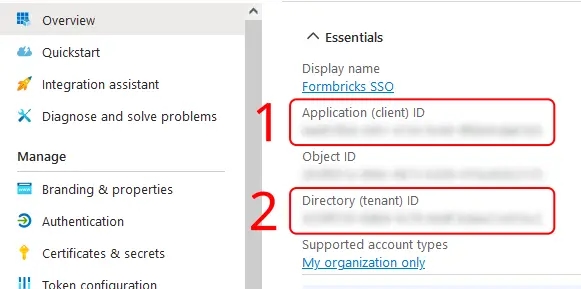
|
||||
</Step>
|
||||
|
||||
<Step title="Create a client secret">
|
||||
- From your App registration's _Overview_ page, go to **Manage** > **Certificates & secrets**.
|
||||
|
||||
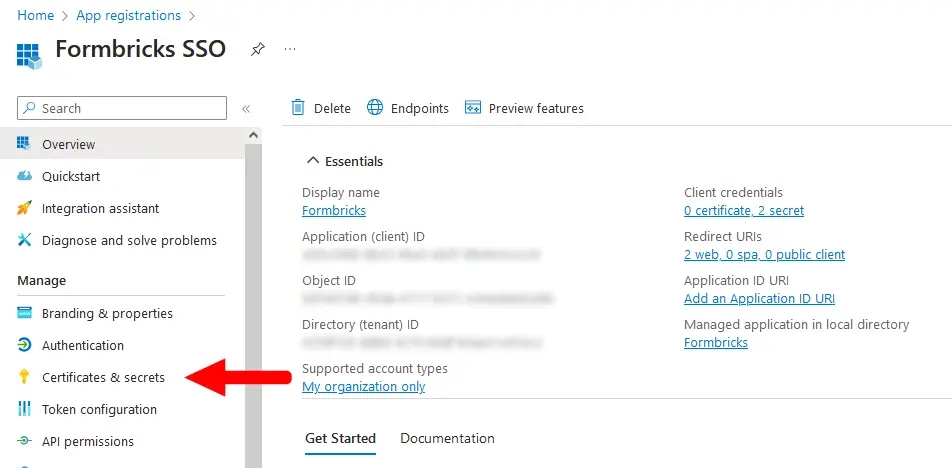
|
||||
|
||||
- Make sure you have the **Client secrets** tab active, and click **New client secret**.
|
||||
|
||||
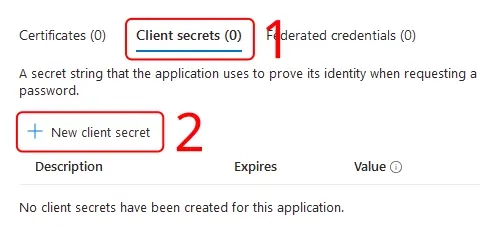
|
||||
|
||||
- Enter a **Description**, set an **Expires** period, then click **Add**.
|
||||
|
||||
<Note>
|
||||
You will need to create a new client secret using these steps whenever your chosen expiry period ends.
|
||||
</Note>
|
||||
|
||||
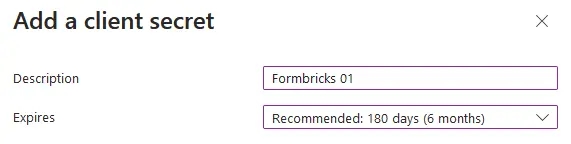
|
||||
|
||||
- Copy the entry under **Value** to populate the `AZUREAD_CLIENT_SECRET` variable.
|
||||
|
||||
<Note>
|
||||
Microsoft will only show this value to you immediately after creation, and you will not be able to access it again. If you lose it, simply create a new secret.
|
||||
</Note>
|
||||
|
||||

|
||||
</Step>
|
||||
|
||||
<Step title="Update environment variables">
|
||||
- Update these environment variables in your `docker-compose.yml` or pass it like your other environment variables to the Formbricks container.
|
||||
|
||||
<Note>
|
||||
You must wrap the `AZUREAD_CLIENT_SECRET` value in double quotes (e.g., "THis~iS4faKe.53CreTvALu3"`) to prevent issues with special characters.
|
||||
</Note>
|
||||
|
||||
An example `.env` for Microsoft Entra ID in Formbricks would look like this:
|
||||
|
||||
```yml Formbricks Env for Microsoft Entra ID SSO
|
||||
AZUREAD_CLIENT_ID=a25cadbd-f049-4690-ada3-56a163a72f4c
|
||||
AZUREAD_TENANT_ID=2746c29a-a3a6-4ea1-8762-37816d4b7885
|
||||
AZUREAD_CLIENT_SECRET="THis~iS4faKe.53CreTvALu3"
|
||||
```
|
||||
</Step>
|
||||
|
||||
<Step title="Restart and test">
|
||||
- Restart your Formbricks instance.
|
||||
- You're all set! Users can now sign up & log in using their Microsoft credentials associated with your Entra ID Tenant.
|
||||
</Step>
|
||||
</Steps>
|
||||
@@ -1,81 +0,0 @@
|
||||
---
|
||||
title: "Google OAuth"
|
||||
description: "Configure Google OAuth for secure Single Sign-On with your Formbricks instance. Implement enterprise-grade authentication for your survey platform with Google credentials."
|
||||
icon: "google"
|
||||
---
|
||||
|
||||
<Note>
|
||||
Single Sign-On (SSO) functionality, including OAuth integrations with Google, Microsoft Azure AD, and OpenID Connect, requires is part of the [Enterprise Edition](/self-hosting/advanced/license).
|
||||
</Note>
|
||||
|
||||
### Google OAuth
|
||||
|
||||
Integrating Google OAuth with your Formbricks instance allows users to log in using their Google credentials, ensuring a secure and streamlined user experience. This guide will walk you through the process of setting up Google OAuth for your Formbricks instance.
|
||||
|
||||
### Requirements
|
||||
|
||||
- A Google Cloud Platform (GCP) account
|
||||
|
||||
- A Formbricks instance running
|
||||
|
||||
### How to connect your Formbricks instance to Google
|
||||
|
||||
<Steps>
|
||||
<Step title="Create a GCP Project">
|
||||
- Navigate to the [GCP Console](https://console.cloud.google.com/).
|
||||
- From the projects list, select a project or create a new one.
|
||||
</Step>
|
||||
|
||||
<Step title="Setting up OAuth 2.0">
|
||||
- If the **APIs & services** page isn't already open, open the console left side menu and select **APIs & services**.
|
||||
- On the left, click **Credentials**.
|
||||
- Click **Create Credentials**, then select **OAuth client ID**.
|
||||
</Step>
|
||||
|
||||
<Step title="Configure OAuth Consent Screen">
|
||||
- If this is your first time creating a client ID, configure your consent screen by clicking **Consent Screen**.
|
||||
- Fill in the necessary details and under **Authorized domains**, add the domain where your Formbricks instance is hosted.
|
||||
</Step>
|
||||
|
||||
<Step title="Create OAuth 2.0 Client IDs">
|
||||
- Select the application type **Web application** for your project and enter any additional information required.
|
||||
- Ensure to specify authorized JavaScript origins and authorized redirect URIs.
|
||||
|
||||
```
|
||||
Authorized JavaScript origins: {WEBAPP_URL}
|
||||
Authorized redirect URIs: {WEBAPP_URL}/api/auth/callback/google
|
||||
```
|
||||
</Step>
|
||||
|
||||
<Step title="Update Environment Variables in Docker">
|
||||
- To integrate the Google OAuth, you have two options: either update the environment variables in the docker-compose file or directly add them to the running container.
|
||||
|
||||
- In your Docker setup directory, open the `.env` file, and add or update the following lines with the `Client ID` and `Client Secret` obtained from Google Cloud Platform:
|
||||
|
||||
```sh
|
||||
GOOGLE_CLIENT_ID=your-client-id-here
|
||||
GOOGLE_CLIENT_SECRET=your-client-secret-here
|
||||
```
|
||||
|
||||
- Alternatively, you can add the environment variables directly to the running container using the following commands (replace `container_id` with your actual Docker container ID):
|
||||
|
||||
```sh
|
||||
docker exec -it container_id /bin/bash
|
||||
export GOOGLE_CLIENT_ID=your-client-id-here
|
||||
export GOOGLE_CLIENT_SECRET=your-client-secret-here
|
||||
exit
|
||||
```
|
||||
</Step>
|
||||
|
||||
<Step title="Restart Your Formbricks Instance">
|
||||
<Note>
|
||||
Restarting your Docker containers may cause a brief period of downtime. Plan accordingly.
|
||||
</Note>
|
||||
|
||||
- Once the environment variables have been updated, it's crucial to restart your Docker containers to apply the changes. This ensures that your Formbricks instance can utilize the new Google OAuth configuration for user authentication.
|
||||
|
||||
- Navigate to your Docker setup directory where your `docker-compose.yml` file is located.
|
||||
|
||||
- Run the following command to bring down your current Docker containers and then bring them back up with the updated environment configuration.
|
||||
</Step>
|
||||
</Steps>
|
||||
208
docs/self-hosting/configuration/auth-sso/oauth.mdx
Normal file
208
docs/self-hosting/configuration/auth-sso/oauth.mdx
Normal file
@@ -0,0 +1,208 @@
|
||||
---
|
||||
title: OAuth
|
||||
description: "OAuth for Formbricks"
|
||||
icon: "key"
|
||||
---
|
||||
|
||||
<Note>
|
||||
Single Sign-On (SSO) functionality, including OAuth integrations with Google, Microsoft Entra ID, Github and OpenID Connect, requires a valid Formbricks Enterprise License.
|
||||
</Note>
|
||||
|
||||
### Google OAuth
|
||||
|
||||
Integrating Google OAuth with your Formbricks instance allows users to log in using their Google credentials, ensuring a secure and streamlined user experience. This guide will walk you through the process of setting up Google OAuth for your Formbricks instance.
|
||||
|
||||
#### Requirements:
|
||||
|
||||
- A Google Cloud Platform (GCP) account.
|
||||
|
||||
- A Formbricks instance running and accessible.
|
||||
|
||||
#### Steps:
|
||||
|
||||
1. **Create a GCP Project**:
|
||||
|
||||
- Navigate to the [GCP Console](https://console.cloud.google.com/).
|
||||
|
||||
- From the projects list, select a project or create a new one.
|
||||
|
||||
2. **Setting up OAuth 2.0**:
|
||||
|
||||
- If the **APIs & services** page isn't already open, open the console left side menu and select **APIs & services**.
|
||||
|
||||
- On the left, click **Credentials**.
|
||||
|
||||
- Click **Create Credentials**, then select **OAuth client ID**.
|
||||
|
||||
3. **Configure OAuth Consent Screen**:
|
||||
|
||||
- If this is your first time creating a client ID, configure your consent screen by clicking **Consent Screen**.
|
||||
|
||||
- Fill in the necessary details and under **Authorized domains**, add the domain where your Formbricks instance is hosted.
|
||||
|
||||
4. **Create OAuth 2.0 Client IDs**:
|
||||
|
||||
- Select the application type **Web application** for your project and enter any additional information required.
|
||||
|
||||
- Ensure to specify authorized JavaScript origins and authorized redirect URIs.
|
||||
|
||||
```{{ Redirect & Origin URLs
|
||||
Authorized JavaScript origins: {WEBAPP_URL}
|
||||
Authorized redirect URIs: {WEBAPP_URL}/api/auth/callback/google
|
||||
```
|
||||
|
||||
- **Update Environment Variables in Docker**:
|
||||
|
||||
- To integrate the Google OAuth, you have two options: either update the environment variables in the docker-compose file or directly add them to the running container.
|
||||
|
||||
- In your Docker setup directory, open the `.env` file, and add or update the following lines with the `Client ID` and `Client Secret` obtained from Google Cloud Platform:
|
||||
|
||||
- Alternatively, you can add the environment variables directly to the running container using the following commands (replace `container_id` with your actual Docker container ID):
|
||||
|
||||
```sh Shell commands
|
||||
docker exec -it container_id /bin/bash
|
||||
export GOOGLE_CLIENT_ID=your-client-id-here
|
||||
export GOOGLE_CLIENT_SECRET=your-client-secret-here
|
||||
exit
|
||||
```
|
||||
|
||||
```sh env file
|
||||
GOOGLE_CLIENT_ID=your-client-id-here
|
||||
GOOGLE_CLIENT_SECRET=your-client-secret-here
|
||||
```
|
||||
|
||||
1. **Restart Your Formbricks Instance**:
|
||||
|
||||
- **Note:** Restarting your Docker containers may cause a brief period of downtime. Plan accordingly.
|
||||
|
||||
- Once the environment variables have been updated, it's crucial to restart your Docker containers to apply the changes. This ensures that your Formbricks instance can utilize the new Google OAuth configuration for user authentication. Here's how you can do it:
|
||||
|
||||
- Navigate to your Docker setup directory where your `docker-compose.yml` file is located.
|
||||
|
||||
- Run the following command to bring down your current Docker containers and then bring them back up with the updated environment configuration:
|
||||
|
||||
### Microsoft Entra ID (Azure Active Directory) SSO OAuth
|
||||
|
||||
Do you have a Microsoft Entra ID Tenant? Integrate it with your Formbricks instance to allow users to log in using their existing Microsoft credentials. This guide will walk you through the process of setting up an Application Registration for your Formbricks instance.
|
||||
|
||||
#### Requirements
|
||||
|
||||
- A Microsoft Entra ID Tenant populated with users. [Create a tenant as per Microsoft's documentation](https://learn.microsoft.com/en-us/entra/fundamentals/create-new-tenant).
|
||||
|
||||
- A Formbricks instance running and accessible.
|
||||
|
||||
- The callback URI for your Formbricks instance: `{WEBAPP_URL}/api/auth/callback/azure-ad`
|
||||
|
||||
#### Creating an App Registration
|
||||
|
||||
- Login to the [Microsoft Entra admin center](https://entra.microsoft.com/).
|
||||
|
||||
- Go to **Applications** > **App registrations** in the left menu.
|
||||
|
||||

|
||||
|
||||
- Click the **New registration** button at the top.
|
||||
|
||||

|
||||
|
||||
- Name your application something descriptive, such as `Formbricks SSO`.
|
||||
|
||||

|
||||
|
||||
- If you have multiple tenants/organizations, choose the appropriate **Supported account types** option. Otherwise, leave the default option for _Single Tenant_.
|
||||
|
||||

|
||||
|
||||
- Under **Redirect URI**, select **Web** for the platform and paste your Formbricks callback URI (see Requirements above).
|
||||
|
||||

|
||||
|
||||
- Click **Register** to create the App registration. You will be redirected to your new app's _Overview_ page after it is created.
|
||||
|
||||
- On the _Overview_ page, under **Essentials**:
|
||||
|
||||
- Copy the entry for **Application (client) ID** to populate the `AZUREAD_CLIENT_ID` variable.
|
||||
|
||||
- Copy the entry for **Directory (tenant) ID** to populate the `AZUREAD_TENANT_ID` variable.
|
||||
|
||||

|
||||
|
||||
- From your App registration's _Overview_ page, go to **Manage** > **Certificates & secrets**.
|
||||
|
||||

|
||||
|
||||
- Make sure you have the **Client secrets** tab active, and click **New client secret**.
|
||||
|
||||

|
||||
|
||||
- Enter a **Description**, set an **Expires** period, then click **Add**.
|
||||
|
||||
<Note>
|
||||
You will need to create a new client secret using these steps whenever your chosen expiry period ends.
|
||||
</Note>
|
||||
|
||||

|
||||
|
||||
- Copy the entry under **Value** to populate the `AZUREAD_CLIENT_SECRET` variable.
|
||||
|
||||
<Note>
|
||||
Microsoft will only show this value to you immediately after creation, and you will not be able to access it again. If you lose it, simply start from step 9 to create a new secret.
|
||||
</Note>
|
||||
|
||||

|
||||
|
||||
- Update these environment variables in your `docker-compose.yml` or pass it like your other environment variables to the Formbricks container.
|
||||
|
||||
<Note>
|
||||
You must wrap the `AZUREAD_CLIENT_SECRET` value in double quotes (e.g., "THis~iS4faKe.53CreTvALu3"`) to prevent issues with special characters.
|
||||
</Note>
|
||||
|
||||
An example `.env` for Microsoft Entra ID in Formbricks would look like:
|
||||
|
||||
```yml Formbricks Env for Microsoft Entra ID SSO
|
||||
AZUREAD_CLIENT_ID=a25cadbd-f049-4690-ada3-56a163a72f4c
|
||||
AZUREAD_TENANT_ID=2746c29a-a3a6-4ea1-8762-37816d4b7885
|
||||
AZUREAD_CLIENT_SECRET="THis~iS4faKe.53CreTvALu3"
|
||||
```
|
||||
|
||||
- Restart your Formbricks instance.
|
||||
|
||||
- You're all set! Users can now sign up & log in using their Microsoft credentials associated with your Entra ID Tenant.
|
||||
|
||||
## OpenID Configuration
|
||||
|
||||
Integrating your own OIDC (OpenID Connect) instance with your Formbricks instance allows users to log in using their OIDC credentials, ensuring a secure and streamlined user experience. Please follow the steps below to set up OIDC for your Formbricks instance.
|
||||
|
||||
- Configure your OIDC provider & get the following variables:
|
||||
|
||||
- `OIDC_CLIENT_ID`
|
||||
|
||||
- `OIDC_CLIENT_SECRET`
|
||||
|
||||
- `OIDC_ISSUER`
|
||||
|
||||
- `OIDC_SIGNING_ALGORITHM`
|
||||
|
||||
<Note>
|
||||
Make sure the Redirect URI for your OIDC Client is set to `{WEBAPP_URL}/api/auth/callback/openid`.
|
||||
</Note>
|
||||
|
||||
- Update these environment variables in your `docker-compose.yml` or pass it directly to the running container.
|
||||
|
||||
An example configuration for a FusionAuth OpenID Connect in Formbricks would look like:
|
||||
|
||||
|
||||
```yml Formbricks Env for FusionAuth OIDC
|
||||
OIDC_CLIENT_ID=59cada54-56d4-4aa8-a5e7-5823bbe0e5b7
|
||||
OIDC_CLIENT_SECRET=4f4dwP0ZoOAqMW8fM9290A7uIS3E8Xg29xe1umhlB_s
|
||||
OIDC_ISSUER=http://localhost:9011
|
||||
OIDC_DISPLAY_NAME=FusionAuth
|
||||
OIDC_SIGNING_ALGORITHM=HS256
|
||||
```
|
||||
|
||||
|
||||
- Set an environment variable `OIDC_DISPLAY_NAME` to the display name of your OIDC provider.
|
||||
|
||||
- Restart your Formbricks instance.
|
||||
|
||||
- You're all set! Users can now sign up & log in using their OIDC credentials.
|
||||
@@ -1,45 +0,0 @@
|
||||
---
|
||||
title: "Open ID Connect"
|
||||
description: "Configure Open ID Connect for secure Single Sign-On with your Formbricks instance. Implement enterprise-grade authentication for your survey platform with Open ID Connect."
|
||||
icon: "key"
|
||||
---
|
||||
|
||||
<Note>
|
||||
Single Sign-On (SSO) functionality, including OAuth integrations with Google, Microsoft Azure AD, and OpenID Connect, requires is part of the [Enterprise Edition](/self-hosting/advanced/license).
|
||||
</Note>
|
||||
|
||||
Integrating your own OIDC (OpenID Connect) instance with your Formbricks instance allows users to log in using their OIDC credentials, ensuring a secure and streamlined user experience. Please follow the steps below to set up OIDC for your Formbricks instance.
|
||||
|
||||
- Configure your OIDC provider & get the following variables:
|
||||
|
||||
- `OIDC_CLIENT_ID`
|
||||
|
||||
- `OIDC_CLIENT_SECRET`
|
||||
|
||||
- `OIDC_ISSUER`
|
||||
|
||||
- `OIDC_SIGNING_ALGORITHM`
|
||||
|
||||
<Note>
|
||||
Make sure the Redirect URI for your OIDC Client is set to `{WEBAPP_URL}/api/auth/callback/openid`.
|
||||
</Note>
|
||||
|
||||
- Update these environment variables in your `docker-compose.yml` or pass it directly to the running container.
|
||||
|
||||
An example configuration for a FusionAuth OpenID Connect in Formbricks would look like:
|
||||
|
||||
|
||||
```yml Formbricks Env for FusionAuth OIDC
|
||||
OIDC_CLIENT_ID=59cada54-56d4-4aa8-a5e7-5823bbe0e5b7
|
||||
OIDC_CLIENT_SECRET=4f4dwP0ZoOAqMW8fM9290A7uIS3E8Xg29xe1umhlB_s
|
||||
OIDC_ISSUER=http://localhost:9011
|
||||
OIDC_DISPLAY_NAME=FusionAuth
|
||||
OIDC_SIGNING_ALGORITHM=HS256
|
||||
```
|
||||
|
||||
|
||||
- Set an environment variable `OIDC_DISPLAY_NAME` to the display name of your OIDC provider.
|
||||
|
||||
- Restart your Formbricks instance.
|
||||
|
||||
- You're all set! Users can now sign up & log in using their OIDC credentials.
|
||||
@@ -1,7 +1,7 @@
|
||||
---
|
||||
title: "SAML SSO - Self-hosted"
|
||||
title: "SAML SSO"
|
||||
icon: "user-shield"
|
||||
description: "Configure SAML Single Sign-On (SSO) for secure enterprise authentication with your Formbricks instance."
|
||||
description: "How to set up SAML SSO for Formbricks"
|
||||
---
|
||||
|
||||
<Note>You require an Enterprise License along with a SAML SSO add-on to avail this feature.</Note>
|
||||
@@ -12,7 +12,7 @@ Formbricks supports SAML Single Sign-On (SSO) to enable secure, centralized auth
|
||||
|
||||
To learn more about SAML Jackson, please refer to the [BoxyHQ SAML Jackson documentation](https://boxyhq.com/docs/jackson/deploy).
|
||||
|
||||
## How SAML works in Formbricks
|
||||
## How SAML Works in Formbricks
|
||||
|
||||
SAML (Security Assertion Markup Language) is an XML-based standard for exchanging authentication and authorization data between an Identity Provider (IdP) and Formbricks. Here's how the integration works with BoxyHQ Jackson embedded into the flow:
|
||||
|
||||
@@ -37,7 +37,7 @@ SAML (Security Assertion Markup Language) is an XML-based standard for exchangin
|
||||
7. **Access Granted:**
|
||||
Formbricks logs the user in using the verified information.
|
||||
|
||||
## SAML Auth Flow Sequence Diagram
|
||||
## SAML Authentication Flow Sequence Diagram
|
||||
|
||||
Below is a sequence diagram illustrating the complete SAML authentication flow with BoxyHQ Jackson integrated:
|
||||
|
||||
@@ -67,31 +67,12 @@ sequenceDiagram
|
||||
|
||||
To configure SAML SSO in Formbricks, follow these steps:
|
||||
|
||||
<Steps>
|
||||
<Step title="Database Setup">
|
||||
Configure a dedicated database for SAML by setting the `SAML_DATABASE_URL` environment variable in your `docker-compose.yml` file (e.g., `postgres://postgres:postgres@postgres:5432/formbricks-saml`). If you're using a self-signed certificate for Postgres, include the `sslmode=disable` parameter.
|
||||
</Step>
|
||||
|
||||
<Step title="IdP Application">
|
||||
Create a SAML application in your IdP by following your provider's instructions([SAML Setup](/development/guides/auth-and-provision/setup-saml-with-identity-providers))
|
||||
</Step>
|
||||
|
||||
<Step title="User Provisioning">
|
||||
Provision users in your IdP and configure access to the IdP SAML app for all your users (who need access to Formbricks).
|
||||
</Step>
|
||||
|
||||
<Step title="Metadata">
|
||||
Keep the XML metadata from your IdP handy for the next step.
|
||||
</Step>
|
||||
|
||||
<Step title="Metadata Setup">
|
||||
Create a file called `connection.xml` in your self-hosted Formbricks instance's `formbricks/saml-connection` directory and paste the XML metadata from your IdP into it. Please create the directory if it doesn't exist. Your metadata file should start with a tag like this: `<?xml version="1.0" encoding="UTF-8"?><...>` or `<md:EntityDescriptor entityID="...">`. Please remove any extra text from the metadata.
|
||||
</Step>
|
||||
|
||||
<Step title="Restart Formbricks">
|
||||
Restart Formbricks to apply the changes. You can do this by running `docker compose down` and then `docker compose up -d`.
|
||||
</Step>
|
||||
</Steps>
|
||||
1. **Database Setup:** Configure a dedicated database for SAML by setting the `SAML_DATABASE_URL` environment variable in your `docker-compose.yml` file (e.g., `postgres://postgres:postgres@postgres:5432/formbricks-saml`). If you're using a self-signed certificate for Postgres, include the `sslmode=disable` parameter.
|
||||
2. **IdP Application:** Create a SAML application in your IdP by following your provider's instructions([SAML Setup](/development/guides/auth-and-provision/setup-saml-with-identity-providers))
|
||||
3. **User Provisioning:** Provision users in your IdP and configure access to the IdP SAML app for all your users (who need access to Formbricks).
|
||||
4. **Metadata:** Keep the XML metadata from your IdP handy for the next step.
|
||||
5. **Metadata Setup:** Create a file called `connection.xml` in your self-hosted Formbricks instance's `formbricks/saml-connection` directory and paste the XML metadata from your IdP into it. Please create the directory if it doesn't exist. Your metadata file should start with a tag like this: `<?xml version="1.0" encoding="UTF-8"?><...>` or `<md:EntityDescriptor entityID="...">`. Please remove any extra text from the metadata.
|
||||
6. **Restart Formbricks:** Restart Formbricks to apply the changes. You can do this by running `docker compose down` and then `docker compose up -d`.
|
||||
|
||||
<Note>
|
||||
We don't support multiple SAML connections yet. You can only have one SAML connection at a time. If you
|
||||
|
||||
@@ -33,7 +33,6 @@ These variables are present inside your machine’s docker-compose file. Restart
|
||||
| RATE_LIMITING_DISABLED | Disables rate limiting if set to 1. | optional | |
|
||||
| INVITE_DISABLED | Disables the ability for invited users to create an account if set to 1. | optional | |
|
||||
| MAIL_FROM | Email address to send emails from. | optional (required if email services are to be enabled) | |
|
||||
| MAIL_FROM_NAME | Email name/title to send emails from. | optional (required if email services are to be enabled) | |
|
||||
| SMTP_HOST | Host URL of your SMTP server. | optional (required if email services are to be enabled) | |
|
||||
| SMTP_PORT | Host Port of your SMTP server. | optional (required if email services are to be enabled) | |
|
||||
| SMTP_USER | Username for your SMTP Server. | optional (required if email services are to be enabled) | |
|
||||
@@ -59,10 +58,9 @@ These variables are present inside your machine’s docker-compose file. Restart
|
||||
| OIDC_ISSUER | Issuer URL for Custom OpenID Connect Provider (should have .well-known configured at this) | optional (required if OIDC auth is enabled) | |
|
||||
| OIDC_SIGNING_ALGORITHM | Signing Algorithm for Custom OpenID Connect Provider | optional | RS256 |
|
||||
| OPENTELEMETRY_LISTENER_URL | URL for OpenTelemetry listener inside Formbricks. | optional | |
|
||||
| UNKEY_ROOT_KEY | Key for the [Unkey](https://www.unkey.com/) service. This is used for Rate Limiting for management API. | optional | |
|
||||
| UNKEY_ROOT_KEY | Key for the [Unkey](https://www.unkey.com/) service. This is used for Rate Limiting for management API. | optional | |
|
||||
| CUSTOM_CACHE_DISABLED | Disables custom cache handler if set to 1 (required for deployment on Vercel) | optional | |
|
||||
| PROMETHEUS_ENABLED | Enables Prometheus metrics if set to 1. | optional | |
|
||||
| PROMETHEUS_EXPORTER_PORT | Port for Prometheus metrics. | optional | 9090 |
|
||||
| DOCKER_CRON_ENABLED | Controls whether cron jobs run in the Docker image. Set to 0 to disable (useful for cluster setups). | optional | 1 |
|
||||
| PROMETHEUS_EXPORTER_PORT | Port for Prometheus metrics. | optional | 9090 | | optional | |
|
||||
|
||||
Note: If you want to configure something that is not possible via above, please open an issue on our GitHub repo here or reach out to us on Github Discussions and we’ll try our best to work out a solution with you.
|
||||
|
||||
@@ -33,7 +33,6 @@ To enable email functionality, configure the following environment variables:
|
||||
```bash
|
||||
# Basic SMTP Configuration
|
||||
MAIL_FROM=noreply@yourdomain.com
|
||||
MAIL_FROM_NAME=Formbricks
|
||||
SMTP_HOST=smtp.yourprovider.com
|
||||
SMTP_PORT=587
|
||||
SMTP_USER=your_username
|
||||
@@ -76,7 +75,6 @@ If you're using the one-click setup with Docker Compose, you can either:
|
||||
environment:
|
||||
# Email Configuration
|
||||
MAIL_FROM: noreply@yourdomain.com
|
||||
MAIL_FROM_NAME: Formbricks
|
||||
SMTP_HOST: smtp.yourprovider.com
|
||||
SMTP_PORT: 587
|
||||
SMTP_USER: your_username
|
||||
@@ -97,7 +95,6 @@ environment:
|
||||
|
||||
```bash
|
||||
MAIL_FROM=noreply@yourdomain.com
|
||||
MAIL_FROM_NAME=Formbricks
|
||||
SMTP_HOST=smtp.sendgrid.net
|
||||
SMTP_PORT=587
|
||||
SMTP_USER=apikey
|
||||
@@ -108,7 +105,6 @@ SMTP_PASSWORD=your_sendgrid_api_key
|
||||
|
||||
```bash
|
||||
MAIL_FROM=noreply@yourdomain.com
|
||||
MAIL_FROM_NAME=Formbricks
|
||||
SMTP_HOST=email-smtp.us-east-1.amazonaws.com
|
||||
SMTP_PORT=587
|
||||
SMTP_USER=your_ses_access_key
|
||||
@@ -119,7 +115,6 @@ SMTP_PASSWORD=your_ses_secret_key
|
||||
|
||||
```bash
|
||||
MAIL_FROM=your_email@gmail.com
|
||||
MAIL_FROM_NAME=Formbricks
|
||||
SMTP_HOST=smtp.gmail.com
|
||||
SMTP_PORT=587
|
||||
SMTP_USER=your_email@gmail.com
|
||||
|
||||
@@ -131,7 +131,6 @@ Configure Redis by adding the following environment variables to your instances:
|
||||
|
||||
```sh env
|
||||
REDIS_URL=redis://your-redis-host:6379
|
||||
REDIS_DEFAULT_TTL=86400
|
||||
REDIS_HTTP_URL=http://your-redis-host:8000
|
||||
```
|
||||
|
||||
@@ -161,19 +160,6 @@ When using S3 in a cluster setup, ensure that:
|
||||
- The bucket has appropriate CORS settings configured
|
||||
- IAM roles/users have sufficient permissions for read/write operations
|
||||
|
||||
## Disabling Docker Cron Jobs
|
||||
|
||||
When running Formbricks in a cluster setup, you should disable the built-in cron jobs in the Docker image to prevent them from running on multiple instances simultaneously. Instead, you should set up cron jobs in your orchestration system (like Kubernetes) to run on a single instance or as separate jobs.
|
||||
|
||||
To disable the Docker cron jobs, set the following environment variable:
|
||||
|
||||
```sh env
|
||||
# Disable Docker cron jobs (0 = disabled, 1 = enabled)
|
||||
DOCKER_CRON_ENABLED=0
|
||||
```
|
||||
|
||||
This will prevent the cron jobs from starting in the Docker container while still allowing all other Formbricks functionality to work normally.
|
||||
|
||||
## Kubernetes Setup
|
||||
|
||||
Formbricks provides an official Helm chart for deploying the entire cluster stack on Kubernetes. The Helm chart is available in the [Formbricks GitHub repository](https://github.com/formbricks/formbricks/tree/main/helm-chart).
|
||||
@@ -181,7 +167,6 @@ Formbricks provides an official Helm chart for deploying the entire cluster stac
|
||||
### Features of the Helm Chart
|
||||
|
||||
The Helm chart provides a complete deployment solution that includes:
|
||||
|
||||
- Formbricks application with configurable replicas
|
||||
- PostgreSQL database (with optional HA configuration)
|
||||
- Redis cluster for caching
|
||||
@@ -191,14 +176,12 @@ The Helm chart provides a complete deployment solution that includes:
|
||||
### Installation Steps
|
||||
|
||||
1. Add the Formbricks Helm repository:
|
||||
|
||||
```sh
|
||||
helm repo add formbricks https://raw.githubusercontent.com/formbricks/formbricks/main/helm-chart
|
||||
helm repo update
|
||||
```
|
||||
|
||||
2. Install the chart:
|
||||
|
||||
```sh
|
||||
helm install formbricks formbricks/formbricks
|
||||
```
|
||||
@@ -206,7 +189,6 @@ helm install formbricks formbricks/formbricks
|
||||
### Configuration Options
|
||||
|
||||
The Helm chart can be customized using a `values.yaml` file to configure:
|
||||
|
||||
- Number of Formbricks replicas
|
||||
- Resource limits and requests
|
||||
- Database configuration
|
||||
|
||||
@@ -1,5 +1,5 @@
|
||||
---
|
||||
title: "Third-party Integrations"
|
||||
title: "Overview"
|
||||
description: "Configure third-party integrations with Formbricks Cloud."
|
||||
---
|
||||
|
||||
|
||||
@@ -28,27 +28,34 @@ How to deliver a specific language depends on the survey type (app or link surve
|
||||
|
||||

|
||||
|
||||
|
||||
- Click on the **Edit languages** button, to add a new language to your survey
|
||||
|
||||

|
||||
|
||||
|
||||
- Select the preferred language from the dropdown and assign an identifier Alias. Click the **Add language** button to add the language to your project.
|
||||
|
||||

|
||||
|
||||
|
||||
You can come back to this page anytime to add more languages or remove existing ones.
|
||||
|
||||
- Now, return to the dashboard to create a new survey or edit an existing one.
|
||||
|
||||

|
||||
|
||||
|
||||
- In the survey editor, scroll down to the **Multiple Languages** section at the bottom and enable the toggle next to it.
|
||||
|
||||

|
||||
|
||||
- Choose a **Default Language** for your survey.
|
||||
|
||||
<Note>Changing the default language will reset all the translations you have made for the survey.</Note>
|
||||
<Note>
|
||||
Changing the default language will reset all the translations you have made
|
||||
for the survey.
|
||||
</Note>
|
||||
|
||||
1. Now, add the languages from the dropdown that you want to support in your survey.
|
||||
|
||||
@@ -62,24 +69,28 @@ You can come back to this page anytime to add more languages or remove existing
|
||||
|
||||

|
||||
|
||||
|
||||
1. Once you are done, click on the **Publish** button to save the survey.
|
||||
|
||||
## App Surveys Configuration
|
||||
|
||||
1. After you setup the Formbricks SDK for your user, you can call the `setLanguage` function with the language code. This can be either the ISO identifier or the Alias you set when creating the language. The `language` attribute makes sure that this user only sees surveys with a translation in this specific language available.
|
||||
1. When you initialise the Formbricks SDK for your user, you can pass a `language` attribute with the language code. This can be either the ISO identifier or the Alias you set when creating the language. The `language` attribute makes sure that this user only sees surveys with a translation in this specific language available.
|
||||
|
||||
```js javascript
|
||||
Formbricks.setup({
|
||||
Formbricks.init({
|
||||
environmentId: "<environment-id>",
|
||||
appUrl: "<app-url>",
|
||||
apiHost: "<api-host>",
|
||||
userId: "<user_id>",
|
||||
attributes: {
|
||||
language: "de", // ISO identifier or Alias set when creating language
|
||||
},
|
||||
});
|
||||
|
||||
Formbricks.setLanguage("de"); // ISO identifier or Alias set when creating language
|
||||
```
|
||||
|
||||
<Note>
|
||||
If a user has a language assigned, a survey has multi-language activate and it is missing a translation in
|
||||
the language of the user, the survey will not be displayed.
|
||||
If a user has a language assigned, a survey has multi-language activate and it
|
||||
is missing a translation in the language of the user, the survey will not be
|
||||
displayed.
|
||||
</Note>
|
||||
|
||||
1. That's it! Now, users with the language attribute set will see the survey in their preferred language. You can start collecting responses in multiple languages and filter them by language on the summary page.
|
||||
|
||||
@@ -1,5 +1,5 @@
|
||||
---
|
||||
title: "Quickstart - Link Surveys"
|
||||
title: "Quickstart"
|
||||
description: "Create your first link survey in under 5 minutes."
|
||||
icon: "rocket"
|
||||
---
|
||||
|
||||
@@ -1,6 +1,5 @@
|
||||
---
|
||||
title: "Framework Guides"
|
||||
description: "Easily add the Formbricks App Survey SDK to your app with guides for different frameworks."
|
||||
icon: "book"
|
||||
---
|
||||
|
||||
@@ -17,12 +16,14 @@ Integrate the **Formbricks App Survey SDK** into your app using multiple options
|
||||
</Card>
|
||||
|
||||
<Card title="Next.js" icon="react" href="#nextjs">
|
||||
[Natively add us to your Next.js project, with support for both App and Pages project
|
||||
[Natively add us to your Next.js project, with support for both App and Pages
|
||||
project
|
||||
structure.](https://formbricks.com/docs/app-surveys/framework-guides#next-js)
|
||||
</Card>
|
||||
|
||||
<Card title="Vue.js" icon="vuejs" href="#vue-js">
|
||||
Learn how to use Formbricks' React Native SDK to integrate your surveys into React Native applications.
|
||||
Learn how to use Formbricks' React Native SDK to integrate your surveys into
|
||||
React Native applications.
|
||||
</Card>
|
||||
|
||||
<Card title="React Native" icon="react" color="lightblue" href="#react-native">
|
||||
@@ -46,9 +47,10 @@ All you need to do is copy a `<script>` tag to your HTML head:
|
||||
<!-- START Formbricks Surveys -->
|
||||
<script type="text/javascript">
|
||||
!function(){
|
||||
var appUrl = "https://app.formbricks.com";
|
||||
var apiHost = "https://app.formbricks.com";
|
||||
var environmentId = "<your-environment-id>";
|
||||
var t=document.createElement("script");t.type="text/javascript",t.async=!0,t.src=appUrl+"/js/formbricks.umd.cjs";var e=document.getElementsByTagName("script")[0];e.parentNode.insertBefore(t,e),setTimeout(function(){window.formbricks.setup({environmentId: environmentId, appUrl: appUrl})},500)}();
|
||||
var userId = "<your-user-id>"; //optional
|
||||
var t=document.createElement("script");t.type="text/javascript",t.async=!0,t.src=apiHost+"/js/formbricks.umd.cjs";var e=document.getElementsByTagName("script")[0];e.parentNode.insertBefore(t,e),setTimeout(function(){window.formbricks.init({environmentId: environmentId, apiHost: apiHost, userId: userId})},500)}();
|
||||
</script>
|
||||
<!-- END Formbricks Surveys -->
|
||||
```
|
||||
@@ -58,7 +60,7 @@ All you need to do is copy a `<script>` tag to your HTML head:
|
||||
| Name | Type | Description |
|
||||
| -------------- | ------ | -------------------------------------- |
|
||||
| environment-id | string | Formbricks Environment ID. |
|
||||
| app-url | string | URL of the hosted Formbricks instance. |
|
||||
| api-host | string | URL of the hosted Formbricks instance. |
|
||||
|
||||
Now, visit the [Validate Your Setup](#validate-your-setup) section to verify your setup!
|
||||
|
||||
@@ -86,9 +88,10 @@ Update your `App.js/ts` file to initialize Formbricks.
|
||||
import formbricks from "@formbricks/js";
|
||||
|
||||
if (typeof window !== "undefined") {
|
||||
formbricks.setup({
|
||||
formbricks.init({
|
||||
environmentId: "<environment-id>",
|
||||
appUrl: "<app-url>",
|
||||
apiHost: "<api-host>",
|
||||
userId: "<user-id>", //optional
|
||||
});
|
||||
}
|
||||
|
||||
@@ -104,7 +107,7 @@ export default App;
|
||||
| Name | Type | Description |
|
||||
| -------------- | ------ | -------------------------------------- |
|
||||
| environment-id | string | Formbricks Environment ID. |
|
||||
| app-url | string | URL of the hosted Formbricks instance. |
|
||||
| api-host | string | URL of the hosted Formbricks instance. |
|
||||
|
||||
Now, visit the [Validate Your Setup](#validate-your-setup) section to verify your setup!
|
||||
|
||||
@@ -144,9 +147,10 @@ export default function FormbricksProvider() {
|
||||
const searchParams = useSearchParams();
|
||||
|
||||
useEffect(() => {
|
||||
formbricks.setup({
|
||||
formbricks.init({
|
||||
environmentId: "<environment-id>",
|
||||
appUrl: "<app-url>",
|
||||
apiHost: "<api-host>",
|
||||
userId: "<user-id>", //optional
|
||||
});
|
||||
}, []);
|
||||
|
||||
@@ -188,9 +192,10 @@ import { useEffect } from "react";
|
||||
import formbricks from "@formbricks/js";
|
||||
|
||||
if (typeof window !== "undefined") {
|
||||
formbricks.setup({
|
||||
formbricks.init({
|
||||
environmentId: "<environment-id>",
|
||||
appUrl: "<app-url>",
|
||||
apiHost: "<api-host>",
|
||||
userId: "<user-id>", //optional
|
||||
});
|
||||
}
|
||||
|
||||
@@ -215,7 +220,7 @@ export default function App({ Component, pageProps }: AppProps) {
|
||||
| Name | Type | Description |
|
||||
| -------------- | ------ | -------------------------------------- |
|
||||
| environment-id | string | Formbricks Environment ID. |
|
||||
| app-url | string | URL of the hosted Formbricks instance. |
|
||||
| api-host | string | URL of the hosted Formbricks instance. |
|
||||
|
||||
First, initialize the Formbricks SDK to run only on the client side. To track page changes, register the route change event with the Next.js router.
|
||||
|
||||
@@ -241,9 +246,10 @@ yarn add @formbricks/js
|
||||
import formbricks from "@formbricks/js";
|
||||
|
||||
if (typeof window !== "undefined") {
|
||||
formbricks.setup({
|
||||
formbricks.init({
|
||||
environmentId: "<environment-id>",
|
||||
appUrl: "<app-url>",
|
||||
apiHost: "<api-host>",
|
||||
userId: "<user-id>", //optional
|
||||
});
|
||||
}
|
||||
|
||||
@@ -272,7 +278,7 @@ router.afterEach((to, from) => {
|
||||
| Name | Type | Description |
|
||||
| -------------- | ------ | -------------------------------------- |
|
||||
| environment-id | string | Formbricks Environment ID. |
|
||||
| app-url | string | URL of the hosted Formbricks instance. |
|
||||
| api-host | string | URL of the hosted Formbricks instance. |
|
||||
|
||||
Now, visit the [Validate Your Setup](#validate-your-setup) section to verify your setup!
|
||||
|
||||
@@ -300,7 +306,8 @@ import Formbricks from "@formbricks/react-native";
|
||||
|
||||
const config = {
|
||||
environmentId: "<environment-id>",
|
||||
appUrl: "<app-url>",
|
||||
apiHost: "<api-host>",
|
||||
userId: "<user-id>", // optional
|
||||
};
|
||||
|
||||
export default function App() {
|
||||
@@ -318,7 +325,7 @@ export default function App() {
|
||||
| Name | Type | Description |
|
||||
| -------------- | ------ | -------------------------------------- |
|
||||
| environment-id | string | Formbricks Environment ID. |
|
||||
| app-url | string | URL of the hosted Formbricks instance. |
|
||||
| api-host | string | URL of the hosted Formbricks instance. |
|
||||
|
||||
## Validate your setup
|
||||
|
||||
|
||||
@@ -1,5 +1,5 @@
|
||||
---
|
||||
title: "Quickstart - Web & App Surveys"
|
||||
title: "Quickstart"
|
||||
description: "App surveys deliver 6–10x higher conversion rates compared to email surveys. If you are new to Formbricks, follow the steps in this guide to launch a survey in your web or mobile app (React Native) within 10–15 minutes."
|
||||
icon: "rocket"
|
||||
---
|
||||
|
||||
@@ -27,44 +27,57 @@ This method is recommended for applications where users are required to log in a
|
||||
|
||||
### Setting User ID
|
||||
|
||||
To enable user identification, call the `setUserId` function of Formbricks and pass the user id. The user will show up in the Formbricks dashboard. Use a unique string, like a database ID or a unique email address. You can also anonymize the identifier, as long as it is unique for each user.
|
||||
To enable user identification, set the `userId` in the `init()` call of Formbricks. The user will show up in the Formbricks dashboard only if the `userId` is set. Use a unique string, like a database ID or a unique email address. You can also anonymize the identifier, as long as it is unique for each user.
|
||||
|
||||
```javascript
|
||||
formbricks.setUserId("<user-id>");
|
||||
formbricks.init({
|
||||
environmentId: "<environment-id>",
|
||||
apiHost: "<api-host>",
|
||||
userId: "<user_id>",
|
||||
});
|
||||
```
|
||||
|
||||
### Enhanced Initialization with User Attributes
|
||||
|
||||
Set user attributes in Formbricks during initialization along with the `userId`.
|
||||
|
||||
```javascript Enhanced Initialization with User Attributes
|
||||
formbricks.init({
|
||||
environmentId: "<environment-id>",
|
||||
apiHost: "<api-host>",
|
||||
userId: "<user_id>",
|
||||
attributes: {
|
||||
// your custom attributes
|
||||
Plan: "premium",
|
||||
},
|
||||
});
|
||||
```
|
||||
|
||||
## Setting Custom User Attributes
|
||||
|
||||
Use the `setAttribute` function to set custom attributes for the user (e.g., name, plan).
|
||||
|
||||
```javascript Setting Custom Attributes
|
||||
formbricks.setAttribute("Plan", "free");
|
||||
```
|
||||
<Note>
|
||||
**Note**: the number of different attribute classes (e.g., "Plan,"
|
||||
"First Name," etc.) is currently limited to 150 attributes per environment.
|
||||
</Note>
|
||||
|
||||
```javascript Setting Custom Attributes
|
||||
formbricks.setAttribute("Plan","free");
|
||||
```
|
||||
|
||||
The `setAttribute` function works like this:
|
||||
|
||||
|
||||
```javascript Setting Custom Attributes
|
||||
formbricks.setAttribute("attribute_key", "attribute_value");
|
||||
```
|
||||
|
||||
You can also set multiple attributes at once by passing an object to the `setAttributes` function:
|
||||
|
||||
```javascript Setting Multiple Custom Attributes
|
||||
formbricks.setAttributes({
|
||||
attribute_key_1: "attribute_value_1",
|
||||
attribute_key_2: "attribute_value_2",
|
||||
});
|
||||
```
|
||||
|
||||
<Note>
|
||||
**Note**: the number of different attribute classes (e.g., "Plan," "First Name," etc.) is currently limited
|
||||
to 150 attributes per environment.
|
||||
</Note>
|
||||
|
||||
### Logging Out Users
|
||||
|
||||
When a user logs out of your webpage, also log them out of Formbricks to prevent activity from being linked to the wrong user. Use the logout function:
|
||||
|
||||
```javascript Logging out User
|
||||
formbricks.logout();
|
||||
```javascript Logging out User
|
||||
formbricks.logout();
|
||||
```
|
||||
|
||||
@@ -5,7 +5,8 @@ description: A Helm chart for Formbricks with PostgreSQL, Redis
|
||||
type: application
|
||||
|
||||
# Helm chart Version
|
||||
version: 0.0.0-dev
|
||||
version: 3.3.1
|
||||
appVersion: v3.3.1
|
||||
|
||||
keywords:
|
||||
- formbricks
|
||||
@@ -17,6 +18,7 @@ maintainers:
|
||||
- name: Formbricks
|
||||
email: info@formbricks.com
|
||||
|
||||
|
||||
dependencies:
|
||||
- name: postgresql
|
||||
version: "16.4.16"
|
||||
|
||||
@@ -1,6 +1,6 @@
|
||||
# formbricks
|
||||
|
||||
 
|
||||
  
|
||||
|
||||
A Helm chart for Formbricks with PostgreSQL, Redis
|
||||
|
||||
|
||||
@@ -1,40 +1,49 @@
|
||||
{{- if (.Values.cronJob).enabled }}
|
||||
{{- range $name, $job := .Values.cronJob.jobs }}
|
||||
---
|
||||
{{ if $.Capabilities.APIVersions.Has "batch/v1/CronJob" -}}
|
||||
apiVersion: batch/v1
|
||||
{{- else -}}
|
||||
apiVersion: batch/v1beta1
|
||||
{{- end }}
|
||||
apiVersion: {{ if $.Capabilities.APIVersions.Has "batch/v1/CronJob" }}batch/v1{{ else }}batch/v1beta1{{ end }}
|
||||
kind: CronJob
|
||||
metadata:
|
||||
labels:
|
||||
{{- include "formbricks.labels" $ | nindent 4 }}
|
||||
{{- if $job.additionalLabels }}
|
||||
{{ $job.additionalLabels | indent 4 }}
|
||||
{{- end }}
|
||||
{{- if $job.annotations }}
|
||||
annotations:
|
||||
{{ $job.annotations | indent 4 }}
|
||||
{{- end }}
|
||||
name: {{ $name }}
|
||||
namespace: {{ template "formbricks.namespace" $ }}
|
||||
labels:
|
||||
# Standard labels for tracking CronJobs
|
||||
{{- include "formbricks.labels" $ | nindent 4 }}
|
||||
|
||||
# Additional labels if specified
|
||||
{{- if $job.additionalLabels }}
|
||||
{{- toYaml $job.additionalLabels | indent 4 }}
|
||||
{{- end }}
|
||||
|
||||
# Additional annotations if specified
|
||||
{{- if $job.annotations }}
|
||||
annotations:
|
||||
{{- toYaml $job.annotations | indent 4 }}
|
||||
{{- end }}
|
||||
|
||||
spec:
|
||||
# Define the execution schedule for the job
|
||||
schedule: {{ $job.schedule | quote }}
|
||||
{{- if ge (int $.Capabilities.KubeVersion.Minor) 27 }}
|
||||
{{- if $job.timeZone }}
|
||||
|
||||
# Kubernetes 1.27+ supports time zones for CronJobs
|
||||
{{- if ge (int $.Capabilities.KubeVersion.Minor) 27 }}
|
||||
{{- if $job.timeZone }}
|
||||
timeZone: {{ $job.timeZone }}
|
||||
{{ end }}
|
||||
{{- end }}
|
||||
{{- if $job.successfulJobsHistoryLimit }}
|
||||
{{- end }}
|
||||
{{- end }}
|
||||
|
||||
# Define job retention policies
|
||||
{{- if $job.successfulJobsHistoryLimit }}
|
||||
successfulJobsHistoryLimit: {{ $job.successfulJobsHistoryLimit }}
|
||||
{{ end }}
|
||||
{{- if $job.concurrencyPolicy }}
|
||||
concurrencyPolicy: {{ $job.concurrencyPolicy }}
|
||||
{{ end }}
|
||||
{{- if $job.failedJobsHistoryLimit }}
|
||||
{{- end }}
|
||||
{{- if $job.failedJobsHistoryLimit }}
|
||||
failedJobsHistoryLimit: {{ $job.failedJobsHistoryLimit }}
|
||||
{{ end }}
|
||||
{{- end }}
|
||||
|
||||
# Define concurrency policy
|
||||
{{- if $job.concurrencyPolicy }}
|
||||
concurrencyPolicy: {{ $job.concurrencyPolicy }}
|
||||
{{- end }}
|
||||
|
||||
jobTemplate:
|
||||
spec:
|
||||
{{- with $job.activeDeadlineSeconds }}
|
||||
@@ -46,101 +55,48 @@ spec:
|
||||
template:
|
||||
metadata:
|
||||
labels:
|
||||
{{- include "formbricks.labels" $ | nindent 12 }}
|
||||
{{- include "formbricks.labels" $ | nindent 12 }}
|
||||
|
||||
# Additional pod-level labels
|
||||
{{- with $job.additionalPodLabels }}
|
||||
{{- toYaml . | nindent 12 }}
|
||||
{{- end }}
|
||||
|
||||
# Additional annotations
|
||||
{{- with $job.additionalPodAnnotations }}
|
||||
annotations: {{ toYaml . | nindent 12 }}
|
||||
annotations: {{- toYaml . | nindent 12 }}
|
||||
{{- end }}
|
||||
|
||||
spec:
|
||||
# Define the service account if RBAC is enabled
|
||||
{{- if $.Values.rbac.enabled }}
|
||||
{{- if $.Values.rbac.serviceAccount.name }}
|
||||
serviceAccountName: {{ $.Values.rbac.serviceAccount.name }}
|
||||
{{- else }}
|
||||
serviceAccountName: {{ template "formbricks.name" $ }}
|
||||
{{- end }}
|
||||
{{- end }}
|
||||
|
||||
# Define the job container
|
||||
containers:
|
||||
- name: {{ $name }}
|
||||
{{- $image := required (print "Undefined image repo for container '" $name "'") $job.image.repository }}
|
||||
{{- with $job.image.tag }} {{- $image = print $image ":" . }} {{- end }}
|
||||
{{- with $job.image.digest }} {{- $image = print $image "@" . }} {{- end }}
|
||||
image: {{ $image }}
|
||||
{{- if $job.image.imagePullPolicy }}
|
||||
imagePullPolicy: {{ $job.image.imagePullPolicy }}
|
||||
{{ end }}
|
||||
- name: {{ $name }}
|
||||
image: "{{ required "Image repository is undefined" $job.image.repository }}:{{ $job.image.tag | default "latest" }}"
|
||||
imagePullPolicy: {{ $job.image.imagePullPolicy | default "IfNotPresent" }}
|
||||
|
||||
# Environment variables from values
|
||||
{{- with $job.env }}
|
||||
env:
|
||||
env:
|
||||
{{- range $key, $value := $job.env }}
|
||||
- name: {{ include "formbricks.tplvalues.render" ( dict "value" $key "context" $ ) }}
|
||||
{{- if kindIs "string" $value }}
|
||||
value: {{ include "formbricks.tplvalues.render" ( dict "value" $value "context" $ ) | quote }}
|
||||
{{- else }}
|
||||
{{- toYaml $value | nindent 16 }}
|
||||
{{- end }}
|
||||
- name: {{ $key }}
|
||||
value: {{ $value | quote }}
|
||||
{{- end }}
|
||||
{{- end }}
|
||||
{{- with $job.envFrom }}
|
||||
envFrom:
|
||||
{{ toYaml . | indent 12 }}
|
||||
{{- end }}
|
||||
{{- if $job.command }}
|
||||
command: {{ $job.command }}
|
||||
|
||||
# Define command and arguments if specified
|
||||
{{- with $job.command }}
|
||||
command: {{- toYaml . | indent 14 }}
|
||||
{{- end }}
|
||||
|
||||
{{- with $job.args }}
|
||||
args:
|
||||
{{- range . }}
|
||||
- {{ . | quote }}
|
||||
{{- end }}
|
||||
{{- end }}
|
||||
{{- with $job.resources }}
|
||||
resources:
|
||||
{{ toYaml . | indent 14 }}
|
||||
args: {{- toYaml . | indent 14 }}
|
||||
{{- end }}
|
||||
{{- with $job.volumeMounts }}
|
||||
volumeMounts:
|
||||
{{ toYaml . | indent 12 }}
|
||||
{{- end }}
|
||||
{{- with $job.securityContext }}
|
||||
securityContext: {{ toYaml . | nindent 14 }}
|
||||
{{- end }}
|
||||
{{- with $job.nodeSelector }}
|
||||
nodeSelector:
|
||||
{{ toYaml . | indent 12 }}
|
||||
{{- end }}
|
||||
{{- with $job.affinity }}
|
||||
affinity:
|
||||
{{ toYaml . | indent 12 }}
|
||||
{{- end }}
|
||||
{{- with $job.priorityClassName }}
|
||||
priorityClassName: {{ . }}
|
||||
{{- end }}
|
||||
{{- with $job.tolerations }}
|
||||
tolerations: {{ toYaml . | nindent 12 }}
|
||||
{{- end }}
|
||||
{{- with $job.topologySpreadConstraints }}
|
||||
topologySpreadConstraints: {{ toYaml . | nindent 12 }}
|
||||
{{- end }}
|
||||
{{- if $job.restartPolicy }}
|
||||
restartPolicy: {{ $job.restartPolicy }}
|
||||
{{ else }}
|
||||
restartPolicy: OnFailure
|
||||
{{ end }}
|
||||
{{- with $job.imagePullSecrets }}
|
||||
imagePullSecrets:
|
||||
{{ toYaml . | indent 12 }}
|
||||
{{ end }}
|
||||
{{- if $job.dnsConfig }}
|
||||
dnsConfig:
|
||||
{{ toYaml $job.dnsConfig | indent 12 }}
|
||||
{{- end }}
|
||||
{{- if $job.dnsPolicy }}
|
||||
dnsPolicy: {{ $job.dnsPolicy }}
|
||||
{{- end }}
|
||||
{{- with $job.volumes }}
|
||||
volumes:
|
||||
{{ toYaml . | indent 12 }}
|
||||
{{- end }}
|
||||
|
||||
restartPolicy: {{ $job.restartPolicy | default "OnFailure" }}
|
||||
{{- end }}
|
||||
{{- end }}
|
||||
|
||||
@@ -13,9 +13,6 @@ metadata:
|
||||
{{- if .Values.deployment.annotations }}
|
||||
{{- toYaml .Values.deployment.annotations | nindent 4 }}
|
||||
{{- end }}
|
||||
{{- if .Values.deployment.reloadOnChange }}
|
||||
reloader.stakater.com/auto: "true"
|
||||
{{- end }}
|
||||
{{- end }}
|
||||
spec:
|
||||
{{- if .Values.deployment.replicas }}
|
||||
@@ -97,12 +94,8 @@ spec:
|
||||
protocol: {{ $config.protocol | default "TCP" | quote }}
|
||||
{{- end }}
|
||||
{{- end }}
|
||||
{{- if or .Values.deployment.envFrom (or (and .Values.externalSecret.enabled (index .Values.externalSecret.files "app-secrets")) .Values.secret.enabled) }}
|
||||
{{- if .Values.deployment.envFrom }}
|
||||
envFrom:
|
||||
{{- if or .Values.secret.enabled (and .Values.externalSecret.enabled (index .Values.externalSecret.files "app-secrets")) }}
|
||||
- secretRef:
|
||||
name: {{ template "formbricks.name" . }}-app-secrets
|
||||
{{- end }}
|
||||
{{- range $value := .Values.deployment.envFrom }}
|
||||
{{- if (eq .type "configmap") }}
|
||||
- configMapRef:
|
||||
@@ -127,13 +120,47 @@ spec:
|
||||
{{- end }}
|
||||
{{- end }}
|
||||
env:
|
||||
{{- if and (.Values.enterprise.enabled) (ne .Values.enterprise.licenseKey "") }}
|
||||
- name: ENTERPRISE_LICENSE_KEY
|
||||
valueFrom:
|
||||
secretKeyRef:
|
||||
name: {{ template "formbricks.name" . }}-app-secrets
|
||||
key: ENTERPRISE_LICENSE_KEY
|
||||
{{- else if and (.Values.enterprise.enabled) (eq .Values.enterprise.licenseKey "") }}
|
||||
- name: ENTERPRISE_LICENSE_KEY
|
||||
valueFrom:
|
||||
secretKeyRef:
|
||||
name: {{ template "formbricks.name" . }}-app-secrets
|
||||
key: ENTERPRISE_LICENSE_KEY
|
||||
{{- end }}
|
||||
- name: REDIS_URL
|
||||
valueFrom:
|
||||
secretKeyRef:
|
||||
name: {{ template "formbricks.name" . }}-app-secrets
|
||||
key: REDIS_URL
|
||||
- name: DATABASE_URL
|
||||
valueFrom:
|
||||
secretKeyRef:
|
||||
name: {{ template "formbricks.name" . }}-app-secrets
|
||||
key: DATABASE_URL
|
||||
- name: CRON_SECRET
|
||||
valueFrom:
|
||||
secretKeyRef:
|
||||
name: {{ template "formbricks.name" . }}-app-secrets
|
||||
key: CRON_SECRET
|
||||
- name: ENCRYPTION_KEY
|
||||
valueFrom:
|
||||
secretKeyRef:
|
||||
name: {{ template "formbricks.name" . }}-app-secrets
|
||||
key: ENCRYPTION_KEY
|
||||
- name: NEXTAUTH_SECRET
|
||||
valueFrom:
|
||||
secretKeyRef:
|
||||
name: {{ template "formbricks.name" . }}-app-secrets
|
||||
key: NEXTAUTH_SECRET
|
||||
{{- range $key, $value := .Values.deployment.env }}
|
||||
- name: {{ include "formbricks.tplvalues.render" ( dict "value" $key "context" $ ) }}
|
||||
{{- if kindIs "string" $value }}
|
||||
value: {{ include "formbricks.tplvalues.render" ( dict "value" $value "context" $ ) | quote }}
|
||||
{{- else }}
|
||||
{{- toYaml $value | nindent 14 }}
|
||||
{{- end }}
|
||||
{{ include "formbricks.tplvalues.render" ( dict "value" $value "context" $ ) | indent 10 }}
|
||||
{{- end }}
|
||||
{{- if .Values.deployment.resources }}
|
||||
resources:
|
||||
|
||||
@@ -1,6 +1,10 @@
|
||||
{{- if .Values.autoscaling.enabled }}
|
||||
---
|
||||
{{- if .Capabilities.APIVersions.Has "autoscaling/v2/HorizontalPodAutoscaler" }}
|
||||
apiVersion: autoscaling/v2
|
||||
{{- else }}
|
||||
apiVersion: autoscaling/v2beta2
|
||||
{{- end }}
|
||||
kind: HorizontalPodAutoscaler
|
||||
metadata:
|
||||
name: {{ template "formbricks.name" . }}
|
||||
|
||||
@@ -54,14 +54,16 @@ deployment:
|
||||
|
||||
# Environment variables from ConfigMaps or Secrets
|
||||
envFrom:
|
||||
# app-secrets:
|
||||
# type: secret
|
||||
# nameSuffix: app-secrets
|
||||
# app-secrets:
|
||||
# type: secret
|
||||
# nameSuffix: app-secrets
|
||||
|
||||
# Environment variables passed to the app container
|
||||
env:
|
||||
DOCKER_CRON_ENABLED:
|
||||
value: "0"
|
||||
EMAIL_VERIFICATION_DISABLED:
|
||||
value: "1"
|
||||
PASSWORD_RESET_DISABLED:
|
||||
value: "1"
|
||||
|
||||
# Tolerations for scheduling pods on tainted nodes
|
||||
tolerations: []
|
||||
@@ -296,4 +298,4 @@ postgresql:
|
||||
containerSecurityContext:
|
||||
enabled: true
|
||||
runAsUser: 1001
|
||||
readOnlyRootFilesystem: false
|
||||
readOnlyRootFilesystem: false
|
||||
|
||||
@@ -1,195 +0,0 @@
|
||||
data "aws_ssm_parameter" "slack_notification_channel" {
|
||||
name = "/prod/formbricks/slack-webhook-url"
|
||||
with_decryption = true
|
||||
}
|
||||
|
||||
resource "aws_cloudwatch_log_group" "cloudwatch_cis_benchmark" {
|
||||
name = "/aws/cis-benchmark-group"
|
||||
retention_in_days = 365
|
||||
}
|
||||
|
||||
module "notify-slack" {
|
||||
source = "terraform-aws-modules/notify-slack/aws"
|
||||
version = "6.6.0"
|
||||
|
||||
slack_channel = "kubernetes"
|
||||
slack_username = "formbricks-cloudwatch"
|
||||
slack_webhook_url = data.aws_ssm_parameter.slack_notification_channel.value
|
||||
sns_topic_name = "cloudwatch-alarms"
|
||||
create_sns_topic = true
|
||||
}
|
||||
|
||||
module "cloudwatch_cis-alarms" {
|
||||
source = "terraform-aws-modules/cloudwatch/aws//modules/cis-alarms"
|
||||
version = "5.7.1"
|
||||
log_group_name = aws_cloudwatch_log_group.cloudwatch_cis_benchmark.name
|
||||
alarm_actions = [module.notify-slack.slack_topic_arn]
|
||||
}
|
||||
|
||||
locals {
|
||||
alarms = {
|
||||
ALB_HTTPCode_Target_5XX_Count = {
|
||||
alarm_description = "Average API 5XX target group error code count is too high"
|
||||
comparison_operator = "GreaterThanThreshold"
|
||||
evaluation_periods = 5
|
||||
threshold = 1
|
||||
period = 60
|
||||
unit = "Count"
|
||||
namespace = "AWS/ApplicationELB"
|
||||
metric_name = "HTTPCode_Target_5XX_Count"
|
||||
statistic = "Sum"
|
||||
}
|
||||
ALB_HTTPCode_ELB_5XX_Count = {
|
||||
alarm_description = "Average API 5XX load balancer error code count is too high"
|
||||
comparison_operator = "GreaterThanThreshold"
|
||||
evaluation_periods = 5
|
||||
threshold = 1
|
||||
period = 60
|
||||
unit = "Count"
|
||||
namespace = "AWS/ApplicationELB"
|
||||
metric_name = "HTTPCode_ELB_5XX_Count"
|
||||
statistic = "Sum"
|
||||
}
|
||||
ALB_TargetResponseTime = {
|
||||
alarm_description = format("Average API response time is greater than %s", 0.05)
|
||||
comparison_operator = "GreaterThanThreshold"
|
||||
evaluation_periods = 5
|
||||
threshold = 0.05
|
||||
period = 60
|
||||
unit = "Seconds"
|
||||
namespace = "AWS/ApplicationELB"
|
||||
metric_name = "TargetResponseTime"
|
||||
statistic = "Average"
|
||||
}
|
||||
ALB_UnHealthyHostCount = {
|
||||
alarm_description = format("Unhealthy host count is greater than %s", 1)
|
||||
comparison_operator = "GreaterThanThreshold"
|
||||
evaluation_periods = 5
|
||||
threshold = 1
|
||||
period = 60
|
||||
unit = "Count"
|
||||
namespace = "AWS/ApplicationELB"
|
||||
metric_name = "UnHealthyHostCount"
|
||||
statistic = "Minimum"
|
||||
}
|
||||
RDS_CPUUtilization = {
|
||||
alarm_description = format("Average RDS CPU utilization is greater than %s", 80)
|
||||
comparison_operator = "GreaterThanThreshold"
|
||||
evaluation_periods = 5
|
||||
threshold = 80
|
||||
period = 60
|
||||
unit = "Percent"
|
||||
namespace = "AWS/RDS"
|
||||
metric_name = "CPUUtilization"
|
||||
statistic = "Average"
|
||||
}
|
||||
RDS_FreeStorageSpace = {
|
||||
alarm_description = format("Average RDS free storage space is less than %s", 5)
|
||||
comparison_operator = "LessThanThreshold"
|
||||
evaluation_periods = 5
|
||||
threshold = 5
|
||||
period = 60
|
||||
unit = "Gigabytes"
|
||||
namespace = "AWS/RDS"
|
||||
metric_name = "FreeStorageSpace"
|
||||
statistic = "Average"
|
||||
}
|
||||
RDS_FreeableMemory = {
|
||||
alarm_description = format("Average RDS freeable memory is less than %s", 100)
|
||||
comparison_operator = "LessThanThreshold"
|
||||
evaluation_periods = 5
|
||||
threshold = 100
|
||||
period = 60
|
||||
unit = "Megabytes"
|
||||
namespace = "AWS/RDS"
|
||||
metric_name = "FreeableMemory"
|
||||
statistic = "Average"
|
||||
}
|
||||
RDS_DiskQueueDepth = {
|
||||
alarm_description = format("Average RDS disk queue depth is greater than %s", 1)
|
||||
comparison_operator = "GreaterThanThreshold"
|
||||
evaluation_periods = 5
|
||||
threshold = 1
|
||||
period = 60
|
||||
unit = "Count"
|
||||
namespace = "AWS/RDS"
|
||||
metric_name = "DiskQueueDepth"
|
||||
statistic = "Average"
|
||||
}
|
||||
RDS_ReadIOPS = {
|
||||
alarm_description = format("Average RDS read IOPS is greater than %s", 1000)
|
||||
comparison_operator = "GreaterThanThreshold"
|
||||
evaluation_periods = 5
|
||||
threshold = 1000
|
||||
period = 60
|
||||
unit = "Count/Second"
|
||||
namespace = "AWS/RDS"
|
||||
metric_name = "ReadIOPS"
|
||||
statistic = "Average"
|
||||
}
|
||||
RDS_WriteIOPS = {
|
||||
alarm_description = format("Average RDS write IOPS is greater than %s", 1000)
|
||||
comparison_operator = "GreaterThanThreshold"
|
||||
evaluation_periods = 5
|
||||
threshold = 1000
|
||||
period = 60
|
||||
unit = "Count/Second"
|
||||
namespace = "AWS/RDS"
|
||||
metric_name = "WriteIOPS"
|
||||
statistic = "Average"
|
||||
}
|
||||
SQS_ApproximateAgeOfOldestMessage = {
|
||||
alarm_description = format("Average SQS approximate age of oldest message is greater than %s", 300)
|
||||
comparison_operator = "GreaterThanThreshold"
|
||||
evaluation_periods = 5
|
||||
threshold = 300
|
||||
period = 60
|
||||
unit = "Seconds"
|
||||
namespace = "AWS/SQS"
|
||||
metric_name = "ApproximateAgeOfOldestMessage"
|
||||
statistic = "Maximum"
|
||||
}
|
||||
DynamoDB_ConsumedReadCapacityUnits = {
|
||||
alarm_description = format("Average DynamoDB consumed read capacity units is greater than %s", 90)
|
||||
comparison_operator = "GreaterThanThreshold"
|
||||
evaluation_periods = 5
|
||||
threshold = 90
|
||||
period = 60
|
||||
unit = "Count"
|
||||
namespace = "AWS/DynamoDB"
|
||||
metric_name = "ConsumedReadCapacityUnits"
|
||||
statistic = "Average"
|
||||
}
|
||||
Lambda_Errors = {
|
||||
alarm_description = format("Average Lambda errors is greater than %s", 1)
|
||||
comparison_operator = "GreaterThanThreshold"
|
||||
evaluation_periods = 5
|
||||
threshold = 1
|
||||
period = 60
|
||||
unit = "Count"
|
||||
namespace = "AWS/Lambda"
|
||||
metric_name = "Errors"
|
||||
statistic = "Sum"
|
||||
}
|
||||
}
|
||||
}
|
||||
|
||||
module "metric_alarm" {
|
||||
source = "terraform-aws-modules/cloudwatch/aws//modules/metric-alarm"
|
||||
version = "5.7.1"
|
||||
|
||||
for_each = local.alarms
|
||||
alarm_name = each.key
|
||||
alarm_description = each.value.alarm_description
|
||||
comparison_operator = each.value.comparison_operator
|
||||
evaluation_periods = each.value.evaluation_periods
|
||||
threshold = each.value.threshold
|
||||
period = each.value.period
|
||||
unit = each.value.unit
|
||||
|
||||
namespace = each.value.namespace
|
||||
metric_name = each.value.metric_name
|
||||
statistic = each.value.statistic
|
||||
|
||||
alarm_actions = [module.notify-slack.slack_topic_arn]
|
||||
}
|
||||
@@ -10,11 +10,3 @@ data "aws_eks_cluster_auth" "eks" {
|
||||
data "aws_ecrpublic_authorization_token" "token" {
|
||||
provider = aws.virginia
|
||||
}
|
||||
|
||||
data "aws_iam_roles" "administrator" {
|
||||
name_regex = "AWSReservedSSO_AdministratorAccess"
|
||||
}
|
||||
|
||||
data "aws_iam_roles" "github" {
|
||||
name_regex = "formbricks-prod-github"
|
||||
}
|
||||
|
||||
@@ -1,70 +0,0 @@
|
||||
################################################################################
|
||||
# ElastiCache Module
|
||||
################################################################################
|
||||
resource "random_password" "valkey" {
|
||||
length = 20
|
||||
special = false
|
||||
}
|
||||
resource "random_password" "valkey_default_user" {
|
||||
length = 20
|
||||
special = false
|
||||
}
|
||||
|
||||
module "valkey_sg" {
|
||||
source = "terraform-aws-modules/security-group/aws"
|
||||
version = "~> 5.0"
|
||||
|
||||
name = "valkey-sg"
|
||||
description = "Security group for VPC traffic"
|
||||
vpc_id = module.vpc.vpc_id
|
||||
|
||||
ingress_cidr_blocks = [module.vpc.vpc_cidr_block]
|
||||
ingress_rules = ["redis-tcp"]
|
||||
|
||||
tags = local.tags
|
||||
}
|
||||
|
||||
module "elasticache_user_group" {
|
||||
source = "terraform-aws-modules/elasticache/aws//modules/user-group"
|
||||
version = "1.4.1"
|
||||
|
||||
user_group_id = "${local.name}-valkey"
|
||||
create_default_user = false
|
||||
default_user = {
|
||||
user_id = "formbricks-default"
|
||||
passwords = [random_password.valkey_default_user.result]
|
||||
}
|
||||
users = {
|
||||
formbricks = {
|
||||
access_string = "on ~* +@all"
|
||||
passwords = [random_password.valkey.result]
|
||||
}
|
||||
}
|
||||
engine = "redis"
|
||||
tags = merge(local.tags, {
|
||||
terraform-aws-modules = "elasticache"
|
||||
})
|
||||
}
|
||||
|
||||
module "valkey_serverless" {
|
||||
source = "terraform-aws-modules/elasticache/aws//modules/serverless-cache"
|
||||
version = "1.4.1"
|
||||
|
||||
engine = "valkey"
|
||||
cache_name = "${local.name}-valkey-serverless"
|
||||
cache_usage_limits = {
|
||||
data_storage = {
|
||||
maximum = 2
|
||||
}
|
||||
ecpu_per_second = {
|
||||
maximum = 1000
|
||||
}
|
||||
}
|
||||
major_engine_version = 7
|
||||
subnet_ids = module.vpc.database_subnets
|
||||
|
||||
security_group_ids = [
|
||||
module.valkey_sg.security_group_id
|
||||
]
|
||||
user_group_id = module.elasticache_user_group.group_id
|
||||
}
|
||||
@@ -23,7 +23,7 @@ module "iam_github_oidc_role" {
|
||||
"repo:formbricks/*:*",
|
||||
]
|
||||
policies = {
|
||||
Administrator = "arn:aws:iam::aws:policy/AdministratorAccess"
|
||||
Administrator = "arn:aws:iam::aws:policy/AmazonS3ReadOnlyAccess"
|
||||
}
|
||||
|
||||
tags = local.tags
|
||||
|
||||
@@ -32,6 +32,11 @@ module "route53_zones" {
|
||||
}
|
||||
}
|
||||
|
||||
output "route53_ns_records" {
|
||||
value = module.route53_zones.route53_zone_name_servers
|
||||
}
|
||||
|
||||
|
||||
module "acm" {
|
||||
source = "terraform-aws-modules/acm/aws"
|
||||
version = "5.1.1"
|
||||
@@ -106,6 +111,116 @@ module "vpc_vpc-endpoints" {
|
||||
tags = local.tags
|
||||
}
|
||||
|
||||
################################################################################
|
||||
# PostgreSQL Serverless v2
|
||||
################################################################################
|
||||
data "aws_rds_engine_version" "postgresql" {
|
||||
engine = "aurora-postgresql"
|
||||
version = "16.4"
|
||||
}
|
||||
|
||||
resource "random_password" "postgres" {
|
||||
length = 20
|
||||
special = false
|
||||
}
|
||||
|
||||
module "rds-aurora" {
|
||||
source = "terraform-aws-modules/rds-aurora/aws"
|
||||
version = "9.12.0"
|
||||
|
||||
name = "${local.name}-postgres"
|
||||
engine = data.aws_rds_engine_version.postgresql.engine
|
||||
engine_mode = "provisioned"
|
||||
engine_version = data.aws_rds_engine_version.postgresql.version
|
||||
storage_encrypted = true
|
||||
master_username = "formbricks"
|
||||
master_password = random_password.postgres.result
|
||||
manage_master_user_password = false
|
||||
|
||||
vpc_id = module.vpc.vpc_id
|
||||
db_subnet_group_name = module.vpc.database_subnet_group_name
|
||||
security_group_rules = {
|
||||
vpc_ingress = {
|
||||
cidr_blocks = module.vpc.private_subnets_cidr_blocks
|
||||
}
|
||||
}
|
||||
performance_insights_enabled = true
|
||||
|
||||
apply_immediately = true
|
||||
skip_final_snapshot = true
|
||||
|
||||
enable_http_endpoint = true
|
||||
|
||||
serverlessv2_scaling_configuration = {
|
||||
min_capacity = 0
|
||||
max_capacity = 10
|
||||
seconds_until_auto_pause = 3600
|
||||
}
|
||||
|
||||
instance_class = "db.serverless"
|
||||
|
||||
instances = {
|
||||
one = {}
|
||||
}
|
||||
|
||||
tags = local.tags
|
||||
|
||||
}
|
||||
|
||||
################################################################################
|
||||
# ElastiCache Module
|
||||
################################################################################
|
||||
resource "random_password" "valkey" {
|
||||
length = 20
|
||||
special = false
|
||||
}
|
||||
|
||||
module "elasticache" {
|
||||
source = "terraform-aws-modules/elasticache/aws"
|
||||
version = "1.4.1"
|
||||
|
||||
replication_group_id = "${local.name}-valkey"
|
||||
|
||||
engine = "valkey"
|
||||
engine_version = "7.2"
|
||||
node_type = "cache.m7g.large"
|
||||
|
||||
transit_encryption_enabled = true
|
||||
auth_token = random_password.valkey.result
|
||||
maintenance_window = "sun:05:00-sun:09:00"
|
||||
apply_immediately = true
|
||||
|
||||
# Security Group
|
||||
vpc_id = module.vpc.vpc_id
|
||||
security_group_rules = {
|
||||
ingress_vpc = {
|
||||
# Default type is `ingress`
|
||||
# Default port is based on the default engine port
|
||||
description = "VPC traffic"
|
||||
cidr_ipv4 = module.vpc.vpc_cidr_block
|
||||
}
|
||||
}
|
||||
|
||||
# Subnet Group
|
||||
subnet_group_name = "${local.name}-valkey"
|
||||
subnet_group_description = "${title(local.name)} subnet group"
|
||||
subnet_ids = module.vpc.database_subnets
|
||||
|
||||
# Parameter Group
|
||||
create_parameter_group = true
|
||||
parameter_group_name = "${local.name}-valkey"
|
||||
parameter_group_family = "valkey7"
|
||||
parameter_group_description = "${title(local.name)} parameter group"
|
||||
parameters = [
|
||||
{
|
||||
name = "latency-tracking"
|
||||
value = "yes"
|
||||
}
|
||||
]
|
||||
|
||||
tags = local.tags
|
||||
}
|
||||
|
||||
################################################################################
|
||||
# EKS Module
|
||||
################################################################################
|
||||
@@ -134,7 +249,7 @@ module "eks" {
|
||||
cluster_name = "${local.name}-eks"
|
||||
cluster_version = "1.32"
|
||||
|
||||
enable_cluster_creator_admin_permissions = false
|
||||
enable_cluster_creator_admin_permissions = true
|
||||
cluster_endpoint_public_access = true
|
||||
|
||||
cluster_addons = {
|
||||
@@ -156,41 +271,6 @@ module "eks" {
|
||||
}
|
||||
}
|
||||
|
||||
kms_key_administrators = [
|
||||
tolist(data.aws_iam_roles.github.arns)[0],
|
||||
tolist(data.aws_iam_roles.administrator.arns)[0]
|
||||
]
|
||||
|
||||
kms_key_users = [
|
||||
tolist(data.aws_iam_roles.github.arns)[0],
|
||||
tolist(data.aws_iam_roles.administrator.arns)[0]
|
||||
]
|
||||
|
||||
access_entries = {
|
||||
administrator = {
|
||||
principal_arn = tolist(data.aws_iam_roles.administrator.arns)[0]
|
||||
policy_associations = {
|
||||
Admin = {
|
||||
policy_arn = "arn:aws:eks::aws:cluster-access-policy/AmazonEKSClusterAdminPolicy"
|
||||
access_scope = {
|
||||
type = "cluster"
|
||||
}
|
||||
}
|
||||
}
|
||||
}
|
||||
github = {
|
||||
principal_arn = tolist(data.aws_iam_roles.github.arns)[0]
|
||||
policy_associations = {
|
||||
Admin = {
|
||||
policy_arn = "arn:aws:eks::aws:cluster-access-policy/AmazonEKSClusterAdminPolicy"
|
||||
access_scope = {
|
||||
type = "cluster"
|
||||
}
|
||||
}
|
||||
}
|
||||
}
|
||||
}
|
||||
|
||||
vpc_id = module.vpc.vpc_id
|
||||
subnet_ids = module.vpc.private_subnets
|
||||
control_plane_subnet_ids = module.vpc.intra_subnets
|
||||
@@ -493,139 +573,95 @@ resource "helm_release" "formbricks" {
|
||||
|
||||
values = [
|
||||
<<-EOT
|
||||
postgresql:
|
||||
enabled: false
|
||||
redis:
|
||||
enabled: false
|
||||
ingress:
|
||||
enabled: true
|
||||
ingressClassName: alb
|
||||
hosts:
|
||||
- host: "app.${local.domain}"
|
||||
paths:
|
||||
- path: /
|
||||
pathType: "Prefix"
|
||||
serviceName: "formbricks"
|
||||
annotations:
|
||||
alb.ingress.kubernetes.io/scheme: internet-facing
|
||||
alb.ingress.kubernetes.io/target-type: ip
|
||||
alb.ingress.kubernetes.io/listen-ports: '[{"HTTP": 80}, {"HTTPS": 443}]'
|
||||
alb.ingress.kubernetes.io/ssl-redirect: "443"
|
||||
alb.ingress.kubernetes.io/certificate-arn: ${module.acm.acm_certificate_arn}
|
||||
alb.ingress.kubernetes.io/healthcheck-path: "/health"
|
||||
alb.ingress.kubernetes.io/group.name: formbricks
|
||||
alb.ingress.kubernetes.io/ssl-policy: "ELBSecurityPolicy-TLS13-1-2-2021-06"
|
||||
secret:
|
||||
enabled: false
|
||||
rbac:
|
||||
enabled: true
|
||||
serviceAccount:
|
||||
postgresql:
|
||||
enabled: false
|
||||
redis:
|
||||
enabled: false
|
||||
ingress:
|
||||
enabled: true
|
||||
name: formbricks
|
||||
ingressClassName: alb
|
||||
hosts:
|
||||
- host: "app.${local.domain}"
|
||||
paths:
|
||||
- path: /
|
||||
pathType: "Prefix"
|
||||
serviceName: "formbricks"
|
||||
annotations:
|
||||
eks.amazonaws.com/role-arn: ${module.formkey-aws-access.iam_role_arn}
|
||||
serviceMonitor:
|
||||
enabled: true
|
||||
reloadOnChange: true
|
||||
deployment:
|
||||
image:
|
||||
repository: "ghcr.io/formbricks/formbricks-experimental"
|
||||
tag: "open-telemetry-for-prometheus"
|
||||
pullPolicy: Always
|
||||
env:
|
||||
S3_BUCKET_NAME:
|
||||
value: ${module.s3-bucket.s3_bucket_id}
|
||||
RATE_LIMITING_DISABLED:
|
||||
value: "1"
|
||||
envFrom:
|
||||
app-env:
|
||||
type: secret
|
||||
nameSuffix: app-env
|
||||
annotations:
|
||||
last_updated_at: ${timestamp()}
|
||||
externalSecret:
|
||||
enabled: true # Enable/disable ExternalSecrets
|
||||
secretStore:
|
||||
name: aws-secrets-manager
|
||||
kind: ClusterSecretStore
|
||||
refreshInterval: "1m"
|
||||
files:
|
||||
app-env:
|
||||
dataFrom:
|
||||
key: "prod/formbricks/environment"
|
||||
app-secrets:
|
||||
dataFrom:
|
||||
key: "prod/formbricks/secrets"
|
||||
cronJob:
|
||||
enabled: true
|
||||
jobs:
|
||||
survey-status:
|
||||
schedule: "0 0 * * *"
|
||||
successfulJobsHistoryLimit: 0
|
||||
env:
|
||||
CRON_SECRET:
|
||||
valueFrom:
|
||||
secretKeyRef:
|
||||
name: "formbricks-app-env"
|
||||
key: "CRON_SECRET"
|
||||
WEBAPP_URL:
|
||||
valueFrom:
|
||||
secretKeyRef:
|
||||
name: "formbricks-app-env"
|
||||
key: "WEBAPP_URL"
|
||||
image:
|
||||
repository: curlimages/curl
|
||||
tag: latest
|
||||
imagePullPolicy: IfNotPresent
|
||||
args:
|
||||
- "/bin/sh"
|
||||
- "-c"
|
||||
- 'curl -X POST -H "content-type: application/json" -H "x-api-key: $CRON_SECRET" "$WEBAPP_URL/api/cron/survey-status"'
|
||||
weekely-summary:
|
||||
schedule: "0 8 * * 1"
|
||||
successfulJobsHistoryLimit: 0
|
||||
env:
|
||||
CRON_SECRET:
|
||||
valueFrom:
|
||||
secretKeyRef:
|
||||
name: "formbricks-app-env"
|
||||
key: "CRON_SECRET"
|
||||
WEBAPP_URL:
|
||||
valueFrom:
|
||||
secretKeyRef:
|
||||
name: "formbricks-app-env"
|
||||
key: "WEBAPP_URL"
|
||||
image:
|
||||
repository: curlimages/curl
|
||||
tag: latest
|
||||
imagePullPolicy: IfNotPresent
|
||||
args:
|
||||
- "/bin/sh"
|
||||
- "-c"
|
||||
- 'curl -X POST -H "content-type: application/json" -H "x-api-key: $CRON_SECRET" "$WEBAPP_URL/api/cron/weekly-summary"'
|
||||
ping:
|
||||
schedule: "0 9 * * *"
|
||||
successfulJobsHistoryLimit: 0
|
||||
env:
|
||||
CRON_SECRET:
|
||||
valueFrom:
|
||||
secretKeyRef:
|
||||
name: "formbricks-app-env"
|
||||
key: "CRON_SECRET"
|
||||
WEBAPP_URL:
|
||||
valueFrom:
|
||||
secretKeyRef:
|
||||
name: "formbricks-app-env"
|
||||
key: "WEBAPP_URL"
|
||||
image:
|
||||
repository: curlimages/curl
|
||||
tag: latest
|
||||
imagePullPolicy: IfNotPresent
|
||||
args:
|
||||
- "/bin/sh"
|
||||
- "-c"
|
||||
- 'curl -X POST -H "content-type: application/json" -H "x-api-key: $CRON_SECRET" "$WEBAPP_URL/api/cron/ping"'
|
||||
EOT
|
||||
alb.ingress.kubernetes.io/scheme: internet-facing
|
||||
alb.ingress.kubernetes.io/target-type: ip
|
||||
alb.ingress.kubernetes.io/listen-ports: '[{"HTTP": 80}, {"HTTPS": 443}]'
|
||||
alb.ingress.kubernetes.io/ssl-redirect: "443"
|
||||
alb.ingress.kubernetes.io/certificate-arn: ${module.acm.acm_certificate_arn}
|
||||
alb.ingress.kubernetes.io/healthcheck-path: "/health"
|
||||
alb.ingress.kubernetes.io/group.name: formbricks
|
||||
alb.ingress.kubernetes.io/ssl-policy: "ELBSecurityPolicy-TLS13-1-2-2021-06"
|
||||
secret:
|
||||
enabled: false
|
||||
rbac:
|
||||
enabled: true
|
||||
serviceAccount:
|
||||
enabled: true
|
||||
name: formbricks
|
||||
annotations:
|
||||
eks.amazonaws.com/role-arn: ${module.formkey-aws-access.iam_role_arn}
|
||||
serviceMonitor:
|
||||
enabled: true
|
||||
deployment:
|
||||
image:
|
||||
repository: "ghcr.io/formbricks/formbricks-experimental"
|
||||
tag: "open-telemetry-for-prometheus"
|
||||
pullPolicy: Always
|
||||
env:
|
||||
S3_BUCKET_NAME:
|
||||
value: ${module.s3-bucket.s3_bucket_id}
|
||||
RATE_LIMITING_DISABLED:
|
||||
value: "1"
|
||||
envFrom:
|
||||
app-parameters:
|
||||
type: secret
|
||||
nameSuffix: {RELEASE.name}-app-parameters
|
||||
annotations:
|
||||
deployed_at: ${timestamp()}
|
||||
externalSecret:
|
||||
enabled: true # Enable/disable ExternalSecrets
|
||||
secretStore:
|
||||
name: aws-secrets-manager
|
||||
kind: ClusterSecretStore
|
||||
refreshInterval: "1h"
|
||||
files:
|
||||
app-parameters:
|
||||
dataFrom:
|
||||
key: "/prod/formbricks/env"
|
||||
secretStore:
|
||||
name: aws-parameter-store
|
||||
kind: ClusterSecretStore
|
||||
app-secrets:
|
||||
data:
|
||||
DATABASE_URL:
|
||||
remoteRef:
|
||||
key: "prod/formbricks/secrets"
|
||||
property: DATABASE_URL
|
||||
REDIS_URL:
|
||||
remoteRef:
|
||||
key: "prod/formbricks/secrets"
|
||||
property: REDIS_URL
|
||||
CRON_SECRET:
|
||||
remoteRef:
|
||||
key: "prod/formbricks/secrets"
|
||||
property: CRON_SECRET
|
||||
ENCRYPTION_KEY:
|
||||
remoteRef:
|
||||
key: "prod/formbricks/secrets"
|
||||
property: ENCRYPTION_KEY
|
||||
NEXTAUTH_SECRET:
|
||||
remoteRef:
|
||||
key: "prod/formbricks/secrets"
|
||||
property: NEXTAUTH_SECRET
|
||||
ENTERPRISE_LICENSE_KEY:
|
||||
remoteRef:
|
||||
key: "prod/formbricks/enterprise"
|
||||
property: ENTERPRISE_LICENSE_KEY
|
||||
EOT
|
||||
]
|
||||
}
|
||||
|
||||
|
||||
Some files were not shown because too many files have changed in this diff Show More
Reference in New Issue
Block a user